WebSocket: Real-Time Bidirectional Communication
Why This Matters
Remember when building a chat application meant polling the server every second to check for new messages? Or when live sports scores required you to refresh the page manually? That world was inefficient, battery-draining, and frustratingly slow.
WebSocket changed everything. It's the protocol that powers:
- Real-time chat (Slack, Discord, WhatsApp Web)
- Live collaboration (Google Docs, Figma, Notion)
- Financial trading platforms (instant stock price updates)
- Multiplayer games (instant player movements)
- IoT dashboards (sensor data streaming)
With WebSocket, the server can push data to clients instantly without the client asking. No more polling. No more HTTP request/response overhead. Just a persistent, full-duplex connection where both sides can send messages whenever they want.
By the end of this deep-dive, you'll understand:
- How WebSocket upgrades from HTTP to a persistent connection
- The frame structure and opcodes (text, binary, ping/pong, close)
- When WebSocket beats REST, Server-Sent Events, and polling
- How to implement heartbeats, reconnection, and message ordering
Real-world impact: Slack reduced server costs by 60% when they migrated from polling to WebSocket. Your users got instant messages; their infrastructure scaled better.
What WebSocket Solves
The Limitations of HTTP Request/Response
HTTP follows a strict request/response model:
- Client sends request
- Server responds
- Connection closes (or returns to pool)
- Repeat for every interaction
This creates problems for real-time applications:
Problem 1: Polling is Inefficient
To get real-time updates with HTTP, you poll:
go// Short polling: Check for updates every 1 second
for {
    resp, _ := http.Get("https://api.example.com/messages/new")
    // Process response
    time.Sleep(1 * time.Second)  // Wait and repeat
}
Consequences:
- Wastes bandwidth (99% of requests return "no new data")
- Increases server load (thousands of clients × 1 req/sec = massive load)
- High latency (up to 1 second delay for updates)
- Battery drain on mobile devices
Problem 2: Long Polling is Complex
Long polling keeps the request open until there's data:
go// Long polling: Server holds request until data arrives
resp, _ := http.Get("https://api.example.com/messages/wait")
// Server waits up to 30 seconds before responding
Consequences:
- Complex server infrastructure (hold thousands of open connections)
- Timeout management (need to reconnect every 30-60 seconds)
- Not truly bidirectional (client can't send while waiting)
- HTTP header overhead on every reconnection
Problem 3: Server-Sent Events (SSE) is One-Way
SSE allows server-to-client streaming, but not client-to-server:
go// SSE: Server pushes events, but client must use HTTP for requests
stream := sse.Subscribe("https://api.example.com/events")
for event := range stream {
    // Process event
}

// To send data, client must make separate HTTP request
http.Post("https://api.example.com/messages", ...)
Consequences:
- Need two different protocols (SSE + HTTP POST)
- Not suitable for bidirectional real-time apps (chat, gaming)
- Browser support limited (no IE/Edge support historically)
Real-World Scenarios Where WebSocket Excels
- Chat Applications: Instant message delivery both ways
- Live Collaboration: Real-time document editing (Google Docs)
- Gaming: Multiplayer game state synchronization
- Financial Trading: Live stock prices and order book updates
- IoT Dashboards: Streaming sensor data from devices
- Live Notifications: Push notifications without polling
- Real-Time Analytics: Live dashboards with streaming metrics
How WebSocket Works
WebSocket is a persistent, full-duplex communication protocol that:
- Starts as an HTTP request (upgrade handshake)
- Switches to WebSocket protocol
- Maintains a single TCP connection
- Allows bidirectional messaging anytime
The WebSocket Handshake
WebSocket begins with an HTTP upgrade:
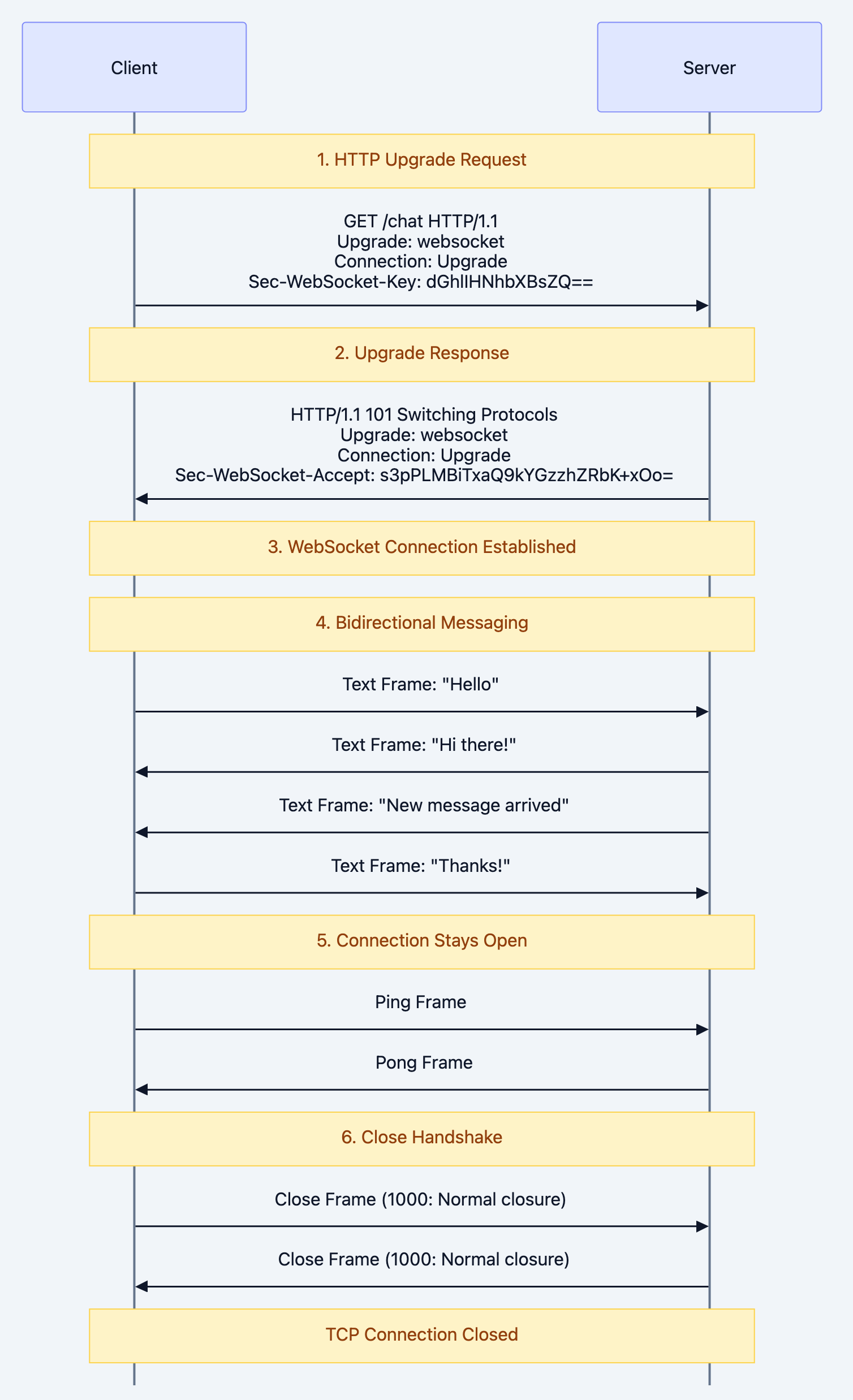
Note over Client,Server: 1. HTTP Upgrade Request
Key Points:
- Uses same ports as HTTP (80/443)
- Works through firewalls and proxies
- Secure version is
wss://(like HTTPS) - No HTTP headers on every message (just small frame overhead)
WebSocket Frame Structure
After the handshake, data is sent in frames:
 0                   1                   2                   3
 0 1 2 3 4 5 6 7 8 9 0 1 2 3 4 5 6 7 8 9 0 1 2 3 4 5 6 7 8 9 0 1
+-+-+-+-+-------+-+-------------+-------------------------------+
|F|R|R|R| opcode|M| Payload len |    Extended payload length    |
|I|S|S|S|  (4)  |A|     (7)     |             (16/64)           |
|N|V|V|V|       |S|             |   (if payload len==126/127)   |
| |1|2|3|       |K|             |                               |
+-+-+-+-+-------+-+-------------+ - - - - - - - - - - - - - - - +
|     Extended payload length continued, if payload len == 127  |
+ - - - - - - - - - - - - - - - +-------------------------------+
|                               | Masking-key, if MASK set to 1 |
+-------------------------------+-------------------------------+
|    Masking-key (continued)    |          Payload Data         |
+-------------------------------- - - - - - - - - - - - - - - - +
:                     Payload Data continued ...                :
+ - - - - - - - - - - - - - - - - - - - - - - - - - - - - - - - +
|                     Payload Data continued ...                |
+---------------------------------------------------------------+
Opcodes (4 bits):
0x0: Continuation frame0x1: Text frame (UTF-8)0x2: Binary frame0x8: Close frame0x9: Ping frame0xA: Pong frame
FIN bit: Indicates final frame in a message (allows fragmentation)
MASK bit: Client-to-server frames MUST be masked (security requirement)
Why Masking is Required
WebSocket requires client-to-server frames to be masked to prevent cache poisoning attacks:
Without masking, a malicious script could send data that looks like HTTP:
GET /admin HTTP/1.1
Host: example.com
An intermediary proxy might cache this as a valid HTTP response. Masking prevents this by XORing payload with a random key.
The Persistent Phone Call
Think of WebSocket like a phone call vs. sending letters:
HTTP (Request/Response):
- Like sending letters back and forth
- You write a letter, mail it, wait for response
- High latency, lots of overhead (envelope, stamp, delivery)
- Every question requires a new letter
WebSocket (Persistent Connection):
- Like a phone call that stays connected
- Both people can talk whenever they want
- Instant communication, minimal overhead
- Connection stays open for hours/days
Polling:
- Like calling someone every minute to ask "any news?"
- Annoying, inefficient, usually the answer is "nope"
Server-Sent Events:
- Like a radio broadcast (one-way communication)
- You listen, but can't respond on the same channel
Deep Technical Dive
1. Code Example: Basic WebSocket Server in Go
Here's a production-ready WebSocket server using the popular
gorilla/websocket library:gopackage main import ( "fmt" "log" "net/http" "sync" "time" "github.com/gorilla/websocket" ) // Upgrader configures the HTTP-to-WebSocket upgrade var upgrader = websocket.Upgrader{ ReadBufferSize: 1024, WriteBufferSize: 1024, // Allow all origins (in production, restrict this!) CheckOrigin: func(r *http.Request) bool { return true }, } // Client represents a connected WebSocket client type Client struct { conn *websocket.Conn send chan []byte hub *Hub } // Hub manages all connected clients and broadcasts messages type Hub struct { clients map[*Client]bool broadcast chan []byte register chan *Client unregister chan *Client mu sync.RWMutex } func NewHub() *Hub { return &Hub{ clients: make(map[*Client]bool), broadcast: make(chan []byte, 256), register: make(chan *Client), unregister: make(chan *Client), } } // Run starts the hub's event loop func (h *Hub) Run() { for { select { case client := <-h.register: h.mu.Lock() h.clients[client] = true h.mu.Unlock() log.Printf("Client connected. Total: %d", len(h.clients)) case client := <-h.unregister: h.mu.Lock() if _, ok := h.clients[client]; ok { delete(h.clients, client) close(client.send) } h.mu.Unlock() log.Printf("Client disconnected. Total: %d", len(h.clients)) case message := <-h.broadcast: h.mu.RLock() for client := range h.clients { select { case client.send <- message: default: // Client's send buffer is full, disconnect close(client.send) delete(h.clients, client) } } h.mu.RUnlock() } } } // readPump reads messages from WebSocket connection func (c *Client) readPump() { defer func() { c.hub.unregister <- c c.conn.Close() }() // Configure read deadline c.conn.SetReadDeadline(time.Now().Add(60 * time.Second)) // Handle pong messages to reset read deadline c.conn.SetPongHandler(func(string) error { c.conn.SetReadDeadline(time.Now().Add(60 * time.Second)) return nil }) for { _, message, err := c.conn.ReadMessage() if err != nil { if websocket.IsUnexpectedCloseError(err, websocket.CloseGoingAway, websocket.CloseAbnormalClosure) { log.Printf("WebSocket error: %v", err) } break } log.Printf("Received: %s", message) // Broadcast message to all clients c.hub.broadcast <- message } } // writePump sends messages from hub to WebSocket connection func (c *Client) writePump() { ticker := time.NewTicker(30 * time.Second) defer func() { ticker.Stop() c.conn.Close() }() for { select { case message, ok := <-c.send: // Set write deadline c.conn.SetWriteDeadline(time.Now().Add(10 * time.Second)) if !ok { // Hub closed the channel c.conn.WriteMessage(websocket.CloseMessage, []byte{}) return } // Send message err := c.conn.WriteMessage(websocket.TextMessage, message) if err != nil { return } case <-ticker.C: // Send ping to keep connection alive c.conn.SetWriteDeadline(time.Now().Add(10 * time.Second)) if err := c.conn.WriteMessage(websocket.PingMessage, nil); err != nil { return } } } } // WebSocket endpoint handler func handleWebSocket(hub *Hub, w http.ResponseWriter, r *http.Request) { // Upgrade HTTP connection to WebSocket conn, err := upgrader.Upgrade(w, r, nil) if err != nil { log.Printf("Upgrade failed: %v", err) return } // Create client client := &Client{ conn: conn, send: make(chan []byte, 256), hub: hub, } // Register client client.hub.register <- client // Start read/write pumps in goroutines go client.writePump() go client.readPump() } func main() { hub := NewHub() go hub.Run() http.HandleFunc("/ws", func(w http.ResponseWriter, r *http.Request) { handleWebSocket(hub, w, r) }) http.HandleFunc("/", func(w http.ResponseWriter, r *http.Request) { fmt.Fprintf(w, "WebSocket server running. Connect to ws://localhost:8080/ws") }) log.Println("WebSocket server starting on :8080") if err := http.ListenAndServe(":8080", nil); err != nil { log.Fatal("Server failed:", err) } }
Key Components:
- Hub: Central message broadcaster managing all clients
- readPump: Goroutine reading messages from each client
- writePump: Goroutine writing messages to each client
- Ping/Pong: Heartbeat to detect dead connections
- Graceful shutdown: Proper cleanup on disconnect
2. Code Example: WebSocket Client in Go
gopackage main

import (
    "log"
    "net/url"
    "os"
    "os/signal"
    "time"

    "github.com/gorilla/websocket"
)

func main() {
    // Connect to WebSocket server
    u := url.URL{Scheme: "ws", Host: "localhost:8080", Path: "/ws"}
    log.Printf("Connecting to %s", u.String())

    conn, _, err := websocket.DefaultDialer.Dial(u.String(), nil)
    if err != nil {
        log.Fatal("Dial failed:", err)
    }
    defer conn.Close()

    // Channel to signal done
    done := make(chan struct{})

    // Goroutine to read messages
    go func() {
        defer close(done)
        for {
            _, message, err := conn.ReadMessage()
            if err != nil {
                log.Println("Read error:", err)
                return
            }
            log.Printf("Received: %s", message)
        }
    }()

    // Goroutine to send messages
    ticker := time.NewTicker(5 * time.Second)
    defer ticker.Stop()

    // Handle interrupt signal
    interrupt := make(chan os.Signal, 1)
    signal.Notify(interrupt, os.Interrupt)

    for {
        select {
        case <-done:
            return

        case <-ticker.C:
            // Send message every 5 seconds
            message := []byte("Hello from client at " + time.Now().Format(time.RFC3339))
            err := conn.WriteMessage(websocket.TextMessage, message)
            if err != nil {
                log.Println("Write error:", err)
                return
            }
            log.Printf("Sent: %s", message)

        case <-interrupt:
            log.Println("Interrupt received, closing connection...")

            // Send close message
            err := conn.WriteMessage(websocket.CloseMessage,
                websocket.FormatCloseMessage(websocket.CloseNormalClosure, ""))
            if err != nil {
                log.Println("Write close error:", err)
                return
            }

            // Wait for server to close or timeout
            select {
            case <-done:
            case <-time.After(time.Second):
            }
            return
        }
    }
}
3. Code Example: Auto-Reconnecting WebSocket Client
Production clients need automatic reconnection:
gopackage main

import (
    "log"
    "net/url"
    "time"

    "github.com/gorilla/websocket"
)

type ReconnectingClient struct {
    url              string
    conn             *websocket.Conn
    reconnectDelay   time.Duration
    maxReconnectWait time.Duration
    onMessage        func([]byte)
}

func NewReconnectingClient(urlStr string, onMessage func([]byte)) *ReconnectingClient {
    return &ReconnectingClient{
        url:              urlStr,
        reconnectDelay:   1 * time.Second,
        maxReconnectWait: 30 * time.Second,
        onMessage:        onMessage,
    }
}

func (rc *ReconnectingClient) Connect() error {
    u, err := url.Parse(rc.url)
    if err != nil {
        return err
    }

    conn, _, err := websocket.DefaultDialer.Dial(u.String(), nil)
    if err != nil {
        return err
    }

    rc.conn = conn
    log.Println("Connected to WebSocket server")
    return nil
}

func (rc *ReconnectingClient) Start() {
    for {
        err := rc.Connect()
        if err != nil {
            log.Printf("Connection failed: %v. Retrying in %v", err, rc.reconnectDelay)
            time.Sleep(rc.reconnectDelay)

            // Exponential backoff
            rc.reconnectDelay *= 2
            if rc.reconnectDelay > rc.maxReconnectWait {
                rc.reconnectDelay = rc.maxReconnectWait
            }
            continue
        }

        // Reset reconnect delay on successful connection
        rc.reconnectDelay = 1 * time.Second

        // Read messages until connection breaks
        rc.readLoop()

        log.Println("Connection lost. Reconnecting...")
    }
}

func (rc *ReconnectingClient) readLoop() {
    for {
        _, message, err := rc.conn.ReadMessage()
        if err != nil {
            if websocket.IsUnexpectedCloseError(err, websocket.CloseGoingAway, websocket.CloseAbnormalClosure) {
                log.Printf("Unexpected close: %v", err)
            }
            return
        }

        if rc.onMessage != nil {
            rc.onMessage(message)
        }
    }
}

func (rc *ReconnectingClient) Send(message []byte) error {
    if rc.conn == nil {
        return fmt.Errorf("not connected")
    }
    return rc.conn.WriteMessage(websocket.TextMessage, message)
}

func main() {
    client := NewReconnectingClient("ws://localhost:8080/ws", func(message []byte) {
        log.Printf("Received: %s", message)
    })

    go client.Start()

    // Send messages periodically
    ticker := time.NewTicker(5 * time.Second)
    for range ticker.C {
        err := client.Send([]byte("Hello at " + time.Now().Format(time.RFC3339)))
        if err != nil {
            log.Printf("Send error: %v", err)
        }
    }
}
Reconnection Strategy:
- Exponential backoff (1s → 2s → 4s → ... → 30s max)
- Automatic reconnection on disconnect
- Reset delay on successful connection
- Handle unexpected close errors
4. Heartbeat: Detecting Dead Connections
WebSocket connections can silently die (network issues, proxy timeouts). Use ping/pong to detect:
go// Server-side ping
ticker := time.NewTicker(30 * time.Second)
defer ticker.Stop()

for {
    select {
    case <-ticker.C:
        if err := conn.WriteMessage(websocket.PingMessage, nil); err != nil {
            return  // Connection dead
        }
    }
}

// Client-side pong handler
conn.SetPongHandler(func(string) error {
    conn.SetReadDeadline(time.Now().Add(60 * time.Second))
    return nil
})
Best Practices:
- Server sends ping every 30 seconds
- Client responds with pong automatically (handled by library)
- Set read deadline to 60 seconds (2x ping interval)
- If no pong received, connection is dead
When to Use: Decision Framework
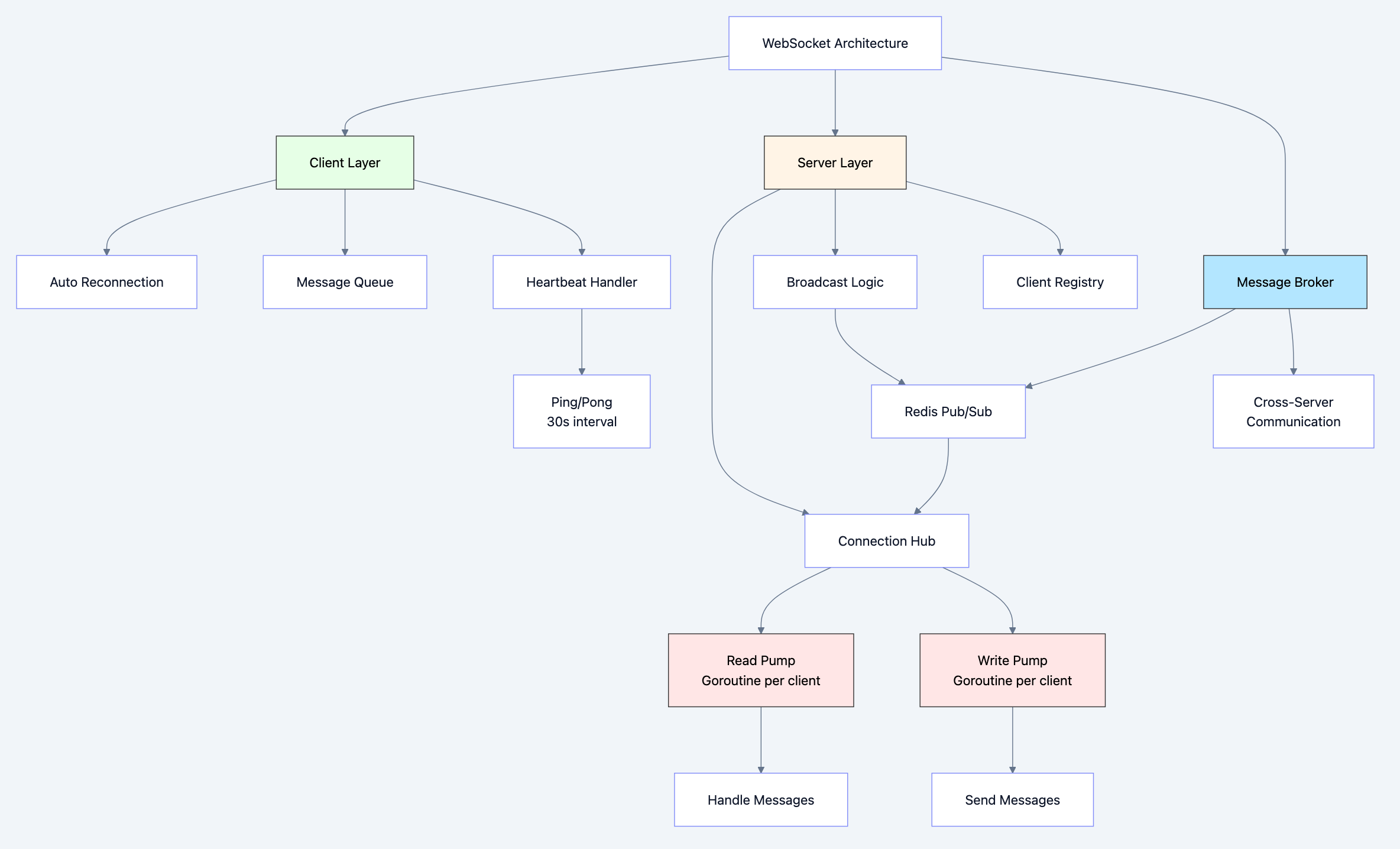
Diagram 2
Use WebSocket When:
- Bidirectional real-time: Chat, gaming, collaboration
- Server push critical: Live notifications, dashboards
- Low latency required: Financial trading, IoT control
- Persistent connection beneficial: Reduces overhead for frequent messages
- Examples: Chat apps, live editing, multiplayer games
Use Server-Sent Events (SSE) When:
- One-way server push: Live feeds, notifications
- Simpler than WebSocket: Less complex server implementation
- HTTP-based: Works better with some proxies
- Examples: Live news feed, stock ticker, server logs
Use Polling When:
- Updates infrequent: Once per minute or slower
- Simple implementation: No persistent connections needed
- Compatibility: Works everywhere (even old browsers)
- Examples: Email inbox refresh, weather updates
Use gRPC Streaming When:
- Service-to-service: Backend microservices communication
- Type safety required: Protocol Buffers schema
- High performance: Binary serialization
- Examples: Internal APIs, backend data pipelines
Common Pitfalls and How to Avoid Them
Pitfall 1: Not Handling Reconnection
The Mistake:
go// Connect once, no retry logic
conn, _ := websocket.Dial("ws://server.com/ws")
for {
    _, msg, _ := conn.ReadMessage()  // Panics when connection drops!
}
The Fix:
Implement automatic reconnection with exponential backoff (see example above).
Pitfall 2: No Heartbeat/Ping-Pong
The Problem:
Connection silently dies (firewall timeout, network issue). Client thinks it's connected but can't receive messages.
The Fix:
go// Server sends ping every 30 seconds
ticker := time.NewTicker(30 * time.Second)
conn.WriteMessage(websocket.PingMessage, nil)

// Client sets pong handler to reset read deadline
conn.SetPongHandler(func(string) error {
    conn.SetReadDeadline(time.Now().Add(60 * time.Second))
    return nil
})
Pitfall 3: Unbounded Message Buffer
The Mistake:
go// Client send channel with unlimited buffer
client.send = make(chan []byte)  // No limit!
The Problem:
Slow clients accumulate messages in memory, causing OOM.
The Fix:
go// Bounded buffer
client.send = make(chan []byte, 256)

// Drop slow clients
select {
case client.send <- message:
default:
    // Buffer full, disconnect slow client
    close(client.send)
    delete(clients, client)
}
Pitfall 4: Not Validating Origin
The Mistake:
goupgrader := websocket.Upgrader{
    CheckOrigin: func(r *http.Request) bool {
        return true  // INSECURE: Allows any origin!
    },
}
The Problem:
Cross-Site WebSocket Hijacking (CSWSH) attack.
The Fix:
goupgrader := websocket.Upgrader{
    CheckOrigin: func(r *http.Request) bool {
        origin := r.Header.Get("Origin")
        return origin == "https://yourdomain.com"  // Whitelist origins
    },
}
Pitfall 5: Blocking in Message Handlers
The Mistake:
gofor {
    _, msg, _ := conn.ReadMessage()
    processMessage(msg)  // Blocks for 10 seconds!
}
The Problem:
While processing, no ping/pong handled, connection times out.
The Fix:
gofor {
    _, msg, _ := conn.ReadMessage()
    go processMessage(msg)  // Process in goroutine
}
Performance Implications
WebSocket vs HTTP Polling
Bandwidth Comparison:
HTTP Polling (every 1 second):
- Request headers: ~500 bytes
- Response headers: ~400 bytes
- Total: ~900 bytes per second (even if no data!)
- For 10,000 clients: ~9 MB/sec of pure overhead
WebSocket:
- Initial handshake: ~800 bytes (one-time)
- Per message: ~2-6 bytes frame overhead
- For 10,000 clients: ~50 KB/sec (180x less!)
Latency Comparison:
| Method | Latency | Notes |
|---|---|---|
| Short polling (1s) | 500ms average | Depends on poll interval |
| Long polling | 50-100ms | Reconnection overhead |
| WebSocket | 1-5ms | Direct message delivery |
CPU/Memory:
| Method | CPU | Memory | Connections |
|---|---|---|---|
| Polling | High (parse HTTP headers) | Low | New connections |
| WebSocket | Low (frame parsing) | Medium | Persistent connections |
Optimization Strategies
1. Message Batching:
go// Instead of sending 100 small messages
for _, item := range items {
    conn.WriteMessage(websocket.TextMessage, item)  // 100 frames
}

// Batch into one message
batch := combineItems(items)
conn.WriteMessage(websocket.TextMessage, batch)  // 1 frame
2. Binary Frames for Non-Text:
go// Use binary frames for images, files, binary data
conn.WriteMessage(websocket.BinaryMessage, binaryData)
3. Compression Extension:
goupgrader := websocket.Upgrader{
    EnableCompression: true,  // Per-message deflate compression
}
4. Connection Pooling (for clients):
Reuse WebSocket connection instead of creating new ones.
Testing and Debugging
Testing WebSocket Servers
Unit Testing with Mock:
goimport (
    "github.com/gorilla/websocket"
    "net/http/httptest"
    "testing"
)

func TestWebSocketHandler(t *testing.T) {
    // Create test server
    server := httptest.NewServer(http.HandlerFunc(handleWebSocket))
    defer server.Close()

    // Convert http:// to ws://
    wsURL := "ws" + strings.TrimPrefix(server.URL, "http") + "/ws"

    // Connect client
    conn, _, err := websocket.DefaultDialer.Dial(wsURL, nil)
    if err != nil {
        t.Fatal(err)
    }
    defer conn.Close()

    // Send message
    testMsg := []byte("test message")
    err = conn.WriteMessage(websocket.TextMessage, testMsg)
    if err != nil {
        t.Fatal(err)
    }

    // Read response
    _, msg, err := conn.ReadMessage()
    if err != nil {
        t.Fatal(err)
    }

    if string(msg) != string(testMsg) {
        t.Errorf("Expected %s, got %s", testMsg, msg)
    }
}
Debugging with Browser DevTools
Chrome DevTools shows WebSocket frames:
- Open DevTools → Network tab
- Filter by "WS" (WebSocket)
- Click connection to see frames
- View sent/received messages with timestamps
Command-Line Testing with websocat
bash# Connect to WebSocket server
websocat ws://localhost:8080/ws

# Type messages interactively

# Or pipe data
echo "Hello" | websocat ws://localhost:8080/ws

# Server mode (listen for connections)
websocat -s 8080
Real-World Use Cases
Use Case 1: Slack - Real-Time Chat
Slack's WebSocket implementation:
Architecture:
- Client connects to WebSocket gateway
- Server pushes messages, typing indicators, presence updates
- Client sends messages, read receipts
Benefits:
- Instant message delivery (<10ms)
- Reduced server costs (60% less than polling)
- Better user experience (no refresh needed)
Use Case 2: Trading Platforms - Live Market Data
Financial trading uses WebSocket for:
- Live stock prices (updates every 100ms)
- Order book updates
- Trade confirmations
Requirements:
- Sub-10ms latency critical
- Message ordering guaranteed
- Automatic reconnection with state recovery
Implementation:
go// Subscribe to ticker updates
conn.WriteJSON(map[string]string{
    "type": "subscribe",
    "symbol": "AAPL",
})

// Receive updates
for {
    var update PriceUpdate
    conn.ReadJSON(&update)
    // Update UI with new price
}
Use Case 3: Figma - Collaborative Design
Figma uses WebSocket for real-time collaboration:
Features:
- See other users' cursors in real-time
- Sync design changes instantly
- Conflict resolution with Operational Transformation
Technical:
- WebSocket for real-time updates
- Optimistic UI updates (apply locally, sync later)
- Vector CRDT for conflict-free merging
Interview Questions: What You Should Know
Junior Level
Q: What is WebSocket and how is it different from HTTP?
A: WebSocket is a protocol for bidirectional, persistent communication. Unlike HTTP (request/response, stateless), WebSocket maintains an open connection where both client and server can send messages anytime.
Q: How does the WebSocket handshake work?
A: Client sends HTTP request with
Upgrade: websocket header. Server responds with 101 Switching Protocols. Connection then switches to WebSocket protocol.Q: Why do we need ping/pong frames?
A: To detect dead connections. If a client doesn't respond to ping with pong, the connection is likely broken (network issue, firewall timeout).
Mid Level
Q: Explain the WebSocket frame structure and opcodes.
A: Frames have FIN bit (final frame), opcode (text/binary/ping/pong/close), MASK bit (client must mask), payload length, and payload data. Opcodes: 0x1 (text), 0x2 (binary), 0x8 (close), 0x9 (ping), 0xA (pong).
Q: Why must client-to-server frames be masked?
A: To prevent cache poisoning attacks. Without masking, malicious JavaScript could send data that looks like HTTP requests to intermediary proxies, potentially poisoning their cache.
Q: How would you handle reconnection in a WebSocket client?
A: Implement exponential backoff (1s, 2s, 4s, ..., max 30s). On disconnect, attempt reconnection. Reset delay on successful connection. Include message queue to replay unsent messages.
Senior Level
Q: Design a scalable WebSocket architecture for 1 million concurrent connections.
A:
- Load balancing: Use sticky sessions (same client → same server) with haproxy/nginx
- Horizontal scaling: Multiple WebSocket servers behind load balancer
- Message broker: Redis Pub/Sub or Kafka for cross-server communication
- Connection tracking: Track which user is on which server (Redis)
- Graceful shutdown: Drain connections before server restart
- Monitoring: Track connection count, message rate, latency per server
Q: How would you ensure message ordering and delivery guarantees with WebSocket?
A:
- Ordering: TCP guarantees in-order delivery within a connection
- Delivery: Add sequence numbers to application-level messages
- Client tracks: Last received sequence number
- On reconnect: Client sends last sequence, server replays missed messages
- Idempotency: Use message IDs to detect duplicates after reconnection
Q: Compare WebSocket, gRPC streaming, and Server-Sent Events.
A:
| Feature | WebSocket | gRPC Streaming | SSE |
|---|---|---|---|
| Direction | Bidirectional | Bidirectional | Server→Client only |
| Protocol | WS over HTTP upgrade | HTTP/2 | HTTP |
| Format | Text or binary | Binary (Protobuf) | Text (event-stream) |
| Browser support | Excellent | Requires grpc-web | Good (no IE) |
| Use case | Chat, gaming | Microservices | Live feeds |
Key Takeaways
-
WebSocket is persistent and bidirectional - unlike HTTP's request/response
-
Starts with HTTP upgrade - compatible with existing infrastructure (ports 80/443)
-
Frame-based protocol - minimal overhead compared to HTTP headers
-
Requires heartbeat (ping/pong) - to detect dead connections
-
Always implement reconnection - networks are unreliable
-
Validate Origin header - prevent CSWSH attacks
-
Use bounded buffers - protect against slow client OOM
-
Best for real-time bidirectional - chat, collaboration, gaming
-
More efficient than polling - 100x less bandwidth for frequent updates
-
Production needs load balancing - sticky sessions for scalability
Further Learning
- Practice: Build a chat application with WebSocket
- Read: RFC 6455 (WebSocket protocol specification)
- Experiment: Compare WebSocket vs SSE vs polling performance
- Advanced: Study CRDT for collaborative editing (Figma, Google Docs)
- Production: Learn Kubernetes WebSocket load balancing strategies
WebSocket isn't just another protocol it's the foundation for real-time web applications. Master it, and you'll build experiences users love.