TLS/mTLS: Securing Internet Communication
Why This Matters
Every time you see that little padlock icon in your browser's address bar, you're witnessing TLS (Transport Layer Security) in action. This single protocol protects your credit card numbers, passwords, medical records, and private messages from being intercepted by attackers lurking on the network.
But here's what most developers don't realize: TLS isn't just about encryption. It's a sophisticated dance of cryptographic algorithms, certificate validation, and key exchanges that must happen in milliseconds without the user noticing. A misconfigured TLS setup can be worse than no security at all it creates a false sense of safety while leaving your data vulnerable.
In modern microservices architectures, we've taken TLS even further with mTLS (mutual TLS), where not just the server proves its identity to the client, but the client also proves its identity to the server. This is how services like Istio, Linkerd, and AWS App Mesh secure service-to-service communication in production.
By the end of this deep-dive, you'll understand:
- How TLS handshake actually works (spoiler: it uses both asymmetric and symmetric encryption)
- Why certificate chains exist and how browsers validate them
- When and how to implement mTLS for zero-trust architectures
- Common TLS vulnerabilities and how to avoid them
Real-world impact: A single TLS misconfiguration caused Equifax to expose 147 million records in 2017. Understanding TLS isn't optional it's critical.
What TLS Solves
The Fundamental Security Problems
Before TLS existed, HTTP traffic traveled across the internet in plain text. This meant:
-
Eavesdropping (Confidentiality): Anyone between you and the server could read your data
- ISPs could see every website you visited and every form you submitted
- WiFi attackers could intercept passwords at coffee shops
- Government surveillance could monitor all traffic
-
Tampering (Integrity): Attackers could modify data in transit
- Man-in-the-middle attackers could inject malicious JavaScript
- ISPs could inject ads into web pages
- Attackers could change bank transfer amounts
-
Impersonation (Authentication): No way to verify you're talking to the real server
- Fake banking sites could steal credentials
- DNS hijacking could redirect you to malicious servers
- No proof that "bank.com" is actually your bank
Why Simple Encryption Isn't Enough
You might think: "Just encrypt everything with a password!" But this creates more problems:
Problem 1: Key Distribution
- If client and server share a secret key, how do they exchange it securely?
- If they send it over the network, attackers can intercept it
- If they meet in person, it doesn't scale to billions of connections
Problem 2: Server Authentication
- Even with encryption, how do you know you're encrypting data for the RIGHT server?
- An attacker could say "I'm your bank" and give you their encryption key
Problem 3: Performance
- Strong encryption algorithms are computationally expensive
- Doing asymmetric encryption for every byte of data would be too slow
Real-World Scenarios Where TLS is Critical
- E-commerce: Credit card transactions
- Healthcare: HIPAA-compliant patient data transmission
- Finance: Banking and investment platforms
- Microservices: Service-to-service authentication with mTLS
- APIs: Securing API endpoints and preventing token theft
- IoT: Device authentication and firmware updates
How TLS Works
TLS solves all these problems with a brilliant combination of:
- Asymmetric encryption for secure key exchange
- Symmetric encryption for fast data transmission
- Digital certificates for server authentication
- Certificate Authorities for trust establishment
TLS Handshake: The Foundation
The TLS handshake is where all the magic happens. It's a multi-step protocol that establishes a secure connection:
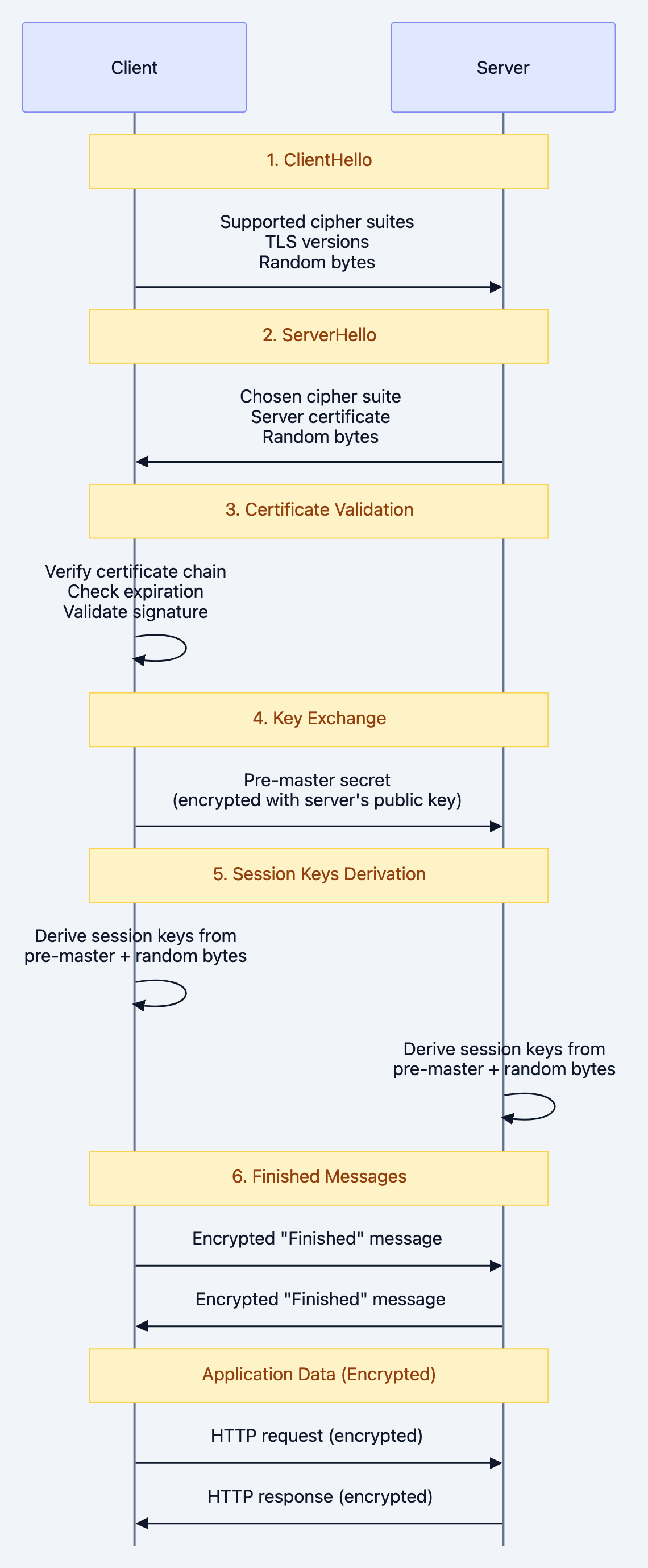
Note over Client,Server: 1. ClientHello
The Two Types of Encryption
TLS cleverly uses TWO different encryption approaches:
Asymmetric Encryption (Public/Private Key Pairs):
- Used during handshake for key exchange
- Server has a public key (shared with everyone) and private key (kept secret)
- Slow but solves the key distribution problem
- Examples: RSA, ECDHE (Elliptic Curve Diffie-Hellman Ephemeral)
Symmetric Encryption (Shared Secret Key):
- Used for actual data transmission after handshake
- Both client and server derive the same session key
- Fast and efficient for bulk data
- Examples: AES-GCM, ChaCha20-Poly1305
Certificate Chain of Trust
Certificates create a chain of trust from your browser to the server:
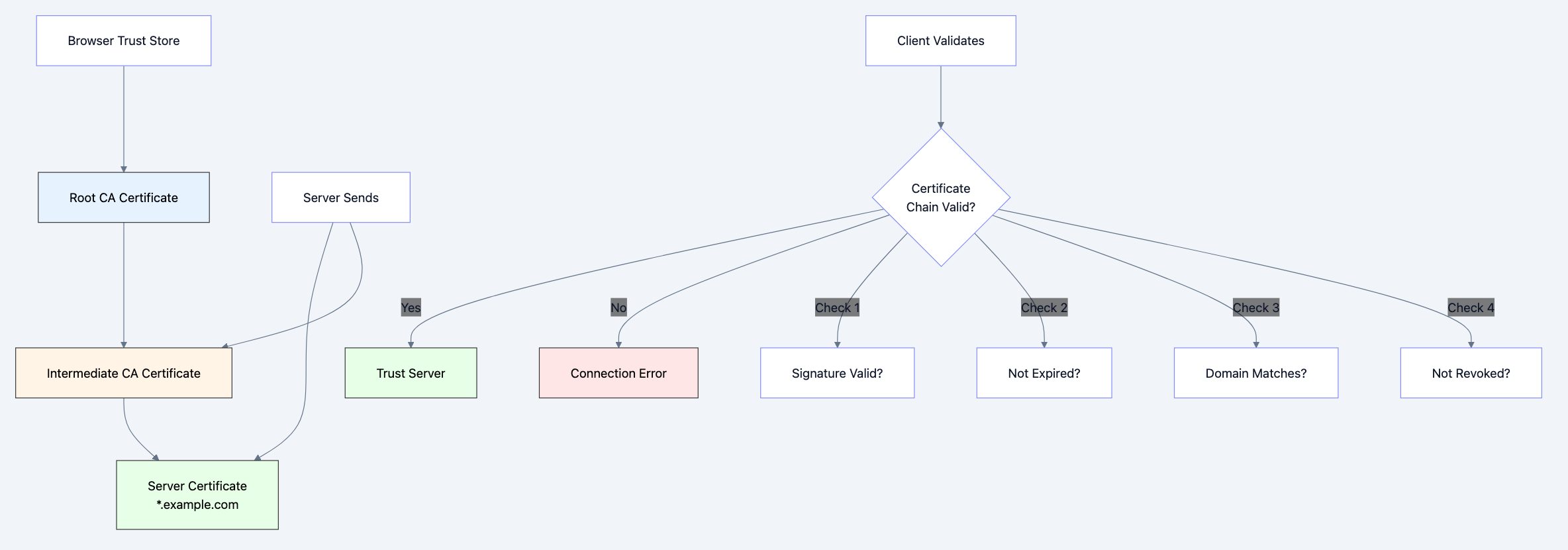
Diagram 2
Mutual TLS (mTLS): Both Sides Authenticate
In standard TLS, only the server proves its identity. With mTLS:
- Client also has a certificate
- Server validates the client's certificate
- Creates a zero-trust architecture
This is essential for:
- Microservices communication
- API authentication (better than API keys)
- IoT device authentication
- Service meshes (Istio, Linkerd, Consul)
The Secure Envelope Analogy
Think of TLS like sending a letter in a secure envelope system:
Standard Mail (HTTP):
- Postcard: Everyone can read your message
- No seal: Anyone can modify it
- No return address verification: Could be from anyone
TLS Mail (HTTPS):
- Server Authentication (Certificate): Like a government-issued ID that proves the bank is legitimate
- Asymmetric Encryption (Handshake): Like a lockbox exchange where you send the key in a secure container
- Symmetric Encryption (Session): Like a shared secret code that you both use for fast communication
- Integrity (MAC): Like a tamper-evident seal that shows if anyone opened the envelope
mTLS Mail (Mutual Authentication):
- Both sender AND receiver show government IDs before exchanging messages
- Used in high-security facilities where both parties must prove identity
Deep Technical Dive
1. TLS 1.2 vs TLS 1.3: Major Differences
TLS 1.2 Handshake:
- 2 round trips (latency: ~200ms on typical connections)
- Supports legacy cipher suites (some insecure)
- RSA key exchange (no forward secrecy by default)
TLS 1.3 Improvements:
- 1 round trip (latency: ~100ms)
- Only secure cipher suites allowed
- Always uses forward secrecy (ECDHE)
- 0-RTT mode for resumption (even faster)
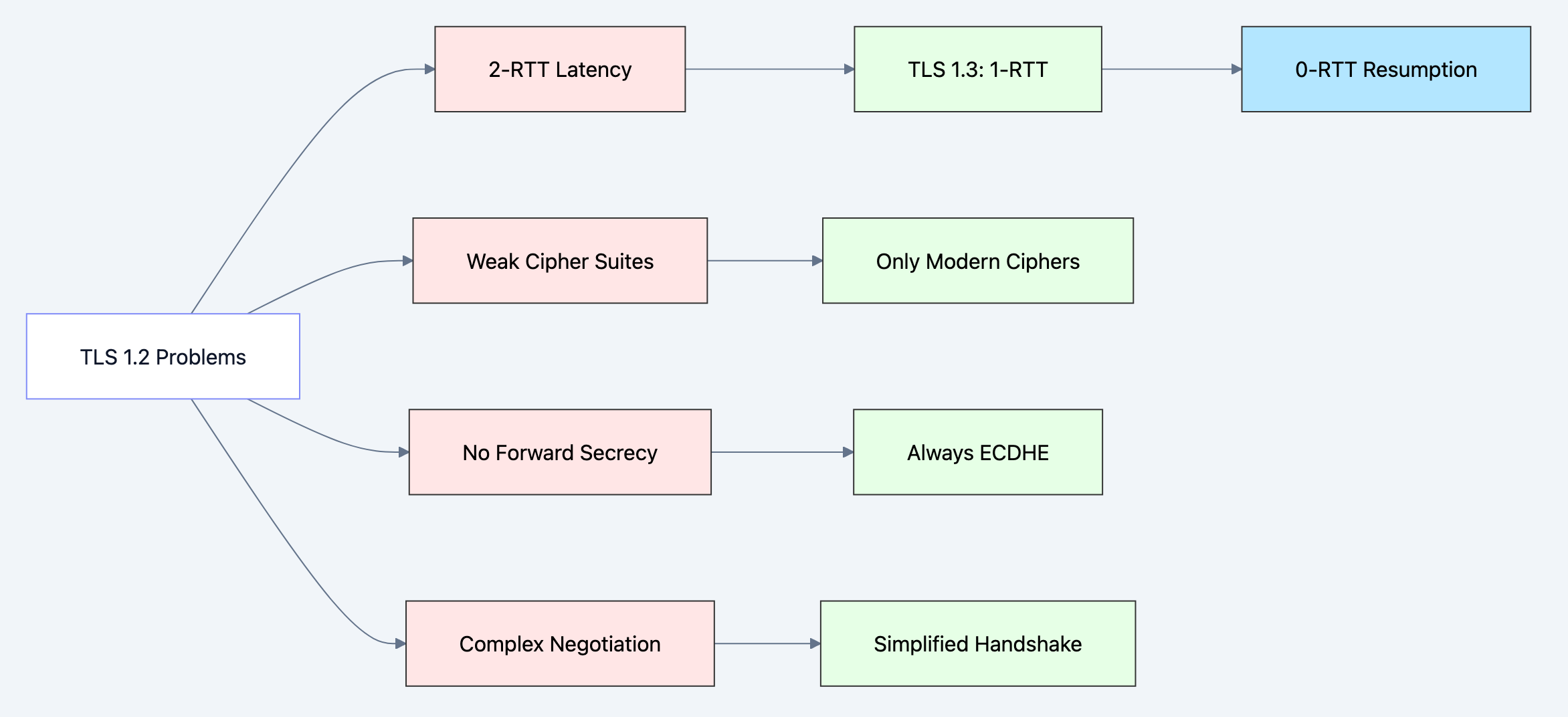
Diagram 3
2. Code Example: Basic TLS Server in Go
Here's a production-ready TLS server with proper configuration:
gopackage main

import (
    "crypto/tls"
    "fmt"
    "log"
    "net/http"
    "time"
)

func main() {
    // Define secure TLS configuration
    tlsConfig := &tls.Config{
        // Minimum TLS version - reject anything below TLS 1.2
        MinVersion: tls.VersionTLS12,

        // Prefer TLS 1.3 if client supports it
        MaxVersion: tls.VersionTLS13,

        // Cipher suites for TLS 1.2 (TLS 1.3 ciphers are fixed and secure)
        CipherSuites: []uint16{
            tls.TLS_ECDHE_RSA_WITH_AES_256_GCM_SHA384,
            tls.TLS_ECDHE_RSA_WITH_AES_128_GCM_SHA256,
            tls.TLS_ECDHE_ECDSA_WITH_AES_256_GCM_SHA384,
            tls.TLS_ECDHE_ECDSA_WITH_AES_128_GCM_SHA256,
        },

        // Prefer server's cipher suite order
        PreferServerCipherSuites: true,

        // Curve preferences for ECDHE
        CurvePreferences: []tls.CurveID{
            tls.X25519,    // Modern, fast, secure
            tls.CurveP256, // Widely supported
        },
    }

    // Create HTTPS server with timeouts
    server := &http.Server{
        Addr:         ":8443",
        TLSConfig:    tlsConfig,
        readtimeout:  10 * time.Second,
        WriteTimeout: 10 * time.Second,
        IdleTimeout:  120 * time.Second,
    }

    // Simple handler
    http.HandleFunc("/", func(w http.ResponseWriter, r *http.Request) {
        // Check TLS connection state
        if r.TLS != nil {
            fmt.Fprintf(w, "Secure connection established!\n")
            fmt.Fprintf(w, "TLS Version: %s\n", tlsVersionToString(r.TLS.Version))
            fmt.Fprintf(w, "Cipher Suite: %s\n", tls.CipherSuiteName(r.TLS.CipherSuite))
            fmt.Fprintf(w, "Server Name: %s\n", r.TLS.ServerName)
        } else {
            fmt.Fprintf(w, "No TLS connection\n")
        }
    })

    log.Println("Starting TLS server on https://localhost:8443")

    // Start server with certificate and key
    // In production, use proper certificates from Let's Encrypt or CA
    err := server.ListenAndServeTLS("server.crt", "server.key")
    if err != nil {
        log.Fatal("Server failed:", err)
    }
}

func tlsVersionToString(version uint16) string {
    switch version {
    case tls.VersionTLS10:
        return "TLS 1.0 (INSECURE)"
    case tls.VersionTLS11:
        return "TLS 1.1 (INSECURE)"
    case tls.VersionTLS12:
        return "TLS 1.2"
    case tls.VersionTLS13:
        return "TLS 1.3"
    default:
        return "Unknown"
    }
}
Key Security Configurations:
- MinVersion: TLS 1.2 - TLS 1.0 and 1.1 are deprecated and vulnerable
- CipherSuites - Only ECDHE (forward secrecy) with AES-GCM (authenticated encryption)
- CurvePreferences - X25519 is modern and fast, P256 for compatibility
- Timeouts - Prevent slowloris attacks and resource exhaustion
3. Code Example: mTLS Server (Client Certificate Validation)
For microservices or high-security APIs, implement mutual TLS:
gopackage main

import (
    "crypto/tls"
    "crypto/x509"
    "fmt"
    "io/ioutil"
    "log"
    "net/http"
)

func main() {
    // Load CA certificate to validate client certificates
    caCert, err := ioutil.ReadFile("ca.crt")
    if err != nil {
        log.Fatal("Failed to read CA certificate:", err)
    }

    // Create certificate pool with CA
    caCertPool := x509.NewCertPool()
    if !caCertPool.AppendCertsFromPEM(caCert) {
        log.Fatal("Failed to parse CA certificate")
    }

    // TLS configuration requiring client certificates
    tlsConfig := &tls.Config{
        // Require and verify client certificate
        ClientAuth: tls.RequireAndVerifyClientCert,

        // CA pool for validating client certificates
        ClientCAs: caCertPool,

        // Server security settings
        MinVersion: tls.VersionTLS12,
        CipherSuites: []uint16{
            tls.TLS_ECDHE_RSA_WITH_AES_256_GCM_SHA384,
            tls.TLS_ECDHE_ECDSA_WITH_AES_256_GCM_SHA384,
        },
    }

    server := &http.Server{
        Addr:      ":8443",
        TLSConfig: tlsConfig,
    }

    http.HandleFunc("/api/secure", func(w http.ResponseWriter, r *http.Request) {
        // Access client certificate information
        if r.TLS != nil && len(r.TLS.PeerCertificates) > 0 {
            clientCert := r.TLS.PeerCertificates[0]

            // Extract client identity from certificate
            commonName := clientCert.Subject.CommonName
            organization := clientCert.Subject.Organization

            fmt.Fprintf(w, "Client authenticated successfully!\n")
            fmt.Fprintf(w, "Common Name: %s\n", commonName)
            fmt.Fprintf(w, "Organization: %v\n", organization)
            fmt.Fprintf(w, "Certificate Serial: %s\n", clientCert.SerialNumber)

            // In production, map certificate to user/service identity
            // and enforce authorization based on CommonName or SAN

        } else {
            http.Error(w, "Client certificate required", http.StatusUnauthorized)
        }
    })

    log.Println("Starting mTLS server on https://localhost:8443")
    err = server.ListenAndServeTLS("server.crt", "server.key")
    if err != nil {
        log.Fatal("Server failed:", err)
    }
}
mTLS Authentication Flow:
- Client sends certificate during TLS handshake
- Server validates certificate against CA pool
- Server extracts identity (Common Name, SANs, Organization)
- Server authorizes request based on certificate identity
When to use mTLS:
- Service-to-service communication in microservices
- API authentication (more secure than API keys)
- IoT device authentication
- High-security environments requiring zero-trust
4. Code Example: TLS Client with Certificate Pinning
Certificate pinning prevents man-in-the-middle attacks even if a CA is compromised:
gopackage main

import (
    "crypto/sha256"
    "crypto/tls"
    "crypto/x509"
    "encoding/hex"
    "fmt"
    "log"
    "net/http"
)

// Expected certificate fingerprint (SHA-256 hash of the certificate)
// In production, get this from your server's actual certificate
const expectedCertFingerprint = "a1b2c3d4e5f6..." // Replace with actual fingerprint

func main() {
    // Create custom TLS config with certificate verification callback
    tlsConfig := &tls.Config{
        // Custom certificate verification
        VerifyPeerCertificate: func(rawCerts [][]byte, verifiedChains [][]*x509.Certificate) error {
            // Pin the server certificate (not just the CA)
            if len(rawCerts) == 0 {
                return fmt.Errorf("no certificates provided by server")
            }

            // Get the server's certificate (first in chain)
            serverCert := rawCerts[0]

            // Calculate SHA-256 fingerprint
            hash := sha256.Sum256(serverCert)
            fingerprint := hex.EncodeToString(hash[:])

            // Compare with expected fingerprint
            if fingerprint != expectedCertFingerprint {
                return fmt.Errorf("certificate fingerprint mismatch: expected %s, got %s",
                    expectedCertFingerprint, fingerprint)
            }

            log.Println("Certificate pinning successful!")
            return nil
        },

        // Still perform standard verification
        MinVersion: tls.VersionTLS12,
    }

    // Create HTTP client with custom TLS config
    client := &http.Client{
        Transport: &http.Transport{
            TLSClientConfig: tlsConfig,
        },
    }

    // Make request to server
    resp, err := client.Get("https://api.example.com/data")
    if err != nil {
        log.Fatal("Request failed:", err)
    }
    defer resp.Body.Close()

    fmt.Println("Response status:", resp.Status)
}

// Utility function to get certificate fingerprint from a server
func getCertificateFingerprint(host string) (string, error) {
    conn, err := tls.Dial("tcp", host+":443", &tls.Config{
        InsecureSkipVerify: true, // Only for getting fingerprint
    })
    if err != nil {
        return "", err
    }
    defer conn.Close()

    certs := conn.ConnectionState().PeerCertificates
    if len(certs) == 0 {
        return "", fmt.Errorf("no certificates")
    }

    hash := sha256.Sum256(certs[0].Raw)
    return hex.EncodeToString(hash[:]), nil
}
Certificate Pinning Benefits:
- Protects against compromised Certificate Authorities
- Prevents man-in-the-middle attacks with forged certificates
- Used by mobile apps and high-security APIs
Certificate Pinning Drawbacks:
- Certificate rotation is complex (app updates required)
- Can cause outages if certificate changes unexpectedly
- Consider backup pins or time-limited pinning
When to Use: Decision Framework
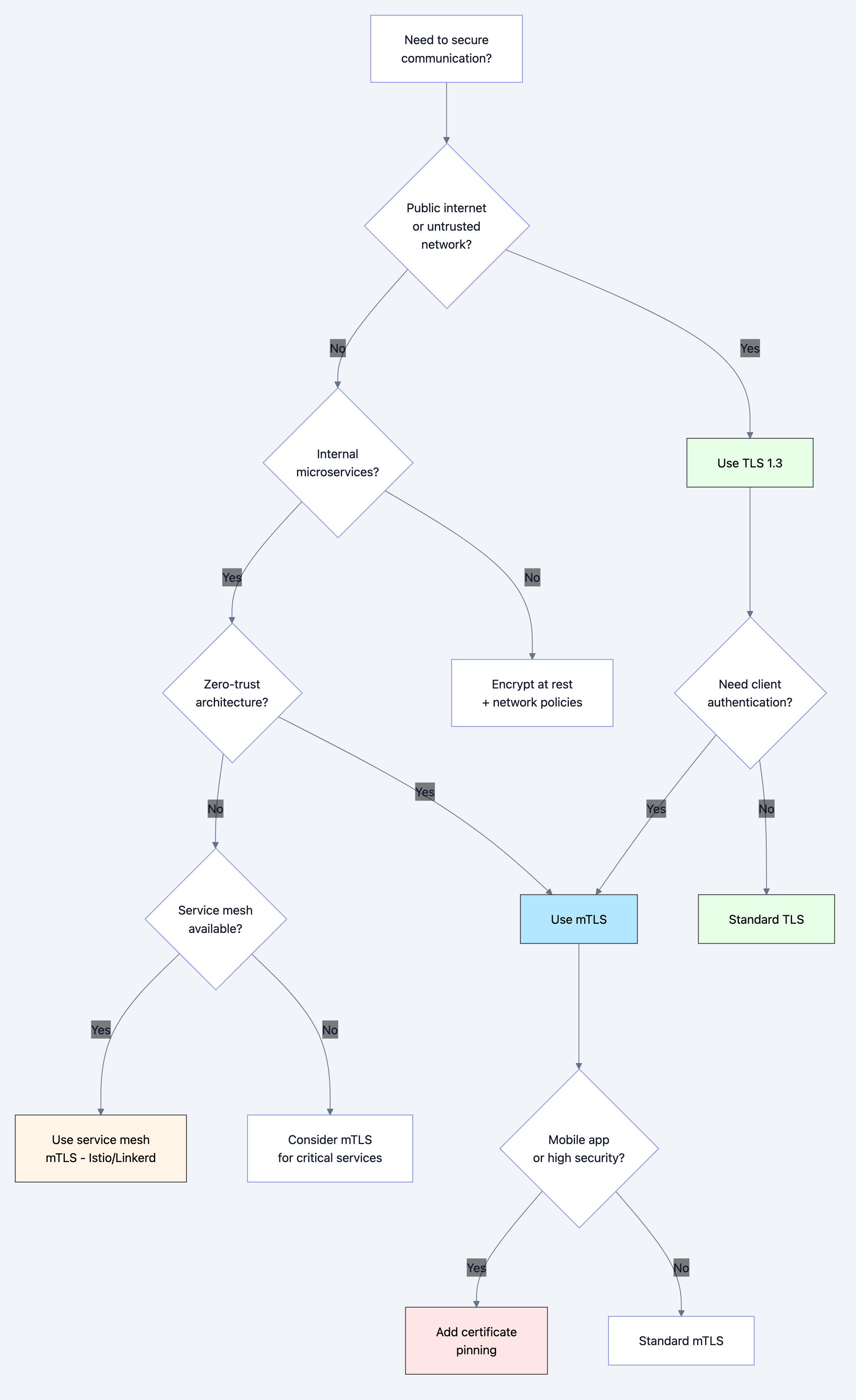
Diagram 4
Use Standard TLS When:
- Building web applications accessible over internet
- Securing API endpoints with token-based auth
- Encrypting database connections
- Any communication over untrusted networks
Use mTLS When:
- Service-to-service authentication in microservices
- Zero-trust architecture requirements
- API authentication without bearer tokens
- IoT device authentication
- High-security environments (banking, healthcare)
Use Certificate Pinning When:
- Mobile applications connecting to your API
- Extremely high-security requirements
- Protecting against nation-state attacks
- Financial or medical applications
Common Pitfalls and How to Avoid Them
Pitfall 1: Using Self-Signed Certificates in Production
The Mistake:
go// NEVER DO THIS IN PRODUCTION
tlsConfig := &tls.Config{
    InsecureSkipVerify: true, // Disables ALL certificate validation
}
Why It's Dangerous:
- Allows man-in-the-middle attacks
- Defeats the entire purpose of TLS
- Often done to "fix" certificate errors quickly
The Fix:
Use proper certificates from Let's Encrypt (free) or a trusted CA:
bash# Get free certificates with certbot
certbot certonly --standalone -d api.example.com
Pitfall 2: Not Setting Minimum TLS Version
The Mistake:
go// Accepts TLS 1.0 and 1.1 (VULNERABLE)
tlsConfig := &tls.Config{}
Why It's Dangerous:
- TLS 1.0 and 1.1 have known vulnerabilities (POODLE, BEAST)
- PCI DSS requires minimum TLS 1.2
The Fix:
gotlsConfig := &tls.Config{
    MinVersion: tls.VersionTLS12, // or TLS13
}
Pitfall 3: Certificate Validation Errors in mTLS
The Problem:
Client certificates fail validation with cryptic errors:
- "x509: certificate signed by unknown authority"
- "x509: certificate has expired"
The Fix:
Proper CA certificate chain management:
go// Load CA certificate
caCert, _ := ioutil.ReadFile("ca.crt")
caCertPool := x509.NewCertPool()
caCertPool.AppendCertsFromPEM(caCert)

// Load intermediate certificates if needed
intermediateCert, _ := ioutil.ReadFile("intermediate.crt")
caCertPool.AppendCertsFromPEM(intermediateCert)

tlsConfig := &tls.Config{
    ClientCAs: caCertPool,
    ClientAuth: tls.RequireAndVerifyClientCert,
}
Pitfall 4: Not Handling Certificate Expiration
The Problem:
Certificates expire, causing production outages.
The Fix:
Monitor certificate expiration and automate renewal:
gofunc checkCertificateExpiration(certFile string) (time.Duration, error) {
    certPEM, err := ioutil.ReadFile(certFile)
    if err != nil {
        return 0, err
    }

    block, _ := pem.Decode(certPEM)
    cert, err := x509.ParseCertificate(block.Bytes)
    if err != nil {
        return 0, err
    }

    timeUntilExpiry := time.Until(cert.NotAfter)

    // Alert if less than 30 days
    if timeUntilExpiry < 30*24*time.Hour {
        log.Printf("WARNING: Certificate expires in %v days", timeUntilExpiry.Hours()/24)
    }

    return timeUntilExpiry, nil
}
Pitfall 5: Weak Cipher Suites
The Mistake:
Allowing weak or deprecated cipher suites:
go// Bad: Includes weak ciphers
CipherSuites: []uint16{
    tls.TLS_RSA_WITH_RC4_128_SHA, // BROKEN
    tls.TLS_RSA_WITH_3DES_EDE_CBC_SHA, // WEAK
}
The Fix:
Only allow modern, secure cipher suites with forward secrecy:
goCipherSuites: []uint16{
    tls.TLS_ECDHE_RSA_WITH_AES_256_GCM_SHA384,
    tls.TLS_ECDHE_ECDSA_WITH_AES_256_GCM_SHA384,
    tls.TLS_ECDHE_RSA_WITH_CHACHA20_POLY1305,
}
Performance Implications
TLS Handshake Overhead
TLS 1.2:
- 2 round trips = ~100-200ms on typical internet connections
- CPU cost: RSA operations are expensive
- Memory: ~5-10KB per connection state
TLS 1.3:
- 1 round trip = ~50-100ms
- 0-RTT resumption = ~0ms for repeat connections
- More efficient algorithms (X25519 vs RSA)
Optimization Strategies
1. TLS Session Resumption:
gotlsConfig := &tls.Config{
    ClientSessionCache: tls.NewLRUClientSessionCache(128),
}
Reduces repeat handshakes by 80-90%.
2. Connection Pooling:
gotransport := &http.Transport{
    MaxIdleConns:        100,
    MaxIdleConnsPerHost: 10,
    IdleConnTimeout:     90 * time.Second,
}
Reuses TLS connections instead of handshaking every time.
3. Hardware Acceleration:
Use AES-NI CPU instructions for encryption (enabled by default in Go).
4. Certificate Chain Optimization:
- Minimize certificate chain length
- Use ECDSA certificates (smaller and faster than RSA)
- Enable OCSP stapling to avoid client lookups
Performance Metrics
| Operation | Latency | CPU Cost |
|---|---|---|
| TLS 1.3 handshake | 50-100ms | Medium |
| TLS 1.2 handshake | 100-200ms | High |
| TLS 1.3 resumption (0-RTT) | <1ms | Low |
| AES-GCM encryption | <0.1ms/MB | Low (with AES-NI) |
| Certificate validation | 5-20ms | Medium |
Testing and Debugging
Testing TLS Configuration with OpenSSL
Test your server's TLS configuration:
bash# Test TLS 1.3 connection
openssl s_client -connect localhost:8443 -tls1_3

# Test TLS 1.2 connection
openssl s_client -connect localhost:8443 -tls1_2

# Show certificate chain
openssl s_client -connect localhost:8443 -showcerts

# Check specific cipher suite
openssl s_client -connect localhost:8443 -cipher ECDHE-RSA-AES256-GCM-SHA384
Testing mTLS with curl
Test client certificate authentication:
bash# With client certificate
curl --cert client.crt --key client.key https://localhost:8443/api/secure

# Without certificate (should fail)
curl https://localhost:8443/api/secure
TLS Testing Tools
-
SSL Labs Server Test: https://www.ssllabs.com/ssltest/
- Grades your TLS configuration (A+ is best)
- Identifies vulnerabilities
-
testssl.sh: Command-line TLS scannerbash
testssl.sh https://your-api.com -
Wireshark: Packet capture to debug handshake issues
- Can decrypt TLS if you have the private key
- Useful for debugging certificate validation failures
Real-World Use Cases
Use Case 1: Microservices with mTLS (Istio)
In a Kubernetes service mesh with Istio:
yamlapiVersion: security.istio.io/v1beta1
kind: PeerAuthentication
metadata:
  name: default
  namespace: production
spec:
  mtls:
    mode: STRICT  # Require mTLS for all services
Istio automatically:
- Issues certificates to each service
- Rotates certificates before expiry
- Validates service identity via SPIFFE
- Encrypts all service-to-service traffic
Use Case 2: API Gateway with Certificate Pinning
Mobile app connecting to backend API:
go// Mobile SDK pins certificate
const apiCertFingerprint = "sha256/abc123..."

// API Gateway configuration
tlsConfig := &tls.Config{
    MinVersion: tls.VersionTLS13,
    Certificates: []tls.Certificate{cert},
}

// Rotation strategy: Support both old and new fingerprints
// for 30 days during certificate rotation
Use Case 3: Database Connections with TLS
PostgreSQL with TLS:
goimport "github.com/lib/pq"

// Connection string with TLS
connStr := "postgres://user:pass@localhost/db?sslmode=require&sslrootcert=ca.crt"

db, err := sql.Open("postgres", connStr)
SSL Modes:
disable: No TLS (INSECURE)require: TLS required, but doesn't verify certificateverify-ca: Verifies certificate against CAverify-full: Verifies certificate and hostname (RECOMMENDED)
Interview Questions: What You Should Know
Junior Level
Q: What is the difference between HTTP and HTTPS?
A: HTTPS uses TLS to encrypt data, authenticate the server, and ensure data integrity. HTTP sends data in plain text.
Q: What does the padlock icon in a browser mean?
A: It indicates the connection uses valid TLS encryption and the server's certificate has been verified.
Q: Why do we need both asymmetric and symmetric encryption in TLS?
A: Asymmetric encryption solves key distribution (handshake) but is slow. Symmetric encryption is fast for data transmission. TLS uses asymmetric for handshake, then switches to symmetric for efficiency.
Mid Level
Q: Explain the TLS handshake process.
A:
- Client sends supported cipher suites and random bytes
- Server responds with chosen cipher, certificate, and random bytes
- Client validates certificate chain
- Client encrypts pre-master secret with server's public key
- Both derive session keys from pre-master + random bytes
- Exchange encrypted "Finished" messages to confirm
- Application data flows with symmetric encryption
Q: What is forward secrecy and why is it important?
A: Forward secrecy ensures that past communications remain secure even if the server's private key is compromised. Achieved using ephemeral keys (ECDHE) that are discarded after each session.
Q: How does certificate validation work?
A: Client validates:
- Certificate signature using CA's public key
- Certificate hasn't expired
- Domain name matches (Common Name or SAN)
- Certificate hasn't been revoked (OCSP/CRL)
- Chain traces back to a trusted root CA
Senior Level
Q: Design an mTLS authentication system for a microservices architecture.
A:
- Certificate Authority: Use internal CA or service mesh (Istio)
- Certificate Issuance: Automated via cert-manager or SPIFFE
- Rotation: Automatic rotation every 24-48 hours
- Identity: Extract service identity from certificate CN or SAN
- Authorization: Map certificate identity to RBAC policies
- Monitoring: Track certificate expiration, failed validations
- Fallback: Graceful degradation if mTLS fails
Q: What are the trade-offs between certificate pinning and standard TLS?
A:
- Pinning Pros: Protection against CA compromise, MITM attacks
- Pinning Cons: Complex rotation, can cause outages, requires app updates
- Recommendation: Use for mobile apps with backup pins and 30-day overlap during rotation
Q: How would you debug a "certificate signed by unknown authority" error in production?
A:
- Check CA certificate is in trust store
- Verify intermediate certificates are sent by server
- Ensure certificate chain is complete (leaf → intermediate → root)
- Check for clock skew (certificate not yet valid)
- Verify certificate hasn't expired
- Test with
openssl s_client -showcerts
Key Takeaways
-
TLS provides three guarantees: Confidentiality (encryption), Integrity (tampering detection), and Authentication (identity verification)
-
TLS uses hybrid encryption: Asymmetric encryption for handshake, symmetric encryption for data
-
Certificate validation is critical: Always validate certificates properly, never use
InsecureSkipVerifyin production -
TLS 1.3 is faster: 1-RTT vs 2-RTT, with 0-RTT resumption
-
mTLS for zero-trust: Both client and server authenticate, essential for microservices
-
Certificate pinning adds security: Protects against CA compromise but complicates rotation
-
Monitor certificate expiration: Automate renewal with Let's Encrypt or cert-manager
-
Use modern cipher suites: Only ECDHE with AES-GCM or ChaCha20-Poly1305
-
Performance optimization: Session resumption, connection pooling, hardware acceleration
-
Testing is essential: Use SSL Labs, testssl.sh, and OpenSSL to validate configuration
Further Learning
- Practice: Set up your own CA with
cfssloreasy-rsa - Read: RFC 8446 (TLS 1.3 specification)
- Experiment: Deploy Istio locally to see mTLS in action
- Tools: Master OpenSSL commands for certificate management
- Security: Study common TLS attacks (Heartbleed, POODLE, BEAST)
TLS isn't just about adding an 'S' to HTTP it's a sophisticated security protocol that every backend engineer must understand deeply. Master it, and you'll build systems that protect billions of users.