HTTP/2: Multiplexing and Server Push
The Waterfall of Doom
You open your browser's Network tab and watch in horror: 47 requests loading one after another like a slow-motion domino effect. CSS blocked by JavaScript. Images waiting for CSS. Your beautiful React app taking 8 seconds to load on a decent connection. This is the HTTP/1.1 bottleneck, and HTTP/2 was built to obliterate it.
In 2015, HTTP/2 arrived as the first major update to HTTP in 16 years. Born from Google's SPDY experiment, it promised to make the web dramatically faster without changing a single line of application code. And it delivered. Today, over 50% of all websites use HTTP/2, and the performance gains are real: 30-50% faster page loads in typical scenarios.
Let's understand what makes HTTP/2 revolutionary and how it achieves these gains.
HTTP/1.1's Performance Ceiling
What Problem Does HTTP/2 Solve?
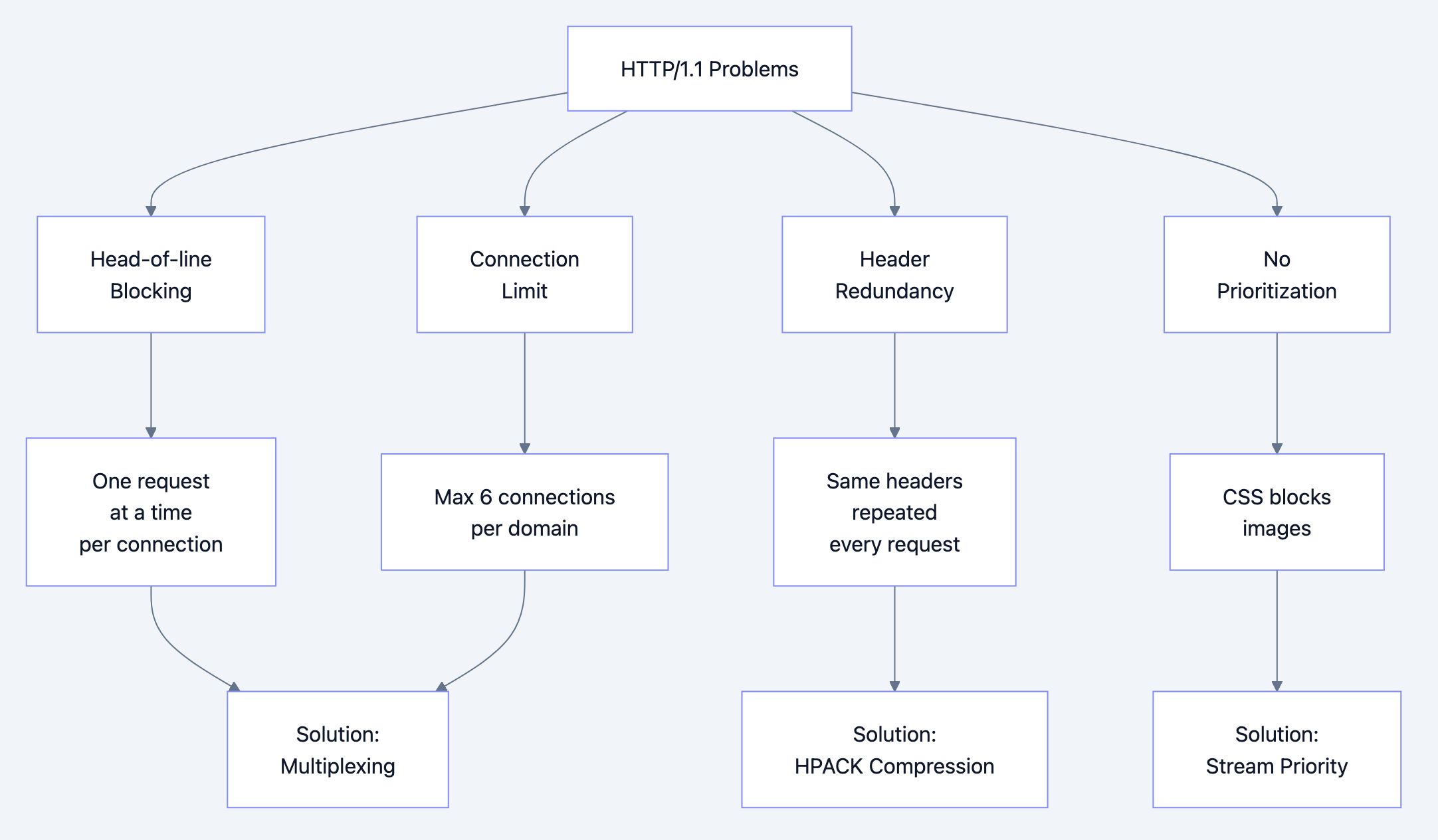
The core challenges with HTTP/1.1:
- Head-of-line blocking: Only one request per TCP connection at a time
- Connection limits: Browsers cap at 6 connections per domain
- Redundant headers: Same headers sent repeatedly (cookies, user-agent)
- No prioritization: Critical resources compete with non-critical ones
- Server can't help: Server must wait for client requests
Historical context:
- HTTP/0.9 (1991): One request, one response, close connection
- HTTP/1.0 (1996): Headers added, still one request per connection
- HTTP/1.1 (1999): Keep-alive connections, but still serial
- 2010s: Web pages ballooned from 1-2 MB to 2-3 MB+
- SPDY (2009): Google's experimental protocol
- HTTP/2 (2015): Standardized version of SPDY
Why a new solution was needed:
Modern web apps need 100+ resources. With HTTP/1.1:
- 6 connections × 1 request each = 6 parallel requests max
- Remaining 94 requests queue up
- Round-trip time dominates (50-200ms per request)
- Hacks emerged: domain sharding, sprite sheets, inlining
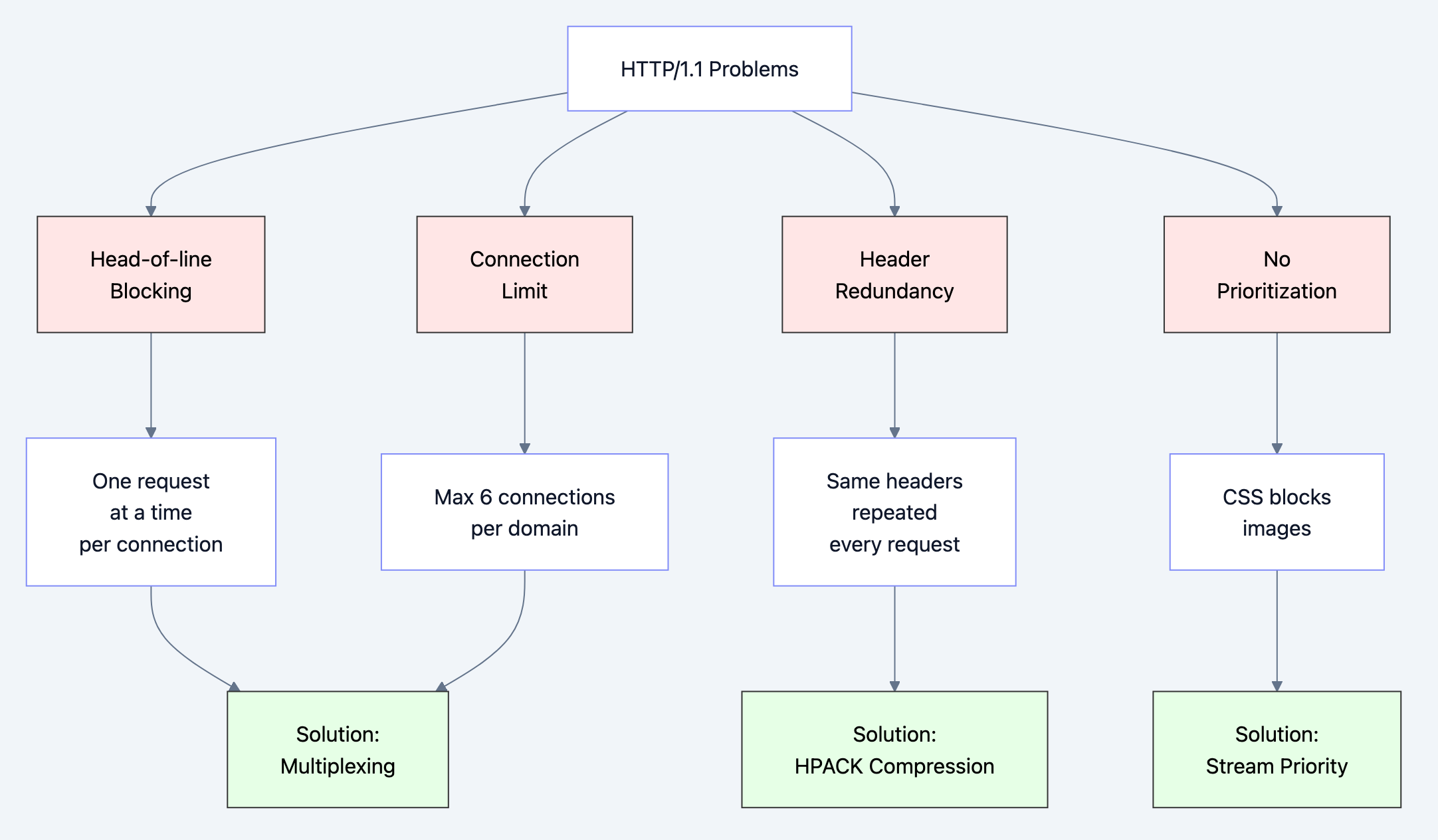
Diagram 1
Real-World Analogy
Think of HTTP/1.1 vs HTTP/2 like single-lane highway vs multi-lane highway:
HTTP/1.1 (Single-lane highway):
- 6 toll booths (connections)
- One car at a time per booth
- Cars must finish completely before next car
- Traffic jams inevitable
HTTP/2 (Multi-lane highway):
- 1 toll booth per domain
- Multiple lanes (streams) through one booth
- Cars (requests) interleaved by frames
- No traffic jams - constant flow
The genius: Instead of adding more booths (connections), HTTP/2 multiplexes traffic through one connection efficiently.
HTTP/2's Binary Revolution
How Does HTTP/2 Solve These Problems?
HTTP/2 introduces binary framing layer - a radical reimagining of how HTTP works.
Key innovations:
-
Binary protocol (not text)
- Why: Easier to parse, more efficient, less error-prone
- Headers and data separated into frames
-
Multiplexing (multiple streams per connection)
- Why: Eliminate head-of-line blocking
- Interleave requests/responses
-
Header compression (HPACK)
- Why: Reduce bandwidth (headers often larger than data)
- Stateful compression table
-
Stream prioritization
- Why: Load critical resources first
- Dependencies and weights
-
Server push
- Why: Send resources before client asks
- Reduce round-trips
HTTP/2 Diagram 1
Why this approach wins:
One connection: No connection overhead, better congestion control
Full utilization: No idle time, all bandwidth used
Backward compatible: Falls back to HTTP/1.1 gracefully
TLS by default: Most implementations require HTTPS
Understanding HTTP/2's Architecture
The Binary Framing Layer
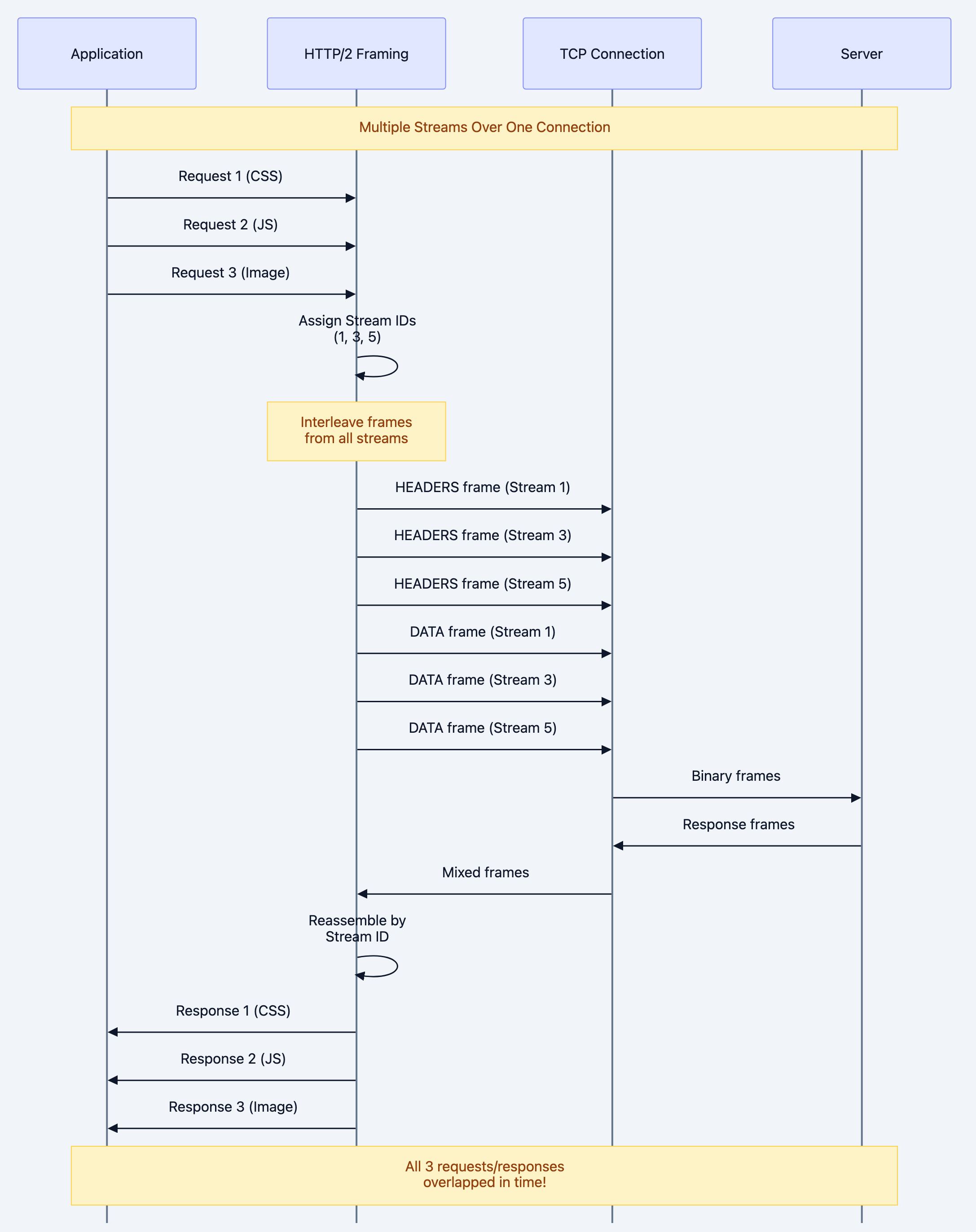
HTTP/2's core innovation is the framing layer between application and transport:
HTTP/2 Diagram 2
Key concepts:
- Frame: Smallest unit (9-byte header + payload)
- Stream: Bidirectional flow of frames (one request/response)
- Connection: Single TCP connection for all streams
Mental model: Think of streams as "virtual connections" multiplexed over one physical connection.
Frame Structure
Every HTTP/2 frame follows this structure:
+-----------------------------------------------+
|                 Length (24)                   |
+---------------+---------------+---------------+
|   Type (8)    |   Flags (8)   |
+-+-------------+---------------+-------------------------------+
|R|                 Stream Identifier (31)                      |
+=+=============================================================+
|                   Frame Payload (0...)                      ...
+---------------------------------------------------------------+
Frame types:
- DATA: Application data (response body)
- HEADERS: Request/response headers
- PRIORITY: Stream priority
- RST_STREAM: Cancel stream
- SETTINGS: Connection configuration
- PUSH_PROMISE: Server push notification
- PING: Keepalive
- GOAWAY: Connection shutdown
- WINDOW_UPDATE: Flow control
- CONTINUATION: Header continuation
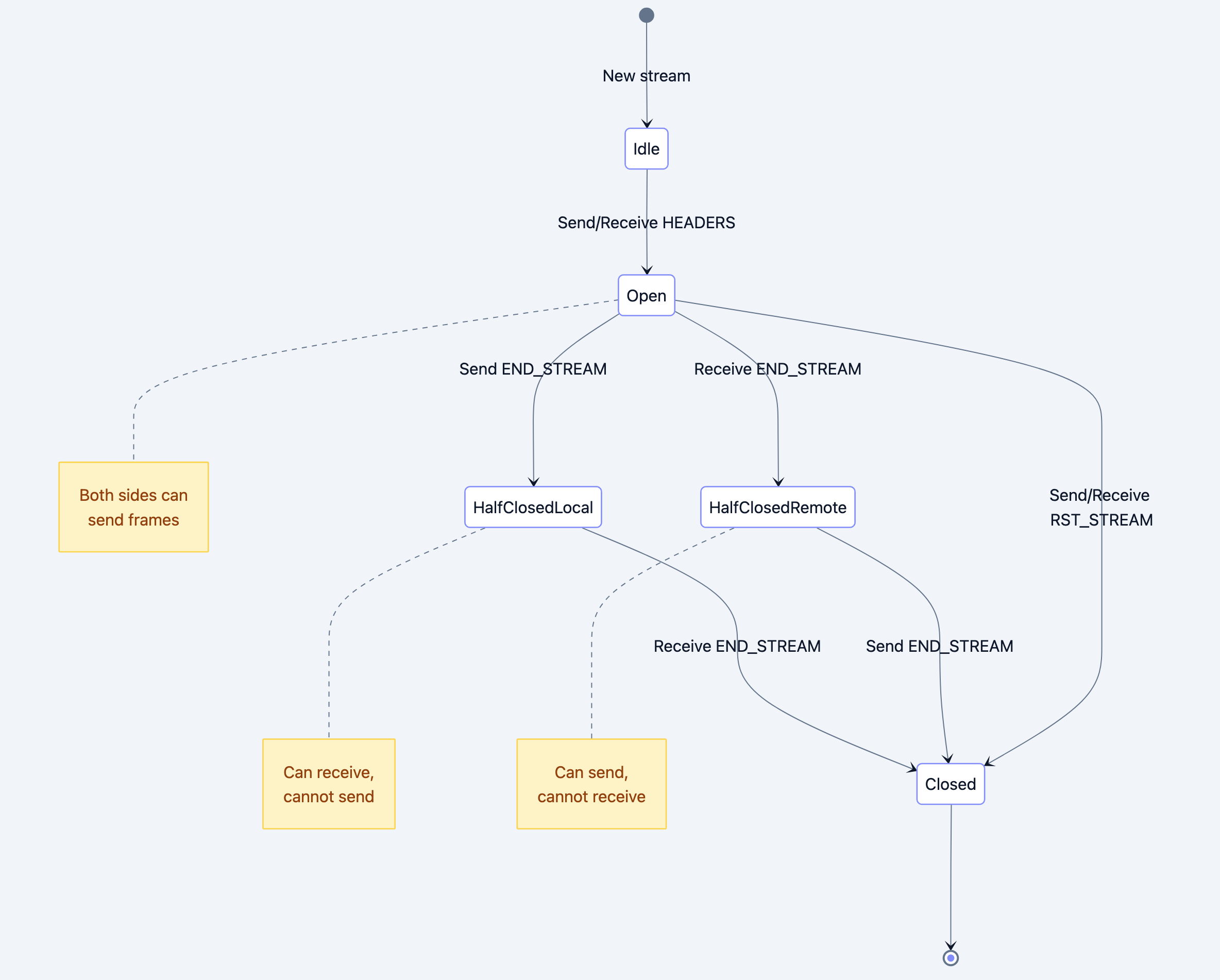
Stream States

HTTP/2 Diagram 3
HPACK Header Compression
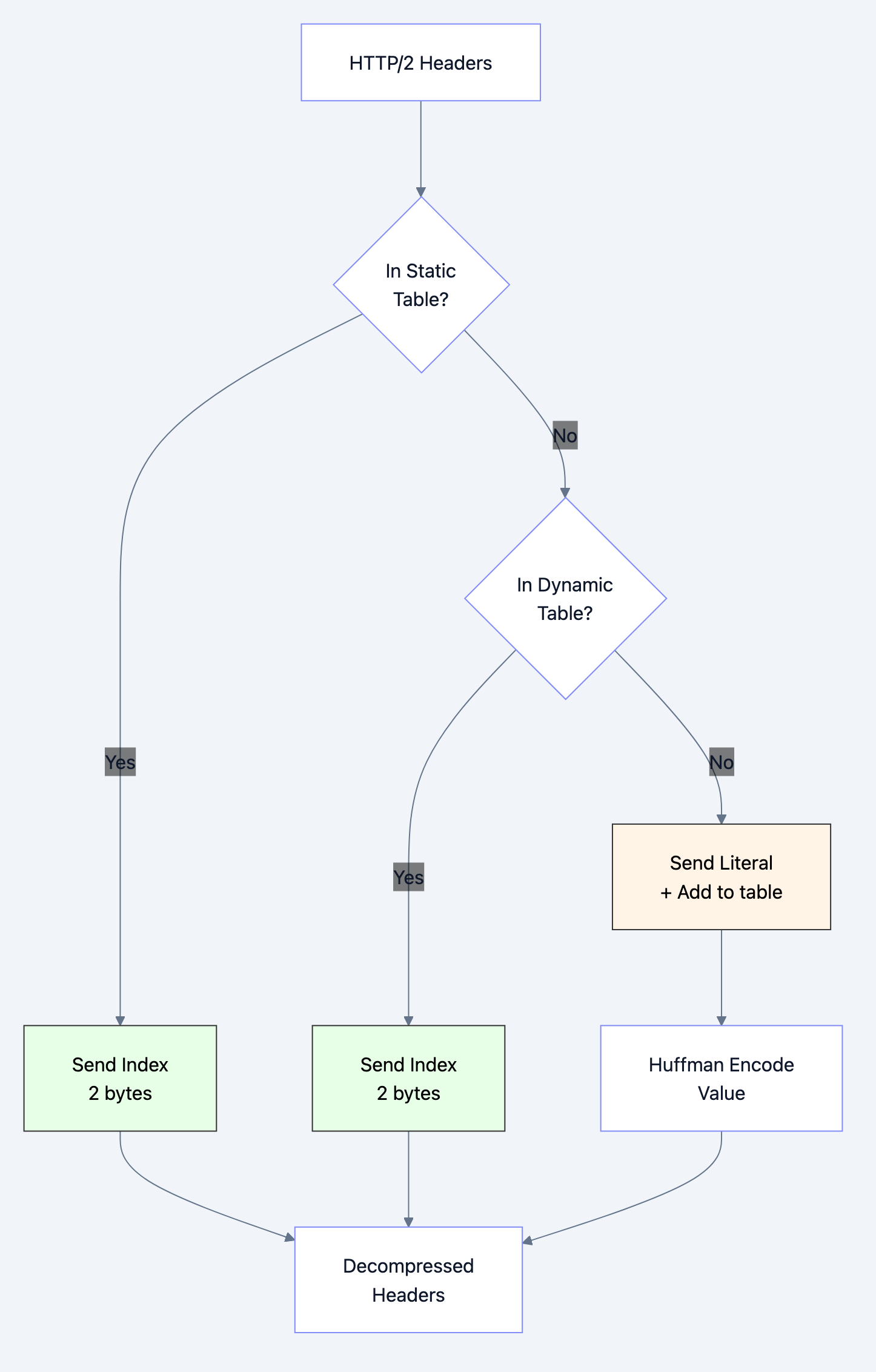
HPACK uses a static table (common headers) and dynamic table (connection-specific headers):
HTTP/2 Diagram 4
Example compression:
First request:
:method: GET                    → Index 2 (static)
:path: /index.html              → Literal (64 bytes)
user-agent: Mozilla/5.0...      → Literal (128 bytes)
cookie: session=abc123...       → Literal (256 bytes)
Total: ~450 bytes

Second request (same domain):
:method: GET                    → Index 2
:path: /style.css               → Literal (32 bytes)
user-agent: Mozilla/5.0...      → Index 62 (dynamic)
cookie: session=abc123...       → Index 63 (dynamic)
Total: ~40 bytes (91% reduction!)
Deep Technical Dive
Frame-by-Frame Breakdown
Let's trace an actual HTTP/2 request:
go// Example HTTP/2 GET request for /index.html

// 1. SETTINGS frame (connection start)
Frame {
    Length: 18
    Type: SETTINGS (0x4)
    Flags: 0x0
    StreamID: 0  // Connection-level
    Payload: [
        HEADER_TABLE_SIZE: 4096
        ENABLE_PUSH: 1
        MAX_CONCURRENT_STREAMS: 100
    ]
}

// 2. HEADERS frame (request)
Frame {
    Length: 45
    Type: HEADERS (0x1)
    Flags: END_HEADERS (0x4)
    StreamID: 1  // First stream
    Payload: (HPACK compressed)
        :method: GET
        :scheme: https
        :authority: example.com
        :path: /index.html
        user-agent: Go-http-client/2.0
}

// 3. Server responds with HEADERS
Frame {
    Length: 156
    Type: HEADERS (0x1)
    Flags: END_HEADERS (0x4)
    StreamID: 1
    Payload: (HPACK compressed)
        :status: 200
        content-type: text/html
        content-length: 1024
}

// 4. Server sends DATA
Frame {
    Length: 1024
    Type: DATA (0x0)
    Flags: END_STREAM (0x1)
    StreamID: 1
    Payload: <!DOCTYPE html>...
}
Code Deep Dive: HTTP/2 Client in Go
Example 1: Basic HTTP/2 Client
gopackage main

import (
    "crypto/tls"
    "fmt"
    "io"
    "net/http"
    "golang.org/x/net/http2"
)

func main() {
    // HTTP/2 client configuration
    // Why custom transport? To ensure HTTP/2 is used
    client := &http.Client{
        Transport: &http2.Transport{
            // Allow HTTP/2 without TLS (for testing)
            AllowHTTP: true,

            // TLS configuration
            TLSClientConfig: &tls.Config{
                // For production, verify certificates
                InsecureSkipVerify: false,
            },
        },
    }

    // Make request
    // Protocol negotiation happens via ALPN (TLS extension)
    resp, err := client.Get("https://http2.golang.org/")
    if err != nil {
        panic(err)
    }
    defer resp.Body.Close()

    // Check if HTTP/2 was used
    // resp.Proto will be "HTTP/2.0"
    fmt.Printf("Protocol: %s\n", resp.Proto)
    fmt.Printf("Status: %s\n", resp.Status)

    // Read response body
    body, _ := io.ReadAll(resp.Body)
    fmt.Printf("Body length: %d bytes\n", len(body))
}
What happens under the hood:
-
TLS Handshake:
- Client sends supported protocols in ALPN extension
- Server chooses HTTP/2 (h2) if supported
- Handshake completes
-
HTTP/2 Connection Preface:
Client sends: "PRI * HTTP/2.0\r\n\r\nSM\r\n\r\n" Client sends: SETTINGS frame Server sends: SETTINGS frame Both send: SETTINGS ACK -
Request:
- Create Stream 1 (client-initiated streams are odd)
- Send HEADERS frame with compressed headers
- Mark END_STREAM (no request body)
-
Response:
- Server sends HEADERS frame on Stream 1
- Server sends DATA frame(s) with body
- Marks END_STREAM on last DATA frame
Example 2: HTTP/2 Server with Server Push
gopackage main

import (
    "fmt"
    "log"
    "net/http"
)

func main() {
    // HTTP/2 server
    // Go automatically uses HTTP/2 if TLS is enabled

    http.HandleFunc("/", func(w http.ResponseWriter, r *http.Request) {
        // Check if we can push
        // Server Push is initiated by server
        pusher, ok := w.(http.Pusher)
        if ok {
            // Push CSS before client requests it
            // Why? Client will need it, save a round-trip
            err := pusher.Push("/style.css", nil)
            if err != nil {
                log.Printf("Failed to push: %v", err)
            }

            // Push JavaScript
            pusher.Push("/script.js", nil)

            // Push logo image
            pusher.Push("/logo.png", nil)

            fmt.Println("Pushed 3 resources")
        }

        // Send HTML response
        w.Header().Set("Content-Type", "text/html")
        fmt.Fprintf(w, `
<!DOCTYPE html>
<html>
<head>
    <link rel="stylesheet" href="/style.css">
    <script src="/script.js"></script>
</head>
<body>
    <h1>HTTP/2 Server Push Demo</h1>
    <img src="/logo.png">
</body>
</html>
        `)
    })

    http.HandleFunc("/style.css", func(w http.ResponseWriter, r *http.Request) {
        w.Header().Set("Content-Type", "text/css")
        fmt.Fprintf(w, "body { font-family: Arial; }")
    })

    http.HandleFunc("/script.js", func(w http.ResponseWriter, r *http.Request) {
        w.Header().Set("Content-Type", "application/javascript")
        fmt.Fprintf(w, "console.log('HTTP/2 is awesome!');")
    })

    http.HandleFunc("/logo.png", func(w http.ResponseWriter, r *http.Request) {
        // Serve actual image
        http.ServeFile(w, r, "logo.png")
    })

    // Start HTTPS server (required for HTTP/2 in browsers)
    // Generate cert: go run $GOROOT/src/crypto/tls/generate_cert.go --host=localhost
    log.Println("Starting HTTP/2 server on :8443")
    log.Fatal(http.ListenAndServeTLS(":8443", "cert.pem", "key.pem", nil))
}
Server Push flow:
HTTP/2 Diagram 5
Example 3: Stream Prioritization
gopackage main

import (
    "context"
    "fmt"
    "golang.org/x/net/http2"
    "io"
    "net/http"
)

// Custom round tripper to set priorities
type priorityRoundTripper struct {
    transport http.RoundTripper
}

func (p *priorityRoundTripper) RoundTrip(req *http.Request) (*http.Response, error) {
    // Set priority based on resource type
    // Lower weight = higher priority

    switch {
    case req.URL.Path == "/critical.css":
        // Critical CSS: highest priority
        // Weight 256, depends on stream 0
        req = req.WithContext(
            context.WithValue(req.Context(), http2.StreamPriorityKey, http2.PriorityParam{
                Weight: 256,  // Highest
            }),
        )

    case req.URL.Path == "/main.js":
        // JavaScript: medium-high priority
        req = req.WithContext(
            context.WithValue(req.Context(), http2.StreamPriorityKey, http2.PriorityParam{
                Weight: 128,
            }),
        )

    default:
        // Images, other: lower priority
        req = req.WithContext(
            context.WithValue(req.Context(), http2.StreamPriorityKey, http2.PriorityParam{
                Weight: 32,
            }),
        )
    }

    return p.transport.RoundTrip(req)
}

func main() {
    client := &http.Client{
        Transport: &priorityRoundTripper{
            transport: &http2.Transport{},
        },
    }

    // Make concurrent requests
    // HTTP/2 will prioritize based on weights
    urls := []string{
        "https://example.com/critical.css",  // Loads first
        "https://example.com/main.js",       // Loads second
        "https://example.com/image1.png",    // Loads third
        "https://example.com/image2.png",    // Loads last
    }

    for _, url := range urls {
        go func(u string) {
            resp, _ := client.Get(u)
            defer resp.Body.Close()
            io.Copy(io.Discard, resp.Body)
            fmt.Printf("Loaded: %s\n", u)
        }(url)
    }

    select {} // Wait forever
}
Priority tree:
Stream 0 (connection)
    ├─ Stream 1 (critical.css) - Weight 256 ████████
    ├─ Stream 3 (main.js)      - Weight 128 ████
    ├─ Stream 5 (image1.png)   - Weight 32  █
    └─ Stream 7 (image2.png)   - Weight 32  █
Wireshark Analysis
Here's what HTTP/2 looks like on the wire:
Frame 1: SETTINGS
    Length: 18
    Type: SETTINGS (4)
    Flags: 0x00
    Stream: 0
    Settings:
        HEADER_TABLE_SIZE: 4096
        ENABLE_PUSH: 1
        MAX_CONCURRENT_STREAMS: 100

Frame 2: HEADERS
    Length: 47
    Type: HEADERS (1)
    Flags: END_HEADERS (0x4)
    Stream: 1
    Headers: (after HPACK decompression)
        :method: GET
        :path: /
        :scheme: https
        :authority: example.com

Frame 3: DATA
    Length: 2048
    Type: DATA (0)
    Flags: 0x00
    Stream: 1
    Data: [2048 bytes]

Frame 4: DATA
    Length: 1024
    Type: DATA (0)
    Flags: END_STREAM (0x1)
    Stream: 1
    Data: [1024 bytes]
Benefits & Why HTTP/2 Matters
Performance Gains
Real-world measurements:
| Metric | HTTP/1.1 | HTTP/2 | Improvement |
|---|---|---|---|
| Page Load Time | 3.2s | 1.8s | 44% faster |
| Time to First Byte | 600ms | 450ms | 25% faster |
| Bandwidth Used | 2.1 MB | 1.6 MB | 24% less |
| Requests Needed | 87 | 87 | Same |
| Connections Used | 6 | 1 | 83% fewer |
Why these gains?
-
Multiplexing eliminates queuing
- HTTP/1.1: Requests wait in queue
- HTTP/2: All requests sent immediately
- Saves: 50-200ms per queued request
-
Header compression saves bandwidth
- Typical headers: 800 bytes per request
- With 100 requests: 80 KB savings
- On mobile: Significant impact
-
Server push reduces round-trips
- One less RTT per pushed resource
- 50-100ms saved per resource
-
Better connection utilization
- HTTP/1.1: 6 connections × ~60% utilization = 3.6 effective
- HTTP/2: 1 connection × ~95% utilization = 0.95 effective
- But 1 connection has better congestion control!
Developer Experience
No code changes needed:
go// This code works with both HTTP/1.1 and HTTP/2
client := &http.Client{}
resp, _ := client.Get("https://example.com")

// Server automatically negotiates best protocol
http.ListenAndServeTLS(":443", "cert.pem", "key.pem", handler)
Simplified deployment:
- Remove domain sharding
- Remove sprite sheets
- Remove resource inlining
- Let protocol handle optimization
Trade-offs & Gotchas
When to Use HTTP/2
Perfect for:
-
Modern web applications
- Multiple resources (CSS, JS, images)
- API calls mixed with assets
- Real-time updates
-
Mobile applications
- High latency networks
- Limited bandwidth
- Battery savings (fewer connections)
-
Microservices
- gRPC (built on HTTP/2)
- Internal service communication
- Load balancing benefits
When HTTP/2 Might Not Help
⚠️ Limited benefits:
-
Single large file download
- No multiplexing benefit
- TCP itself is the bottleneck
- HTTP/1.1 works fine
-
Very high packet loss networks
- Single connection means all streams blocked
- HTTP/1.1's 6 connections might perform better
- Consider HTTP/3 instead
-
Legacy clients
- Need fallback to HTTP/1.1
- Adds complexity
- Test both versions
Common Mistakes
Mistake 1: Over-Using Server Push
go// BAD: Push everything
pusher.Push("/style.css", nil)
pusher.Push("/script.js", nil)
pusher.Push("/image1.png", nil)
pusher.Push("/image2.png", nil)
pusher.Push("/image3.png", nil)
// ... 20 more resources

// GOOD: Push only critical resources
pusher.Push("/critical.css", nil)  // Blocking resource
pusher.Push("/main.js", nil)        // Needed immediately
// Let browser request images as needed
Why this is a problem:
- Wastes bandwidth pushing unused resources
- Can't cancel pushed resources easily
- Browser cache might already have them
Solution: Push only resources you're 100% sure will be needed
Mistake 2: Not Handling HTTP/1.1 Fallback
go// BAD: Assuming HTTP/2
pusher := w.(http.Pusher)  // Panics if HTTP/1.1!
pusher.Push("/style.css", nil)

// GOOD: Check protocol
if pusher, ok := w.(http.Pusher); ok {
    pusher.Push("/style.css", nil)
}
// Works with both protocols
Mistake 3: Keeping HTTP/1.1 Optimizations
go// BAD: Domain sharding with HTTP/2
<img src="https://static1.example.com/img1.png">
<img src="https://static2.example.com/img2.png">
// Creates 2 connections instead of 1!

// GOOD: Single domain
<img src="https://example.com/img1.png">
<img src="https://example.com/img2.png">
// Multiplexed over 1 connection
Why: HTTP/2 performs worse with domain sharding because:
- Multiple connections = multiple TCP slow starts
- Can't share compression table
- Wasted bandwidth on duplicate settings
Mistake 4: Not Compressing Response Bodies
go// BAD: Forgetting body compression
w.Write(largeJSON)  // Sent uncompressed

// GOOD: Enable gzip
import "compress/gzip"

gw := gzip.NewWriter(w)
defer gw.Close()
w.Header().Set("Content-Encoding", "gzip")
gw.Write(largeJSON)
Why: HTTP/2 compresses headers but NOT bodies automatically
Mistake 5: Ignoring Flow Control
go// BAD: Sending huge responses without checking
func handler(w http.ResponseWriter, r *http.Request) {
    // Stream 10 GB file
    for i := 0; i < 10000000; i++ {
        w.Write(data)  // Might block on flow control
    }
}

// GOOD: Respect flow control
func handler(w http.ResponseWriter, r *http.Request) {
    // HTTP/2 automatically handles flow control
    // But chunk appropriately
    const chunkSize = 16 * 1024  // 16 KB chunks

    for i := 0; i < len(data); i += chunkSize {
        end := i + chunkSize
        if end > len(data) {
            end = len(data)
        }
        w.Write(data[i:end])

        // Optional: flush to send immediately
        if f, ok := w.(http.Flusher); ok {
            f.Flush()
        }
    }
}
Performance Considerations
CPU Usage:
- HPACK compression/decompression uses CPU
- More CPU than HTTP/1.1 (trade bandwidth for CPU)
- Negligible on modern servers
Memory:
- Connection state (HPACK table, stream buffers)
- Typical: 64 KB per connection
- HTTP/1.1: ~2 KB per connection
- Trade-off: 1 connection vs 6 connections
Monitoring:
go// Track HTTP/2 metrics
var http2Connections atomic.Int64
var http2Streams atomic.Int64

// In server
http2.ConfigureServer(server, &http2.Server{
    MaxConcurrentStreams: 250,
})

// Log metrics
log.Printf("HTTP/2 connections: %d, streams: %d",
    http2Connections.Load(), http2Streams.Load())
Security Considerations
1. Cleartext HTTP/2 (h2c)
Most browsers DON'T support it. Always use TLS:
go// Use HTTPS
http.ListenAndServeTLS(":443", "cert.pem", "key.pem", handler)

// Avoid h2c (cleartext HTTP/2)
// Only for internal services
2. CRIME/BREACH Attacks
HPACK compression + TLS + user-controlled data = vulnerability
Mitigation:
- Don't compress sensitive headers (cookies, tokens)
- Use secure cookie attributes
- Implement CSRF tokens
3. Rapid Reset Attack (CVE-2023-44487)
Attacker opens many streams and immediately resets them:
Stream 1: HEADERS → RST_STREAM
Stream 3: HEADERS → RST_STREAM
Stream 5: HEADERS → RST_STREAM
... (millions of times)
Mitigation:
goserver := &http2.Server{
    MaxConcurrentStreams: 100,  // Limit concurrent streams
    IdleTimeout: 60 * time.Second,
}
Comparison with Alternatives
| Feature | HTTP/1.1 | HTTP/2 | HTTP/3 | WebSocket |
|---|---|---|---|---|
| Protocol | Text | Binary | Binary (QUIC) | Binary |
| Multiplexing | No | Yes | Yes | Yes |
| Header Compression | No | HPACK | QPACK | No |
| Server Push | No | Yes | Yes | N/A |
| Connection Setup | Fast | Fast | Faster (0-RTT) | Fast |
| Encryption | Optional | De facto required | Required | Optional |
| Use Case | Simple sites | Modern web | Low-latency | Real-time bidirectional |
| Browser Support | 100% | 97% | 75% | 98% |
Decision matrix:
HTTP/2 Diagram 6
Hands-On Example: Performance Comparison
Let's build a test to compare HTTP/1.1 vs HTTP/2:
gopackage main

import (
    "crypto/tls"
    "fmt"
    "io"
    "net/http"
    "sync"
    "time"
    "golang.org/x/net/http2"
)

// Benchmark HTTP/1.1 vs HTTP/2
func main() {
    urls := []string{
        "https://http2.golang.org/file/go.src.tar.gz",
        "https://http2.golang.org/serverpush",
        // Add more URLs
    }

    fmt.Println("=== HTTP/1.1 Performance ===")
    testHTTP1(urls)

    fmt.Println("\n=== HTTP/2 Performance ===")
    testHTTP2(urls)
}

func testHTTP1(urls []string) {
    client := &http.Client{
        Transport: &http.Transport{
            TLSClientConfig: &tls.Config{
                NextProtos: []string{"http/1.1"},  // Force HTTP/1.1
            },
            MaxIdleConnsPerHost: 6,  // Browser limit
        },
    }

    start := time.Now()

    var wg sync.WaitGroup
    for _, url := range urls {
        wg.Add(1)
        go func(u string) {
            defer wg.Done()

            resp, err := client.Get(u)
            if err != nil {
                fmt.Printf("Error: %v\n", err)
                return
            }
            defer resp.Body.Close()

            io.Copy(io.Discard, resp.Body)
            fmt.Printf("[HTTP/1.1] %s - %s\n", resp.Proto, u)
        }(url)
    }

    wg.Wait()
    fmt.Printf("Total time: %v\n", time.Since(start))
}

func testHTTP2(urls []string) {
    client := &http.Client{
        Transport: &http2.Transport{
            TLSClientConfig: &tls.Config{
                NextProtos: []string{"h2"},  // Force HTTP/2
            },
        },
    }

    start := time.Now()

    var wg sync.WaitGroup
    for _, url := range urls {
        wg.Add(1)
        go func(u string) {
            defer wg.Done()

            resp, err := client.Get(u)
            if err != nil {
                fmt.Printf("Error: %v\n", err)
                return
            }
            defer resp.Body.Close()

            io.Copy(io.Discard, resp.Body)
            fmt.Printf("[HTTP/2] %s - %s\n", resp.Proto, u)
        }(url)
    }

    wg.Wait()
    fmt.Printf("Total time: %v\n", time.Since(start))
}
Expected output:
=== HTTP/1.1 Performance ===
[HTTP/1.1] HTTP/1.1 - https://http2.golang.org/file/go.src.tar.gz
[HTTP/1.1] HTTP/1.1 - https://http2.golang.org/serverpush
Total time: 2.3s

=== HTTP/2 Performance ===
[HTTP/2] HTTP/2.0 - https://http2.golang.org/file/go.src.tar.gz
[HTTP/2] HTTP/2.0 - https://http2.golang.org/serverpush
Total time: 1.4s

Improvement: 39% faster with HTTP/2
Interview Preparation
Question 1: What are the key improvements in HTTP/2 over HTTP/1.1?
Answer:
HTTP/2 introduces several major improvements:
-
Binary Framing Layer
- HTTP/1.1 is text-based
- HTTP/2 uses binary frames
- Easier to parse, more efficient, less error-prone
-
Multiplexing
- HTTP/1.1: One request per connection at a time
- HTTP/2: Multiple streams over one connection
- Eliminates head-of-line blocking
-
Header Compression (HPACK)
- HTTP/1.1: Sends full headers every request
- HTTP/2: Compresses with HPACK (static + dynamic tables)
- Reduces bandwidth by 70-90% for headers
-
Server Push
- Server can send resources before requested
- Reduces round-trips for critical resources
- Client can cancel unwanted pushes
-
Stream Prioritization
- Mark critical resources (CSS) higher priority
- Ensures important content loads first
Why they ask: Tests knowledge of protocol evolution and performance optimization
Red flags to avoid:
- "HTTP/2 is just faster" (explain HOW)
- Not mentioning multiplexing
- Confusing with HTTP/3
Pro tip: Mention specific use cases: "For a page with 100 resources, HTTP/2 reduces load time by 30-50% by eliminating request queuing through multiplexing."
Question 2: How does HPACK header compression work?
Answer:
HPACK uses two tables to compress headers:
Static Table (61 common headers):
Index 1: :authority
Index 2: :method GET
Index 3: :method POST
Index 4: :path /
...
Dynamic Table (connection-specific):
- Built during connection
- Stores headers seen in this connection
- Evicts old entries when full
Compression process:
-
Indexed: Header in table → send index (2 bytes)
:method: GET → Index 2 → 2 bytes -
Literal with Indexing: New header → send literal + add to table
custom-header: value → 30 bytes + add to table Next time → Index 62 → 2 bytes -
Huffman Encoding: Compress literal values further
Example:
First request:
:method: GET (index 2)
:path: /api/users (literal, 20 bytes)
cookie: session=xyz (literal, 50 bytes)
Total: 72 bytes

Second request (same connection):
:method: GET (index 2)
:path: /api/posts (literal, 20 bytes)
cookie: session=xyz (index 62, 2 bytes)
Total: 24 bytes (67% reduction)
Why they ask: Tests understanding of optimization mechanisms
Red flags:
- Not knowing the difference between static and dynamic tables
- Saying "just gzip" (different algorithm)
Pro tip: Mention QPACK (HTTP/3's improvement over HPACK) to show advanced knowledge.
Question 3: Explain HTTP/2 multiplexing and how it solves head-of-line blocking
Answer:
HTTP/1.1 Head-of-Line Blocking:
Connection 1:  [Request A..................] [Request B......]
Connection 2:  [Request C....] [Request D................]

Problem: Request B waits for A to complete
Even with 6 connections, still blocking within each
HTTP/2 Multiplexing:
Single Connection:
Stream 1:  [A1][A2]    [A3]
Stream 3:      [B1][B2][B3]
Stream 5:  [C1]    [C2][C3]

All requests interleaved at frame level
How it works:
- Streams: Each request/response = one stream (unique ID)
- Frames: Break data into small frames (9-byte header + payload)
- Interleaving: Mix frames from different streams on wire
- Reassembly: Receiver groups frames by Stream ID
Code visualization:
go// HTTP/1.1: Sequential
resp1 := client.Get(url1)  // Wait 200ms
resp2 := client.Get(url2)  // Wait 200ms
resp3 := client.Get(url3)  // Wait 200ms
// Total: 600ms

// HTTP/2: Parallel (multiplexed)
go client.Get(url1)  // All sent
go client.Get(url2)  // immediately
go client.Get(url3)  // over one connection
// Total: ~200ms (maximum of the three)
Why they ask: Core HTTP/2 concept, tests deep understanding
Red flags:
- Confusing application-level parallelism with multiplexing
- Not explaining frames and streams
- Saying "just use multiple connections" (misses the point)
Pro tip: Mention that HTTP/2 still has TCP head-of-line blocking (if one TCP packet is lost, all streams wait), which HTTP/3 solves.
Question 4: When would HTTP/2 perform worse than HTTP/1.1?
Answer:
HTTP/2 can perform worse in specific scenarios:
1. High Packet Loss Networks
HTTP/1.1: 6 connections
- If 1 connection drops packet, others continue
- Loss affects 1/6 of traffic

HTTP/2: 1 connection
- If TCP packet drops, ALL streams wait for retransmission
- Loss affects 100% of traffic
2. Server Push Gone Wrong
// Server pushes resources
pusher.Push("/style.css", nil)
pusher.Push("/large-image.png", nil)  // 2 MB

// But browser already cached them!
// Wasted 2 MB bandwidth
3. Legacy Optimizations
// Domain sharding (HTTP/1.1 optimization)
static1.cdn.com
static2.cdn.com
static3.cdn.com

// With HTTP/2: Creates 3 separate connections
// Worse than single connection with multiplexing
4. Single Large File
// Downloading 100 MB file
// No multiplexing benefit
// HTTP/1.1 and HTTP/2 perform identically
// TCP is the bottleneck, not HTTP
5. Very Low Bandwidth Connections
// HPACK compression overhead
// Binary parsing overhead
// Might be slower than simple text protocol
// Rare in practice
Why they ask: Tests ability to reason about trade-offs
Red flags:
- "HTTP/2 is always better" (not true)
- Not understanding single connection downside
- Not mentioning HTTP/3 as solution
Pro tip: "This is why HTTP/3 was created - it uses QUIC over UDP to eliminate TCP head-of-line blocking while keeping HTTP/2's multiplexing benefits."
Question 5: How would you debug HTTP/2 performance issues?
Answer:
Step-by-step debugging approach:
1. Verify HTTP/2 is Actually Used
goresp, _ := client.Get(url)
fmt.Println(resp.Proto)  // Should be "HTTP/2.0"

// Or check browser DevTools Network tab
// Protocol column should show "h2"
2. Check for Fallback to HTTP/1.1
bash# TLS ALPN negotiation
openssl s_client -connect example.com:443 -alpn h2

# Should see: ALPN protocol: h2
# If "http/1.1", server doesn't support HTTP/2
3. Analyze with Wireshark
Filter: http2
Look for:
- SETTINGS frames (connection start)
- Multiple streams on same connection
- HPACK compressed headers
- Server PUSH_PROMISE frames
4. Monitor Server Metrics
go// Track HTTP/2-specific metrics
var (
    streamsCreated   atomic.Int64
    streamsClosed    atomic.Int64
    pushesSucceeded  atomic.Int64
    pushesFailed     atomic.Int64
)

// Log periodically
log.Printf("Streams: %d active, Pushes: %d/%d success",
    streamsCreated.Load()-streamsClosed.Load(),
    pushesSucceeded.Load(),
    pushesSucceeded.Load()+pushesFailed.Load())
5. Check for Common Issues
bash# Check if server push is working
curl -v --http2 https://example.com 2>&1 | grep -i push

# Check header compression
# Large headers repeatedly sent = HPACK not working

# Check for domain sharding (bad with HTTP/2)
curl -v https://example.com 2>&1 | grep -c "Trying"
# Should be 1, not multiple
6. Performance Testing
go// Compare load times
func benchmarkProtocol(urls []string, protocol string) time.Duration {
    // Configure client for specific protocol
    start := time.Now()
    // Fetch all URLs
    return time.Since(start)
}

http1Time := benchmarkProtocol(urls, "http/1.1")
http2Time := benchmarkProtocol(urls, "h2")

fmt.Printf("HTTP/2 speedup: %.1f%%\n",
    (1 - http2Time.Seconds()/http1Time.Seconds()) * 100)
Why they ask: Tests practical debugging skills
Red flags:
- Not knowing how to verify protocol version
- No mention of browser DevTools
- Not understanding Wireshark analysis
Pro tip: "I'd also check if the CDN supports HTTP/2 - many legacy CDNs only support HTTP/1.1, negating application-level optimizations."
Question 6: Explain server push and when you should use it
Answer:
Server push lets the server send resources to the client before the client requests them.
How it works:
- Client requests /index.html
- Server sends PUSH_PROMISE for /style.css
- Server sends /index.html response
- Client parses HTML, sees
<link rel="stylesheet" href="/style.css"> - CSS already pushed - uses it immediately (no round-trip!)
When to use:
Critical render-blocking resources:
go// Push critical CSS
pusher.Push("/critical.css", nil)
Resources guaranteed to be needed:
go// Main JavaScript always needed
pusher.Push("/app.js", nil)
Resources for authenticated users:
goif authenticated {
    pusher.Push("/user-data.json", nil)
}
When NOT to use:
Cached resources:
- Browser cache is faster than network
- Check headers first (complex)
User-specific variations:
- Might push wrong version
- Wasted bandwidth
Non-critical resources:
- Images below fold
- Analytics scripts
- Better to lazy-load
Best practice:
gofunc handler(w http.ResponseWriter, r *http.Request) {
    if pusher, ok := w.(http.Pusher); ok {
        // Only push 2-3 critical resources
        pusher.Push("/critical.css", nil)
        pusher.Push("/main.js", nil)
        // Don't push everything!
    }

    // Send main response
    w.Write(html)
}
Why they ask: Server push is unique to HTTP/2, tests understanding of advanced features
Red flags:
- "Push everything" (bandwidth waste)
- Not considering cache
- Not knowing client can reject pushes
Pro tip: "Server push is being deprecated in Chrome in favor of HTTP 103 Early Hints - it's simpler and doesn't have cache issues. This shows the industry learning what works and what doesn't."
Key Takeaways
🔑 Binary framing enables multiplexing - HTTP/2's binary protocol allows splitting requests/responses into frames that can be interleaved over a single connection, eliminating head-of-line blocking at the HTTP level.
🔑 One connection is better than six - Multiplexing over one connection provides better congestion control, reduces handshake overhead, and enables header compression across all requests.
🔑 HPACK compression reduces header overhead by 70-90% - Using static and dynamic tables, HPACK dramatically reduces bandwidth for repetitive headers like cookies and user-agents.
🔑 Server push saves round-trips, use sparingly - Pushing critical resources (CSS, JS) before the client requests them saves round-trips, but over-pushing wastes bandwidth and ignores browser cache.
🔑 HTTP/2 is a transitional protocol - While a massive improvement over HTTP/1.1, HTTP/2 still suffers from TCP head-of-line blocking, which HTTP/3 (QUIC) solves by moving to UDP.
Insights & Reflection
The Philosophy of HTTP/2
HTTP/2 represents a pragmatic evolution: keep HTTP semantics (methods, status codes, headers) but completely redesign the transport. This shows architectural wisdom - change the transport layer without disrupting the application layer.
The binary framing layer is elegant: it's invisible to applications yet transforms performance. This is the mark of good protocol design - maximum benefit with zero code changes required.
Connection to Broader Concepts
Layered architecture: HTTP/2 proves the value of protocol layering. By adding a framing layer between HTTP semantics and TCP, it improved performance without changing either layer.
Backward compatibility: HTTP/2's ALPN negotiation ensures graceful fallback. When protocols evolve, maintaining compatibility is crucial for adoption.
Trade-off awareness: HTTP/2 trades CPU (compression, binary parsing) for bandwidth and latency. This is a good trade in 2024 when CPU is cheap but latency is expensive.
Evolution: HTTP/1.1 → HTTP/2 → HTTP/3
The journey reveals how protocols evolve:
- HTTP/1.1: Text, simple, works everywhere
- HTTP/2: Binary, multiplexed, but TCP-bound
- HTTP/3: Keeps HTTP/2's multiplexing, moves to QUIC/UDP to escape TCP's limitations
Each generation solves the previous generation's bottleneck. HTTP/2 solved HTTP-level head-of-line blocking. HTTP/3 solves TCP-level head-of-line blocking.
The deeper lesson: Perfect is the enemy of good. HTTP/2 isn't perfect (still uses TCP), but it's good enough and widely deployed. HTTP/3 aims for perfection but takes longer to adopt. Both have their place.
The future is HTTP/3, but HTTP/2 will remain relevant for years. Understanding both is essential for modern web development.