HTTP/1.1: The Web's Workhorse
You click a link. In 200 milliseconds, a full webpage with images, stylesheets, and data appears on your screen. Behind this everyday miracle lies HTTP/1.1 - a protocol so ubiquitous that it handles trillions of requests every single day.
But here's the thing: most developers use HTTP daily without truly understanding what happens when they call
fetch(), axios.get(), or http.Get(). They know it "makes requests" but can't explain why a POST differs from a PUT at the protocol level, or why their API suddenly returns 304 Not Modified, or what actually travels across the wire.Understanding HTTP/1.1 isn't just interview prep - it's the difference between debugging API issues for hours versus minutes, between building APIs that scale versus ones that crumble, and between being a developer who uses tools versus one who truly understands them.
Let's change that.
What Problem Does HTTP Solve?
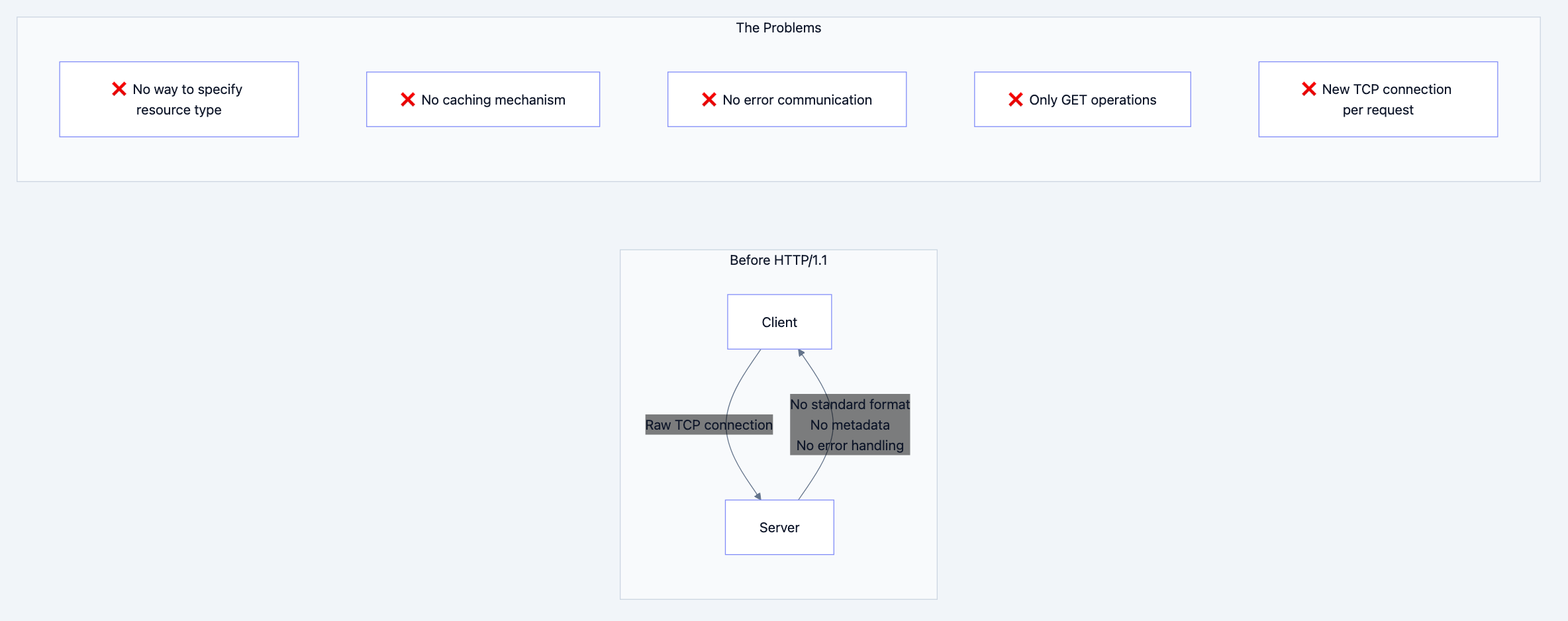
In the early 1990s, the internet existed but the World Wide Web didn't. Computers could exchange raw data over TCP/IP, but there was no standardized way to:
- Request specific resources (documents, images) from remote servers
- Describe what you're sending (Is this HTML? An image? JSON?)
- Handle errors gracefully (What if the resource doesn't exist?)
- Cache responses to avoid redundant transfers
- Support different types of operations (read, write, delete)
FTP existed for file transfer, but it required authentication and wasn't designed for the quick, stateless interactions needed for browsing documents. SMTP handled email but was one-directional. We needed something simple, stateless, and extensible for document retrieval.
Tim Berners-Lee created HTTP/0.9 in 1991 - it was brutally simple: one line requesting a document, server sends HTML, closes connection. That's it. No headers, no status codes, no way to send anything but HTML.
Flowchart diagram 1
HTTP/1.0 (1996) added headers, status codes, and methods, but each request still required a new TCP connection - imagine the overhead! Every image on a webpage meant a new three-way handshake, slow start, and connection teardown.
Real-World Analogy
Think of HTTP/1.1 like ordering at a drive-through restaurant:
- Request (Order): "I'd like a burger, fries, and a drink" (GET /menu/combo1)
- Request Headers: "Make it a large, no pickles, for here not to-go" (Accept, Content-Type, Cookies)
- Response (Food): The actual food you ordered (Response body)
- Response Headers: "Here's your receipt, it's hot, expires in 30 minutes" (Content-Type, Cache-Control, Set-Cookie)
- Status Code: "Order ready!" (200 OK) or "Sorry, ice cream machine broken" (503 Service Unavailable)
The key innovation? Keep the connection open (persistent connections) - like staying at the window for multiple orders instead of driving away and coming back each time. This is what HTTP/1.1 brought to the table.
The Solution
How HTTP/1.1 Solved These Problems
HTTP/1.1 (released in 1997, refined in 1999 via RFC 2616, updated in 2014 via RFC 7230-7235) introduced several game-changing features:
- Persistent Connections (Keep-Alive): One TCP connection handles multiple requests
- Pipelining: Send multiple requests without waiting for responses (though rarely used due to head-of-line blocking)
- Chunked Transfer Encoding: Stream data without knowing the total size upfront
- Host Header: Multiple websites on one IP address (virtual hosting)
- Cache Control: Sophisticated caching with ETags, Last-Modified, Cache-Control
- Additional Methods: PUT, DELETE, OPTIONS, TRACE, CONNECT for RESTful operations
- Content Negotiation: Server adapts response based on client capabilities
Why this approach? HTTP/1.1 balanced three competing goals:
- Simplicity: Text-based, human-readable for easy debugging
- Performance: Persistent connections reduce latency by ~50%
- Extensibility: New headers can be added without breaking existing implementations

Flow diagram showing process
Building Your Understanding
The Complete HTTP/1.1 Request-Response Cycle
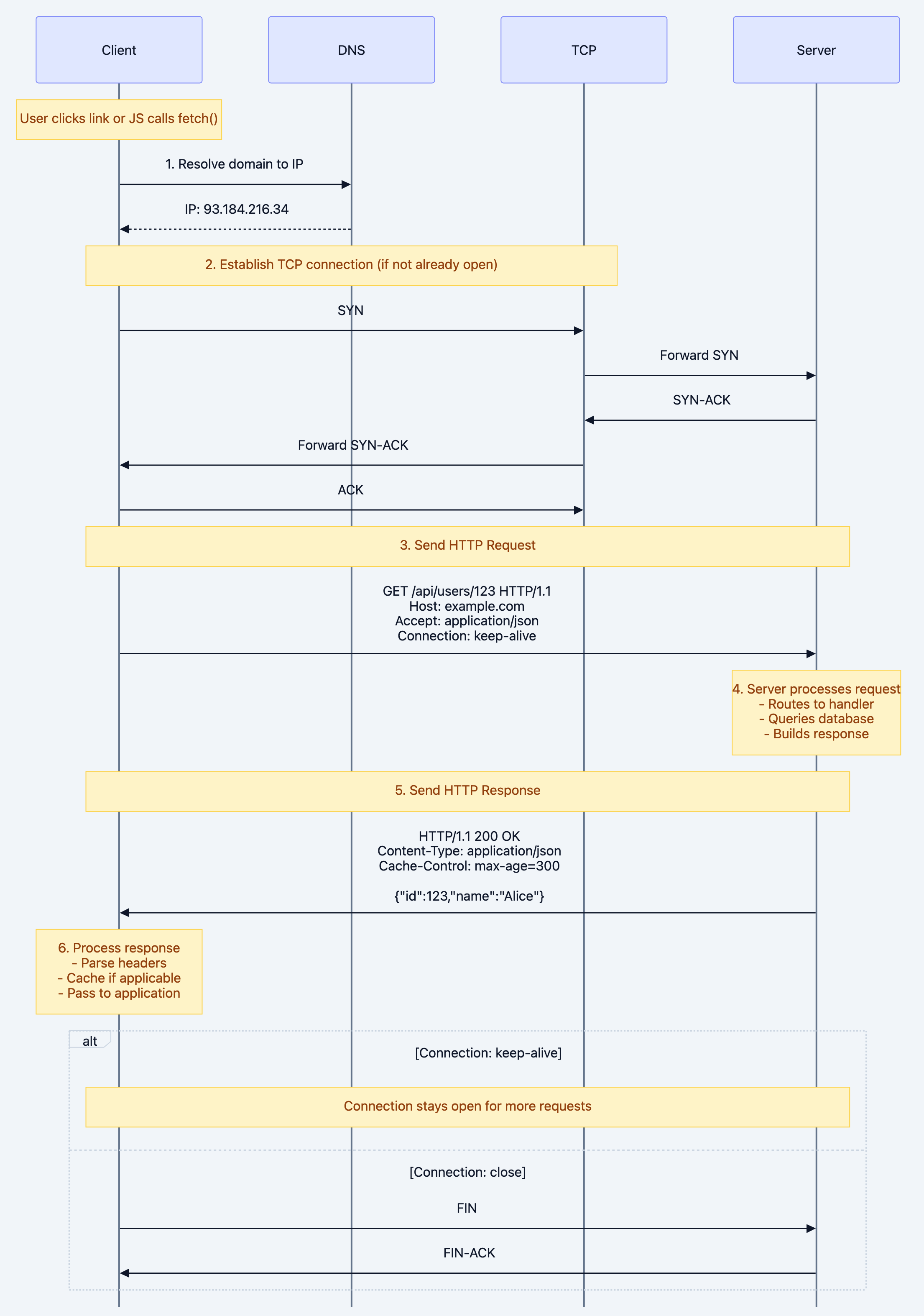
Let's visualize exactly what happens when you make an HTTP request:
User clicks link or JS calls fetch()
Why each step matters:
- DNS Resolution: Without this, you can't find the server. This is cached by your OS (check with
nslookup example.com) - TCP Connection: The three-way handshake costs ~50-100ms on typical internet connections. HTTP/1.1's persistent connections mean you only pay this cost once per domain
- HTTP Request: This is a text-based message - literally readable ASCII characters sent over the wire
- Server Processing: This is where your application code runs - routing, database queries, business logic
- HTTP Response: Also text-based with headers + body separated by blank line
- Connection Reuse: The killer feature - subsequent requests skip steps 1-2, saving 100-200ms per request
HTTP Request Anatomy

Flow diagram showing process
HTTP Response Anatomy

Flow diagram showing process
HTTP Methods: The Decision Tree
Flowchart diagram 6
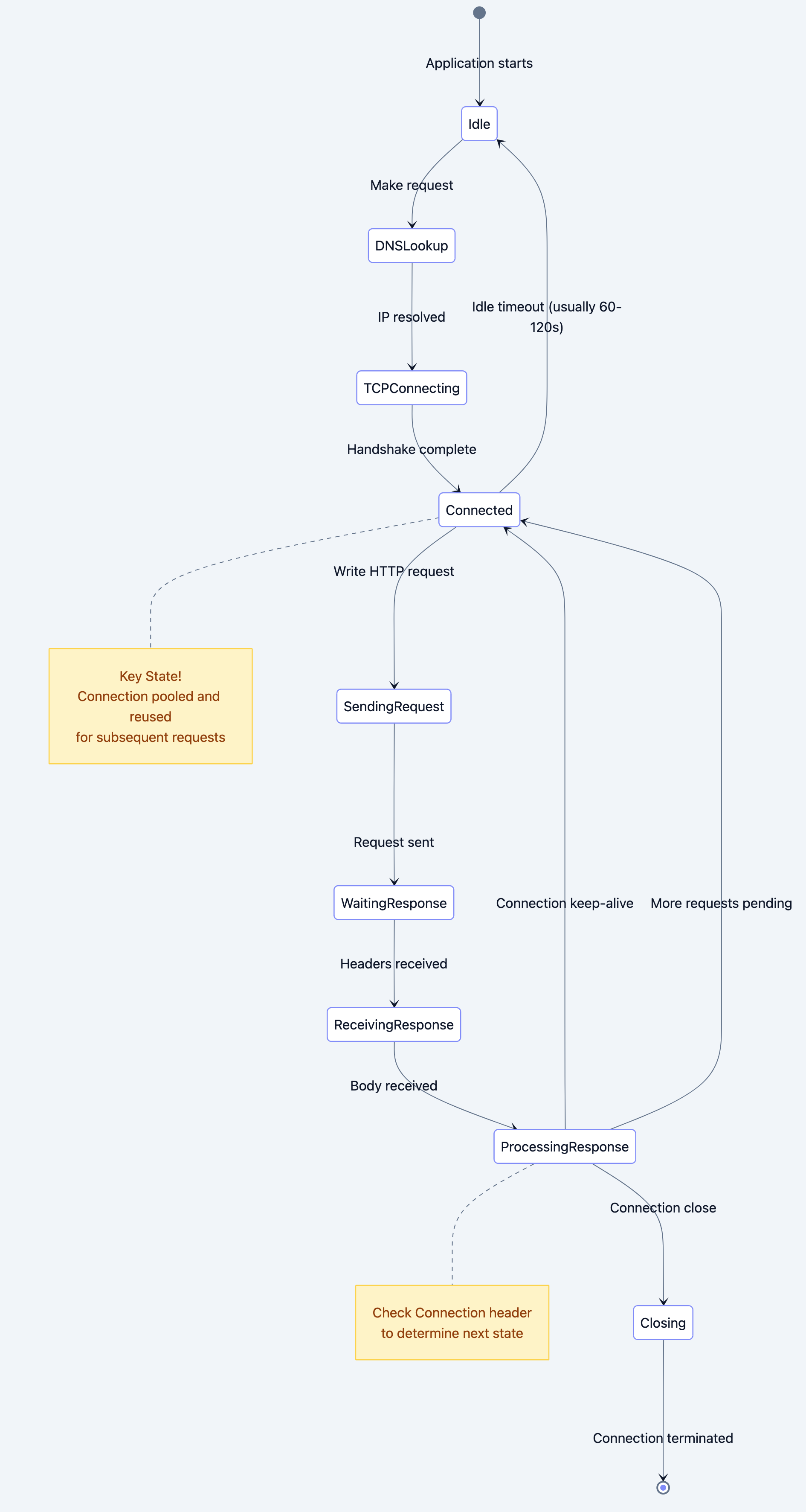
State Diagram: HTTP Connection Lifecycle
Flow diagram showing process
Deep Technical Dive
Architecture Breakdown
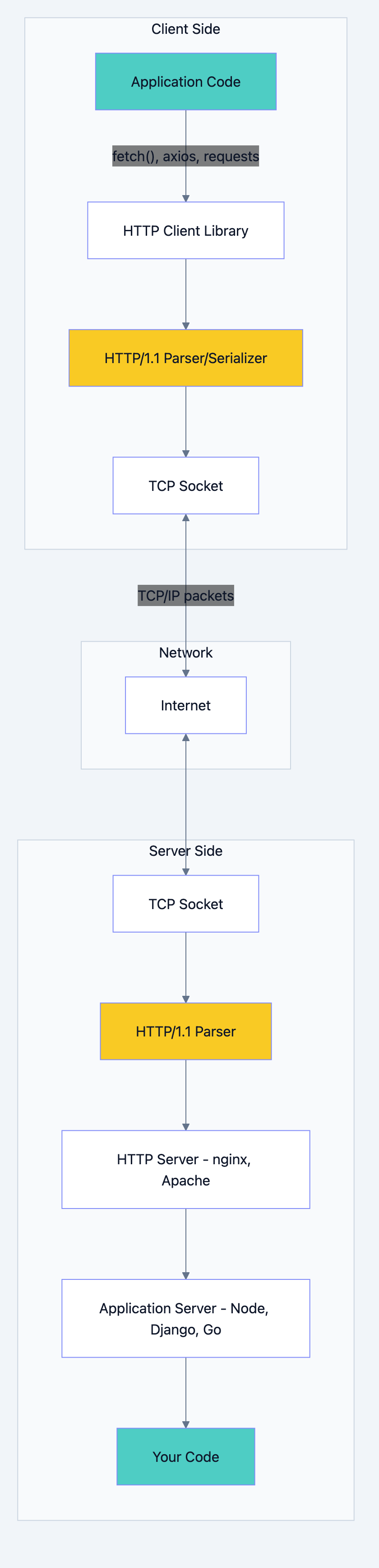
HTTP/1.1 operates at the Application Layer (Layer 7 of OSI model). It relies on a reliable transport layer - almost always TCP (HTTPS uses TLS over TCP).
Flowchart diagram 8
Component Communication:
- Client Library serializes your request object into raw HTTP text
- TCP Socket breaks the text into TCP segments and adds headers
- Network routes packets (IP layer handles addressing)
- Server TCP Socket reassembles segments into original HTTP message
- HTTP Parser extracts method, headers, body into structured data
- Server routes request to your handler code based on method + path
Internal Mechanics: What's Actually on the Wire
Let's see the exact bytes transmitted for a simple GET request:
GET /api/users/123 HTTP/1.1\r\n
Host: api.example.com\r\n
Accept: application/json\r\n
User-Agent: Mozilla/5.0 (Macintosh; Intel Mac OS X 10_15_7)\r\n
Accept-Encoding: gzip, deflate, br\r\n
Connection: keep-alive\r\n
\r\n
Breaking it down:
\r\nis CRLF (Carriage Return + Line Feed) - required after EVERY line- The blank line (
\r\n\r\n) separates headers from body - No body for GET requests
- Each header is
Key: Value\r\n - Request line format:
METHOD URI VERSION\r\n
Response on the wire:
HTTP/1.1 200 OK\r\n
Date: Sun, 26 Jan 2026 15:30:00 GMT\r\n
Content-Type: application/json; charset=utf-8\r\n
Content-Length: 58\r\n
Cache-Control: max-age=300\r\n
ETag: "33a64df551425fcc55e"\r\n
Connection: keep-alive\r\n
\r\n
{"id":123,"name":"Alice","email":"alice@example.com"}
Why these specific headers?
Date: When response was generated (required by spec)Content-Type: Tells client how to parse the bodyContent-Length: Client knows when full body is receivedCache-Control: How long this can be cached (300 seconds)ETag: Unique identifier for this version - used for conditional requestsConnection: keep-alive: Keep TCP connection open
Protocol Specifications
Status Code Categories:
| Range | Meaning | Purpose | Examples |
|---|---|---|---|
| 1xx | Informational | Interim response, continue | 100 Continue, 101 Switching Protocols |
| 2xx | Success | Request succeeded | 200 OK, 201 Created, 204 No Content |
| 3xx | Redirection | Client must take additional action | 301 Moved Permanently, 304 Not Modified |
| 4xx | Client Error | Client sent invalid request | 400 Bad Request, 401 Unauthorized, 404 Not Found |
| 5xx | Server Error | Server failed to fulfill valid request | 500 Internal Server Error, 503 Service Unavailable |
Key Headers Deep Dive:
Request Headers:
-
Host(REQUIRED): Virtual hosting - multiple domains on one IPHost: www.example.com -
Accept: Content negotiation - what formats client understandsAccept: application/json, text/html;q=0.9, */*;q=0.8Theqvalues (quality factors) indicate preference: 1.0 is highest (default) -
Authorization: Credentials for authenticationAuthorization: Bearer eyJhbGciOiJIUzI1NiIs... Authorization: Basic dXNlcjpwYXNzd29yZA== -
If-None-Match: Conditional request with ETagIf-None-Match: "33a64df551425fcc55e"Server returns 304 if resource hasn't changed -
User-Agent: Client identificationUser-Agent: Mozilla/5.0 (Macintosh; Intel Mac OS X 10_15_7) AppleWebKit/537.36
Response Headers:
-
Content-Type: MIME type of response bodyContent-Type: application/json; charset=utf-8 Content-Type: text/html; charset=UTF-8 Content-Type: image/png -
Cache-Control: Caching directivesCache-Control: max-age=3600 # Cache for 1 hour Cache-Control: no-cache # Validate before using Cache-Control: no-store # Never cache Cache-Control: public, max-age=31536000 # Cache 1 year, any cache -
Set-Cookie: Send cookie to clientSet-Cookie:session=abc123; Path=/; HttpOnly; Secure; SameSite=Strict -
Location: Used with 3xx redirects and 201 CreatedLocation: https://example.com/users/123
Code Deep Dive: Complete Examples
Example 1: HTTP Server in Go (Production-Ready)
gopackage main

import (
    "encoding/json"
    "fmt"
    "log"
    "net/http"
    "strconv"
    "sync"
    "time"
)

// User represents our domain model
type User struct {
    ID    int    `json:"id"`
    Name  string `json:"name"`
    Email string `json:"email"`
}

// Simple in-memory store with mutex for concurrency safety
// WHY: HTTP servers handle multiple requests concurrently,
// so we need thread-safe data access
type UserStore struct {
    mu    sync.RWMutex
    users map[int]User
    nextID int
}

func NewUserStore() *UserStore {
    return &UserStore{
        users: make(map[int]User),
        nextID: 1,
    }
}

// Create adds a new user (POST /users)
// WHY return 201 Created: Signals successful resource creation
// WHY return Location header: Tells client where to find new resource
func (s *UserStore) Create(user User) (User, error) {
    s.mu.Lock()
    defer s.mu.Unlock()

    user.ID = s.nextID
    s.users[user.ID] = user
    s.nextID++

    return user, nil
}

// Get retrieves a user by ID (GET /users/{id})
// WHY use RLock: Multiple readers can access simultaneously (better performance)
// WHY separate lock types: Read operations don't block each other
func (s *UserStore) Get(id int) (User, bool) {
    s.mu.RLock()
    defer s.mu.RUnlock()

    user, exists := s.users[id]
    return user, exists
}

// GetAll returns all users (GET /users)
func (s *UserStore) GetAll() []User {
    s.mu.RLock()
    defer s.mu.RUnlock()

    users := make([]User, 0, len(s.users))
    for _, user := range s.users {
        users = append(users, user)
    }
    return users
}

// Update modifies existing user (PUT /users/{id})
func (s *UserStore) Update(id int, user User) bool {
    s.mu.Lock()
    defer s.mu.Unlock()

    if _, exists := s.users[id]; !exists {
        return false
    }

    user.ID = id
    s.users[id] = user
    return true
}

// Delete removes a user (DELETE /users/{id})
// WHY check existence: Return 404 if not found, not 204
func (s *UserStore) Delete(id int) bool {
    s.mu.Lock()
    defer s.mu.Unlock()

    if _, exists := s.users[id]; !exists {
        return false
    }

    delete(s.users, id)
    return true
}

// Middleware for logging every request
// WHY middleware: Separation of concerns - logging is cross-cutting
// WHY wrap handler: Allows us to execute code before AND after the handler
func loggingMiddleware(next http.HandlerFunc) http.HandlerFunc {
    return func(w http.ResponseWriter, r *http.Request) {
        start := time.Now()

        // Log request
        log.Printf("Started %s %s", r.Method, r.URL.Path)

        // Call the actual handler
        next(w, r)

        // Log response time
        log.Printf("Completed in %v", time.Since(start))
    }
}

// Set CORS headers for browser clients
// WHY CORS: Browsers enforce same-origin policy - this opts in to cross-origin
func setCORSHeaders(w http.ResponseWriter) {
    w.Header().Set("Access-Control-Allow-Origin", "*")
    w.Header().Set("Access-Control-Allow-Methods", "GET, POST, PUT, DELETE, OPTIONS")
    w.Header().Set("Access-Control-Allow-Headers", "Content-Type, Authorization")
}

func main() {
    store := NewUserStore()

    // Seed some data
    store.Create(User{Name: "Alice", Email: "alice@example.com"})
    store.Create(User{Name: "Bob", Email: "bob@example.com"})

    // Routes
    // WHY pattern matching: http.ServeMux uses longest match wins
    // WHY trailing slash matters: "/users/" matches /users/123, "/users" doesn't
    http.HandleFunc("/users", loggingMiddleware(func(w http.ResponseWriter, r *http.Request) {
        // WHY check method explicitly: Different methods = different operations
        // WHY not use switch: Each case is substantially different

        // Handle CORS preflight
        // WHY: Browsers send OPTIONS before actual request for cross-origin
        if r.Method == "OPTIONS" {
            setCORSHeaders(w)
            w.WriteHeader(http.StatusNoContent)
            return
        }

        setCORSHeaders(w)

        if r.Method == "GET" {
            // GET /users - List all users
            users := store.GetAll()

            // WHY set Content-Type: Client needs to know how to parse response
            w.Header().Set("Content-Type", "application/json")
            // WHY set Cache-Control: List can be cached for 30 seconds
            w.Header().Set("Cache-Control", "max-age=30")

            // WHY 200 OK: Successful retrieval (even if empty list)
            w.WriteHeader(http.StatusOK)
            json.NewEncoder(w).Encode(users)

        } else if r.Method == "POST" {
            // POST /users - Create new user
            var user User

            // WHY decode JSON: Request body is JSON string, need Go struct
            if err := json.NewDecoder(r.Body).Decode(&user); err != nil {
                // WHY 400 Bad Request: Client sent malformed data
                w.Header().Set("Content-Type", "application/json")
                w.WriteHeader(http.StatusBadRequest)
                json.NewEncoder(w).Encode(map[string]string{
                    "error": "Invalid JSON",
                })
                return
            }

            createdUser, _ := store.Create(user)

            // WHY set Location: RESTful practice - tell client where to find resource
            w.Header().Set("Location", fmt.Sprintf("/users/%d", createdUser.ID))
            w.Header().Set("Content-Type", "application/json")
            // WHY 201 Created: Specifically for successful resource creation
            w.WriteHeader(http.StatusCreated)
            json.NewEncoder(w).Encode(createdUser)

        } else {
            // WHY 405 Method Not Allowed: Method exists but not allowed on this resource
            // WHY not 404: Resource exists, method just isn't allowed
            w.Header().Set("Allow", "GET, POST, OPTIONS")
            w.WriteHeader(http.StatusMethodNotAllowed)
        }
    }))

    http.HandleFunc("/users/", loggingMiddleware(func(w http.ResponseWriter, r *http.Request) {
        // Extract ID from path: /users/123 -> 123
        // WHY manual parsing: Go's http.ServeMux doesn't support path parameters
        // (Modern alternatives: chi, gorilla/mux, httprouter)
        idStr := r.URL.Path[len("/users/"):]
        id, err := strconv.Atoi(idStr)
        if err != nil {
            w.WriteHeader(http.StatusBadRequest)
            return
        }

        if r.Method == "OPTIONS" {
            setCORSHeaders(w)
            w.WriteHeader(http.StatusNoContent)
            return
        }

        setCORSHeaders(w)

        if r.Method == "GET" {
            user, exists := store.Get(id)
            if !exists {
                // WHY 404 Not Found: Resource doesn't exist
                w.WriteHeader(http.StatusNotFound)
                return
            }

            w.Header().Set("Content-Type", "application/json")
            // WHY longer cache: Individual resources change less frequently
            w.Header().Set("Cache-Control", "max-age=300")
            // WHY ETag: Enables conditional requests with If-None-Match
            w.Header().Set("ETag", fmt.Sprintf(`"%d-v1"`, user.ID))

            w.WriteHeader(http.StatusOK)
            json.NewEncoder(w).Encode(user)

        } else if r.Method == "PUT" {
            var user User
            if err := json.NewDecoder(r.Body).Decode(&user); err != nil {
                w.WriteHeader(http.StatusBadRequest)
                return
            }

            if store.Update(id, user) {
                w.Header().Set("Content-Type", "application/json")
                w.WriteHeader(http.StatusOK)
                json.NewEncoder(w).Encode(user)
            } else {
                // WHY 404: Can't update what doesn't exist
                // Alternative: Create it (then return 201 Created)
                w.WriteHeader(http.StatusNotFound)
            }

        } else if r.Method == "DELETE" {
            if store.Delete(id) {
                // WHY 204 No Content: Success but nothing to return
                // Alternative: Return deleted resource with 200 OK
                w.WriteHeader(http.StatusNoContent)
            } else {
                w.WriteHeader(http.StatusNotFound)
            }

        } else {
            w.Header().Set("Allow", "GET, PUT, DELETE, OPTIONS")
            w.WriteHeader(http.StatusMethodNotAllowed)
        }
    }))

    // WHY port 8080: Common dev port, doesn't require root (ports < 1024 do)
    log.Println("Server starting on http://localhost:8080")

    // WHY ListenAndServe: Blocking call that accepts connections forever
    // Under the hood: Creates TCP listener, spawns goroutine per connection
    if err := http.ListenAndServe(":8080", nil); err != nil {
        log.Fatal(err)
    }
}
What happens internally when a request arrives:
- TCP Connection: Go's HTTP server accepts TCP connection
- Goroutine Spawned: Each connection handled by separate goroutine (lightweight thread)
- HTTP Parsing: Server reads from socket, parses HTTP request line-by-line
- Routing: ServeMux matches URL path to registered handler
- Handler Execution: Your code runs, has access to Request and ResponseWriter
- Response Writing: Data written to ResponseWriter buffers, then flushes to TCP socket
- Connection Management: If
Connection: keep-alive, socket stays open for next request
Example 2: HTTP Client in Python (Advanced Usage)
pythonimport requests
from requests.adapters import HTTPAdapter
from urllib3.util.retry import Retry
import json
import time

class APIClient:
    """
    Production-ready HTTP client with connection pooling,
    retries, and timeout handling.

    WHY use Session: Reuses TCP connections (connection pooling)
    WHY use mount: Applies retry strategy to all requests
    WHY custom timeouts: Prevent hanging on slow servers
    """

    def __init__(self, base_url, timeout=10):
        self.base_url = base_url
        self.timeout = timeout
        self.session = requests.Session()

        # Configure retry strategy
        # WHY retry on these status codes: They're often transient errors
        # WHY backoff_factor: 1s, 2s, 4s, 8s delays prevent hammering
        retry_strategy = Retry(
            total=3,  # Total number of retries
            backoff_factor=1,  # Exponential backoff
            status_forcelist=[429, 500, 502, 503, 504],
            allowed_methods=["HEAD", "GET", "OPTIONS", "PUT", "DELETE"]
            # WHY not POST: POST isn't idempotent - retrying could duplicate
        )

        adapter = HTTPAdapter(
            max_retries=retry_strategy,
            pool_connections=10,  # Number of connection pools
            pool_maxsize=20       # Max connections per pool
        )

        # WHY mount for both http and https: Cover all bases
        self.session.mount("http://", adapter)
        self.session.mount("https://", adapter)

        # Set default headers for all requests
        # WHY User-Agent: Good practice, some servers require it
        self.session.headers.update({
            'User-Agent': 'APIClient/1.0',
            'Accept': 'application/json'
        })

    def get(self, endpoint, params=None, use_cache=True):
        """
        GET request with optional caching support.

        WHY params separate: requests library URL-encodes them properly
        WHY use_cache parameter: Sometimes you need fresh data
        """
        url = f"{self.base_url}{endpoint}"

        headers = {}
        if not use_cache:
            # WHY Cache-Control in request: Tell intermediary caches to fetch fresh
            # WHY Pragma: HTTP/1.0 backward compatibility
            headers['Cache-Control'] = 'no-cache'
            headers['Pragma'] = 'no-cache'

        try:
            response = self.session.get(
                url,
                params=params,
                headers=headers,
                timeout=self.timeout  # (connect timeout, read timeout)
            )

            # WHY raise_for_status: Converts 4xx/5xx to exceptions
            # Makes error handling consistent
            response.raise_for_status()

            # Log cache status
            # WHY check X-Cache: See if CDN served cached response
            if 'X-Cache' in response.headers:
                print(f"Cache: {response.headers['X-Cache']}")

            return response.json()

        except requests.exceptions.Timeout:
            # WHY separate exception types: Different recovery strategies
            print(f"Request to {url} timed out")
            raise
        except requests.exceptions.ConnectionError:
            print(f"Failed to connect to {url}")
            raise
        except requests.exceptions.HTTPError as e:
            print(f"HTTP error: {e.response.status_code}")
            raise

    def post(self, endpoint, data=None, json_data=None):
        """
        POST request for creating resources.

        WHY data vs json_data parameters: Different content types
        - data: application/x-www-form-urlencoded
        - json_data: application/json
        """
        url = f"{self.base_url}{endpoint}"

        # WHY choose json over data: Modern APIs prefer JSON
        # requests library automatically sets Content-Type: application/json
        response = self.session.post(
            url,
            json=json_data if json_data else None,
            data=data if data else None,
            timeout=self.timeout
        )

        response.raise_for_status()

        # WHY check Location header: Server tells us where resource was created
        if 'Location' in response.headers:
            print(f"Resource created at: {response.headers['Location']}")

        # WHY check status code: 201 vs 200 tells us about server behavior
        if response.status_code == 201:
            return response.json()
        else:
            # Some servers return 200 OK instead of 201 Created
            return response.json() if response.content else None

    def put(self, endpoint, json_data):
        """
        PUT request for full replacement updates.

        WHY PUT not PATCH: PUT replaces entire resource
        MUST send complete object, not partial fields
        """
        url = f"{self.base_url}{endpoint}"
        response = self.session.put(url, json=json_data, timeout=self.timeout)
        response.raise_for_status()
        return response.json()

    def patch(self, endpoint, json_data):
        """
        PATCH request for partial updates.

        WHY PATCH: Only send changed fields, more bandwidth-efficient
        Server merges changes with existing resource
        """
        url = f"{self.base_url}{endpoint}"
        response = self.session.patch(url, json=json_data, timeout=self.timeout)
        response.raise_for_status()
        return response.json()

    def delete(self, endpoint):
        """
        DELETE request for removing resources.

        WHY check 204 No Content: Server might not return body
        """
        url = f"{self.base_url}{endpoint}"
        response = self.session.delete(url, timeout=self.timeout)
        response.raise_for_status()

        # WHY 204 check: Avoid parsing empty response as JSON
        if response.status_code == 204:
            return None
        return response.json() if response.content else None

    def conditional_get(self, endpoint, etag=None, last_modified=None):
        """
        Conditional GET using ETag or Last-Modified.

        WHY conditional requests: Save bandwidth, reduce server load
        Server returns 304 Not Modified if resource unchanged
        """
        url = f"{self.base_url}{endpoint}"
        headers = {}

        if etag:
            # WHY If-None-Match: "Give me resource unless ETag matches"
            headers['If-None-Match'] = etag

        if last_modified:
            # WHY If-Modified-Since: "Give me resource only if changed since date"
            headers['If-Modified-Since'] = last_modified

        response = self.session.get(url, headers=headers, timeout=self.timeout)

        # WHY check 304: Resource hasn't changed, use cached version
        if response.status_code == 304:
            print("Resource not modified, use cached version")
            return None  # Signal to use cache

        response.raise_for_status()

        # Return new data along with cache validators
        return {
            'data': response.json(),
            'etag': response.headers.get('ETag'),
            'last_modified': response.headers.get('Last-Modified')
        }

    def close(self):
        """Close session and cleanup connection pool."""
        self.session.close()

# Usage example demonstrating all features
if __name__ == "__main__":
    client = APIClient("http://localhost:8080")

    try:
        # Create a new user (POST)
        print("Creating user...")
        new_user = client.post("/users", json_data={
            "name": "Charlie",
            "email": "charlie@example.com"
        })
        print(f"Created: {new_user}")

        # Get all users (GET)
        print("\nFetching all users...")
        users = client.get("/users")
        print(f"Users: {users}")

        # Get specific user (GET)
        print("\nFetching user by ID...")
        user = client.get(f"/users/{new_user['id']}")
        print(f"User: {user}")

        # Conditional GET example
        print("\nConditional GET example...")
        result = client.conditional_get(
            f"/users/{new_user['id']}",
            etag=f'"{new_user["id"]}-v1"'
        )
        if result:
            print(f"Resource changed: {result['data']}")
            # Store ETag for next time
            etag = result['etag']
        else:
            print("Resource unchanged")

        # Partial update (PATCH)
        print("\nPartially updating user...")
        updated = client.patch(f"/users/{new_user['id']}", json_data={
            "name": "Charles"  # Only updating name
        })
        print(f"Updated: {updated}")

        # Full replacement (PUT)
        print("\nFully replacing user...")
        replaced = client.put(f"/users/{new_user['id']}", json_data={
            "name": "Chuck",
            "email": "chuck@example.com"
        })
        print(f"Replaced: {replaced}")

        # Delete user (DELETE)
        print("\nDeleting user...")
        client.delete(f"/users/{new_user['id']}")
        print("Deleted successfully")

        # Verify deletion
        try:
            client.get(f"/users/{new_user['id']}")
        except requests.exceptions.HTTPError as e:
            if e.response.status_code == 404:
                print("Confirmed: User no longer exists")

    finally:
        # WHY finally block: Ensure connections cleaned up even on error
        client.close()
What happens under the hood:
- Session Creation: Creates connection pool (reusable TCP connections)
- First Request: DNS lookup → TCP handshake → HTTP request
- Connection Pooling: TCP connection stored in pool (key: host+port)
- Subsequent Requests: Reuse existing connection from pool (skip DNS + TCP)
- Retry Logic: On failure, adapter automatically retries with backoff
- Timeout Handling: Separate connect vs read timeouts prevent indefinite hangs
Example 3: Raw HTTP with JavaScript (Understanding the Fundamentals)
javascript/**
 * Low-level HTTP demonstration using Node.js 'net' module
 * Shows exactly what goes over the wire
 *
 * WHY use 'net' instead of 'http' module: See raw TCP communication
 * WHY this matters: Debugging network issues requires understanding bytes on wire
 */

const net = require('net');

function sendRawHTTPRequest(host, port, method, path, headers = {}, body = null) {
    return new Promise((resolve, reject) => {
        // Create TCP socket connection
        // WHY net.createConnection: Direct TCP socket, no HTTP abstraction
        const socket = net.createConnection({ host, port }, () => {
            console.log('TCP connection established');

            // Build HTTP request manually
            // WHY \r\n: HTTP spec requires CRLF (Carriage Return + Line Feed)
            let request = `${method} ${path} HTTP/1.1\r\n`;

            // Host header is REQUIRED in HTTP/1.1
            // WHY required: Virtual hosting - multiple domains on one IP
            request += `Host: ${host}\r\n`;

            // Add custom headers
            for (const [key, value] of Object.entries(headers)) {
                request += `${key}: ${value}\r\n`;
            }

            // If body exists, set Content-Length
            // WHY Content-Length required: Server needs to know when body ends
            if (body) {
                const bodyBytes = Buffer.byteLength(body, 'utf8');
                request += `Content-Length: ${bodyBytes}\r\n`;
                request += `Content-Type: application/json\r\n`;
            }

            // Add Connection header for explicit control
            // WHY keep-alive: Reuse connection for subsequent requests
            request += `Connection: keep-alive\r\n`;

            // Blank line separates headers from body
            // WHY \r\n\r\n: Two CRLFs signal end of headers
            request += `\r\n`;

            // Add body if present
            if (body) {
                request += body;
            }

            console.log('\n📤 Sending raw HTTP request:\n---');
            // Show non-printable characters
            console.log(request.replace(/\r\n/g, '\\r\\n\n'));
            console.log('---\n');

            // Send the raw bytes
            socket.write(request);
        });

        let responseData = '';

        // WHY 'data' event: TCP sends chunks, not complete messages
        // HTTP response might arrive in multiple TCP segments
        socket.on('data', (chunk) => {
            responseData += chunk.toString();

            // WHY check for \r\n\r\n: Marks end of headers
            // Body size determined by Content-Length or chunked encoding
            if (responseData.includes('\r\n\r\n')) {
                const [headers, body] = responseData.split('\r\n\r\n', 2);

                // Parse status line
                const lines = headers.split('\r\n');
                const statusLine = lines[0];
                const [version, statusCode, ...reasonParts] = statusLine.split(' ');
                const reasonPhrase = reasonParts.join(' ');

                console.log('📥 Received raw HTTP response:\n---');
                console.log(`Status: ${statusCode} ${reasonPhrase}`);
                console.log('\nHeaders:');

                const headerMap = {};
                for (let i = 1; i < lines.length; i++) {
                    const [key, ...valueParts] = lines[i].split(': ');
                    const value = valueParts.join(': ');
                    headerMap[key.toLowerCase()] = value;
                    console.log(`  ${key}: ${value}`);
                }

                console.log('\nBody:');
                console.log(body || '(empty)');
                console.log('---\n');

                // Check if we should close connection
                // WHY check Connection header: Determines connection persistence
                const connectionHeader = headerMap['connection'];
                if (connectionHeader && connectionHeader.toLowerCase() === 'close') {
                    socket.end();
                }

                resolve({
                    statusCode: parseInt(statusCode),
                    reasonPhrase,
                    headers: headerMap,
                    body
                });
            }
        });

        socket.on('error', (err) => {
            console.error('Socket error:', err.message);
            reject(err);
        });

        socket.on('end', () => {
            console.log('🔌 Connection closed by server');
        });
    });
}

// Demonstration of different HTTP methods
async function demo() {
    const host = 'localhost';
    const port = 8080;

    try {
        // GET request
        console.log('=== GET Request ===\n');
        await sendRawHTTPRequest(host, port, 'GET', '/users', {
            'Accept': 'application/json',
            'User-Agent': 'RawHTTPClient/1.0'
        });

        await new Promise(resolve => setTimeout(resolve, 1000));

        // POST request
        console.log('\n=== POST Request ===\n');
        const userData = JSON.stringify({
            name: 'David',
            email: 'david@example.com'
        });

        await sendRawHTTPRequest(host, port, 'POST', '/users', {
            'Accept': 'application/json',
            'User-Agent': 'RawHTTPClient/1.0'
        }, userData);

    } catch (error) {
        console.error('Demo failed:', error);
    }
}

// Run demonstration
demo();
Understanding the byte flow:
[Application Layer - HTTP]
    ↓
    Your code builds text: "GET /users HTTP/1.1\r\nHost: localhost\r\n..."
    ↓
[Transport Layer - TCP]
    ↓
    TCP breaks text into segments, adds:
    - Source/Destination ports (8080)
    - Sequence numbers
    - Checksum
    ↓
[Network Layer - IP]
    ↓
    IP adds routing information:
    - Source/Destination IP addresses
    - TTL, Protocol (TCP = 6)
    ↓
[Link Layer - Ethernet]
    ↓
    Adds MAC addresses, sends bits over wire
Benefits & Why It Matters
Performance Benefits
Connection Reuse:
- HTTP/1.0: Each request = new TCP connection = 100ms overhead
- HTTP/1.1 keep-alive: One connection for multiple requests = ~50% latency reduction
Real numbers from a typical webpage (50 resources):
- HTTP/1.0: 50 connections × 100ms = 5,000ms (5 seconds) just for handshakes
- HTTP/1.1: 1 connection × 100ms = 100ms, then pipelined requests
Caching:
- Properly implemented caching can reduce server load by 70-90%
- ETag/Last-Modified enable smart revalidation without full downloads
- for immutable resources (CSS with hash filenames) = instant loads
Cache-Control: max-age=31536000
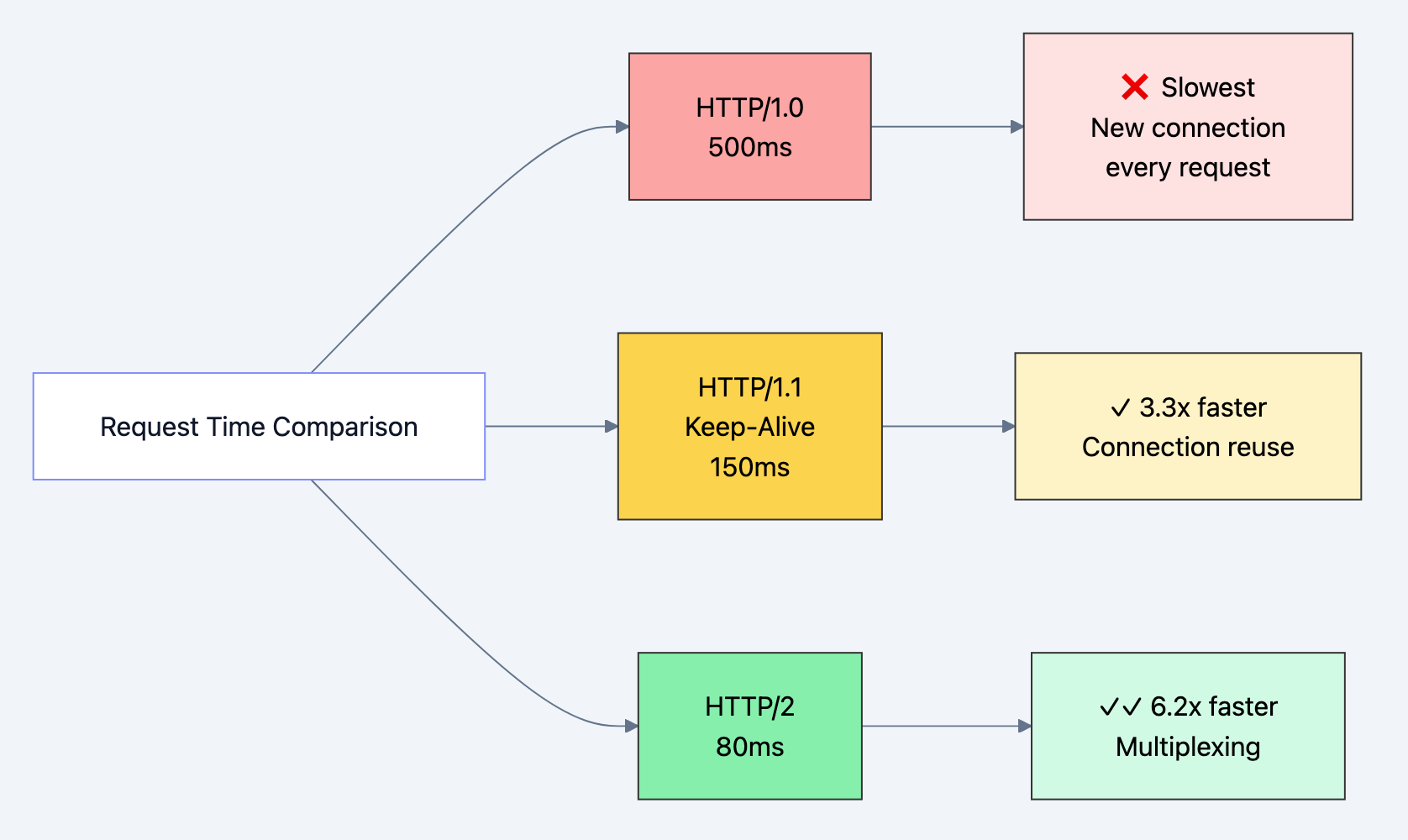
Diagram 9
Developer Experience
Debuggability:
- Text-based protocol means you can read it with
curl,tcpdump, or browser DevTools - Try:
curl -v https://api.github.com/users/octocat - The
-vflag shows exact HTTP headers sent and received
Standardization:
- Every language has robust HTTP libraries
- RESTful APIs built on HTTP are universally understood
- Tooling (Postman, Insomnia, httpie) work across platforms
Flexibility:
- Headers are extensible - add custom headers like
X-Request-IDfor tracing - Content negotiation allows same endpoint to serve JSON, XML, HTML
- Authentication methods (Bearer, Basic, Digest) plug in via headers
Real-World Success Stories
- GitHub API: Serves billions of requests using HTTP/1.1 REST principles
- Stripe API: Built on HTTP/1.1, handles millions in transactions with 99.99% uptime
- Netflix: Initially HTTP/1.1 (now HTTP/2), but principles remain the same
Trade-offs & Gotchas
When to Use HTTP/1.1
Perfect for:
- RESTful APIs with moderate request rates
- Server-to-server communication
- Simple CRUD applications
- When broad compatibility is critical
- Debugging (human-readable protocol)
- Learning web fundamentals
Specific scenarios:
- Internal microservices (simplicity > performance)
- Webhooks (one-off requests, no connection reuse benefit)
- IoT devices (lightweight, simple parsing)
When NOT to Use
Better alternatives exist:
- Real-time apps (chat, gaming): Use WebSockets or HTTP/2 Server Push
- High-frequency trading: HTTP/1.1 overhead too high, use binary protocols (gRPC, custom TCP)
- Streaming media: HTTP/1.1 works but HTTP/2 or RTMP better suited
- Mobile apps on slow networks: HTTP/2 or HTTP/3 (QUIC) reduce latency significantly
Why alternatives win:
- HTTP/2: Multiplexing eliminates head-of-line blocking, binary format is more efficient
- WebSockets: Full-duplex, persistent connection for bidirectional communication
- gRPC: HTTP/2-based, Protobuf binary serialization, ~7x faster than JSON
Common Mistakes
1. Not reusing connections (connection pool exhaustion)
python# BAD: Creates new connection every time
for i in range(1000):
    response = requests.get('https://api.example.com/data')

# GOOD: Reuses connection pool
session = requests.Session()
for i in range(1000):
    response = session.get('https://api.example.com/data')
Why it happens: Default - see connection count
requests.get() creates new session each time
How to avoid: Always use Session() for multiple requests
How to debug: Monitor with netstat -an | grep ESTABLISHED2. Misusing PUT vs PATCH vs POST
javascript// BAD: Using POST for updates
POST /users/123 { "name": "New Name" }

// BAD: Using PUT for partial updates (overwrites other fields!)
PUT /users/123 { "name": "New Name" }
// Result: email, phone, etc. all become null!

// GOOD: Use PATCH for partial updates
PATCH /users/123 { "name": "New Name" }

// GOOD: Use PUT only when sending complete resource
PUT /users/123 { "id": 123, "name": "New Name", "email": "user@example.com", ... }
Why it happens: Misunderstanding HTTP semantics
How to avoid: POST = create with server-assigned ID, PUT = full replace, PATCH = partial update
How to debug: Check what fields are null after update
3. Ignoring status codes (treating all responses as success)
go// BAD: Not checking status
resp, _ := http.Get("https://api.example.com/data")
json.NewDecoder(resp.Body).Decode(&data) // Panics on 404!

// GOOD: Check status and handle errors
resp, err := http.Get("https://api.example.com/data")
if err != nil {
    return err
}
defer resp.Body.Close()

if resp.StatusCode != http.StatusOK {
    body, _ := io.ReadAll(resp.Body)
    return fmt.Errorf("API error %d: %s", resp.StatusCode, body)
}

json.NewDecoder(resp.Body).Decode(&data)
Why it happens: Assuming success path only
How to avoid: Always check
StatusCode before parsing body
How to debug: Log full response including status and headers4. Not setting timeouts (hanging forever)
python# BAD: No timeout - hangs indefinitely if server doesn't respond
response = requests.get('https://slow-server.com')

# GOOD: Set reasonable timeout
response = requests.get('https://slow-server.com', timeout=10)

# BETTER: Separate connect vs read timeout
response = requests.get('https://slow-server.com', timeout=(3, 10))
# 3s to connect, 10s to read response
Why it happens: Default timeouts are often None or very high
How to avoid: Always set explicit timeouts based on expected response time
How to debug: Add logging with timestamps to identify hanging requests
5. Cache headers misconfiguration
http# BAD: Caching dynamic data
Cache-Control: max-age=86400
Content: {"balance": "$1,234.56"}
# User's balance cached for 24 hours!

# GOOD: No caching for dynamic data
Cache-Control: no-cache, no-store, must-revalidate
Pragma: no-cache
Expires: 0

# GOOD: Aggressive caching for static assets
Cache-Control: public, max-age=31536000, immutable
Content: style.a8d9c2b7.css
Why it happens: Copy-paste cache headers without understanding
How to avoid: no-cache for dynamic, long max-age for static with content hashing
How to debug: Check browser DevTools Network tab for cache status
6. Not closing response bodies (resource leak)
go// BAD: Response body never closed - leaks TCP connections
resp, _ := http.Get("https://api.example.com/data")
json.NewDecoder(resp.Body).Decode(&data)

// GOOD: Always defer close
resp, err := http.Get("https://api.example.com/data")
if err != nil {
    return err
}
defer resp.Body.Close() // Cleanup even if function panics

json.NewDecoder(resp.Body).Decode(&data)
Why it happens: Forgetting cleanup, especially in error paths
How to avoid:
defer resp.Body.Close() immediately after checking error
How to debug: lsof -p <pid> shows open file descriptors growing7. Sending wrong Content-Type
javascript// BAD: Sending JSON without Content-Type
fetch('/api/users', {
    method: 'POST',
    body: JSON.stringify({ name: 'Alice' })
    // Server receives it as text/plain or form data!
});

// GOOD: Explicit Content-Type
fetch('/api/users', {
    method: 'POST',
    headers: { 'Content-Type': 'application/json' },
    body: JSON.stringify({ name: 'Alice' })
});
Why it happens: Some libraries set it automatically, others don't
How to avoid: Always set
Content-Type when sending body
How to debug: Check request headers in browser DevTools or curl -v8. Retry logic on non-idempotent methods
python# BAD: Retrying POST can create duplicate resources
response = requests.post('/api/orders', json=order_data,
                         retries=3)  # Might create 3 orders!

# GOOD: Only retry idempotent methods
retry_strategy = Retry(
    total=3,
    allowed_methods=["HEAD", "GET", "OPTIONS", "PUT", "DELETE"]
    # POST excluded
)
Why it happens: Not understanding idempotency
How to avoid: Only auto-retry GET, PUT, DELETE. POST requires idempotency keys
How to debug: Check database for duplicate records with same timestamp
Performance Considerations
Bottleneck: Head-of-Line Blocking
- HTTP/1.1 is synchronous - must wait for response before next request
- Workaround: Open multiple connections (browsers use 6 per domain)
- Better solution: Upgrade to HTTP/2 for multiplexing
Bottleneck: Large headers
- Headers sent with EVERY request - cookies can be 4KB+
- Impact: 4KB × 100 requests = 400KB overhead
- Fix: Use separate domain for static assets (no cookies sent)
Bottleneck: Uncompressed responses
- Text data (JSON, HTML) can be 10x larger uncompressed
- Fix: Enable gzip/brotli compression (
Accept-Encoding: gzip, br) - Check:
curl -H "Accept-Encoding: gzip" -I https://example.com
Optimization checklist:
- Enable keep-alive (it's default in HTTP/1.1)
- Use compression (gzip for text, brotli for modern browsers)
- Implement caching with ETags/Last-Modified
- Use connection pooling in clients
- Set appropriate cache headers (immutable for hashed assets)
- Consider HTTP/2 if you control both client and server
Security Considerations
1. Credentials in URLs
http# NEVER: Credentials logged in server access logs
GET /api/data?api_key=secret123

# Use headers instead
GET /api/data
Authorization: Bearer secret123
2. CORS misconfiguration
http# DANGEROUS: Allows any origin
Access-Control-Allow-Origin: *
Access-Control-Allow-Credentials: true

# Whitelist specific origins
Access-Control-Allow-Origin: https://trusted-app.com
3. Missing security headers
http# Essential security headers
Strict-Transport-Security: max-age=31536000; includeSubDomains
X-Content-Type-Options: nosniff
X-Frame-Options: DENY
Content-Security-Policy: default-src 'self'
4. Insecure cookies
http# BAD: Cookie can be stolen by JavaScript or sent over HTTP
Set-Cookie: session=abc123

# GOOD: Secure, HttpOnly, SameSite
Set-Cookie: session=abc123; Secure; HttpOnly; SameSite=Strict; Path=/
5. Sensitive data in GET parameters
http# BAD: Password in URL (logged everywhere)
GET /login?username=alice&password=secret123

# GOOD: POST with body
POST /login
Content-Type: application/json

{"username":"alice","password":"secret123"}
Comparison with Alternatives
| Feature | HTTP/1.1 | HTTP/2 | HTTP/3 (QUIC) | WebSockets | gRPC |
|---|---|---|---|---|---|
| Transport | TCP | TCP | UDP (QUIC) | TCP | TCP (HTTP/2) |
| Format | Text | Binary | Binary | Binary | Binary (Protobuf) |
| Multiplexing | (HOL blocking) | (stream multiplexing) | (better than HTTP/2) | N/A (persistent) | (inherits HTTP/2) |
| Header Compression | (HPACK) | (QPACK) | (HPACK) | ||
| Server Push | (rarely used) | N/A | (streaming) | ||
| Bidirectional | Limited | Limited | (full-duplex) | ||
| Use Case | REST APIs, simple web | Modern web, APIs | Mobile, lossy networks | Chat, gaming, realtime | Microservices, RPC |
| Latency | Moderate (50-200ms) | Low (20-100ms) | Lowest (10-50ms) | Very low (constant) | Very low |
| Debugging | Easy (human readable) | Moderate | Hard | Moderate | Hard |
| Browser Support | 100% | 97%+ | 75%+ (growing) | 98%+ | Via gRPC-Web |
| Connection Setup | 1 RTT (TLS 1.3) | 1-2 RTT | 0 RTT (with PSK) | 1 RTT + HTTP upgrade | Same as HTTP/2 |
When to choose each:
📝 HTTP/1.1: Learning, simple APIs, broad compatibility
🚀 HTTP/2: Production web apps, modern browsers, better performance
📱 HTTP/3: Mobile apps, poor networks, lowest latency
💬 WebSockets: Chat, notifications, gaming, bidirectional streaming
⚡ gRPC: Microservices, internal APIs, type-safe contracts
Hands-On Examples
Scenario 1: Building a RESTful API Client with Caching
Goal: Implement a smart client that caches responses and uses conditional requests.
javascriptclass CachedAPIClient {
    constructor(baseURL) {
        this.baseURL = baseURL;
        this.cache = new Map(); // Simple in-memory cache
    }

    /**
     * Smart GET with caching and conditional requests
     *
     * Flow:
     * 1. Check local cache
     * 2. If cached, send conditional request with ETag
     * 3. If 304 Not Modified, use cached version
     * 4. If 200 OK, update cache with new data
     */
    async get(endpoint) {
        const url = `${this.baseURL}${endpoint}`;
        const cached = this.cache.get(url);

        const headers = {
            'Accept': 'application/json'
        };

        // If we have cached data, send conditional request
        // WHY: Save bandwidth - server returns 304 if unchanged
        if (cached && cached.etag) {
            headers['If-None-Match'] = cached.etag;
            console.log(`🔄 Sending conditional request with ETag: ${cached.etag}`);
        }

        const response = await fetch(url, { headers });

        // Check if resource hasn't changed
        // WHY 304: Server validated our cached version is still current
        if (response.status === 304) {
            console.log('Cache hit! Using cached data.');
            return cached.data;
        }

        // Resource changed or first request
        if (response.ok) {
            const data = await response.json();
            const etag = response.headers.get('ETag');
            const cacheControl = response.headers.get('Cache-Control');

            console.log(`📥 Received new data. ETag: ${etag}`);
            console.log(`📋 Cache-Control: ${cacheControl}`);

            // Parse Cache-Control to determine if we should cache
            // WHY check Cache-Control: Respect server's caching policy
            if (cacheControl && !cacheControl.includes('no-store')) {
                // Extract max-age if present
                const maxAgeMatch = cacheControl.match(/max-age=(\d+)/);
                const maxAge = maxAgeMatch ? parseInt(maxAgeMatch[1]) : null;

                // Store in cache with metadata
                this.cache.set(url, {
                    data,
                    etag,
                    cachedAt: Date.now(),
                    maxAge: maxAge ? maxAge * 1000 : null // Convert to ms
                });

                console.log(`💾 Cached for ${maxAge} seconds`);
            }

            return data;
        }

        throw new Error(`HTTP ${response.status}: ${response.statusText}`);
    }

    /**
     * Check if cached data is still fresh based on max-age
     * WHY: Avoid unnecessary network requests for fresh data
     */
    isCacheFresh(url) {
        const cached = this.cache.get(url);
        if (!cached || !cached.maxAge) return false;

        const age = Date.now() - cached.cachedAt;
        return age < cached.maxAge;
    }

    /**
     * Demonstrate cache behavior
     */
    async demo() {
        const endpoint = '/users/1';

        console.log('=== First Request (cache miss) ===');
        await this.get(endpoint);

        console.log('\n=== Second Request (conditional) ===');
        await this.get(endpoint);

        console.log('\n=== Third Request (still cached) ===');
        await this.get(endpoint);
    }
}

// Usage
const client = new CachedAPIClient('http://localhost:8080');
client.demo();
Expected Output:
=== First Request (cache miss) ===
📥 Received new data. ETag: "1-v1"
📋 Cache-Control: max-age=300
💾 Cached for 300 seconds

=== Second Request (conditional) ===
🔄 Sending conditional request with ETag: "1-v1"
Cache hit! Using cached data.

=== Third Request (still cached) ===
🔄 Sending conditional request with ETag: "1-v1"
Cache hit! Using cached data.
Testing:
- Start the Go server from earlier examples
- Run this client multiple times
- Watch the server logs - second request still hits server but returns 304
- Modify the user data - next request returns 200 with new data
Scenario 2: Debugging HTTP Issues with curl
Common debugging scenarios:
bash# 1. See full request/response headers
curl -v https://api.github.com/users/octocat

# 2. Test API endpoint with JSON POST
curl -X POST http://localhost:8080/users \
  -H "Content-Type: application/json" \
  -d '{"name":"Eve","email":"eve@example.com"}' \
  -v

# 3. Test conditional GET with ETag
curl -H "If-None-Match: \"1-v1\"" \
  http://localhost:8080/users/1 \
  -v

# 4. Test compression
curl -H "Accept-Encoding: gzip" \
  https://example.com \
  --compressed \
  -v

# 5. Test caching behavior
curl -H "Cache-Control: no-cache" \
  http://localhost:8080/users \
  -v

# 6. Follow redirects
curl -L https://github.com

# 7. Save response headers to file
curl -D headers.txt https://api.github.com

# 8. Test timeout behavior
curl --max-time 5 https://slow-server.com

# 9. Test with specific HTTP version
curl --http1.1 https://example.com

# 10. See timing breakdown
curl -w "@curl-format.txt" -o /dev/null -s https://example.com
Create
curl-format.txt for detailed timing:time_namelookup: %{time_namelookup}s\n time_connect: %{time_connect}s\n time_appconnect: %{time_appconnect}s\n time_pretransfer: %{time_pretransfer}s\n time_redirect: %{time_redirect}s\n time_starttransfer: %{time_starttransfer}s\n ----------\n time_total: %{time_total}s\n
Common issues and how to debug:
| Issue | How to Debug | What to Look For |
|---|---|---|
| Timeout | curl -v --max-time 10 | Connection timing, slow response |
| 404 Not Found | curl -v URL | Check URL path, method |
| CORS error | Browser DevTools Network | Access-Control-Allow-Origin header |
| Cache not working | curl -I URL multiple times | Age header increasing |
| Slow response | curl -w "@curl-format.txt" | time_starttransfer vs time_total |
| Wrong encoding | curl -v | Check Content-Type charset |
Interview Preparation
Q1: Explain the HTTP request-response lifecycle in detail.
Answer:
- DNS Resolution: Browser resolves domain to IP address (cached by OS/browser)
- TCP Connection: Three-way handshake (SYN, SYN-ACK, ACK) establishes connection
- TLS Handshake (if HTTPS): Client/server negotiate encryption (adds 1-2 RTT)
- HTTP Request: Client sends text-based request (method, headers, body)
- Request line:
GET /path HTTP/1.1 - Headers:
Host:,Accept:, etc. - Blank line separates headers from body
- Request line:
- Server Processing: Routes request, executes business logic, queries database
- HTTP Response: Server sends status line, headers, body
- Status line:
HTTP/1.1 200 OK - Headers:
Content-Type:,Cache-Control:, etc. - Body: The actual data
- Status line:
- Connection Decision: Based on
Connectionheaderkeep-alive: Connection pooled for reuseclose: TCP teardown (FIN, FIN-ACK, ACK)
Why they ask: Testing understanding of networking layers, protocol knowledge
Red flags to avoid: Skipping DNS or TCP, not mentioning headers, vague answers
Pro tip: Draw a sequence diagram while explaining - shows visual thinking
Q2: What's the difference between PUT, POST, and PATCH?
Answer:
| Method | Purpose | Idempotent? | URI | Body |
|---|---|---|---|---|
| POST | Create resource | No | Collection (/users) | New resource data |
| PUT | Create or full replace | Yes | Specific resource (/users/123) | Complete resource |
| PATCH | Partial update | ⚠️ Usually | Specific resource (/users/123) | Changed fields only |
Examples:
http# POST: Server assigns ID, returns 201 Created with Location header
POST /users
Body: {"name":"Alice","email":"alice@example.com"}
Response: 201 Created, Location: /users/123

# PUT: Client specifies ID, must send all fields
PUT /users/123
Body: {"id":123,"name":"Alice","email":"alice@example.com","phone":"555-0100"}
Response: 200 OK (or 201 Created if didn't exist)

# PATCH: Only changed fields
PATCH /users/123
Body: {"email":"newemail@example.com"}
Response: 200 OK
Idempotency matters:
- PUT
/users/123with same body = same result every time (safe to retry) - POST
/userswith same body = creates duplicate users (DON'T auto-retry) - PATCH depends on implementation (
{"age": 30}is idempotent,{"age": "+1"}isn't)
Why they ask: RESTful API design understanding, idempotency concept
Red flags to avoid: "POST is for creates, PUT is for updates" (too simplistic)
Pro tip: Mention that PUT requires client to know the full URI beforehand
Q3: How does HTTP caching work? Explain ETags vs Last-Modified.
Answer:
Cache-Control directives:
max-age=3600: Fresh for 1 hour, don't contact serverno-cache: Contact server before using (validate with 304)no-store: Never cache (sensitive data)public: Any cache (CDN, proxy) can storeprivate: Only browser cache, not shared caches
Validation mechanisms:
ETag (Entity Tag):
- Unique identifier for specific version (like a hash)
- Server generates based on content:
ETag: "33a64df551" - Client sends back:
If-None-Match: "33a64df551" - Server returns 304 if unchanged, 200 with new data if changed
Last-Modified:
- Timestamp of last modification:
Last-Modified: Wed, 21 Oct 2015 07:28:00 GMT - Client sends back:
If-Modified-Since: Wed, 21 Oct 2015 07:28:00 GMT - Server returns 304 if not modified since that date
Why ETag is better:
- Content-based (detects changes even if timestamp same)
- Works when system clock skewed
- Supports weak ETags (
W/"123") for functionally equivalent content
Complete flow:
1. First request:
   Client → Server: GET /style.css
   Server → Client: 200 OK, ETag: "abc123", Cache-Control: max-age=300

2. Within 5 minutes (fresh):
   Client uses cached version, no network request

3. After 5 minutes (stale):
   Client → Server: GET /style.css, If-None-Match: "abc123"
   Server → Client: 304 Not Modified (or 200 with new content if changed)
Why they ask: Caching is critical for performance, tests real-world knowledge
Red flags to avoid: Confusing no-cache (validate before use) with no-store (never cache)
Pro tip: Mention immutable directive for hashed filenames (
style.a8d9c2b7.css)Q4: What happens when you type a URL into a browser and press Enter?
Answer (HTTP-focused):
-
URL Parsing: Browser parses
https://example.com/path?query=value#hash- Protocol: HTTPS
- Host: example.com
- Port: 443 (default for HTTPS)
- Path: /path
- Query: query=value
-
Cache Check: Browser checks if resource cached and fresh
- If fresh (
max-agenot expired), use cache - If stale, proceed but may send conditional request
- If fresh (
-
DNS Resolution:
- Check browser cache → OS cache → router cache → ISP DNS → root DNS → TLD DNS → authoritative DNS
- Returns IP: 93.184.216.34
-
TCP Connection: Three-way handshake to port 443
-
TLS Handshake:
- Client Hello (supported ciphers)
- Server Hello (chosen cipher, certificate)
- Key exchange and verification
- Encrypted tunnel established
-
HTTP Request:
GET /path?query=value HTTP/1.1 Host: example.com User-Agent: Mozilla/5.0... Accept: text/html,application/xhtml+xml... Accept-Language: en-US,en;q=0.9 Accept-Encoding: gzip, deflate, br Connection: keep-alive Cookie: session=abc123 -
Server Processing:
- Web server (nginx) receives request
- Routes to application server (Node/Python/Go)
- Application executes logic, queries database
- Generates response
-
HTTP Response:
HTTP/1.1 200 OK Content-Type: text/html; charset=UTF-8 Content-Encoding: gzip Cache-Control: max-age=3600 Set-Cookie: session=xyz789; HttpOnly; Secure Content-Length: 4521 <!DOCTYPE html><html>... -
Browser Rendering:
- Parse HTML → construct DOM tree
- Parse CSS → construct CSSOM tree
- Combine into render tree
- Layout (calculate positions)
- Paint (draw pixels)
- Composite (handle layers)
-
Subresource Loading:
- Find linked resources (CSS, JS, images)
- Reuse TCP connection (keep-alive)
- Parallel requests (6 per domain in HTTP/1.1)
- Parse and execute JavaScript
- Fetch API calls for dynamic data
Why they ask: Tests end-to-end understanding, common senior-level question
Red flags to avoid: Forgetting DNS or TCP, not mentioning HTTPS/TLS
Pro tip: Mention that modern browsers use HTTP/2 (multiplexing) when available
Q5: How would you debug an API returning inconsistent responses?
Answer:
Systematic debugging approach:
1. Reproduce the issue:
bash# Make multiple identical requests, save responses
for i in {1..10}; do
  curl -H "Accept: application/json" \
    https://api.example.com/users/123 \
    -o "response_$i.json"
  diff response_1.json response_$i.json
done
2. Check caching layers:
- Browser cache: Disable in DevTools (check "Disable cache")
- CDN cache: Check
X-CacheorCF-Cache-Statusheaders - Server-side cache: Redis, Memcached key inspection
- Test with cache-busting:
?nocache=<timestamp>
3. Inspect full HTTP conversation:
bashcurl -v https://api.example.com/users/123 2>&1 | tee http_debug.txt
Look for:
Varyheader (response varies by certain headers)Set-Cookie(state changes between requests)Ageheader (how long cached)- Different response headers between calls
4. Check for load balancer / multiple servers:
bash# Different servers might have different data
curl -v https://api.example.com/health
# Look for X-Server-ID, X-Node, or similar headers

# Force to specific server (if you control DNS)
curl --resolve api.example.com:443:10.0.1.5 https://api.example.com/users/123
5. Database replication lag:
- Check if reads hitting read replica
- Test against primary:
curl https://api-primary.example.com/users/123 - Look for
X-Database-Lagor similar headers
6. Race conditions:
bash# Parallel requests with same timestamp
time (
  curl https://api.example.com/users/123 &
  curl https://api.example.com/users/123 &
  wait
)
7. Time-dependent logic:
- Check response timestamps:
Dateheader - Test at different times of day
- Look for TTL-based caching or session expiration
8. Network-level debugging:
bash# Capture actual packets
sudo tcpdump -i any -s 0 -A 'tcp port 443 and host api.example.com'

# Or use Wireshark for GUI analysis
Common causes checklist:
- Stale cache (browser, CDN, server)
- Multiple backend servers with inconsistent data
- Database replication lag
- A/B testing or feature flags
- Session-dependent responses without proper
Varyheaders - Time-based logic (rate limiting, scheduled tasks)
- Race conditions in concurrent requests
Why they ask: Tests practical debugging skills, production experience
Red flags to avoid: Immediately blaming the server without investigation
Pro tip: Always check
Vary header - it tells you which request headers affect cachingQ6: Explain HTTP/1.1 persistent connections and head-of-line blocking.
Answer:
Persistent Connections (Keep-Alive):
Before HTTP/1.1 (in HTTP/1.0):
- Each request = new TCP connection
- Overhead: DNS lookup + 3-way handshake + TLS handshake + slow start
- 50 resources = 50 connections = ~5 seconds just for handshakes
HTTP/1.1 default:
Connection: keep-alive- One TCP connection serves multiple requests
- Connection stays open for ~60-120 seconds of inactivity
- Massive latency reduction (50-60%)
How to see it in action:
bash# HTTP/1.0 style (close after each request)
curl -H "Connection: close" http://example.com

# HTTP/1.1 style (reuse connection)
curl -K - <<EOF
url = http://example.com/page1
url = http://example.com/page2
url = http://example.com/page3
EOF
# All three requests use same TCP connection
Head-of-Line (HOL) Blocking:
The problem: HTTP/1.1 is synchronous over a single connection.
Client → Server: GET /large-file.mp4 (takes 10 seconds)
[BLOCKED: Can't send next request until large-file.mp4 completes]
Client wants: GET /style.css
Client wants: GET /script.js
[Waiting... waiting... waiting...]
Server → Client: large-file.mp4 (finally!)
Client → Server: GET /style.css
Even though server could handle
style.css immediately, client must wait because HTTP/1.1 requires request-response pairs to complete in order.Workarounds:
-
Multiple connections: Browsers open 6 concurrent connections per domain
- Pros: Parallelism
- Cons: TCP overhead, connection pool limits, server resource usage
-
Domain sharding:
static1.example.com,static2.example.com- Pros: More parallel connections (6 × N domains)
- Cons: Extra DNS lookups, breaks connection reuse, more TLS handshakes
-
Pipelining (rarely used):
Client → Server: GET /file1 Client → Server: GET /file2 (without waiting for file1 response) Client → Server: GET /file3 Server → Client: file1 Server → Client: file2 Server → Client: file3 (must be in order!)- Pros: Reduces latency
- Cons: Still blocks on slow responses, proxies break it, disabled by default in browsers
HTTP/2 Solution:
- Stream multiplexing: Multiple requests/responses on one connection simultaneously
- Each request gets stream ID, responses can arrive in any order
- No head-of-line blocking at HTTP layer (still exists at TCP layer)
Client → Server: Stream 1: GET /large-file.mp4
Client → Server: Stream 2: GET /style.css
Client → Server: Stream 3: GET /script.js
Server → Client: Stream 2: style.css (arrives first!)
Server → Client: Stream 3: script.js
Server → Client: Stream 1: large-file.mp4 (arrives last)
Why they ask: Tests understanding of performance implications, HTTP evolution
Red flags to avoid: Confusing pipelining (rarely used) with persistent connections (default)
Pro tip: Mention that HTTP/3 (QUIC) eliminates even TCP-level HOL blocking by using UDP
Quick Reference Sheet
Status Codes to Remember:
200 OK- Success201 Created- Resource created (POST)204 No Content- Success, no body (DELETE)301 Moved Permanently- Permanent redirect (update bookmarks)302 Found- Temporary redirect304 Not Modified- Cached version still valid400 Bad Request- Malformed request401 Unauthorized- Authentication required403 Forbidden- Authenticated but not authorized404 Not Found- Resource doesn't exist429 Too Many Requests- Rate limited500 Internal Server Error- Server code error502 Bad Gateway- Upstream server error (proxy issue)503 Service Unavailable- Server overloaded or maintenance504 Gateway Timeout- Upstream timeout
Headers Cheat Sheet:
Request:
Host- REQUIRED in HTTP/1.1Authorization- CredentialsContent-Type- Format of request bodyAccept- Preferred response formatsIf-None-Match- Conditional GET with ETagIf-Modified-Since- Conditional GET with dateUser-Agent- Client identificationCookie- Session/state data
Response:
Content-Type- Format of response bodyContent-Length- Body size in bytesCache-Control- Caching directivesETag- Resource version identifierLast-Modified- Resource modification dateLocation- Redirect target or created resource URISet-Cookie- Send cookie to clientAccess-Control-Allow-Origin- CORS permission
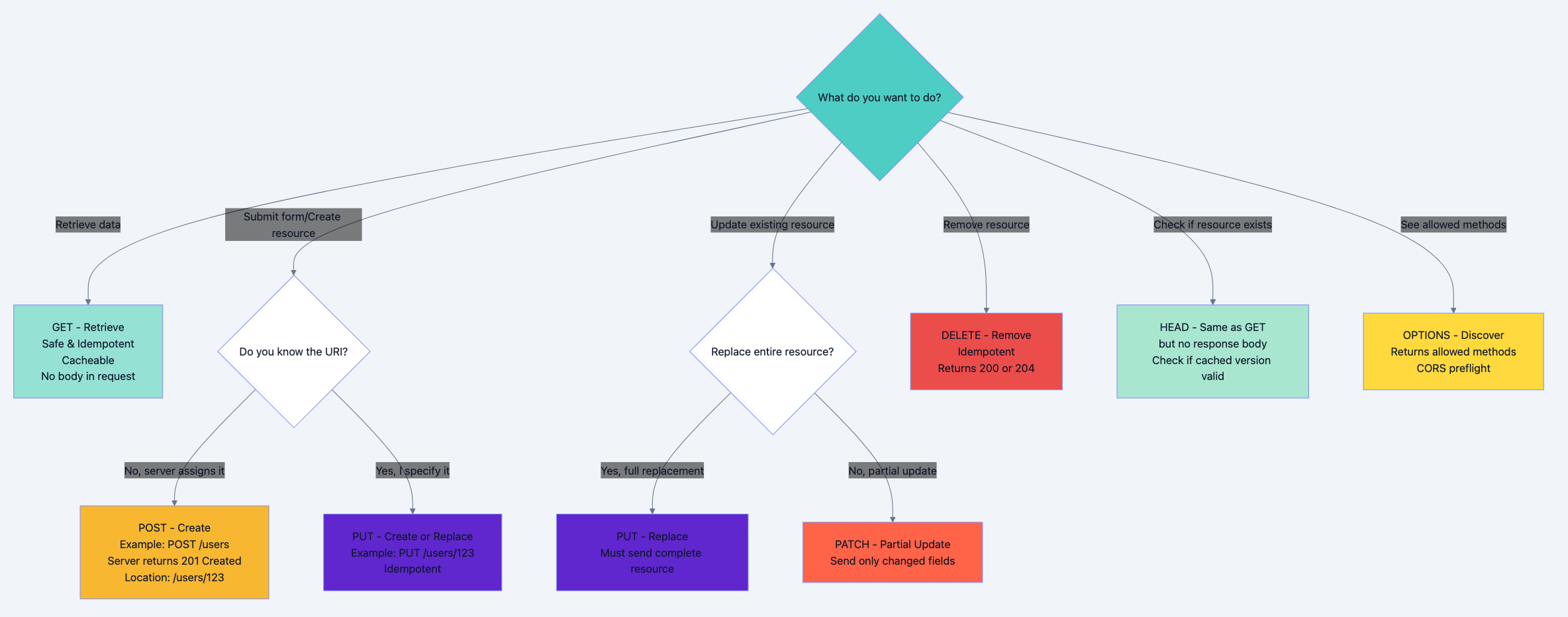
Decision Flowchart: When to Use Each Method
Need to read data? → GET
Need to check if exists without body? → HEAD
Need to see allowed methods? → OPTIONS

Need to create resource?
  ├─ Server assigns ID? → POST to collection (/users)
  └─ Client knows ID? → PUT to specific URI (/users/123)

Need to update resource?
  ├─ Full replacement? → PUT (send all fields)
  └─ Partial update? → PATCH (send changed fields only)

Need to delete resource? → DELETE
Key Takeaways
🔑 HTTP/1.1 is a text-based, stateless request-response protocol - Every transaction is independent, making it simple to debug and scale horizontally, but requiring additional mechanisms (cookies, sessions) for stateful interactions.
🔑 Persistent connections are the game-changer - HTTP/1.1's keep-alive connections reduce latency by ~50% by reusing TCP connections, but head-of-line blocking remains a limitation that HTTP/2 solves with multiplexing.
🔑 Caching is HTTP's superpower - Proper use of
Cache-Control, ETag, and Last-Modified can eliminate 70-90% of redundant requests, dramatically improving performance and reducing server load.🔑 Status codes communicate semantic meaning - They're not just numbers - 2xx means success, 3xx means redirection, 4xx means client error, 5xx means server error. Using the right code makes APIs intuitive and self-documenting.
🔑 Methods have specific semantics and guarantees - GET/HEAD are safe (read-only), PUT/DELETE are idempotent (retryable), POST is neither. Understanding these properties is crucial for reliable API design and proper retry logic.
Insights & Reflection
The Philosophy of HTTP
HTTP's enduring success isn't accidental - it embodies key software engineering principles:
1. Simplicity Over Perfection
HTTP/1.1 chose text-based format over binary for a reason: debuggability and human understanding. Yes, binary is more efficient (see HTTP/2), but when your production API is failing at 3 AM, being able to
curl -v and read raw HTTP is invaluable. The protocol is simple enough to implement by hand, yet powerful enough to run the entire web.2. Extensibility Through Headers
The header system is brilliantly extensible - anyone can add
X-Custom-Header without breaking existing implementations. This "ignore what you don't understand" principle allowed HTTP to evolve from serving simple HTML documents to powering REST APIs, GraphQL, WebSockets upgrades, and more. Modern protocols like gRPC still use HTTP semantics (status codes, headers) because they work.3. The Cost of Statelessness
HTTP's statelessness is both its greatest strength (easy to scale, no server-side session management) and biggest pain point (need cookies, JWT, or sessions for user state). This trade-off is a microcosm of distributed systems: you can't have it all. Stateless scales infinitely but requires more complex client handling. Stateful is simpler for developers but harder to scale. HTTP chose scalability.
HTTP in the Bigger Picture
Understanding HTTP deeply teaches you about:
Layered Abstractions: HTTP sits on TCP which sits on IP which sits on Ethernet. Each layer has a specific job. When debugging, you need to know which layer is failing - is it DNS (application), TCP (transport), routing (network), or physical connectivity?
Text vs Binary Protocols: HTTP/1.1 (text) trades efficiency for debuggability. HTTP/2 (binary) trades debuggability for efficiency. There's no free lunch. Choose based on your constraints.
Backward Compatibility: HTTP/1.1 (1999) still powers billions of requests daily in 2026. That's 27 years! Good protocol design means never breaking existing implementations. Every new HTTP version maintains backward compatibility.
Future Directions
HTTP/3 (QUIC): Built on UDP instead of TCP, eliminates head-of-line blocking entirely, 0-RTT connection establishment. The web is moving here.
WebTransport: Raw UDP access for browsers, competing with WebSockets for real-time applications.
The Pendulum Swings: We started with stateless HTTP, added sessions/cookies, moved to stateless JWT/OAuth, now considering stateful WebSockets/WebTransport again. Each generation rediscovers trade-offs.
Final Thought
HTTP/1.1 isn't just a protocol - it's a lens for understanding distributed systems. Master it, and you'll understand caching, idempotency, statelessness, connection pooling, and dozens of other concepts that apply far beyond the web. Every senior engineer should be able to explain HTTP in their sleep, because it's the foundation of nearly everything we build.
Now go build something amazing. 🚀
Want to dive deeper? Explore RFC 7230-7235 (HTTP/1.1 specification), use browser DevTools Network tab daily, and always
curl -v when debugging APIs.