Database Design Interview Guide: From Requirements to Production
The Interview Mindset
When an interviewer asks "How would you design a database for X?", they're not looking for you to immediately start drawing tables. They want to see how you think. A principal architect doesn't jump to solutions. They ask questions, understand constraints, consider trade-offs, and then design.
The worst answer starts with "I would create a users table with id, name, email..." without understanding what the system actually needs.
The best answer starts with "Before I design anything, I need to understand a few things about the requirements and constraints..."
This guide covers everything you need to approach database design interviews like an experienced architect.
Part 1: The Requirements Gathering Phase
Always Start With Questions
Before touching a whiteboard, gather information. These questions demonstrate experience and prevent designing the wrong thing.
Functional Requirements Questions:
-
What are the core entities? "What are the main things we're storing? Users, products, orders?"
-
What are the relationships? "Can a user have multiple orders? Can an order have multiple products?"
-
What are the access patterns? "How will we query this data? What are the most common operations?"
-
What are the write patterns? "How often does data change? What gets updated frequently?"
-
What data needs to be consistent? "Are there operations that must be atomic? Can we ever show stale data?"
Non-Functional Requirements Questions:
-
What's the expected scale?
- How many users? (1K vs 1B changes everything)
- How many records per table?
- Read/write ratio?
- Requests per second?
-
What's the latency requirement?
- Real-time (< 100ms)?
- Near real-time (< 1s)?
- Batch processing acceptable?
-
What's the availability requirement?
- 99.9% (8.7 hours downtime/year)?
- 99.99% (52 minutes downtime/year)?
- Can we have maintenance windows?
-
What's the consistency requirement?
- Strong consistency (always see latest)?
- Eventual consistency (acceptable lag)?
- Where does consistency matter most?
-
What's the durability requirement?
- Can we lose any data?
- How critical is each piece of data?
-
What's the budget constraint?
- Unlimited cloud resources?
- Cost-sensitive startup?
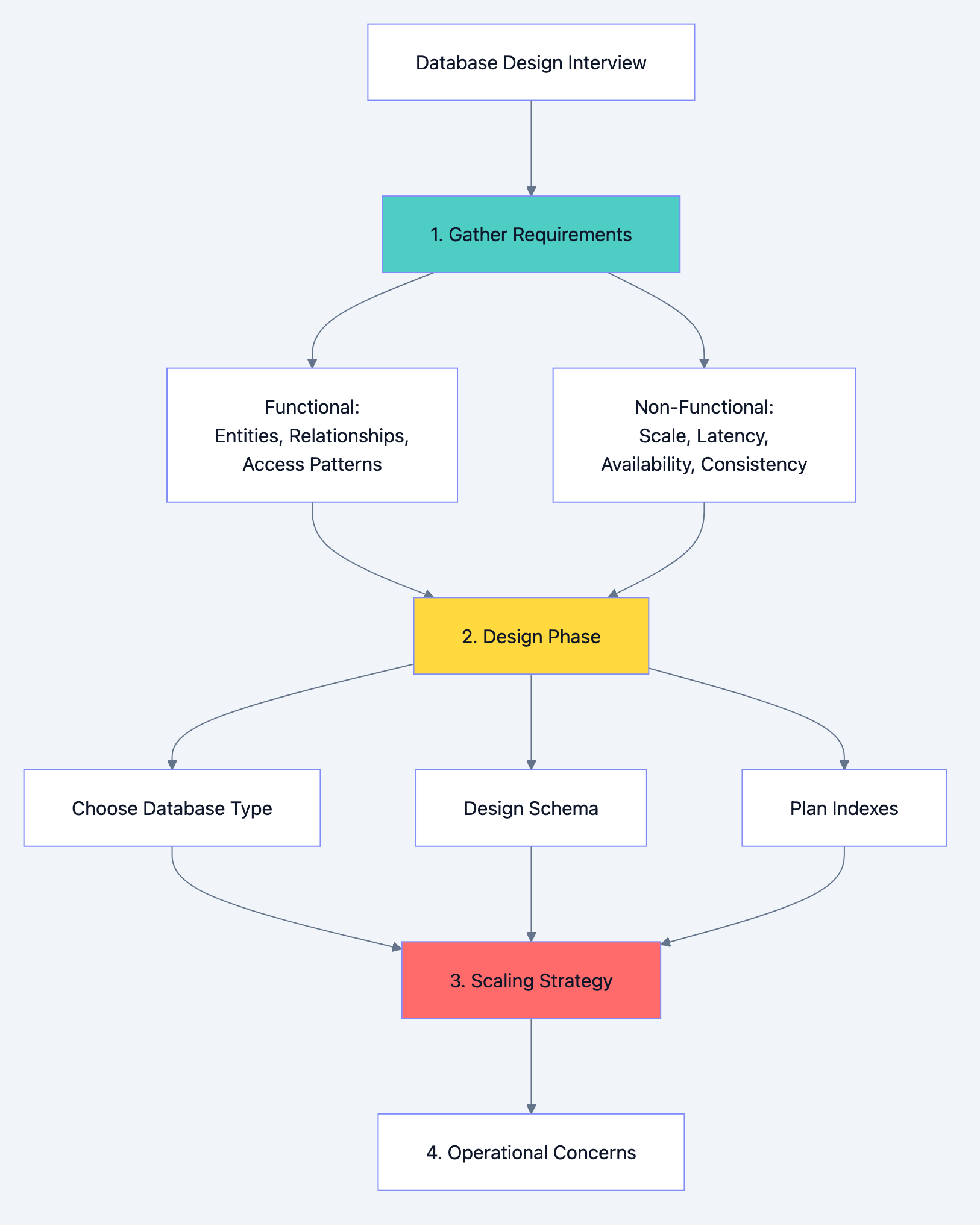
Database design diagram 1
Example: E-Commerce Platform
Interviewer: "Design a database for an e-commerce platform."
Your response: "Before I start designing, I'd like to understand the requirements better."
Then ask:
- What's the expected number of users? Products? Orders per day?
- What are the most frequent operations? Browsing products? Placing orders? Searching?
- Do we need real-time inventory? Or can we oversell occasionally and apologize?
- What's the read/write ratio? Probably read-heavy for product browsing?
- Do we need to support complex queries like "products bought by users who also bought X"?
- What's the geographic distribution? Single region or global?
- What's the consistency requirement for inventory? Orders?
The answers completely change your design. An e-commerce site with 1000 orders/day is designed differently than Amazon with millions.
Part 2: Choosing the Right Database Type
The SQL vs NoSQL Decision Framework
This is often the first major decision. Don't answer with preference. Answer with reasoning based on requirements.
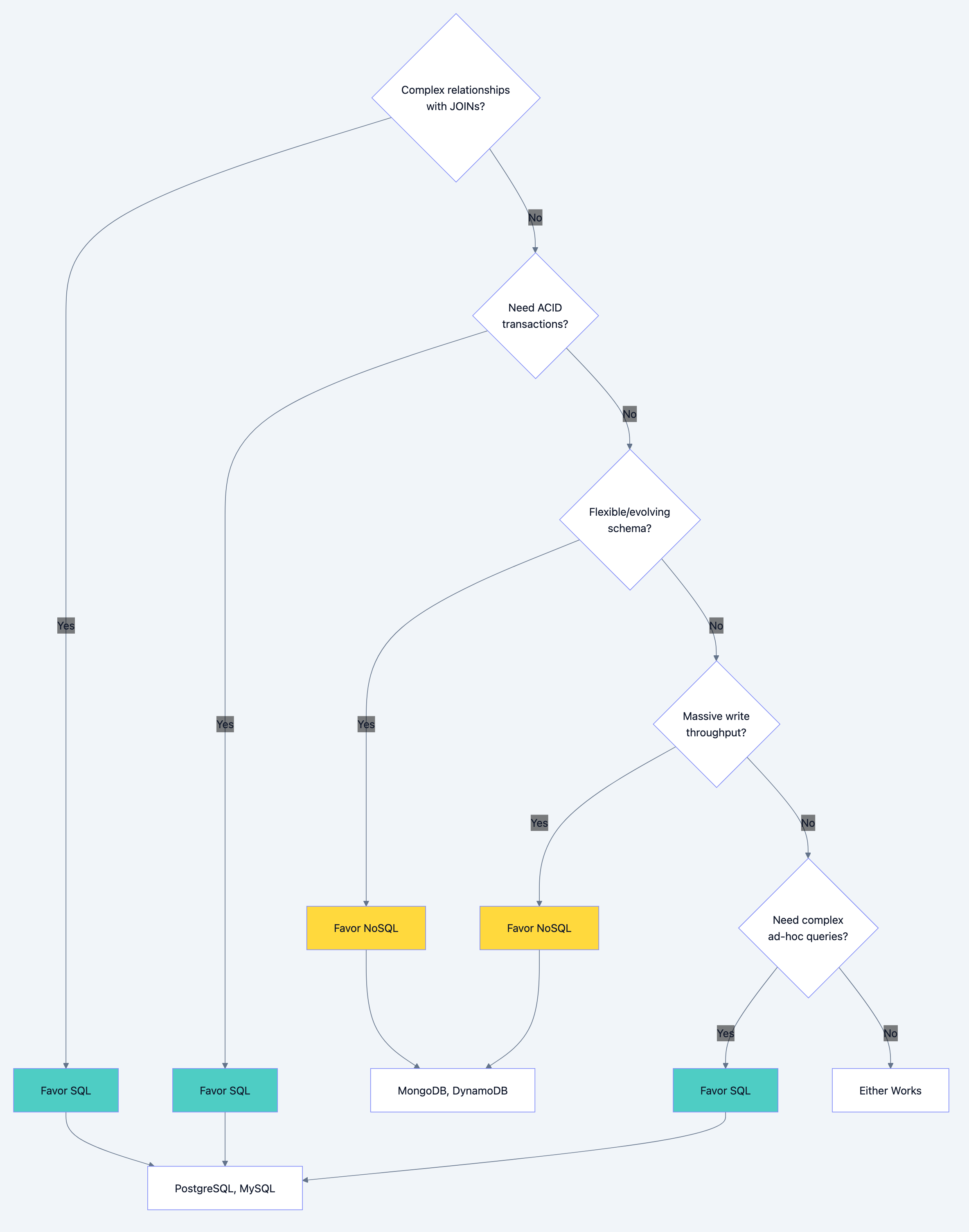
Database design diagram 2
When to Choose SQL (Relational Databases)
Choose SQL when:
-
Data has clear relationships
- Users have orders, orders have items, items belong to products
- You'll frequently JOIN across these relationships
- Referential integrity matters (can't have order without valid user)
-
ACID transactions are required
- Financial transactions (debit one account, credit another atomically)
- Inventory management (decrement stock and create order atomically)
- Any operation where partial completion is unacceptable
-
Complex queries are needed
- Business intelligence and reporting
- Ad-hoc queries by analysts
- Aggregations, groupings, complex filters
-
Schema is stable and well-understood
- You know your data model upfront
- Changes are infrequent and planned
- Data integrity rules are important
SQL Database Comparison:
| Database | Best For | Key Strength | Consideration |
|---|---|---|---|
| PostgreSQL | General purpose, complex queries | Feature rich, extensible | Slightly more complex ops |
| MySQL | Web applications, read-heavy | Simple, fast reads | Less feature rich |
| SQL Server | Enterprise, Microsoft ecosystem | Excellent tooling | Licensing cost |
| Oracle | Large enterprise, mission critical | Mature, powerful | Very expensive |
When to Choose NoSQL
Choose NoSQL when:
-
Schema flexibility is required
- Different products have different attributes
- Schema evolves frequently
- Hierarchical/nested data is common
-
Massive scale is required
- Millions of writes per second
- Petabytes of data
- Horizontal scaling is essential
-
Simple access patterns
- Key-value lookups
- Document retrieval by ID
- No complex JOINs needed
-
Availability over consistency
- Better to show slightly stale data than no data
- Distributed across regions
- Partition tolerance is critical
NoSQL Database Types:
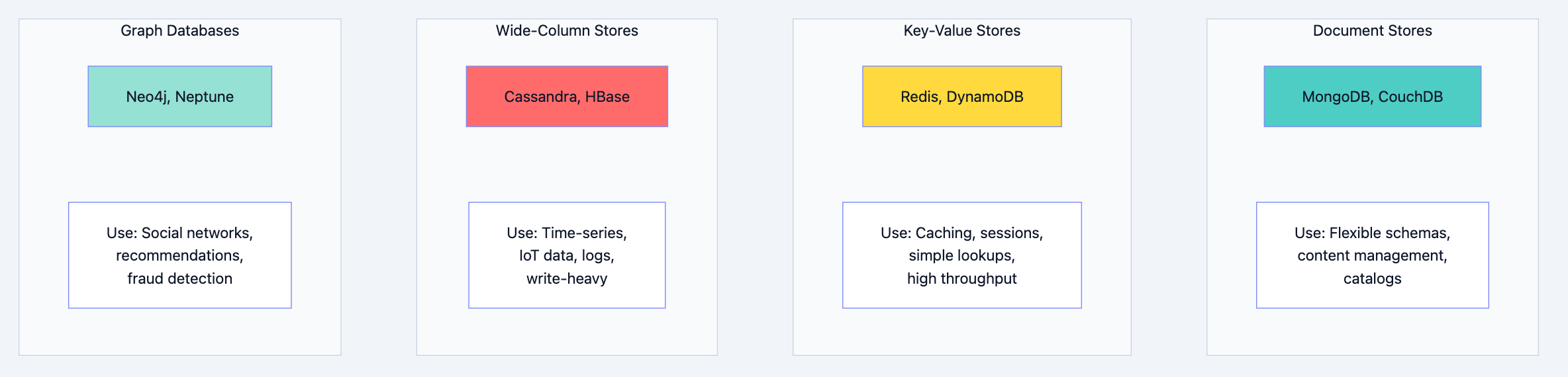
Database design diagram 3
NoSQL Detailed Comparison:
| Type | Database | Data Model | Best For | Limitation |
|---|---|---|---|---|
| Document | MongoDB | JSON documents | Flexible schemas, nested data | Complex transactions |
| Document | CouchDB | JSON documents | Offline-first, sync | Query performance |
| Key-Value | Redis | Key-value pairs | Caching, sessions | Data size (memory) |
| Key-Value | DynamoDB | Key-value/document | Serverless, auto-scaling | Query flexibility |
| Wide-Column | Cassandra | Column families | Write-heavy, time-series | Complex queries |
| Wide-Column | HBase | Column families | Hadoop ecosystem | Operational complexity |
| Graph | Neo4j | Nodes and edges | Relationship queries | Scaling horizontally |
The Polyglot Persistence Pattern
Real systems often use multiple databases. This is called polyglot persistence.
Example: E-Commerce Architecture

Database design diagram 4
When to mention polyglot persistence in interviews:
- When different parts of the system have fundamentally different requirements
- When a single database type can't satisfy all needs efficiently
- When you want to demonstrate architectural maturity
Trade-off to acknowledge:
- Increased operational complexity
- Data synchronization challenges
- More technologies to maintain
Part 3: Schema Design Principles
Relational Schema Design
Normalization: The Foundation
Normalization eliminates redundancy and ensures data integrity. Know the normal forms and when to apply them.
First Normal Form (1NF)
- Each column contains atomic (indivisible) values
- No repeating groups
sql-- Bad: Violates 1NF (phone_numbers contains multiple values)
CREATE TABLE users (
    id INT PRIMARY KEY,
    name VARCHAR(100),
    phone_numbers VARCHAR(500)  -- "555-1234, 555-5678"
);

-- Good: 1NF compliant
CREATE TABLE users (
    id INT PRIMARY KEY,
    name VARCHAR(100)
);

CREATE TABLE user_phones (
    user_id INT REFERENCES users(id),
    phone_number VARCHAR(20),
    PRIMARY KEY (user_id, phone_number)
);
Second Normal Form (2NF)
- Must be in 1NF
- All non-key columns depend on the entire primary key (no partial dependencies)
sql-- Bad: Violates 2NF (product_name depends only on product_id, not full PK)
CREATE TABLE order_items (
    order_id INT,
    product_id INT,
    product_name VARCHAR(100),  -- Depends only on product_id
    quantity INT,
    PRIMARY KEY (order_id, product_id)
);

-- Good: 2NF compliant
CREATE TABLE products (
    id INT PRIMARY KEY,
    name VARCHAR(100)
);

CREATE TABLE order_items (
    order_id INT,
    product_id INT REFERENCES products(id),
    quantity INT,
    PRIMARY KEY (order_id, product_id)
);
Third Normal Form (3NF)
- Must be in 2NF
- No transitive dependencies (non-key columns depending on other non-key columns)
sql-- Bad: Violates 3NF (city depends on zip_code, not directly on user)
CREATE TABLE users (
    id INT PRIMARY KEY,
    name VARCHAR(100),
    zip_code VARCHAR(10),
    city VARCHAR(100),     -- Depends on zip_code, not user
    state VARCHAR(50)      -- Depends on zip_code, not user
);

-- Good: 3NF compliant
CREATE TABLE zip_codes (
    zip_code VARCHAR(10) PRIMARY KEY,
    city VARCHAR(100),
    state VARCHAR(50)
);

CREATE TABLE users (
    id INT PRIMARY KEY,
    name VARCHAR(100),
    zip_code VARCHAR(10) REFERENCES zip_codes(zip_code)
);
When to Denormalize
Normalization optimizes for write consistency. Denormalization optimizes for read performance. In interviews, show you understand both.
Denormalize when:
-
Read performance is critical
- Avoiding JOINs in hot paths
- Reducing query complexity
-
Data is read far more than written
- Reporting tables
- Analytics aggregates
-
Certain JOINs are extremely expensive
- Joining across millions of rows
- Complex multi-table joins
Example: Denormalizing for read performance
sql-- Normalized: Requires JOIN for every order display
SELECT o.id, o.total, u.name, u.email
FROM orders o
JOIN users u ON o.user_id = u.id
WHERE o.id = 12345;

-- Denormalized: Redundant but fast
CREATE TABLE orders (
    id INT PRIMARY KEY,
    user_id INT,
    user_name VARCHAR(100),     -- Denormalized from users
    user_email VARCHAR(100),    -- Denormalized from users
    total DECIMAL(10,2)
);

-- Now no JOIN needed
SELECT id, total, user_name, user_email
FROM orders
WHERE id = 12345;
Trade-off to acknowledge:
- Data inconsistency risk (user changes name, orders still show old name)
- Storage overhead
- Write complexity (must update multiple places)
Mitigation strategies:
- Update denormalized data via triggers or application logic
- Accept eventual consistency for non-critical fields
- Use materialized views that refresh periodically
NoSQL Schema Design
NoSQL schema design follows different principles. The main principle is: design for your queries, not your entities.
Document Store Design (MongoDB)
Embedding vs Referencing:
javascript// Embedding: Good when data is accessed together and doesn't change independently
{
    "_id": "order_123",
    "user": {                           // Embedded
        "id": "user_456",
        "name": "John Doe",
        "email": "john@example.com"
    },
    "items": [                          // Embedded array
        {"product_id": "prod_1", "name": "Widget", "quantity": 2, "price": 29.99},
        {"product_id": "prod_2", "name": "Gadget", "quantity": 1, "price": 49.99}
    ],
    "total": 109.97
}

// Referencing: Good when data is shared or changes independently
{
    "_id": "order_123",
    "user_id": "user_456",              // Reference
    "item_ids": ["item_1", "item_2"],   // References
    "total": 109.97
}
When to embed:
- One-to-few relationships
- Data that's always accessed together
- Data that doesn't change independently
- Child data has no meaning without parent
When to reference:
- One-to-many (unbounded) relationships
- Many-to-many relationships
- Data that's accessed independently
- Data that changes frequently
Key-Value Store Design (Redis/DynamoDB)
Design keys for your access patterns.
# User session by session ID
session:{session_id} → {user_id, created_at, data}

# User's recent orders (need to query by user)
user:{user_id}:orders → [order_id1, order_id2, ...]

# Rate limiting by IP
ratelimit:{ip}:{minute} → count

# Leaderboard
leaderboard:daily → sorted set of {user_id: score}
DynamoDB single-table design:
# Primary Key: PK (partition key), SK (sort key)
# Overloading keys to store multiple entity types

| PK          | SK              | Data                    |
|-------------|-----------------|-------------------------|
| USER#123    | PROFILE         | {name, email, ...}      |
| USER#123    | ORDER#001       | {total, status, ...}    |
| USER#123    | ORDER#002       | {total, status, ...}    |
| PRODUCT#456 | METADATA        | {name, price, ...}      |
| ORDER#001   | ITEM#1          | {product_id, qty, ...}  |

# This allows:
# - Get user profile: PK = USER#123, SK = PROFILE
# - Get all user orders: PK = USER#123, SK begins_with ORDER#
# - Get order items: PK = ORDER#001, SK begins_with ITEM#
Wide-Column Store Design (Cassandra)
Design around your queries. Denormalization is expected.
sql-- Query: Get all orders for a user, sorted by date
CREATE TABLE orders_by_user (
    user_id UUID,
    order_date TIMESTAMP,
    order_id UUID,
    total DECIMAL,
    status TEXT,
    PRIMARY KEY (user_id, order_date, order_id)
) WITH CLUSTERING ORDER BY (order_date DESC);

-- Query: Get all items for an order
CREATE TABLE items_by_order (
    order_id UUID,
    item_id UUID,
    product_name TEXT,
    quantity INT,
    price DECIMAL,
    PRIMARY KEY (order_id, item_id)
);

-- Same data, different access pattern
-- Query: Get orders by status for admin dashboard
CREATE TABLE orders_by_status (
    status TEXT,
    order_date TIMESTAMP,
    order_id UUID,
    user_id UUID,
    total DECIMAL,
    PRIMARY KEY (status, order_date, order_id)
) WITH CLUSTERING ORDER BY (order_date DESC);
Key principle: Create one table per query pattern. Duplicate data across tables.
Part 4: Indexing Strategy
Understanding Index Types and When to Use Them
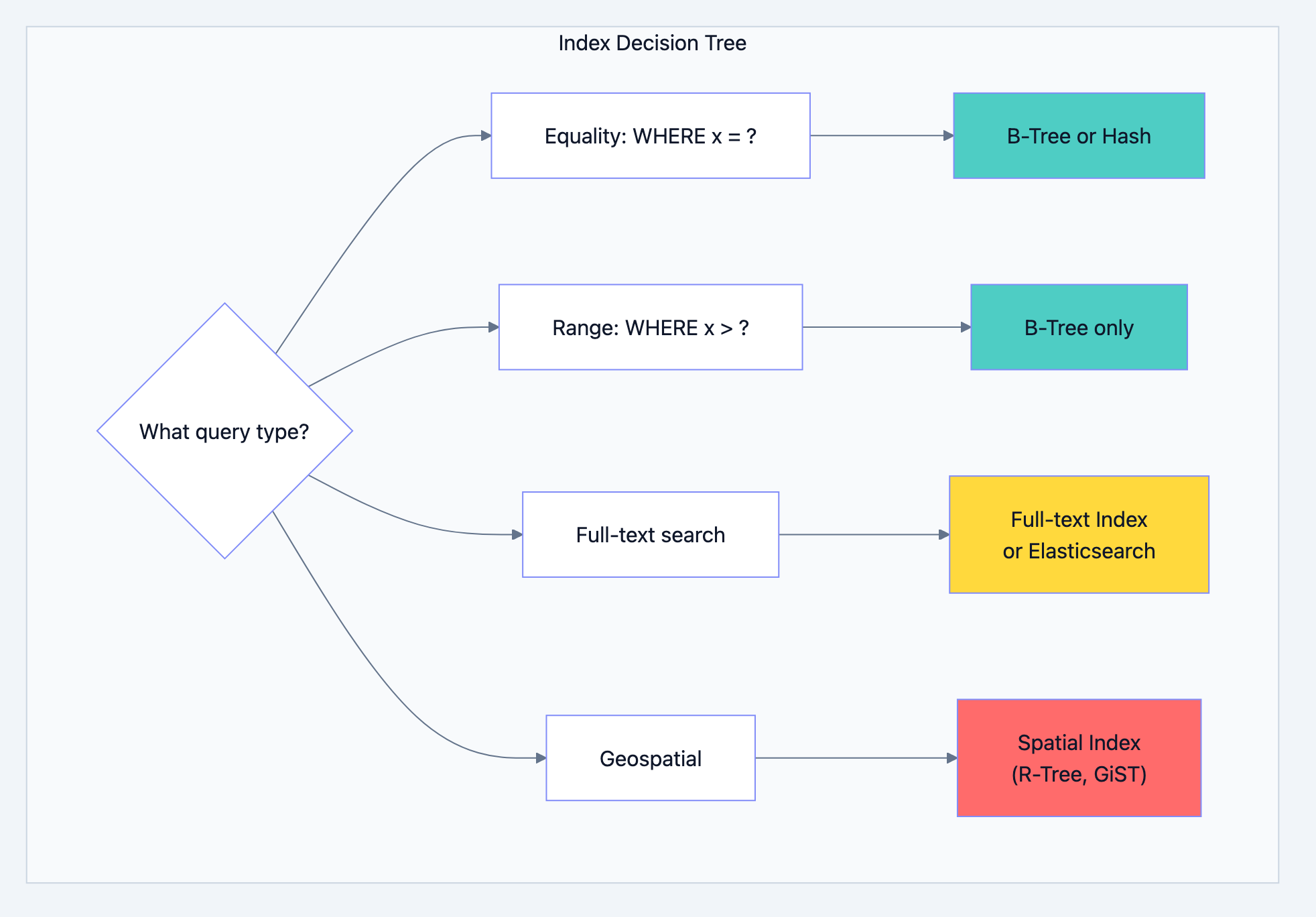
Database design diagram 5
Composite Index Design
The order of columns in a composite index matters enormously.
The Leftmost Prefix Rule:
sql-- Index on (a, b, c) can be used for:
-- WHERE a = ?               ✓
-- WHERE a = ? AND b = ?     ✓
-- WHERE a = ? AND b = ? AND c = ?  ✓
-- WHERE a = ? AND c = ?     ✓ (partial, uses a only)
-- WHERE b = ?               ✗ (cannot use index)
-- WHERE b = ? AND c = ?     ✗ (cannot use index)
-- WHERE c = ?               ✗ (cannot use index)
Designing composite indexes:
sql-- Query: Find active users in a city, ordered by created_at
SELECT * FROM users
WHERE status = 'active'
AND city = 'New York'
ORDER BY created_at DESC;

-- Index design thought process:
-- 1. Equality columns first: status, city
-- 2. Range/sort column last: created_at
-- 3. Consider cardinality: city likely has more unique values

-- Good index:
CREATE INDEX idx_users_status_city_created
ON users(status, city, created_at DESC);
Covering Indexes
A covering index contains all columns needed by a query, avoiding table lookups entirely.
sql-- Query that needs covering
SELECT id, status, amount
FROM orders
WHERE user_id = 123 AND status = 'pending';

-- Covering index (includes all SELECT columns)
CREATE INDEX idx_orders_covering
ON orders(user_id, status) INCLUDE (id, amount);

-- Now the query can be satisfied entirely from the index
Index Anti-Patterns
Know these to avoid them and explain why they're problematic:
1. Over-indexing
sql-- Bad: Index on every column
CREATE INDEX idx_1 ON users(name);
CREATE INDEX idx_2 ON users(email);
CREATE INDEX idx_3 ON users(created_at);
CREATE INDEX idx_4 ON users(status);
CREATE INDEX idx_5 ON users(name, email);
-- ... slows down writes, wastes storage
2. Indexing low-cardinality columns alone
sql-- Bad: Boolean column has only 2 values
CREATE INDEX idx_active ON users(is_active);
-- Query still scans ~50% of table
3. Functions on indexed columns
sql-- Index on created_at exists but cannot be used
SELECT * FROM orders WHERE YEAR(created_at) = 2024;

-- Fix: Use range query
SELECT * FROM orders
WHERE created_at >= '2024-01-01' AND created_at < '2025-01-01';
4. Implicit type conversion
sql-- user_id is INT, but query uses string
SELECT * FROM orders WHERE user_id = '123';  -- May not use index

-- Fix: Use correct type
SELECT * FROM orders WHERE user_id = 123;
NoSQL Indexing
MongoDB Indexes:
javascript// Single field index
db.users.createIndex({ email: 1 })

// Compound index
db.orders.createIndex({ user_id: 1, created_at: -1 })

// Text index for search
db.products.createIndex({ name: "text", description: "text" })

// Partial index (index only matching documents)
db.users.createIndex(
    { email: 1 },
    { partialFilterExpression: { status: "active" } }
)
DynamoDB Indexes:
- Global Secondary Index (GSI): Different partition key, eventually consistent
- Local Secondary Index (LSI): Same partition key, different sort key, strongly consistent
# Table: Orders
# PK: order_id

# GSI: Query orders by user
# GSI PK: user_id, GSI SK: order_date

# LSI: Query orders by status (same partition)
# Table PK: order_id, LSI SK: status
Part 5: Scaling Strategies
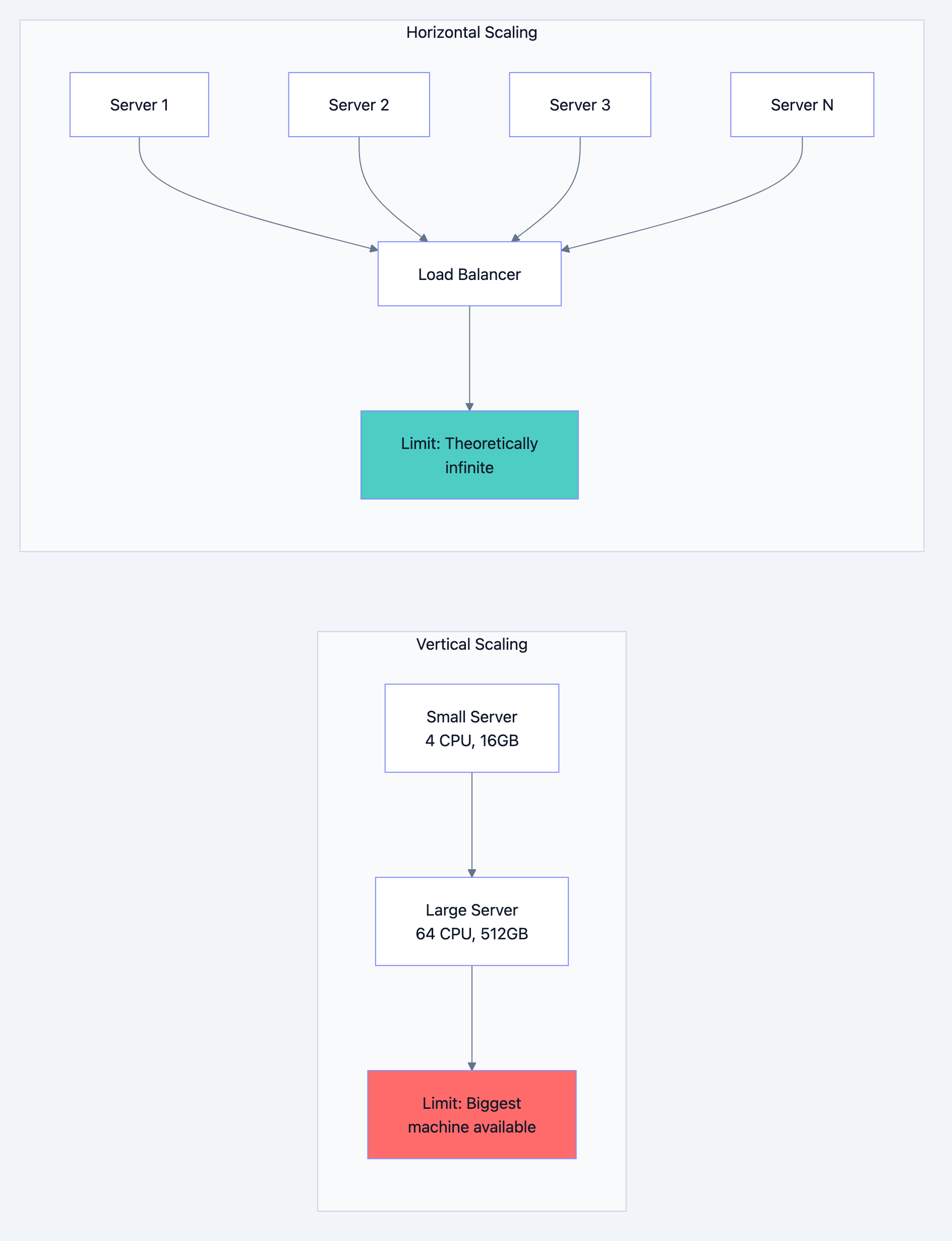
Vertical vs Horizontal Scaling
Database design diagram 6
Vertical Scaling (Scale Up):
- Pros: Simple, no code changes, no distributed system complexity
- Cons: Hardware limits, single point of failure, expensive at high end
- Use when: Simplicity matters, not yet at hardware limits
Horizontal Scaling (Scale Out):
- Pros: Theoretically unlimited, fault tolerant, cost-effective
- Cons: Distributed system complexity, data consistency challenges
- Use when: Vertical limits reached, high availability required
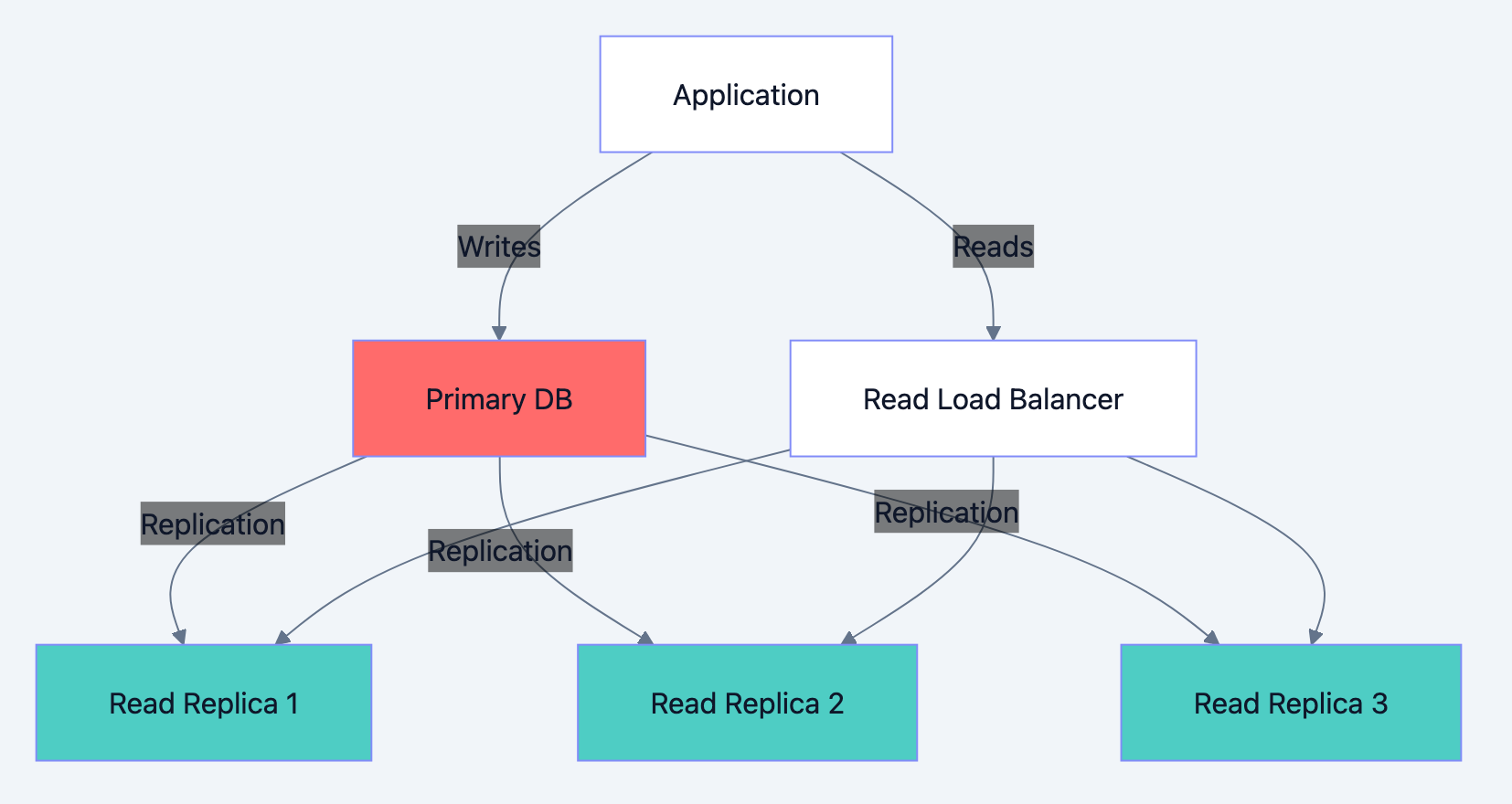
Read Scaling with Replicas
Database design diagram 7
Interview talking points:
- Replication lag: Replicas may be milliseconds to seconds behind. How do you handle read-after-write consistency?
go// Solution 1: Read from primary after write
func CreateOrder(order *Order) error {
    err := primaryDB.Insert(order)
    if err != nil {
        return err
    }
    // For next few seconds, read from primary
    setReadFromPrimary(order.UserID, 5*time.Second)
    return nil
}

// Solution 2: Include version/timestamp
func GetOrder(id string, minVersion int64) (*Order, error) {
    order := replicaDB.Get(id)
    if order.Version < minVersion {
        // Replica is behind, read from primary
        return primaryDB.Get(id)
    }
    return order, nil
}
-
Failover: What happens when primary fails? How do you promote a replica?
-
Load balancing: How do you distribute read traffic across replicas?
Write Scaling with Sharding
When a single primary can't handle write load, you need sharding.
Sharding Strategies Comparison:
| Strategy | How It Works | Pros | Cons |
|---|---|---|---|
| Range | Shard by key range (A-M, N-Z) | Range queries efficient | Hotspots if distribution uneven |
| Hash | Hash key to determine shard | Even distribution | Range queries hit all shards |
| Directory | Lookup table maps keys to shards | Flexible placement | Lookup overhead, SPOF |
| Geographic | Shard by user location | Low latency | Cross-region queries slow |
Consistent Hashing:
When you add or remove shards, consistent hashing minimizes data movement.

Database design diagram 8
Shard Key Selection (Critical Interview Topic):
Choosing the wrong shard key causes hot spots. Consider:
- Cardinality: High cardinality (many unique values) distributes better
- Frequency: Even distribution of queries across keys
- Query patterns: Queries should target single shard when possible
sql-- Bad shard key: created_date
-- All today's writes go to one shard (hot spot)

-- Bad shard key: country
-- US shard gets 60% of traffic (hot spot)

-- Good shard key: user_id
-- Users distribute evenly, user queries hit single shard

-- Good shard key: compound (tenant_id, user_id)
-- For multi-tenant systems, isolates tenants
Cross-Shard Operations
The fundamental challenge: Queries that span shards are expensive.
Cross-shard query example:
sql-- Find top 10 customers by total orders across all shards
-- Must query all shards, aggregate results
SELECT user_id, SUM(total) as order_total
FROM orders
GROUP BY user_id
ORDER BY order_total DESC
LIMIT 10;
Solutions:
-
Scatter-Gather: Query all shards in parallel, merge results
- Latency = slowest shard + merge time
- Works for aggregations, top-N queries
-
Co-locate related data: Put user and their orders on same shard
- User's order queries are always single-shard
-
Maintain aggregate tables: Pre-computed aggregates on separate system
- Updated asynchronously via events
-
Accept eventual consistency: For analytics, slight delay is acceptable
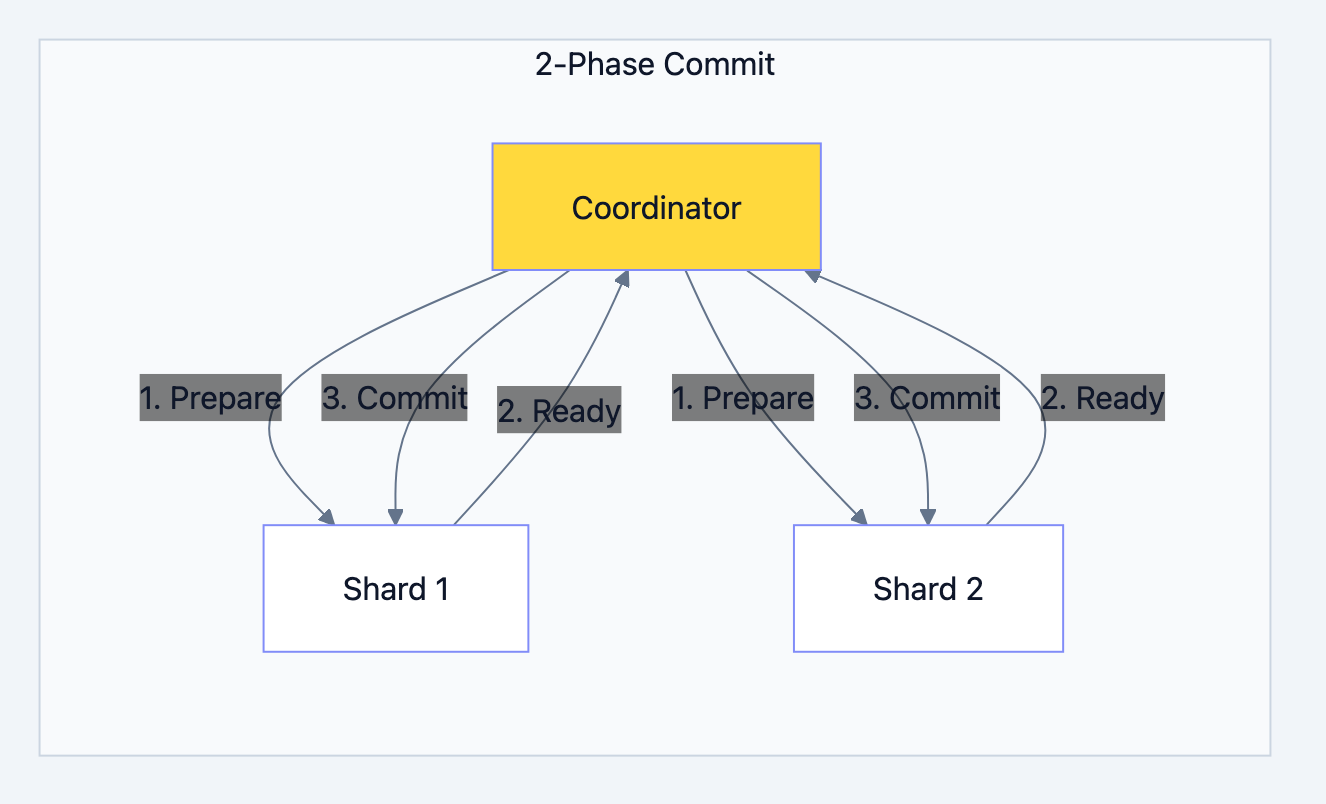
Cross-shard transactions:
Database design diagram 9
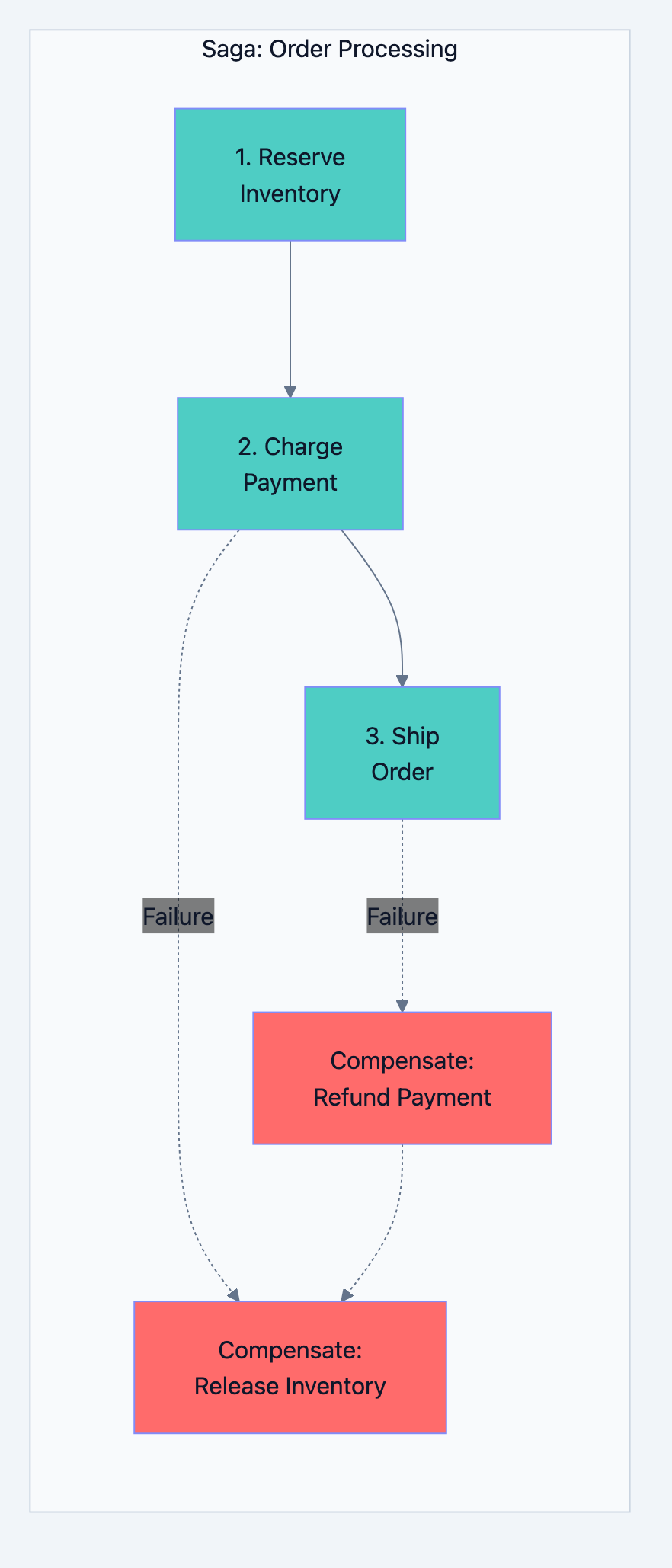
Interview insight: 2PC is slow and doesn't handle coordinator failure well. Modern systems prefer:
- Saga pattern (compensating transactions)
- Eventual consistency with idempotent operations
- Design to avoid cross-shard transactions
Part 6: Caching Architecture
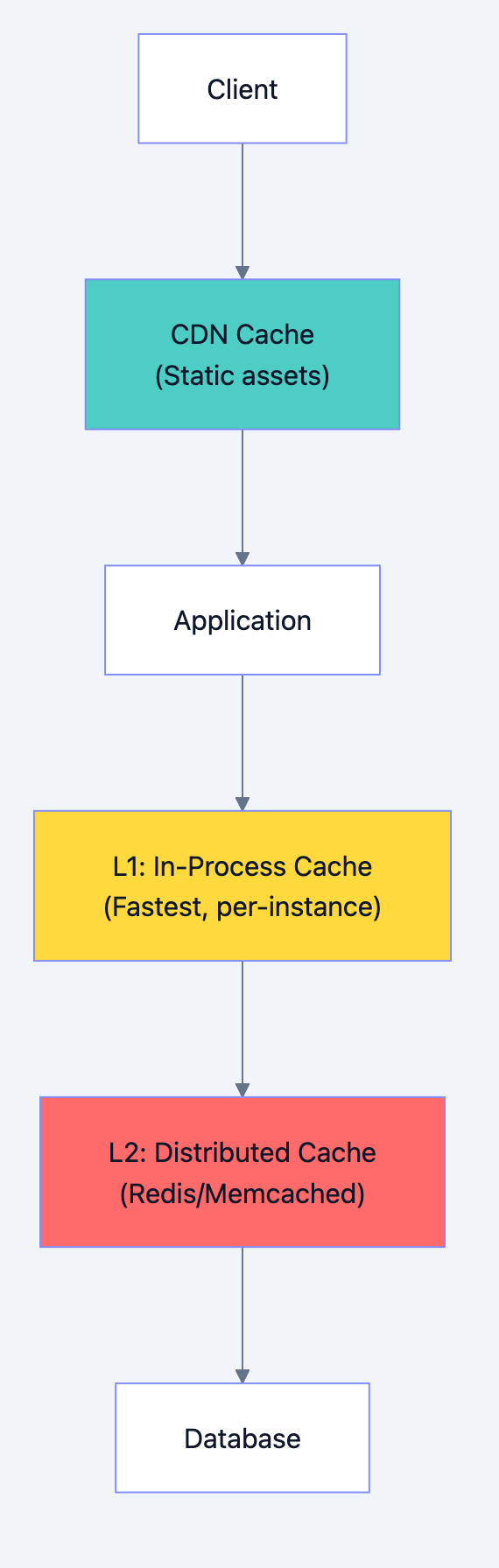
Cache Layers
Database design diagram 10
Caching Strategies Deep Dive
1. Cache-Aside (Lazy Loading)
gofunc GetUser(id string) (*User, error) {
    // Check cache first
    cached, err := cache.Get("user:" + id)
    if err == nil {
        return cached.(*User), nil
    }

    // Cache miss: query database
    user, err := db.GetUser(id)
    if err != nil {
        return nil, err
    }

    // Populate cache
    cache.Set("user:"+id, user, 1*time.Hour)
    return user, nil
}
- Pros: Only caches what's actually used, simple
- Cons: Cache miss penalty, potential thundering herd
2. Write-Through
gofunc UpdateUser(user *User) error {
    // Write to database
    err := db.UpdateUser(user)
    if err != nil {
        return err
    }

    // Immediately update cache
    cache.Set("user:"+user.ID, user, 1*time.Hour)
    return nil
}
- Pros: Cache always consistent with DB
- Cons: Write latency increased, cache may store unread data
3. Write-Behind (Write-Back)
gofunc UpdateUser(user *User) error {
    // Write to cache only
    cache.Set("user:"+user.ID, user, 1*time.Hour)

    // Queue async database write
    writeQueue.Enqueue(user)
    return nil
}

// Background worker
func ProcessWriteQueue() {
    for user := range writeQueue {
        db.UpdateUser(user)
    }
}
- Pros: Very fast writes
- Cons: Data loss risk if cache fails before DB write
4. Read-Through
go// Cache handles DB lookup internally
func GetUser(id string) (*User, error) {
    // Cache implementation:
    // 1. Check cache
    // 2. If miss, call loader function
    // 3. Store in cache
    // 4. Return
    return cache.GetOrLoad("user:"+id, func() (*User, error) {
        return db.GetUser(id)
    })
}
- Pros: Application code simplified
- Cons: Cache library must support this pattern
Cache Invalidation Strategies
Time-based (TTL):
gocache.Set("user:123", user, 5*time.Minute) // Expires in 5 minutes
- Simple but may serve stale data
Event-based:
gofunc UpdateUser(user *User) error {
    db.UpdateUser(user)
    cache.Delete("user:" + user.ID)     // Invalidate
    eventBus.Publish("user.updated", user.ID)  // Notify other instances
}
- More complex but always fresh
Version-based:
gofunc GetUser(id string, expectedVersion int) (*User, error) {
    user := cache.Get("user:" + id)
    if user.Version < expectedVersion {
        // Refetch from database
        return db.GetUser(id)
    }
    return user, nil
}
Cache Problems and Solutions
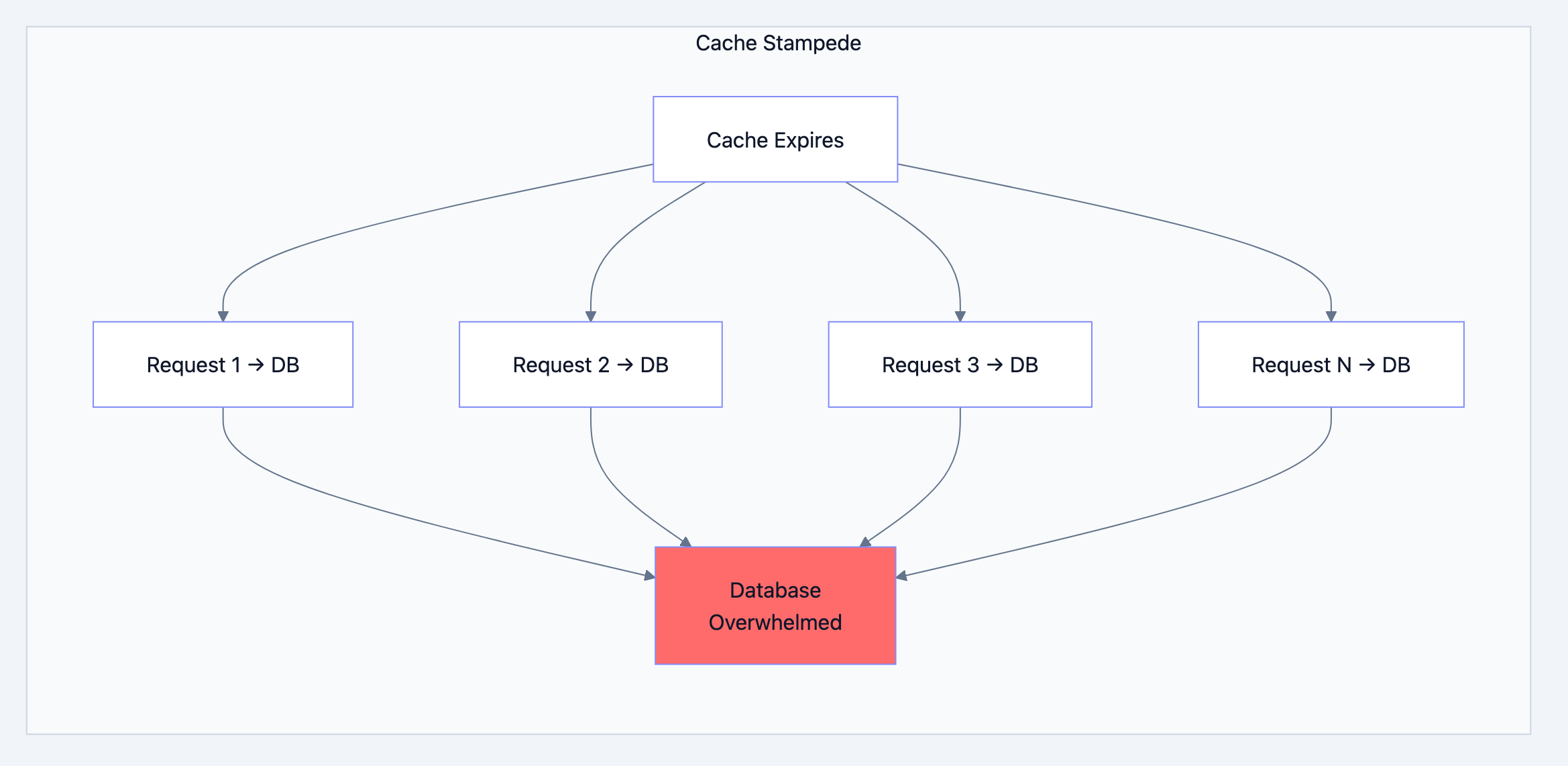
1. Cache Stampede (Thundering Herd)
When cache expires, many requests simultaneously hit database.
Database design diagram 11
Solutions:
go// Solution 1: Locking
func GetUserWithLock(id string) (*User, error) {
    user, err := cache.Get("user:" + id)
    if err == nil {
        return user, nil
    }

    // Acquire lock
    lock, acquired := cache.TryLock("lock:user:"+id, 10*time.Second)
    if !acquired {
        // Another request is fetching, wait and retry
        time.Sleep(100 * time.Millisecond)
        return GetUserWithLock(id)
    }
    defer lock.Release()

    // Double-check cache
    user, err = cache.Get("user:" + id)
    if err == nil {
        return user, nil
    }

    // Fetch from DB
    user, err = db.GetUser(id)
    if err != nil {
        return nil, err
    }

    cache.Set("user:"+id, user, 1*time.Hour)
    return user, nil
}

// Solution 2: Probabilistic early expiration
func GetUserWithEarlyExpire(id string) (*User, error) {
    user, ttl, err := cache.GetWithTTL("user:" + id)
    if err != nil {
        return fetchAndCache(id)
    }

    // Probabilistically refresh before expiration
    // As TTL approaches 0, probability increases
    if shouldRefresh(ttl) {
        go fetchAndCache(id)  // Async refresh
    }

    return user, nil
}

func shouldRefresh(ttl time.Duration) bool {
    // Higher probability as TTL decreases
    probability := 1.0 - (float64(ttl) / float64(originalTTL))
    return rand.Float64() < probability * 0.1
}
2. Cache Penetration
Queries for non-existent data always hit database.
go// Solution: Cache negative results
func GetUser(id string) (*User, error) {
    cached, err := cache.Get("user:" + id)
    if err == nil {
        if cached == nil {
            return nil, ErrNotFound  // Cached "not found"
        }
        return cached.(*User), nil
    }

    user, err := db.GetUser(id)
    if err == ErrNotFound {
        // Cache the "not found" with short TTL
        cache.Set("user:"+id, nil, 5*time.Minute)
        return nil, ErrNotFound
    }
    if err != nil {
        return nil, err
    }

    cache.Set("user:"+id, user, 1*time.Hour)
    return user, nil
}

// Alternative: Bloom filter
// Check bloom filter first - if key definitely doesn't exist, skip DB
3. Hot Key Problem
Single popular key overwhelms one cache node.
go// Solution 1: Local cache for hot keys
var localHotCache = sync.Map{}

func GetProduct(id string) (*Product, error) {
    // Check local cache first (for hot keys)
    if product, ok := localHotCache.Load(id); ok {
        return product.(*Product), nil
    }

    // Check distributed cache
    product, err := redis.Get("product:" + id)
    if err == nil {
        // If this key is hot, cache locally
        if isHotKey(id) {
            localHotCache.Store(id, product)
        }
        return product, nil
    }

    // Fetch from DB...
}

// Solution 2: Replicate hot keys across multiple cache keys
func GetProductWithReplication(id string) (*Product, error) {
    // Randomly pick one of N replicas
    replica := rand.Intn(10)
    key := fmt.Sprintf("product:%s:replica:%d", id, replica)
    return redis.Get(key)
}
Part 7: Data Consistency Patterns
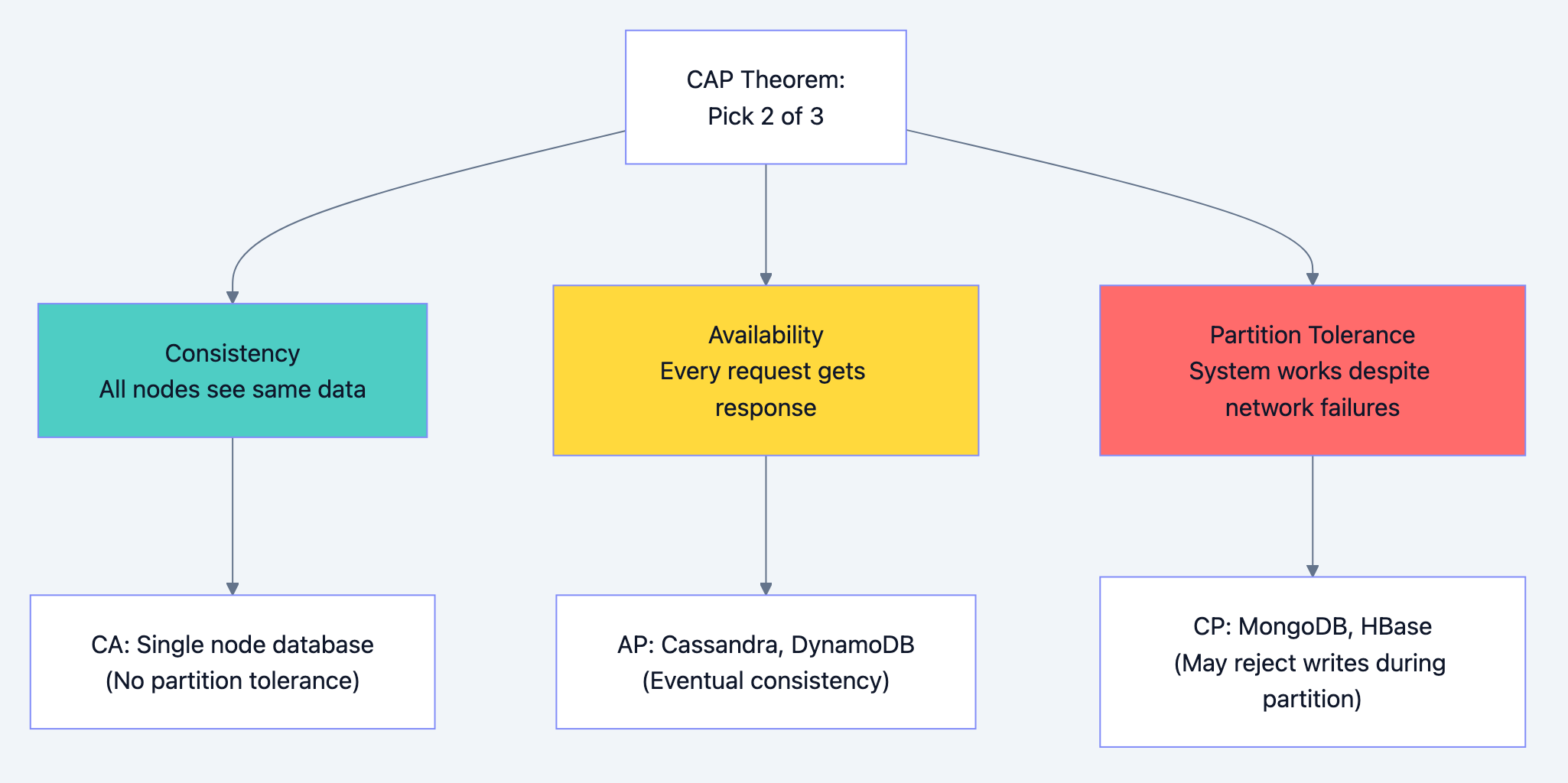
CAP Theorem
Database design diagram 12
Interview insight: In distributed systems, network partitions will happen. So you're really choosing between consistency (CP) and availability (AP).
Consistency Levels
Strong Consistency:
- Every read returns the most recent write
- Achieved through synchronous replication or single leader
- Higher latency, lower availability
Eventual Consistency:
- Updates propagate asynchronously
- Reads may return stale data temporarily
- Lower latency, higher availability
Causal Consistency:
- If A causes B, everyone sees A before B
- Unrelated events may be seen in different orders
Read-Your-Writes Consistency:
- User always sees their own writes
- Other users may see stale data
Implementing Consistency in Practice
Scenario: User updates profile, immediately views it
go// Problem: User might read from replica that hasn't received the write
func UpdateAndView(userID string, newProfile *Profile) (*Profile, error) {
    // Write to primary
    db.Primary.UpdateProfile(userID, newProfile)

    // Read from replica - might be stale!
    return db.Replica.GetProfile(userID)
}

// Solution 1: Sticky sessions to primary after write
func UpdateAndView(userID string, newProfile *Profile) (*Profile, error) {
    db.Primary.UpdateProfile(userID, newProfile)

    // Mark user for primary reads
    session.Set("read_primary_until", time.Now().Add(5*time.Second))

    // This request reads from primary
    return db.Primary.GetProfile(userID)
}

// Solution 2: Version-based consistency
func UpdateAndView(userID string, newProfile *Profile) (*Profile, error) {
    version := db.Primary.UpdateProfile(userID, newProfile)

    // Read with minimum version requirement
    return db.GetProfileWithMinVersion(userID, version)
}

func GetProfileWithMinVersion(userID string, minVersion int64) (*Profile, error) {
    profile := db.Replica.GetProfile(userID)
    if profile.Version >= minVersion {
        return profile, nil
    }
    // Replica is behind, read from primary
    return db.Primary.GetProfile(userID)
}
Distributed Transactions
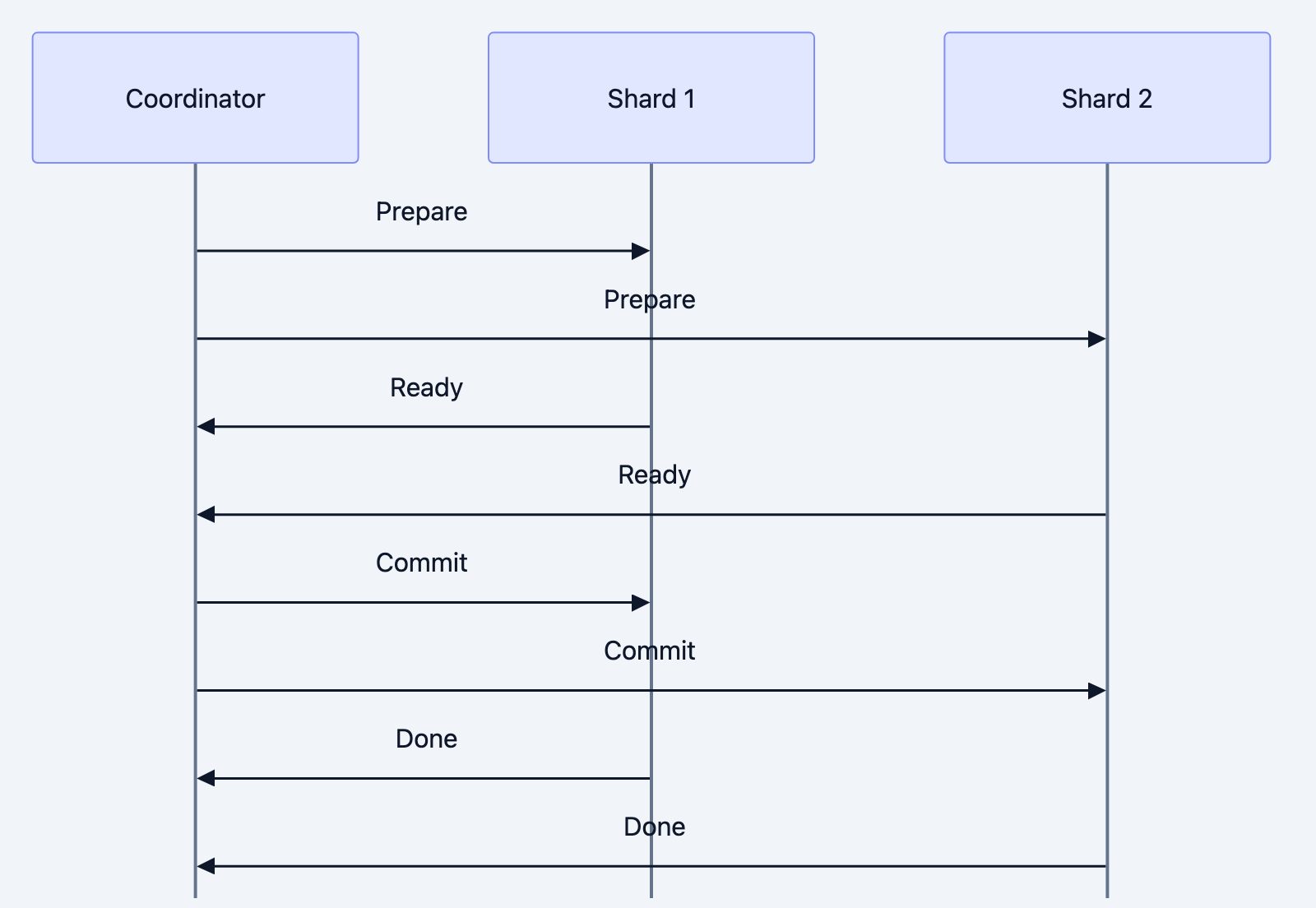
Two-Phase Commit (2PC):
Database design diagram 13
Problems with 2PC:
- Coordinator is single point of failure
- Blocking: participants wait for coordinator
- Slow: multiple round trips
Saga Pattern (Alternative):
Database design diagram 14
go// Saga implementation
type OrderSaga struct {
    steps []SagaStep
}

type SagaStep struct {
    Execute    func() error
    Compensate func() error
}

func (s *OrderSaga) Run() error {
    completedSteps := []SagaStep{}

    for _, step := range s.steps {
        if err := step.Execute(); err != nil {
            // Rollback completed steps in reverse order
            for i := len(completedSteps) - 1; i >= 0; i-- {
                completedSteps[i].Compensate()
            }
            return err
        }
        completedSteps = append(completedSteps, step)
    }

    return nil
}

// Usage
saga := &OrderSaga{
    steps: []SagaStep{
        {
            Execute:    func() error { return inventory.Reserve(items) },
            Compensate: func() error { return inventory.Release(items) },
        },
        {
            Execute:    func() error { return payment.Charge(amount) },
            Compensate: func() error { return payment.Refund(amount) },
        },
        {
            Execute:    func() error { return shipping.CreateLabel(order) },
            Compensate: func() error { return shipping.CancelLabel(order) },
        },
    },
}

err := saga.Run()
Part 8: Operational Excellence
Monitoring and Alerting
Key Metrics to Monitor:
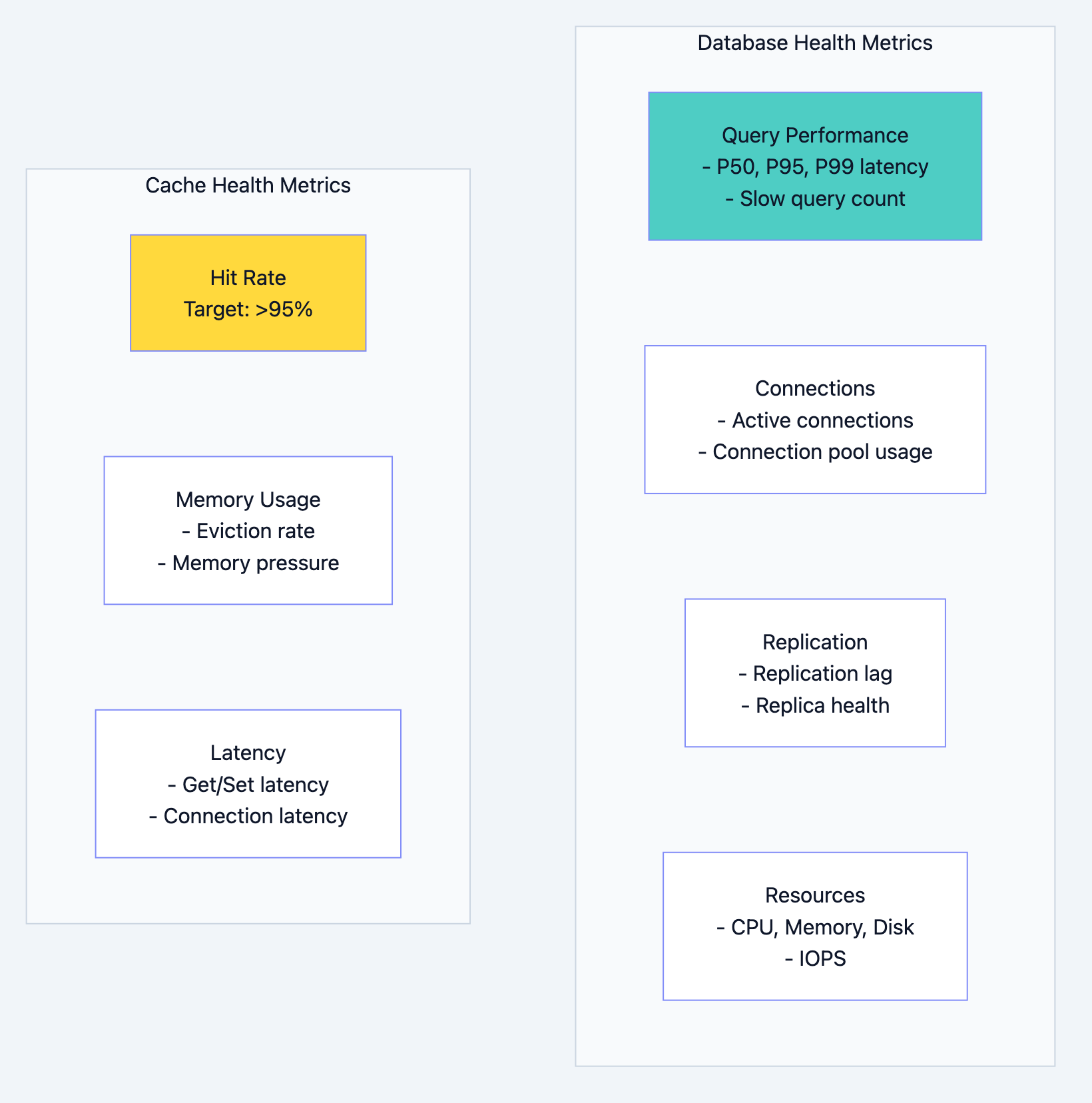
Database design diagram 15
Alert Thresholds:
| Metric | Warning | Critical |
|---|---|---|
| Query P99 latency | > 100ms | > 500ms |
| Replication lag | > 1s | > 10s |
| Connection pool usage | > 70% | > 90% |
| Cache hit rate | < 90% | < 80% |
| Disk usage | > 70% | > 85% |
| CPU usage | > 70% sustained | > 90% sustained |
Backup and Recovery
Backup Types:
-
Full Backup: Complete database copy. Large but simple to restore.
-
Incremental Backup: Only changes since last backup. Smaller but complex restore.
-
Point-in-Time Recovery (PITR): Full backup + transaction logs. Restore to any moment.
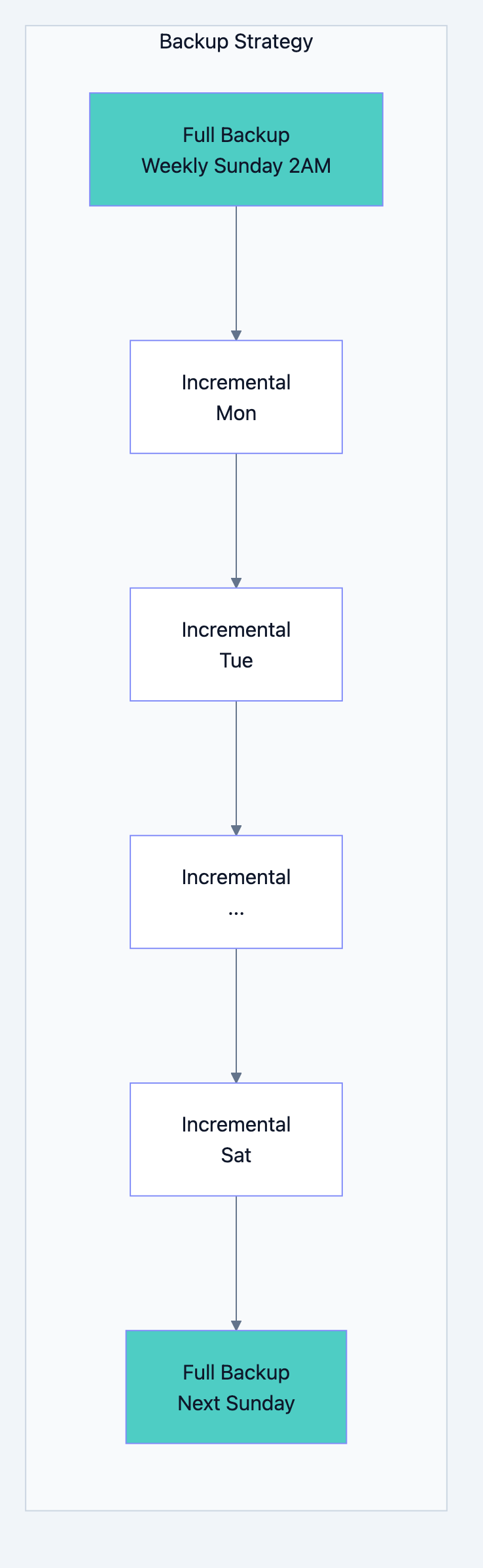
Database design diagram 16
Recovery Time Objective (RTO): How long can you be down?
Recovery Point Objective (RPO): How much data can you lose?
| Requirement | RTO | RPO | Strategy |
|---|---|---|---|
| Relaxed | Hours | Day | Daily backups |
| Standard | 1 hour | 1 hour | Hourly backups + replicas |
| Strict | Minutes | Minutes | Synchronous replicas + PITR |
| Critical | Seconds | Zero | Multi-region active-active |
Migration Strategies
Schema Migrations:
go// Migration file: 20240131_add_email_verified.go

func Up(db *sql.DB) error {
    // Add new column with default
    _, err := db.Exec(`
        ALTER TABLE users
        ADD COLUMN email_verified BOOLEAN DEFAULT FALSE
    `)
    return err
}

func Down(db *sql.DB) error {
    _, err := db.Exec(`
        ALTER TABLE users
        DROP COLUMN email_verified
    `)
    return err
}
Zero-Downtime Migration Pattern:

Database design diagram 17
Data Migration Between Databases:
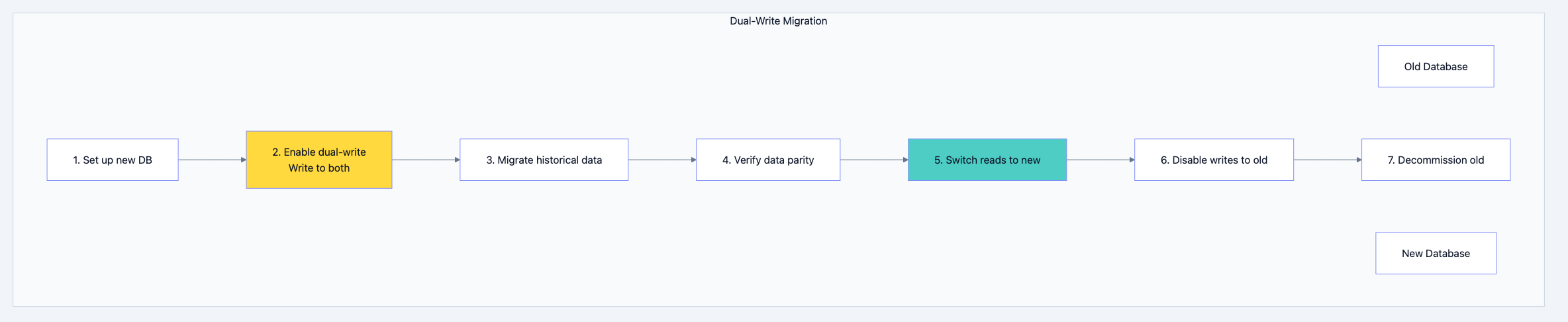
Database design diagram 18
Part 9: Common Interview Scenarios
Scenario 1: Design a URL Shortener Database
Requirements:
- Store short URL → long URL mapping
- Track click analytics
- Handle 100M URLs, 10K clicks/second
Questions to ask:
- What's the read/write ratio? (Heavy read)
- Do we need real-time analytics or batch?
- What's the URL lifecycle? Do they expire?
Design:
sql-- Primary storage (Key-Value optimized)
-- Using Redis or DynamoDB for fast lookups

-- Key: short_code
-- Value: {long_url, created_at, user_id, expires_at}

-- Analytics (Write-heavy, time-series)
-- Using Cassandra or TimescaleDB

CREATE TABLE clicks (
    short_code TEXT,
    clicked_at TIMESTAMP,
    user_agent TEXT,
    ip_address TEXT,
    country TEXT,
    PRIMARY KEY (short_code, clicked_at)
) WITH CLUSTERING ORDER BY (clicked_at DESC);

-- Aggregates (Pre-computed for dashboard)
CREATE TABLE click_stats_hourly (
    short_code TEXT,
    hour TIMESTAMP,
    click_count COUNTER,
    PRIMARY KEY (short_code, hour)
);
Scaling strategy:
- Redis cluster for URL lookups (hash-based sharding on short_code)
- Cassandra for analytics (partition by short_code, cluster by time)
- Pre-aggregate stats to avoid counting on read
Scenario 2: Design a Social Media Feed Database
Requirements:
- Users follow other users
- Posts appear in followers' feeds
- Handle 100M users, 1M posts/day
Questions to ask:
- Is feed real-time or slightly delayed acceptable?
- What's the follow distribution? (Power law - celebrities have millions)
- How far back does feed go?
Design:
sql-- Users (PostgreSQL - relational data)
CREATE TABLE users (
    id BIGINT PRIMARY KEY,
    username VARCHAR(50) UNIQUE,
    created_at TIMESTAMP
);

-- Follow relationships (PostgreSQL or Graph DB)
CREATE TABLE follows (
    follower_id BIGINT REFERENCES users(id),
    following_id BIGINT REFERENCES users(id),
    created_at TIMESTAMP,
    PRIMARY KEY (follower_id, following_id)
);
CREATE INDEX idx_following ON follows(following_id);

-- Posts (PostgreSQL)
CREATE TABLE posts (
    id BIGINT PRIMARY KEY,
    user_id BIGINT REFERENCES users(id),
    content TEXT,
    created_at TIMESTAMP
);
CREATE INDEX idx_posts_user_time ON posts(user_id, created_at DESC);
Feed Generation Approaches:

Database design diagram 19
Hybrid approach:
- Push for normal users (< 1000 followers)
- Pull for celebrities (millions of followers)
- Feed stored in Redis sorted sets
go// Feed cache structure (Redis)
// Key: feed:{user_id}
// Type: Sorted Set
// Score: timestamp
// Member: post_id

func GetFeed(userID int64, limit int) ([]Post, error) {
    // Get post IDs from cache
    postIDs := redis.ZRevRange("feed:"+userID, 0, limit-1)

    if len(postIDs) < limit {
        // Cache miss or cold start - pull from database
        return pullFeedFromDB(userID, limit)
    }

    // Fetch full posts (could be cached too)
    return fetchPosts(postIDs)
}

func CreatePost(post *Post) error {
    // Save to database
    db.Insert(post)

    // Fan-out to followers
    followers := getFollowers(post.UserID)

    if len(followers) > 10000 {
        // Celebrity - don't fan out, followers will pull
        return nil
    }

    // Fan-out to follower feeds
    for _, followerID := range followers {
        redis.ZAdd("feed:"+followerID, post.CreatedAt, post.ID)
        redis.ZRemRangeByRank("feed:"+followerID, 0, -1001) // Keep only 1000
    }

    return nil
}
Scenario 3: Design an E-Commerce Inventory System
Requirements:
- Track inventory across warehouses
- Prevent overselling
- Handle flash sales (10K orders/second)
Questions to ask:
- Can we ever oversell? (Usually no for physical goods)
- Is approximate inventory OK for display? (Usually yes)
- How many SKUs? Warehouses?
Design:
sql-- Inventory table (PostgreSQL with row-level locking)
CREATE TABLE inventory (
    sku VARCHAR(50),
    warehouse_id INT,
    quantity INT NOT NULL CHECK (quantity >= 0),
    reserved INT NOT NULL DEFAULT 0 CHECK (reserved >= 0),
    version INT NOT NULL DEFAULT 0,
    PRIMARY KEY (sku, warehouse_id)
);

-- Reservation with optimistic locking
UPDATE inventory
SET reserved = reserved + $quantity,
    version = version + 1
WHERE sku = $sku
  AND warehouse_id = $warehouse_id
  AND quantity - reserved >= $quantity
  AND version = $expected_version;

-- If affected rows = 0, retry with new version or fail
High-concurrency approach:
go// Pre-allocated inventory tokens for flash sales
type InventoryPool struct {
    tokens chan struct{}
    sku    string
}

func NewInventoryPool(sku string, quantity int) *InventoryPool {
    pool := &InventoryPool{
        tokens: make(chan struct{}, quantity),
        sku:    sku,
    }
    for i := 0; i < quantity; i++ {
        pool.tokens <- struct{}{}
    }
    return pool
}

func (p *InventoryPool) Reserve() bool {
    select {
    case <-p.tokens:
        return true  // Got a token
    default:
        return false // Sold out
    }
}

func (p *InventoryPool) Release() {
    p.tokens <- struct{}{}
}

// For flash sales:
// 1. Pre-load inventory count into memory/Redis
// 2. Decrement in memory (atomic counter)
// 3. Async reconcile with database
// 4. Accept slight overselling risk in extreme cases
Cache strategy:

Database design diagram 20
Scenario 4: Design a Real-Time Leaderboard
Requirements:
- Track scores for millions of players
- Show top 100 and player's rank
- Update on every game completion
Questions to ask:
- How often do scores change? (Every game)
- Do we need historical leaderboards?
- Global or per-region?
Design:
go// Redis Sorted Set - perfect for leaderboards
// Key: leaderboard:global
// Score: player's score
// Member: player_id

func UpdateScore(playerID string, score int64) error {
    // Atomic update - O(log N)
    return redis.ZAdd("leaderboard:global", redis.Z{
        Score:  float64(score),
        Member: playerID,
    })
}

func GetTopPlayers(limit int) ([]Player, error) {
    // Get top N - O(log N + M) where M is limit
    results := redis.ZRevRangeWithScores("leaderboard:global", 0, limit-1)

    players := make([]Player, len(results))
    for i, r := range results {
        players[i] = Player{
            ID:    r.Member.(string),
            Score: int64(r.Score),
            Rank:  i + 1,
        }
    }
    return players, nil
}

func GetPlayerRank(playerID string) (int64, error) {
    // Get rank - O(log N)
    rank, err := redis.ZRevRank("leaderboard:global", playerID)
    if err != nil {
        return 0, err
    }
    return rank + 1, nil // 0-indexed to 1-indexed
}
Scaling for millions:
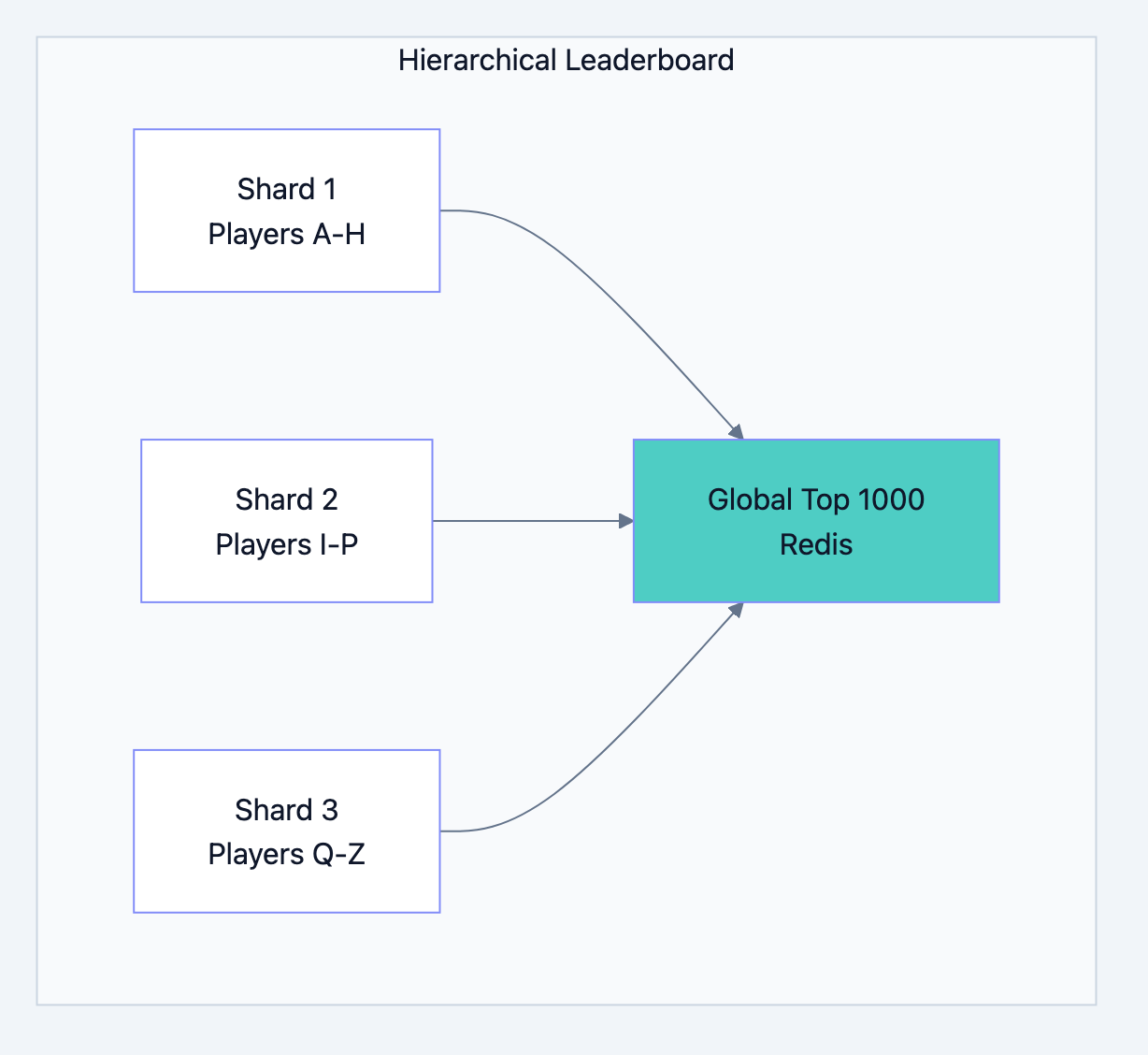
Database design diagram 21
go// For millions of players:
// 1. Shard by player_id hash
// 2. Each shard maintains local leaderboard
// 3. Top N from each shard bubble up to global
// 4. Global leaderboard only tracks top ~10K

func GetPlayerRankSharded(playerID string) (int64, error) {
    shard := getShardForPlayer(playerID)

    // Get rank within shard
    localRank, _ := redis.ZRevRank(shard+":leaderboard", playerID)

    // Get player's score
    score, _ := redis.ZScore(shard+":leaderboard", playerID)

    // Count how many players in other shards have higher scores
    // (This can be approximated with percentile buckets for scale)
    globalHigherCount := countPlayersWithHigherScore(score)

    return localRank + globalHigherCount + 1, nil
}
Part 10: Interview Checklist
Before the Interview
- Understand CAP theorem and its implications
- Know SQL vs NoSQL trade-offs
- Practice explaining indexing strategies
- Understand sharding approaches
- Know caching patterns and pitfalls
- Be ready to discuss consistency levels
- Have examples of each database type's use case
During the Interview
- Start with questions - Don't jump to solutions
- State assumptions - Make your thinking visible
- Draw diagrams - Visualize the architecture
- Discuss trade-offs - Show you understand complexity
- Consider scale - Address growth and limits
- Mention operations - Backup, monitoring, migration
Common Follow-Up Questions
"What happens when X fails?"
- Discuss redundancy, failover, recovery procedures
"How does this scale to 10x/100x?"
- Discuss bottlenecks, horizontal scaling options
"What are the consistency guarantees?"
- Discuss CAP trade-offs, replication lag, transaction boundaries
"How would you migrate from the current system?"
- Discuss dual-write, shadow reads, gradual cutover
"What metrics would you monitor?"
- Discuss latency, throughput, error rates, resource utilization
Summary
Database design is about understanding requirements, choosing appropriate tools, and making informed trade-offs. There's no single "right" answer. The best answer demonstrates:
- Systematic thinking - Requirements before solutions
- Breadth of knowledge - SQL, NoSQL, caching, replication, sharding
- Depth of understanding - Not just what, but why and when
- Practical experience - Real-world considerations like operations and scaling
- Communication - Clear explanation of trade-offs
Remember: Interviewers want to see how you think, not that you memorize solutions. Ask questions, explain your reasoning, acknowledge trade-offs, and show that you understand there are multiple valid approaches to any problem.
The best database architects aren't those who know every detail. They're those who ask the right questions and make thoughtful decisions based on the specific requirements at hand.