Banking System Design: A Complete Interview Guide
Before We Start: How to Use This Guide
This guide is written for two audiences:
-
If you're preparing for interviews: Read everything. Understand the "why" behind each decision. Interviewers don't want you to memorize schemas they want to see you think.
-
If you're new to system design: Don't worry about understanding everything at once. Read it like a story. The concepts will click as you go.
My promise to you: By the end of this guide, you'll be able to walk into any interview and design a banking system from scratch, explaining every decision with confidence.
Chapter 1: Understanding What We're Building
What Does a Bank Actually Do?
Before we write a single line of code or draw a single table, let's understand what a bank does. This is where most interview candidates fail they jump to solutions without understanding the problem.
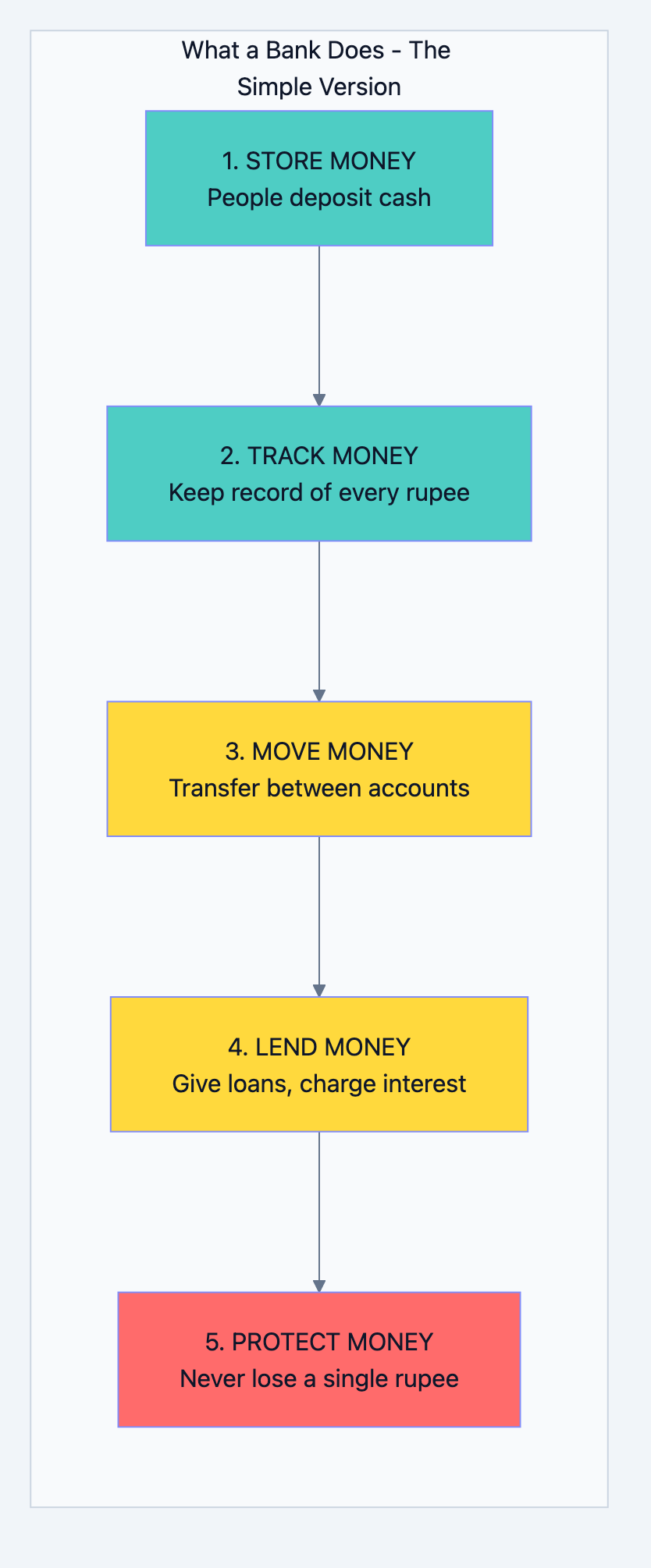
A bank is essentially a trust machine. People give it money, trusting they'll get it back. The bank keeps track of who gave what, who took what, and makes sure the numbers always add up.
Let me break this down into simple operations:
Banking system diagram 1
Why Banking Systems Are Different
When you design Instagram and lose a photo, it's annoying. When you design a bank and lose money, it's a crime. This changes everything about how we design.
The Three Unbreakable Rules of Banking:
| Rule | What It Means | Example |
|---|---|---|
| Never Lose Money | If someone deposits ₹1000, it must exist forever until they withdraw it | Even if servers crash, data centers burn, the money must be safe |
| Never Create Money | Money can only move, not appear from nowhere | If A sends ₹100 to B, A loses exactly ₹100 and B gains exactly ₹100 |
| Never Show Wrong Numbers | The balance shown must always be accurate | No "eventual consistency" - you can't show ₹5000 when reality is ₹4000 |
Scale: How Big Is Banking DB?
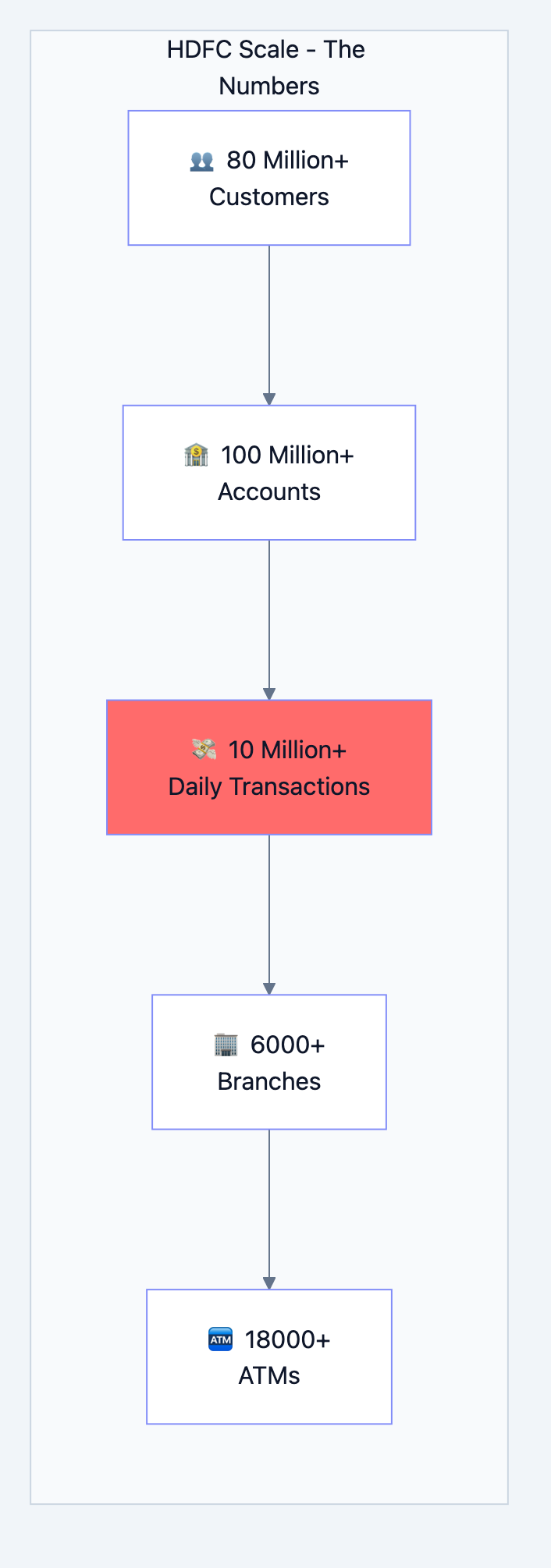
Let's put some numbers to understand what we're designing for:
Banking system diagram 2
What these numbers mean for our design:
- 10 million daily transactions = ~115 transactions per second on average
- But on salary day (1st of month) = 1000+ transactions per second
- During Diwali/festivals = Even higher peaks
- We must design for the peak, not the average
Chapter 2: The Data - What Do We Need to Store?
Think Like a Bank Manager
Imagine you're a bank manager with a pen and notebook. What information would you write down?
For each customer, you'd write:
- Their name, address, phone number
- Their ID proof (PAN, Aadhaar)
- When they joined the bank
- Are they a good customer or risky?
For each account, you'd write:
- Account number
- Whose account is it?
- How much money is in it?
- What type of account (savings, current)?
- Which branch handles it?
For each transaction, you'd write:
- What happened (deposit, withdrawal, transfer)?
- How much money?
- When did it happen?
- What was the balance before and after?
This is exactly what our database tables will store. Let's design them one by one.
Chapter 3: Database Tables - Every Table Explained
Table 1: Customers - The People
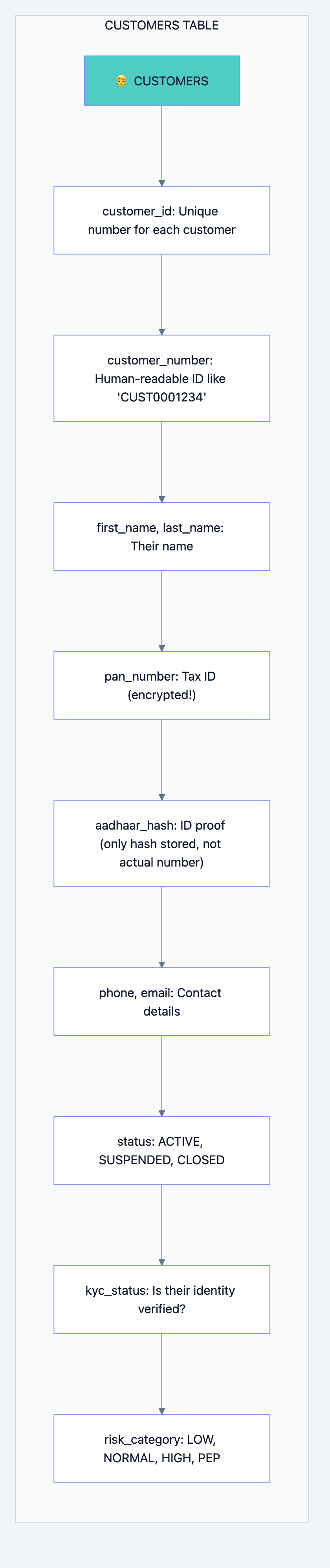
What is this table?
This table stores information about every person who has a relationship with the bank.
Why do we need it?
You can't have a bank account without knowing who owns it. This is the foundation.
Banking system diagram 3
Why each field exists:
| Field | Why We Need It | Interview Insight |
|---|---|---|
customer_id | Computer needs a fast way to find customers. Numbers are faster than names. | "We use BIGINT because we might have billions of customers over time" |
customer_number | Humans need readable IDs. You can't tell a customer "Your ID is 847293847" | "This is for human interfaces, customer_id is for system interfaces" |
pan_number (encrypted) | Required by law. But we encrypt it because it's sensitive | "We use AES-256 encryption. Even if database is stolen, data is safe" |
aadhaar_hash | We need to verify identity but don't want to store actual Aadhaar | "We only store a hash. We can verify but can't recover the actual number" |
status | Account might be frozen, closed, or active | "This allows us to soft-delete customers without losing history" |
kyc_status | RBI requires Know Your Customer verification | "Unverified customers have transaction limits" |
risk_category | Some customers need extra monitoring (politicians, etc.) | "PEP = Politically Exposed Person. Extra scrutiny required by law" |
The SQL:
sqlCREATE TABLE customers (
    -- Primary identifier - the computer's way to find you
    customer_id         BIGSERIAL PRIMARY KEY,

    -- Human-readable identifier - what you see on your passbook
    customer_number     VARCHAR(20) NOT NULL UNIQUE,

    -- Basic information
    first_name          VARCHAR(100) NOT NULL,
    middle_name         VARCHAR(100),
    last_name           VARCHAR(100) NOT NULL,
    date_of_birth       DATE NOT NULL,

    -- Sensitive information (encrypted/hashed)
    pan_number_encrypted BYTEA,          -- Encrypted, not plain text
    aadhaar_hash        VARCHAR(64),      -- Only hash, cannot reverse

    -- Contact (needed for OTP, alerts)
    phone_primary       VARCHAR(15) NOT NULL,
    email               VARCHAR(255),

    -- Status tracking
    status              VARCHAR(20) DEFAULT 'ACTIVE',
    kyc_status          VARCHAR(20) DEFAULT 'PENDING',
    risk_category       VARCHAR(20) DEFAULT 'NORMAL',

    -- Audit trail (who created, when modified)
    created_at          TIMESTAMP DEFAULT CURRENT_TIMESTAMP,
    updated_at          TIMESTAMP DEFAULT CURRENT_TIMESTAMP,

    -- Soft delete (never actually delete customer data)
    is_deleted          BOOLEAN DEFAULT FALSE
);

-- Why these indexes?
-- Finding customer by phone (login, OTP verification)
CREATE INDEX idx_customers_phone ON customers(phone_primary);
-- Finding customer by name (branch staff search)
CREATE INDEX idx_customers_name ON customers(last_name, first_name);
Interview Question: "Why don't you just delete customers when they close their account?"
Your Answer: "We never delete financial data. Regulatory requirements mandate keeping records for 10+ years. Also, a 'deleted' customer might have historical transactions we need for audits. Instead, we use soft delete - set
is_deleted = true but keep the data."Table 2: Accounts - Where Money Lives
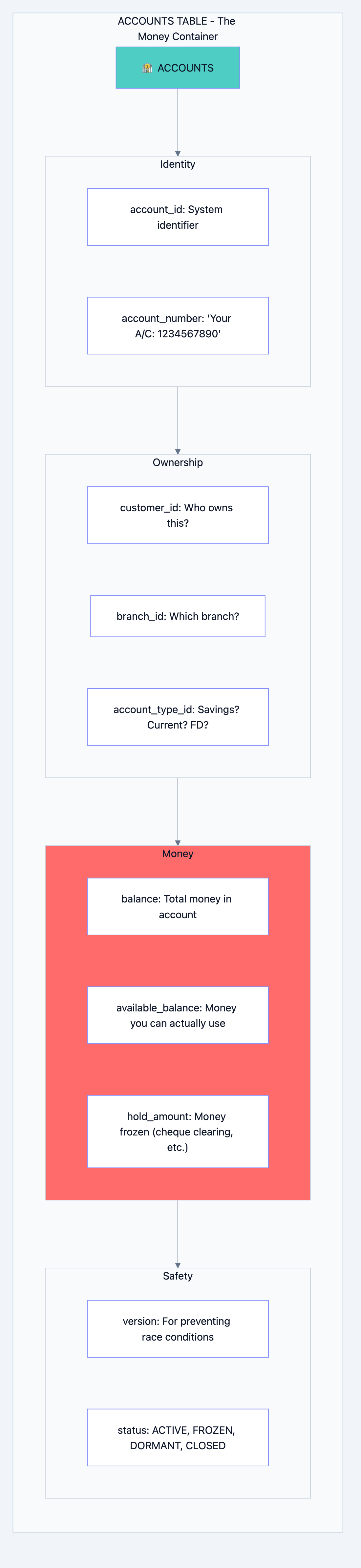
What is this table?
This table tracks every bank account. One customer can have multiple accounts (savings, fixed deposit, loan).
Why do we need it?
Money doesn't belong to a person directly it belongs to an account. The account is the container for money.
Banking system diagram 4
The Critical Concept: Balance vs Available Balance
This confuses many people. Let me explain with a real example:
You have ₹10,000 in your account.
You deposit a cheque for ₹5,000.
The cheque takes 2 days to clear.

Balance: ₹15,000 (total money, including pending cheque)
Available Balance: ₹10,000 (money you can actually withdraw TODAY)
Hold Amount: ₹5,000 (the pending cheque)

Formula: Available Balance = Balance - Hold Amount
Why the
version field?This is crucial for preventing race conditions. Imagine:
Time 0: Your balance is ₹1000
Time 1: ATM in Mumbai reads balance = ₹1000
Time 2: ATM in Delhi reads balance = ₹1000
Time 3: Mumbai ATM withdraws ₹800, sets balance = ₹200
Time 4: Delhi ATM withdraws ₹800, sets balance = ₹200

Problem: You withdrew ₹1600 from ₹1000 account!
The
version field prevents this:Time 0: Balance = ₹1000, Version = 1 Time 1: Mumbai reads: Balance = ₹1000, Version = 1 Time 2: Delhi reads: Balance = ₹1000, Version = 1 Time 3: Mumbai updates: "SET balance = 200 WHERE version = 1" Success! Version becomes 2 Time 4: Delhi updates: "SET balance = 200 WHERE version = 1" FAILS! Version is now 2, not 1 Delhi ATM says "Please try again"
The SQL:
sqlCREATE TABLE accounts (
    -- Identifiers
    account_id          BIGSERIAL PRIMARY KEY,
    account_number      VARCHAR(20) NOT NULL UNIQUE,

    -- Relationships
    customer_id         BIGINT NOT NULL REFERENCES customers(customer_id),
    branch_id           INT NOT NULL REFERENCES branches(branch_id),
    account_type_id     INT NOT NULL REFERENCES account_types(account_type_id),

    -- Money tracking (DECIMAL for exact precision - never use FLOAT for money!)
    balance             DECIMAL(18,2) NOT NULL DEFAULT 0.00,
    available_balance   DECIMAL(18,2) NOT NULL DEFAULT 0.00,
    hold_amount         DECIMAL(18,2) NOT NULL DEFAULT 0.00,
    minimum_balance     DECIMAL(18,2) NOT NULL DEFAULT 0.00,

    -- Interest (for savings accounts)
    interest_rate       DECIMAL(5,4),  -- 0.0350 = 3.5%

    -- Limits (fraud prevention)
    daily_withdrawal_limit  DECIMAL(18,2) DEFAULT 100000.00,
    daily_transfer_limit    DECIMAL(18,2) DEFAULT 500000.00,

    -- Status
    status              VARCHAR(20) DEFAULT 'ACTIVE',

    -- THE CRITICAL VERSION FIELD
    version             INT NOT NULL DEFAULT 1,

    -- Timestamps
    opened_at           TIMESTAMP DEFAULT CURRENT_TIMESTAMP,
    updated_at          TIMESTAMP DEFAULT CURRENT_TIMESTAMP
);

-- Why DECIMAL(18,2)?
-- 18 total digits, 2 after decimal
-- Maximum: 9,999,999,999,999,999.99 (nearly 10 quadrillion)
-- Enough for any bank balance, with paisa precision
Interview Question: "Why DECIMAL and not FLOAT for money?"
Your Answer: "FLOAT has precision issues. For example, 0.1 + 0.2 in floating point equals 0.30000000000000004, not 0.3. In banking, even 1 paisa error across millions of transactions becomes a huge problem. DECIMAL stores exact values."
Table 3: Transactions - The Money Movements
What is this table?
Every time money moves deposit, withdrawal, transfer, interest credit, fee debit it's recorded here.
Why do we need it?
This is your audit trail. If anyone asks "where did my money go?", this table has the answer.
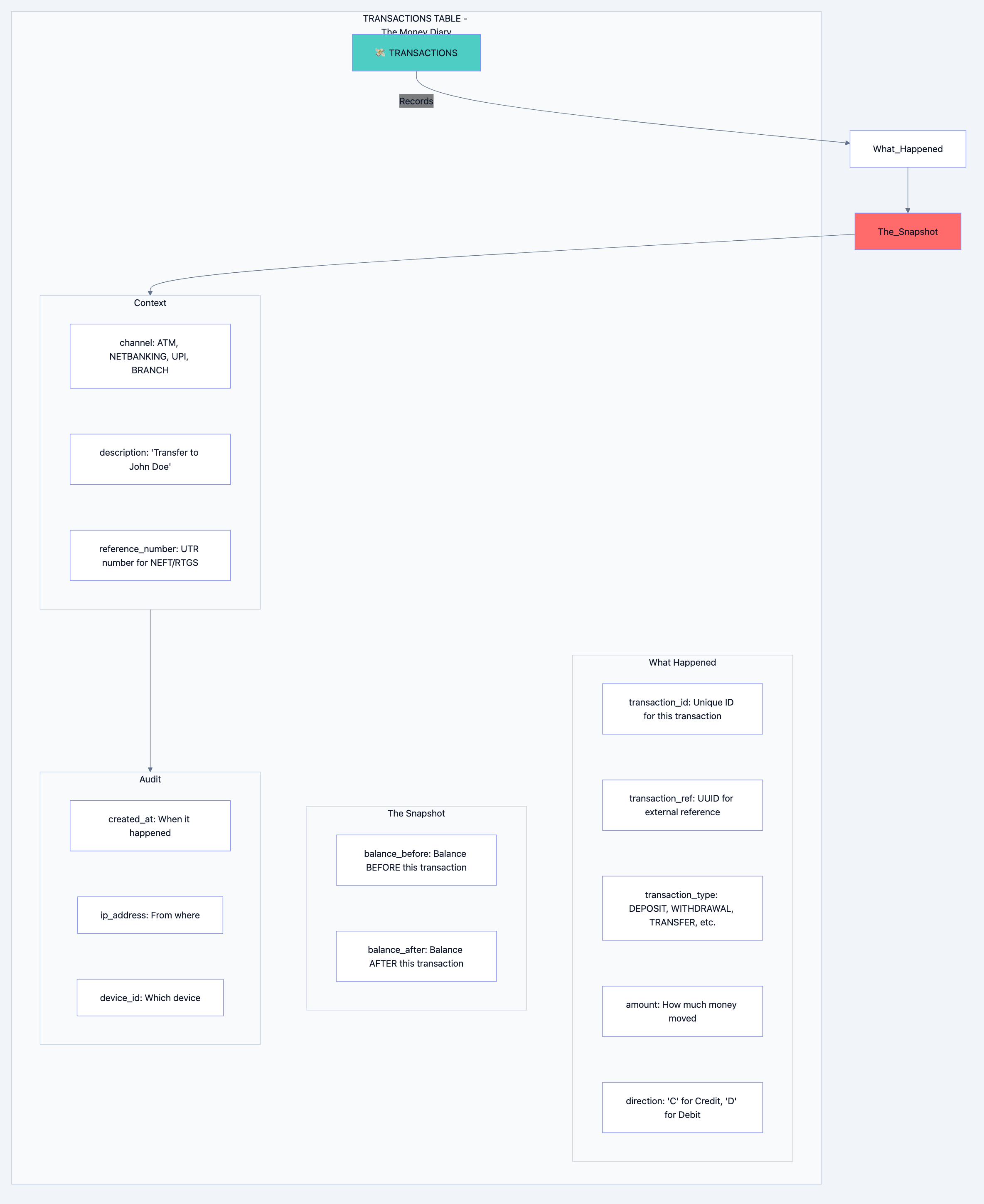
Banking system diagram 5
Why We Store Balance Before and After:
This seems redundant, but it's gold for debugging and audits:
Transaction 1: Deposit ₹1000
  balance_before: 0
  balance_after: 1000

Transaction 2: Withdraw ₹500
  balance_before: 1000
  balance_after: 500

Transaction 3: Transfer ₹200
  balance_before: 500
  balance_after: 300
Benefits:
- Instant balance history: You can see balance at any point in time
- Error detection: If balance_after of Txn 2 ≠ balance_before of Txn 3, something is wrong
- Audit proof: Regulators can verify every rupee movement
Why We Partition This Table:
This table grows FAST. 10 million transactions per day = 3.65 billion per year.
sql-- Partitioned by month
CREATE TABLE transactions (
    transaction_id      BIGSERIAL,
    account_id          BIGINT NOT NULL,
    amount              DECIMAL(18,2) NOT NULL,
    direction           CHAR(1) NOT NULL,  -- 'C' or 'D'
    balance_before      DECIMAL(18,2) NOT NULL,
    balance_after       DECIMAL(18,2) NOT NULL,
    transaction_type    VARCHAR(50) NOT NULL,
    channel             VARCHAR(20) NOT NULL,
    status              VARCHAR(20) DEFAULT 'COMPLETED',
    description         VARCHAR(500),
    reference_number    VARCHAR(50),
    created_at          TIMESTAMP NOT NULL DEFAULT CURRENT_TIMESTAMP,
    ip_address          INET,

    PRIMARY KEY (transaction_id, created_at)
) PARTITION BY RANGE (created_at);

-- Create partitions for each month
CREATE TABLE transactions_2024_01 PARTITION OF transactions
    FOR VALUES FROM ('2024-01-01') TO ('2024-02-01');
CREATE TABLE transactions_2024_02 PARTITION OF transactions
    FOR VALUES FROM ('2024-02-01') TO ('2024-03-01');
-- ... and so on
Why Partition?

Banking system diagram 6
Benefits of Partitioning:
| Benefit | Explanation |
|---|---|
| Faster queries | "Show me January transactions" only scans January partition |
| Easy archival | Drop old partitions instead of deleting rows |
| Parallel processing | Different partitions can be backed up simultaneously |
| Smaller indexes | Each partition has its own smaller, faster indexes |
Table 4: Ledger Entries - The Accountant's Double-Entry
What is this table?
This is the accountant's view of transactions. Every money movement has TWO entries a debit somewhere and a credit somewhere.
Why do we need it?
This is how banks ensure "money never appears or disappears." It's called double-entry bookkeeping.
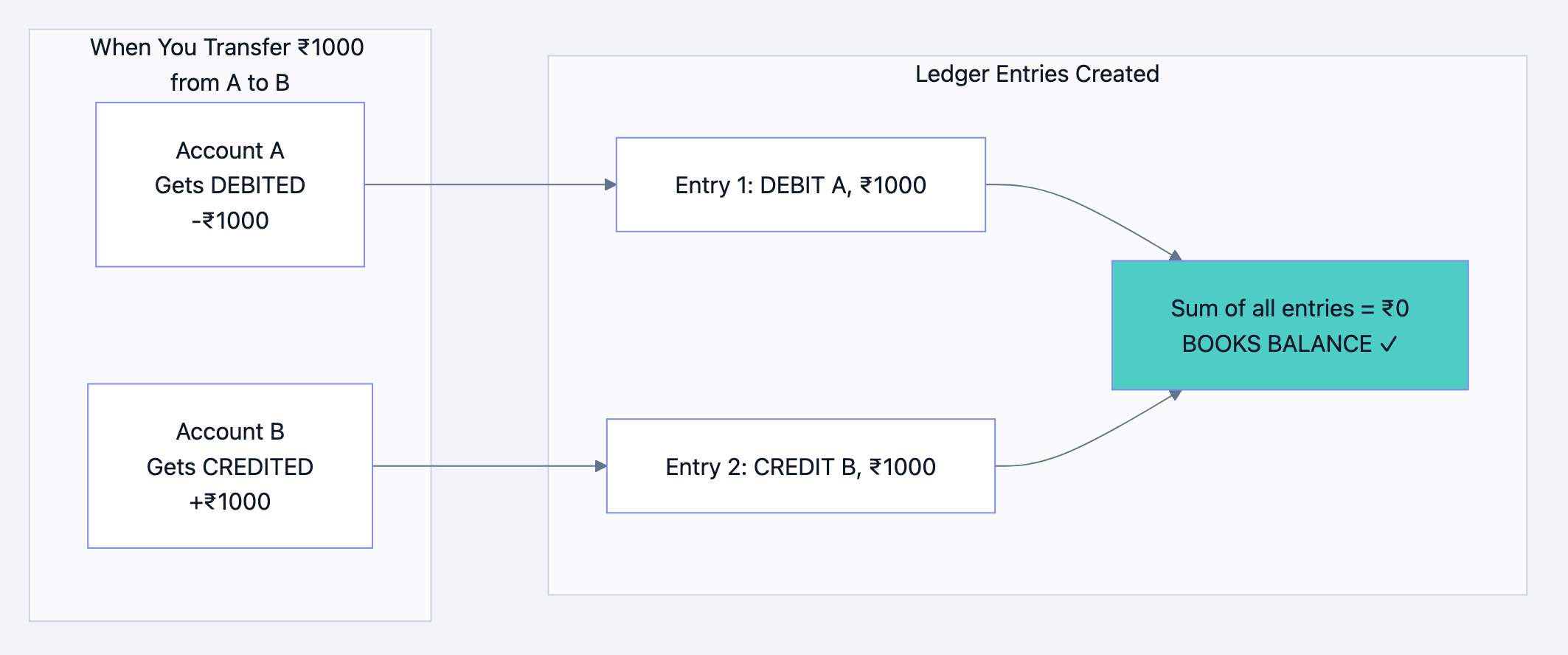
Banking system diagram 7
The Golden Rule:
For every debit, there must be an equal credit. The sum of all ledger entries must always be zero.
If it's not zero, money appeared from nowhere or disappeared into nowhere. That's a crime.
sqlCREATE TABLE ledger_entries (
    entry_id            BIGSERIAL,
    transaction_id      BIGINT NOT NULL,
    account_id          BIGINT NOT NULL,
    entry_type          CHAR(1) NOT NULL,  -- 'D' for Debit, 'C' for Credit
    amount              DECIMAL(18,2) NOT NULL,
    gl_account_id       INT NOT NULL,       -- General Ledger account
    created_at          TIMESTAMP DEFAULT CURRENT_TIMESTAMP,

    PRIMARY KEY (entry_id, created_at)
) PARTITION BY RANGE (created_at);

-- This query should ALWAYS return 0
-- If it doesn't, something is very wrong
SELECT SUM(CASE WHEN entry_type = 'D' THEN amount ELSE -amount END)
FROM ledger_entries;
Interview Question: "Why do you need both transactions and ledger_entries tables?"
Your Answer: "The transactions table is customer-facing it shows what happened to a specific account. The ledger_entries table is accounting-facing it ensures the bank's books balance. A transfer creates one transaction record but two ledger entries. The ledger is how auditors verify the bank hasn't created or destroyed money."
Table 5: Audit Logs - The Security Camera
What is this table?
This records EVERY change to EVERY record in the database.
Why do we need it?
When the RBI auditor asks "who changed this customer's address and when?", you need an answer.
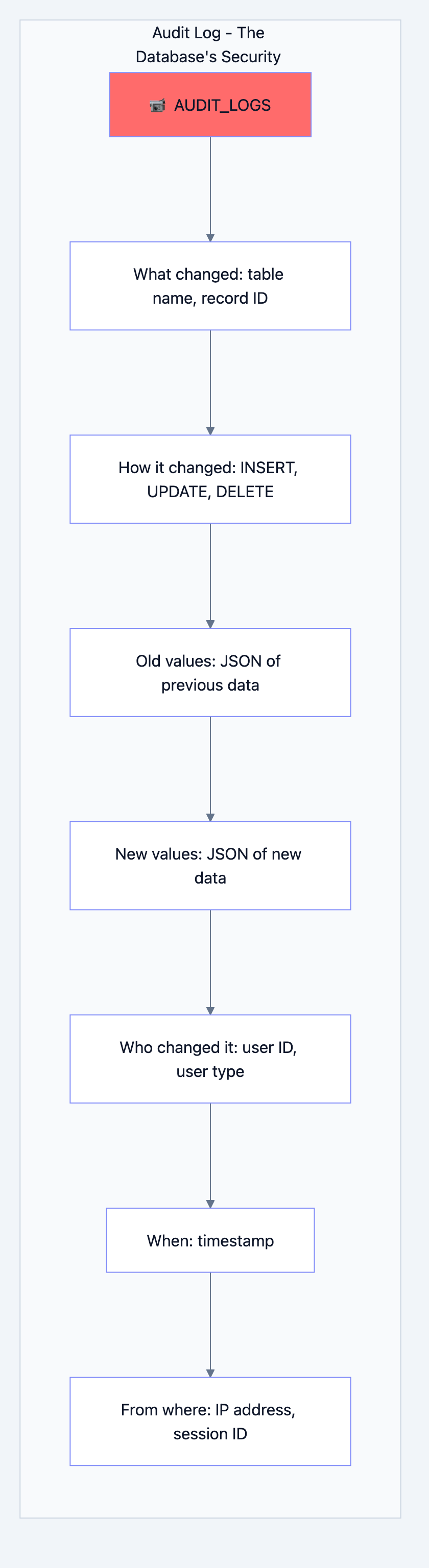
Banking system diagram 8
Key Design Decision: This Table is APPEND-ONLY
sqlCREATE TABLE audit_logs (
    audit_id            BIGSERIAL PRIMARY KEY,
    table_name          VARCHAR(100) NOT NULL,
    record_id           BIGINT NOT NULL,
    operation           CHAR(1) NOT NULL,  -- 'I', 'U', 'D'
    old_values          JSONB,
    new_values          JSONB,
    changed_fields      TEXT[],
    user_id             BIGINT,
    ip_address          INET,
    created_at          TIMESTAMP DEFAULT CURRENT_TIMESTAMP
);

-- CRITICAL: No one can modify or delete audit logs
REVOKE UPDATE, DELETE ON audit_logs FROM PUBLIC;
Why JSONB for old/new values?
Different tables have different columns. Using JSONB lets us store any table's data without creating separate audit tables for each.
json// Example audit log entry
{
    "audit_id": 12345,
    "table_name": "customers",
    "record_id": 67890,
    "operation": "U",
    "old_values": {"phone_primary": "9876543210", "email": "old@email.com"},
    "new_values": {"phone_primary": "9876543210", "email": "new@email.com"},
    "changed_fields": ["email"],
    "user_id": 100,
    "ip_address": "192.168.1.1",
    "created_at": "2024-01-15 14:30:00"
}
Chapter 4: The Complete Architecture - How Everything Connects
Now let's see how all these pieces work together.
The Big Picture
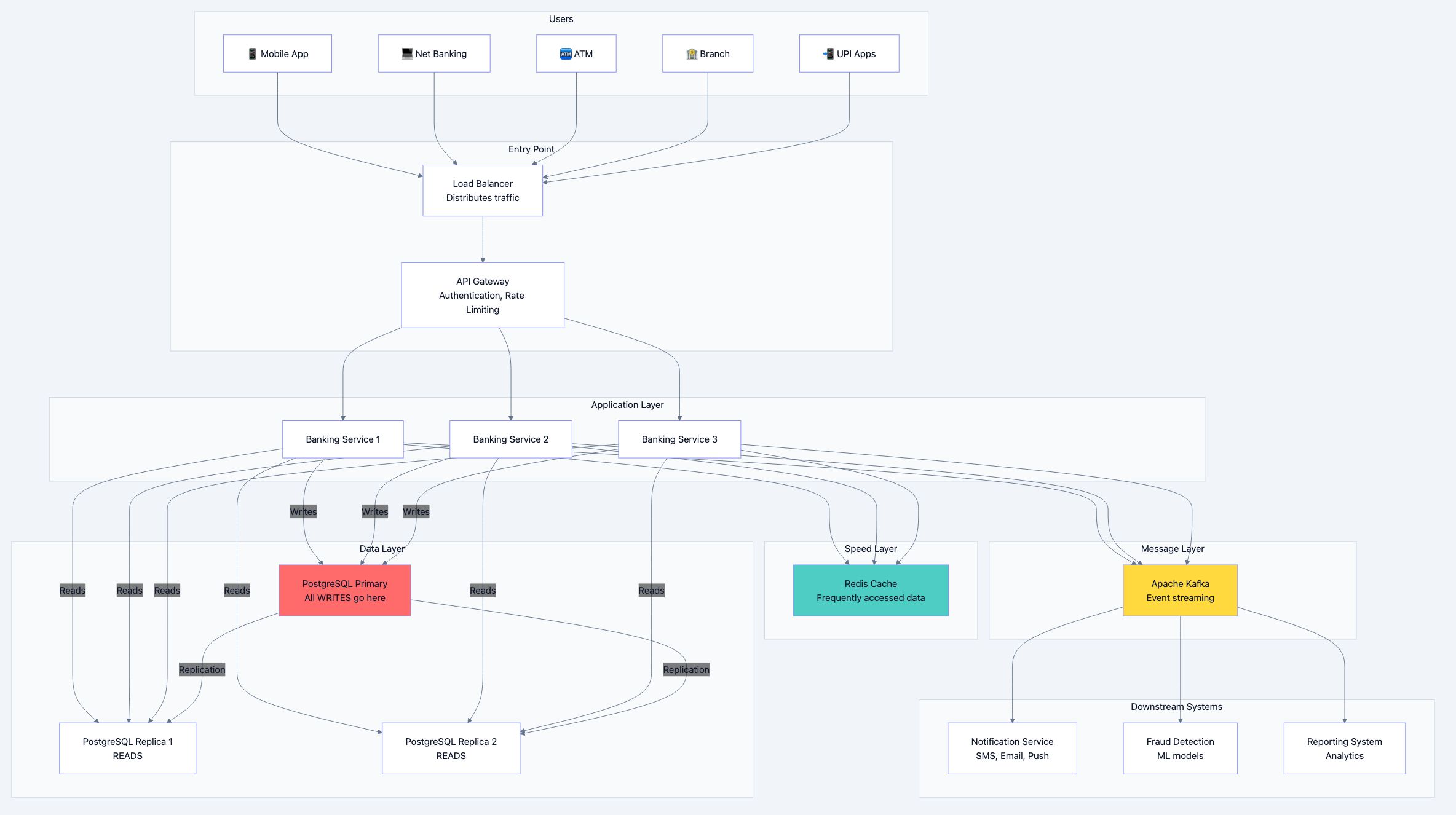
Banking system diagram 9
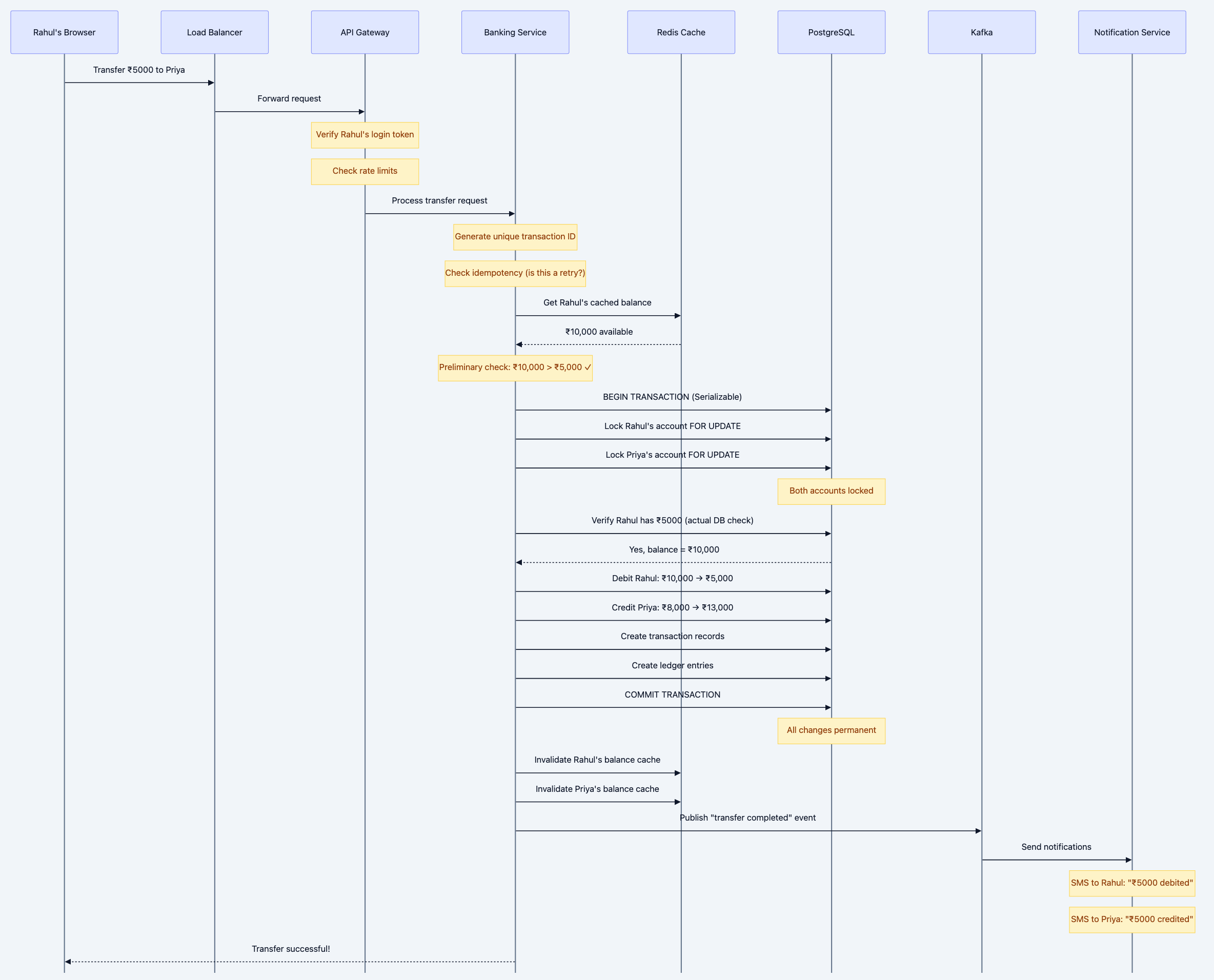
Let's Walk Through a Money Transfer
Scenario: Rahul wants to transfer ₹5,000 from his account to Priya's account using net banking.
Banking system diagram 10
Why Each Component Exists
Let me explain why we need each piece of this architecture:
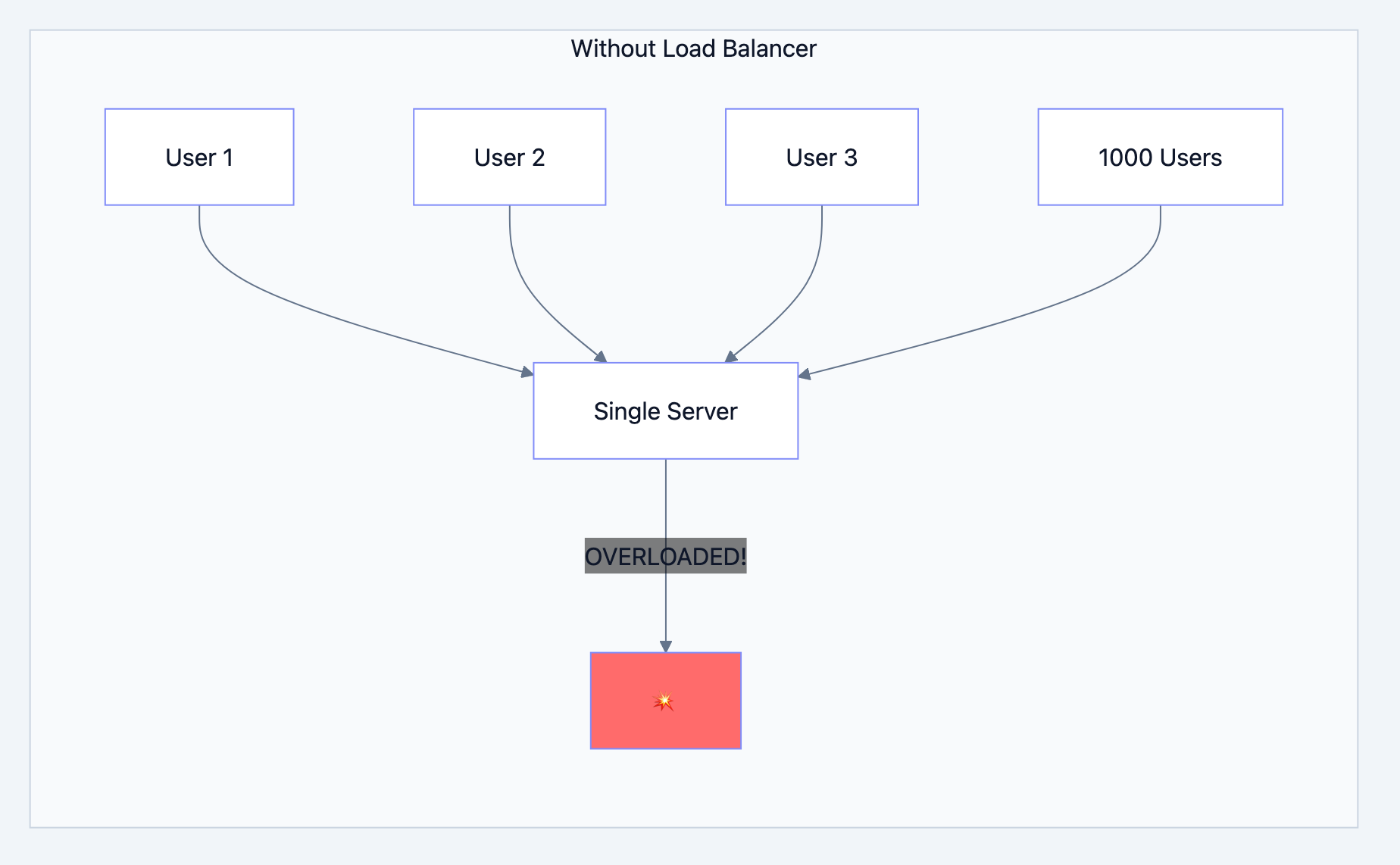
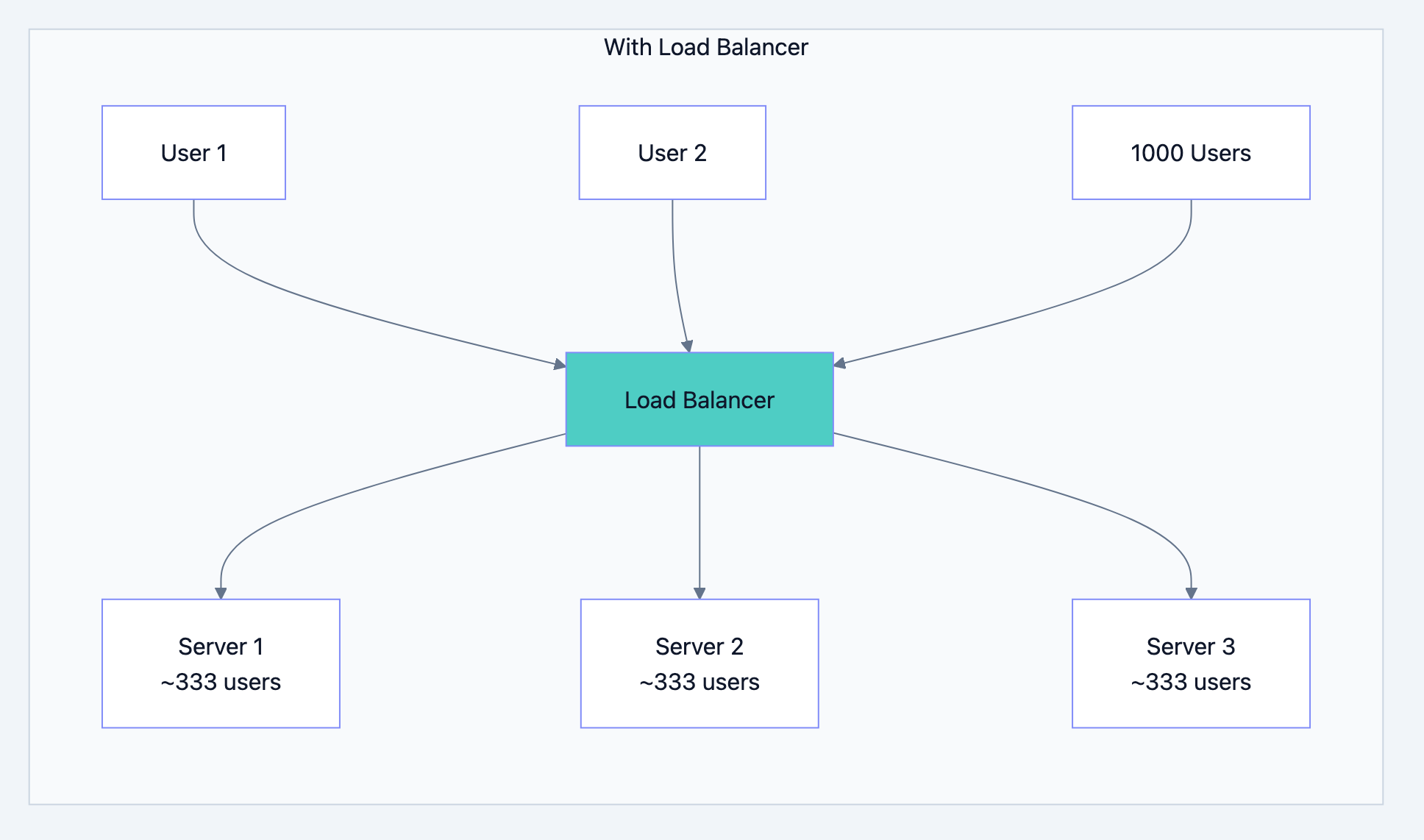
Load Balancer - The Traffic Police
Banking system diagram 11
Banking system diagram 12
What it does:
- Distributes incoming requests across multiple servers
- If one server dies, routes traffic to healthy ones
- Can add more servers during peak times (salary day!)
Real-world analogy: Like multiple billing counters at a supermarket. One long queue is slow; multiple counters serve customers faster.
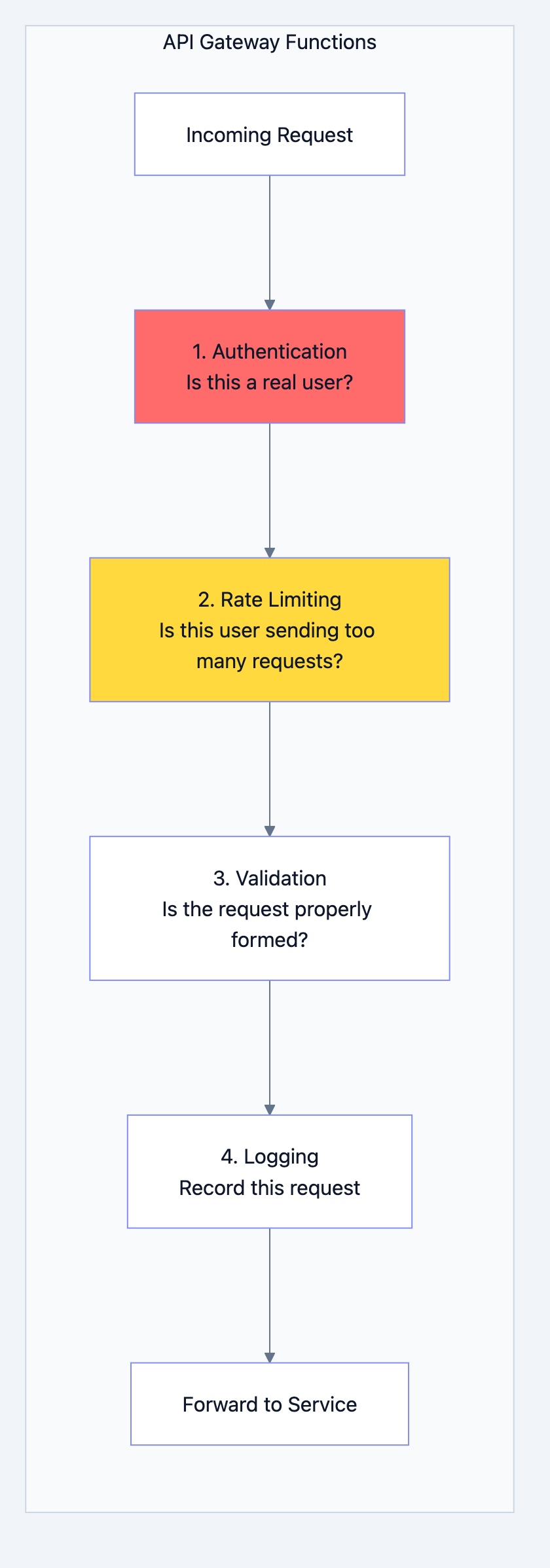
API Gateway - The Security Guard
Banking system diagram 13
Why Rate Limiting?
Without it, a malicious user could:
- Send 1 million requests per second
- Crash your servers (DDoS attack)
- Try to brute-force passwords
With rate limiting:
- Each user gets 100 requests per minute
- Excess requests get rejected with "429 Too Many Requests"
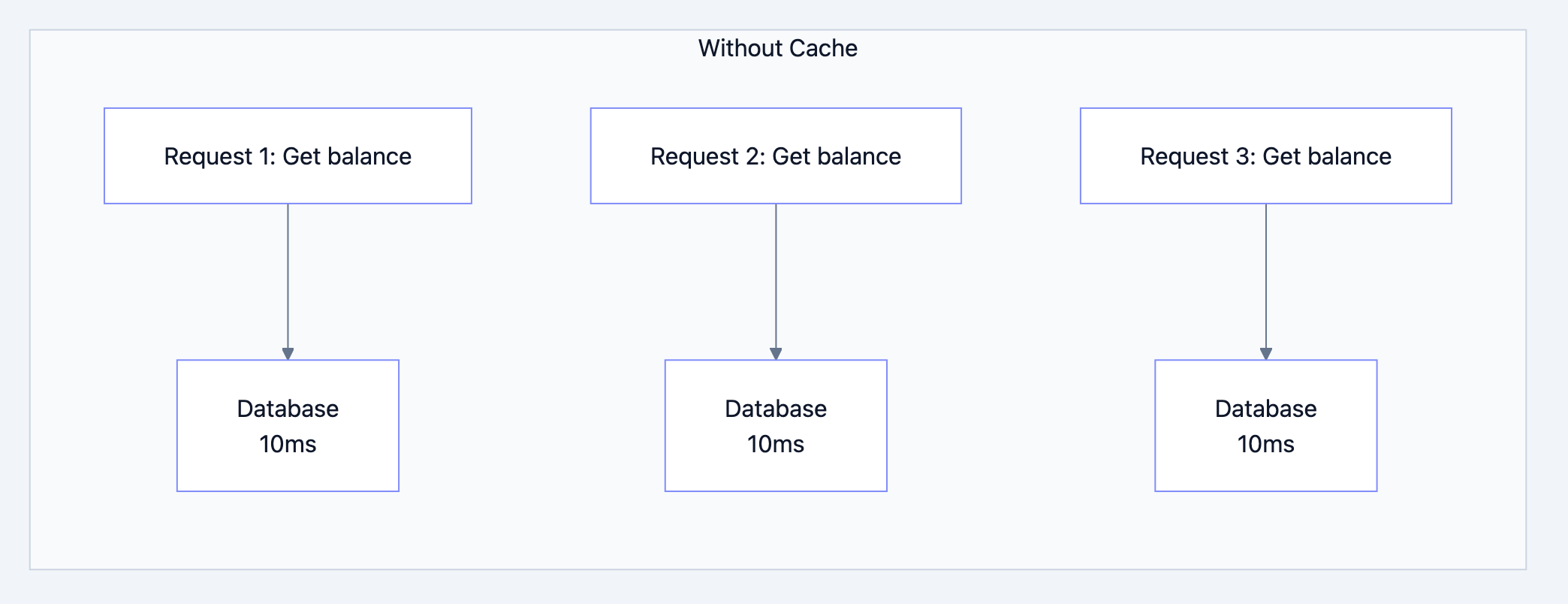
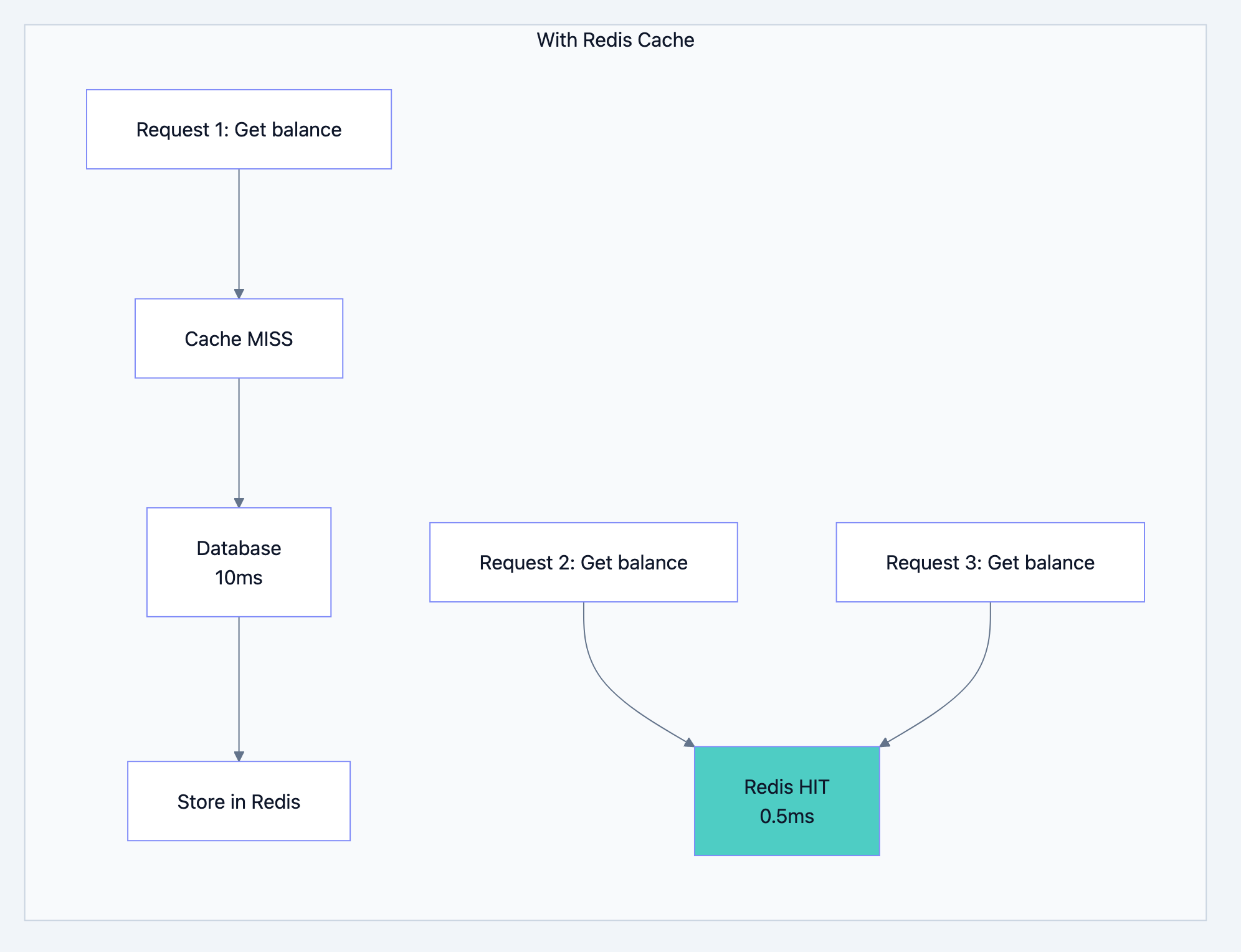
Redis Cache - The Speed Boost
Banking system diagram 14
Banking system diagram 15
What we cache:
- Account balances (read frequently)
- Customer profile data
- Recent transactions (for showing history)
- Session data (login state)
What we DON'T cache:
- The actual balance during a transfer (must be from database)
- Anything where consistency is critical
Interview Question: "If you cache the balance, how do you ensure it's accurate?"
Your Answer: "We cache for READ operations like showing balance on screen. For WRITE operations like transfers, we ALWAYS read from the database and use row-level locking. After any write, we invalidate the cache so the next read fetches fresh data."
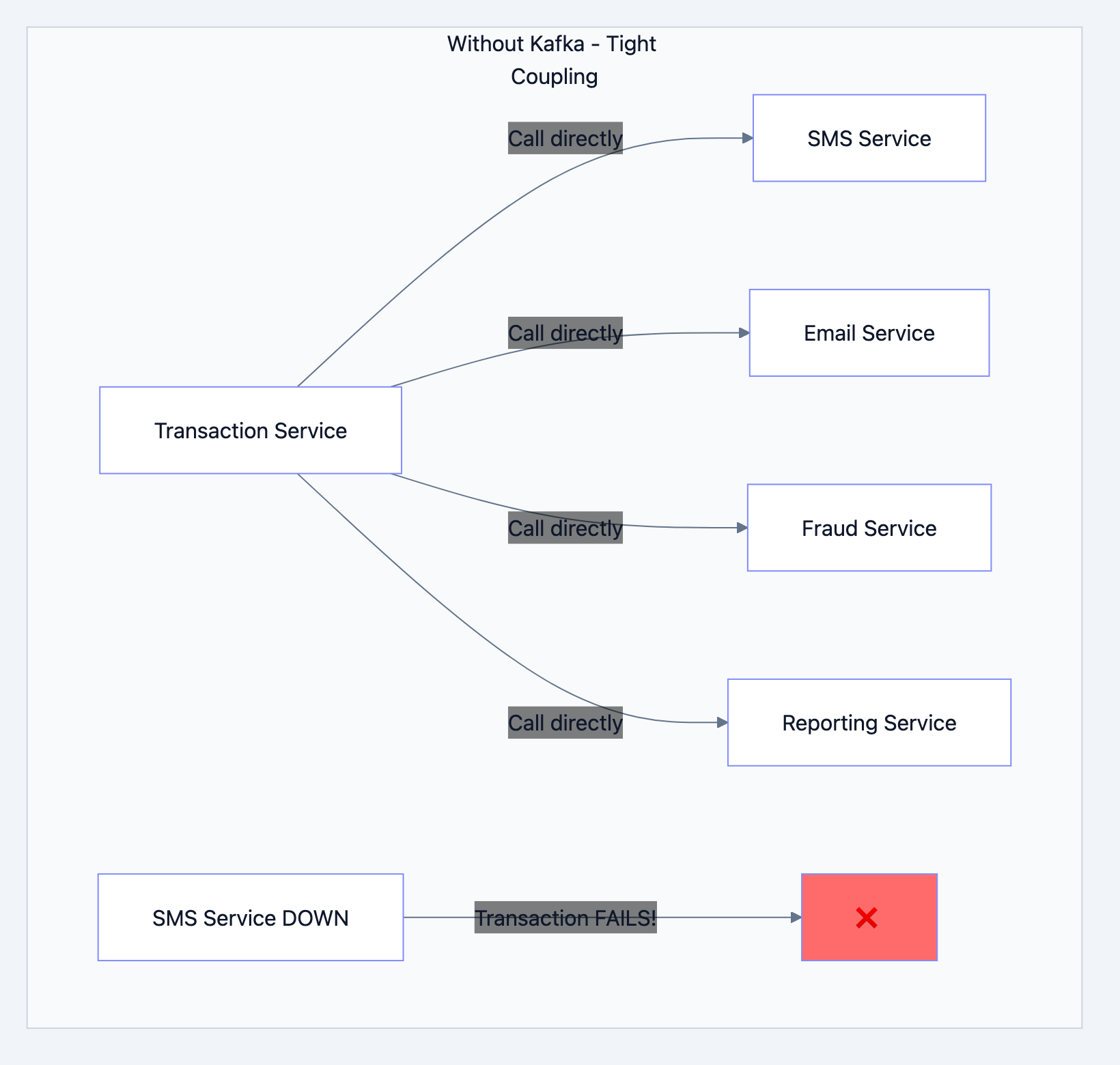
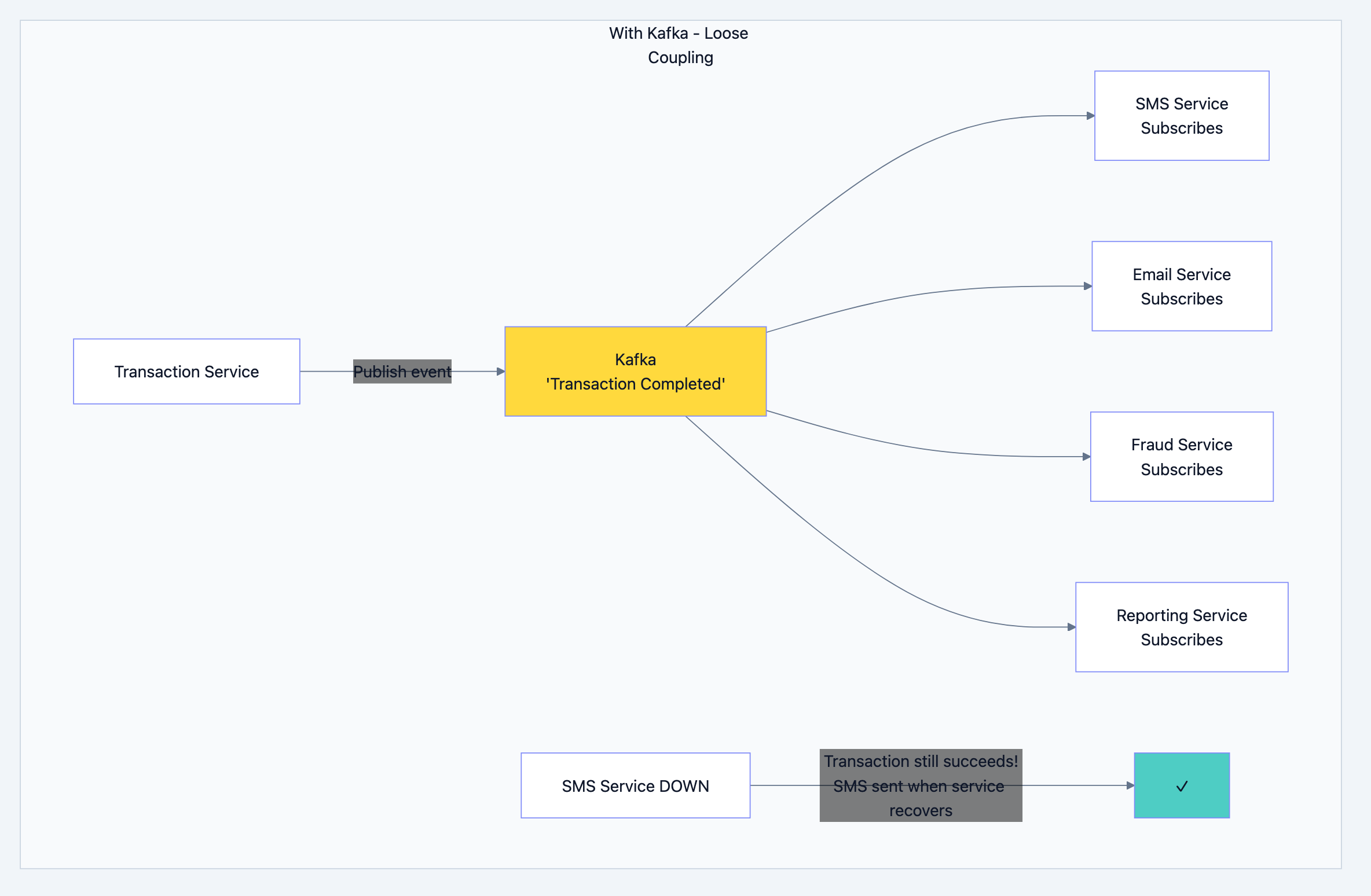
Kafka - The Message Delivery Guy
This is the most misunderstood component. Let me explain simply:
Banking system diagram 16
Problem: If SMS service is slow or down, your transfer fails! That's terrible.
Banking system diagram 17
Why Kafka specifically?
| Feature | Why It Matters for Banking |
|---|---|
| Durability | Messages are saved to disk. Even if Kafka restarts, no message is lost |
| Ordering | Messages for the same account are processed in order |
| Replay | If fraud detection missed something, you can replay old messages |
| Scale | Can handle millions of messages per second |
Real-world analogy: Kafka is like a postal service. You drop a letter (message) in the mailbox. The postal service guarantees delivery even if the recipient isn't home right now. They'll keep trying until it's delivered.
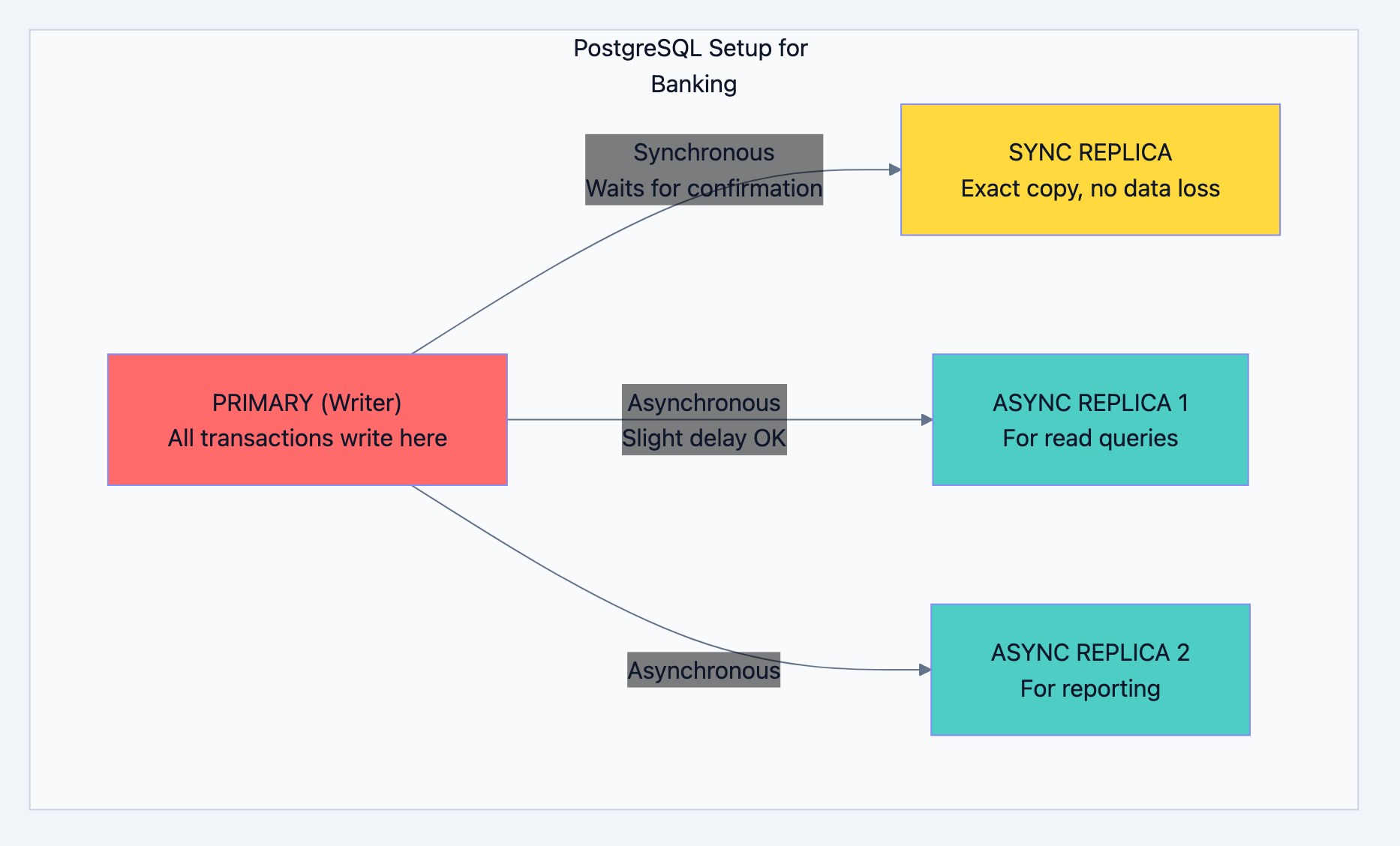
PostgreSQL - The Source of Truth
Banking system diagram 18
Why One Primary for Writes?
This is the "single source of truth" pattern. If you have multiple writers:
- Server A says balance is ₹1000
- Server B says balance is ₹800
- Which one is correct?
With single primary:
- Only PRIMARY knows the real balance
- All writes go there
- No confusion, no conflicts
What is Synchronous vs Asynchronous Replication?
SYNCHRONOUS REPLICATION:
1. Write to Primary: "Set balance = 5000"
2. Primary forwards to Sync Replica
3. Sync Replica confirms: "I've saved it"
4. Primary confirms to application: "Done!"

If Primary crashes AFTER step 4, Sync Replica has ALL the data.
RPO (Recovery Point Objective) = 0 seconds. No data loss.
ASYNCHRONOUS REPLICATION:
1. Write to Primary: "Set balance = 5000"
2. Primary confirms to application: "Done!"
3. Primary forwards to Async Replicas (later)

If Primary crashes BEFORE step 3, Async Replicas might be missing recent data.
But reads are faster because we're not waiting for confirmation.
Interview Question: "Why not make all replicas synchronous?"
Your Answer: "Synchronous replication adds latency every write waits for replica confirmation. For high-throughput banking, we use one sync replica (for zero data loss) and async replicas (for fast reads). It's a balance between safety and speed."
Chapter 5: The Transaction Flow - Deep Dive
Let's trace exactly what happens when you transfer money, line by line.
Step 1: The Request Arrives
go// What arrives at our API
type TransferRequest struct {
    FromAccountID   int64   // Sender's account
    ToAccountID     int64   // Receiver's account
    Amount          float64 // How much to transfer
    Description     string  // "Payment for dinner"
    IdempotencyKey  string  // Prevents double-processing
}
Step 2: Idempotency Check
What is Idempotency?
Imagine this scenario:
- You click "Transfer ₹5000"
- Network is slow, no response
- You click again
- Now you've transferred ₹10,000!
Idempotency prevents this:
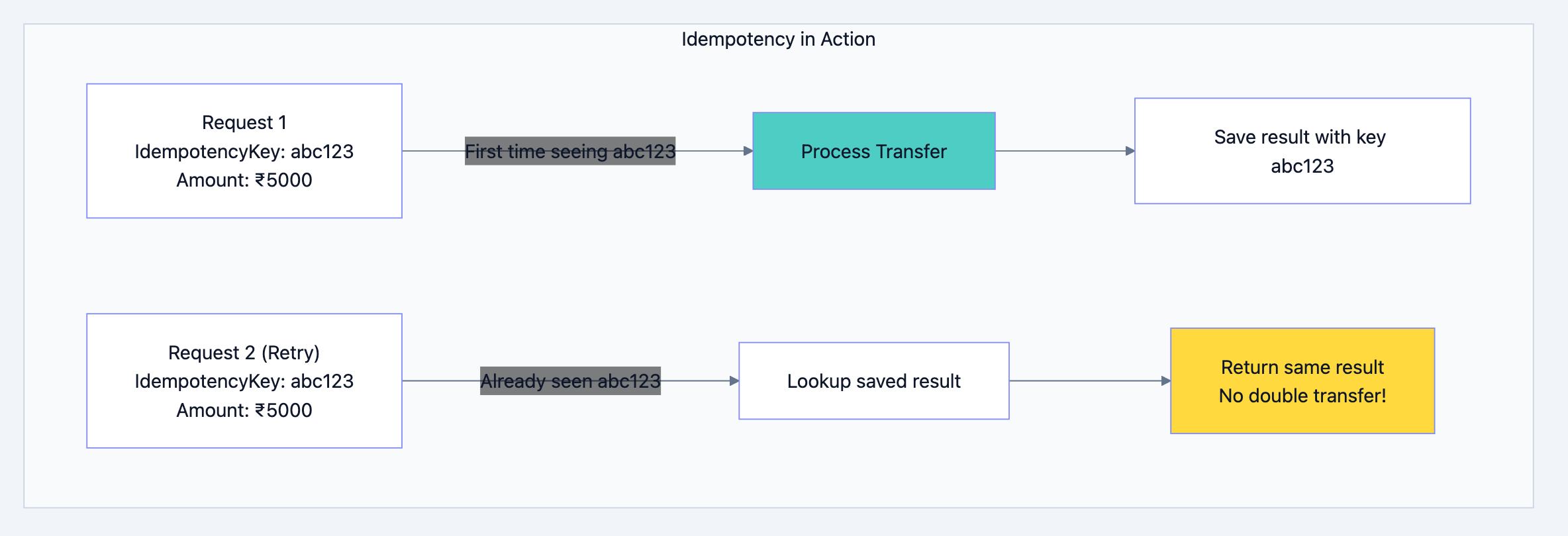
Banking system diagram 19
go// Check if we've seen this request before
func checkIdempotency(key string) (*TransferResult, bool) {
    // Look in Redis first (fast)
    result, err := redis.Get("idempotency:" + key)
    if err == nil {
        // We've processed this before! Return cached result
        return deserialize(result), true
    }

    // New request, proceed with processing
    return nil, false
}
Step 3: Lock the Accounts
Why Locking?
Without locking, concurrent transfers can cause chaos:
Time 0: Rahul's balance = ₹10,000
Time 1: Transfer A reads balance = ₹10,000
Time 2: Transfer B reads balance = ₹10,000
Time 3: Transfer A deducts ₹8,000, sets balance = ₹2,000
Time 4: Transfer B deducts ₹8,000, sets balance = ₹2,000 (WRONG!)

Result: Rahul transferred ₹16,000 from ₹10,000 account!
With locking:
Time 0: Rahul's balance = ₹10,000
Time 1: Transfer A LOCKS account, reads balance = ₹10,000
Time 2: Transfer B tries to lock... WAIT!
Time 3: Transfer A deducts ₹8,000, UNLOCKS
Time 4: Transfer B locks, reads balance = ₹2,000
Time 5: Transfer B says "Insufficient balance!" ✓
The Deadlock Problem:
Transfer 1: Lock Account A, then Lock Account B
Transfer 2: Lock Account B, then Lock Account A

If they run simultaneously:
- Transfer 1 locks A, waits for B
- Transfer 2 locks B, waits for A
- Both wait forever = DEADLOCK!
The Solution: Always Lock in the Same Order
gofunc lockAccountsForTransfer(fromID, toID int64) {
    // ALWAYS lock the lower ID first
    // This way, everyone follows the same order
    var firstID, secondID int64
    if fromID < toID {
        firstID, secondID = fromID, toID
    } else {
        firstID, secondID = toID, fromID
    }

    lockAccount(firstID)
    lockAccount(secondID)
}
Now both transfers will:
- Lock Account A first (lower ID)
- Lock Account B second
- No deadlock!
Step 4: Verify and Execute
gofunc executeTransfer(from, to *Account, amount float64) error {
    // 1. Check balance (inside transaction, with lock held)
    if from.AvailableBalance < amount {
        return ErrInsufficientBalance
    }

    // 2. Check daily limits
    todayTotal := getTodayWithdrawals(from.ID)
    if todayTotal + amount > from.DailyTransferLimit {
        return ErrDailyLimitExceeded
    }

    // 3. Debit sender (with optimistic locking)
    newFromBalance := from.Balance - amount
    result := db.Exec(`
        UPDATE accounts
        SET balance = $1, version = version + 1
        WHERE account_id = $2 AND version = $3
    `, newFromBalance, from.ID, from.Version)

    if result.RowsAffected == 0 {
        // Someone else modified the account!
        return ErrConcurrentModification
    }

    // 4. Credit receiver
    newToBalance := to.Balance + amount
    db.Exec(`
        UPDATE accounts
        SET balance = $1, version = version + 1
        WHERE account_id = $2 AND version = $3
    `, newToBalance, to.ID, to.Version)

    // 5. Create transaction records
    createTransactionRecord(from.ID, amount, "DEBIT", newFromBalance)
    createTransactionRecord(to.ID, amount, "CREDIT", newToBalance)

    // 6. Create ledger entries (double-entry)
    createLedgerEntry(from.ID, amount, "DEBIT")
    createLedgerEntry(to.ID, amount, "CREDIT")

    return nil
}
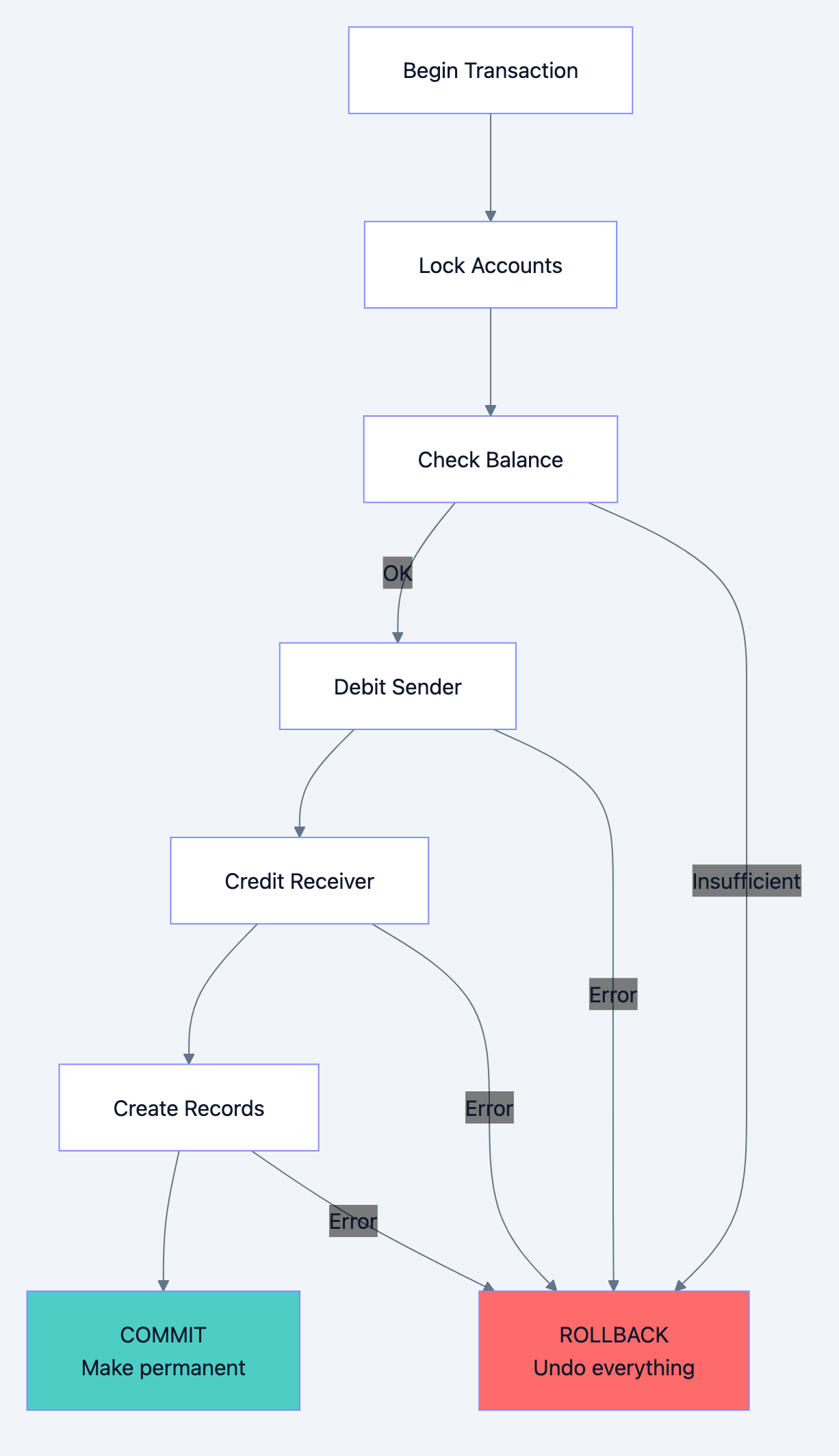
Step 5: Commit or Rollback
Banking system diagram 20
The Magic of Transactions:
Everything between BEGIN and COMMIT is atomic:
- Either ALL changes happen
- Or NONE of them happen
If the server crashes after debiting but before crediting:
- The entire transaction is rolled back
- Sender's money is NOT deducted
- No money is lost or created
Chapter 6: Scaling - Handling 10 Million Transactions
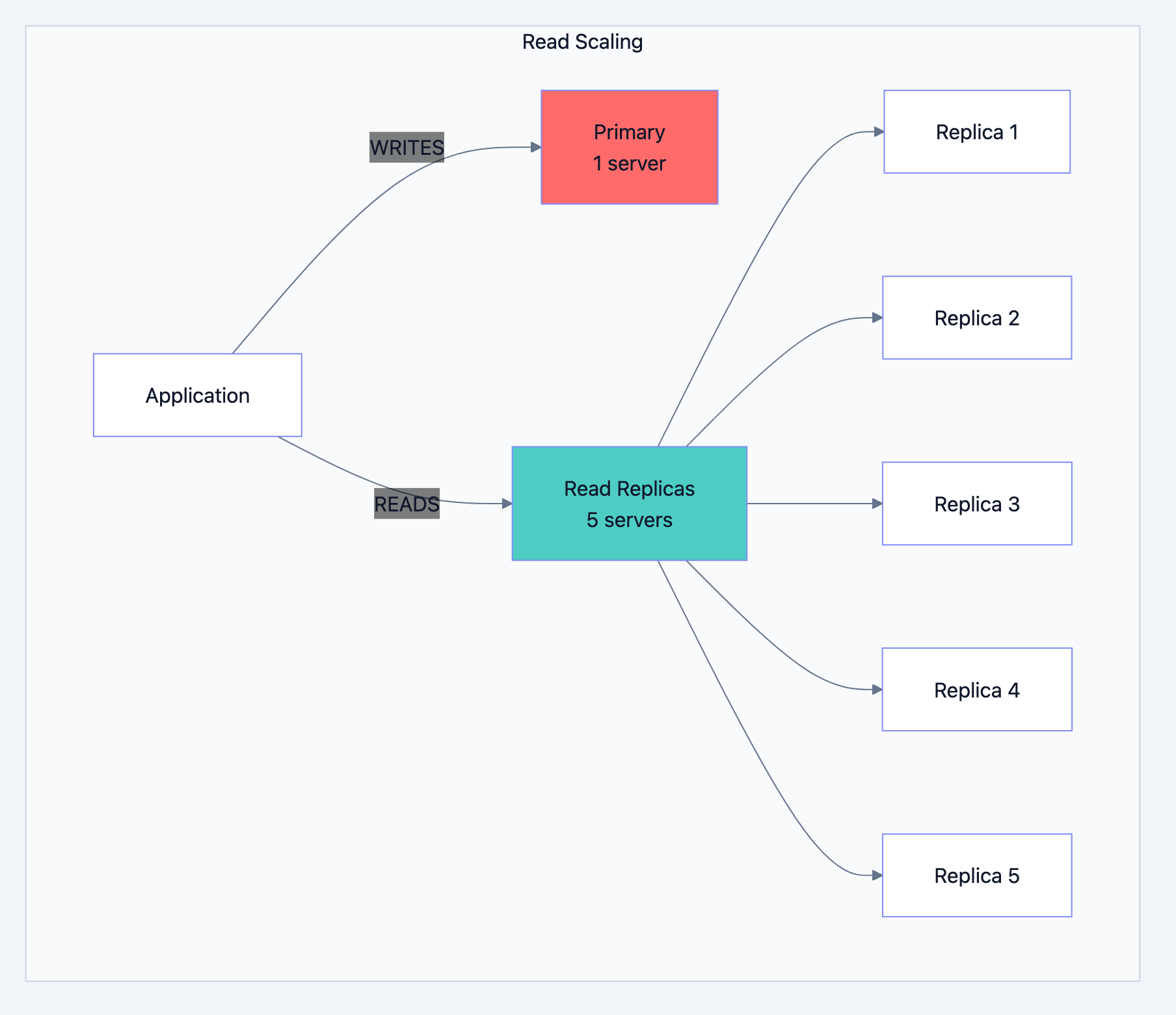
Read Scaling: Add More Replicas
Most banking operations are reads:
- Check balance (READ)
- View transaction history (READ)
- Transfer money (WRITE)
- Download statement (READ)
Ratio is typically 80% reads, 20% writes.
Banking system diagram 21
Adding a replica is easy:
- Set up new PostgreSQL server
- Point it to primary
- It automatically syncs all data
- Start routing read queries to it
Write Scaling: This is Harder
Single primary can handle ~10,000 writes per second. What if you need more?
Option 1: Sharding
Split accounts across multiple databases:
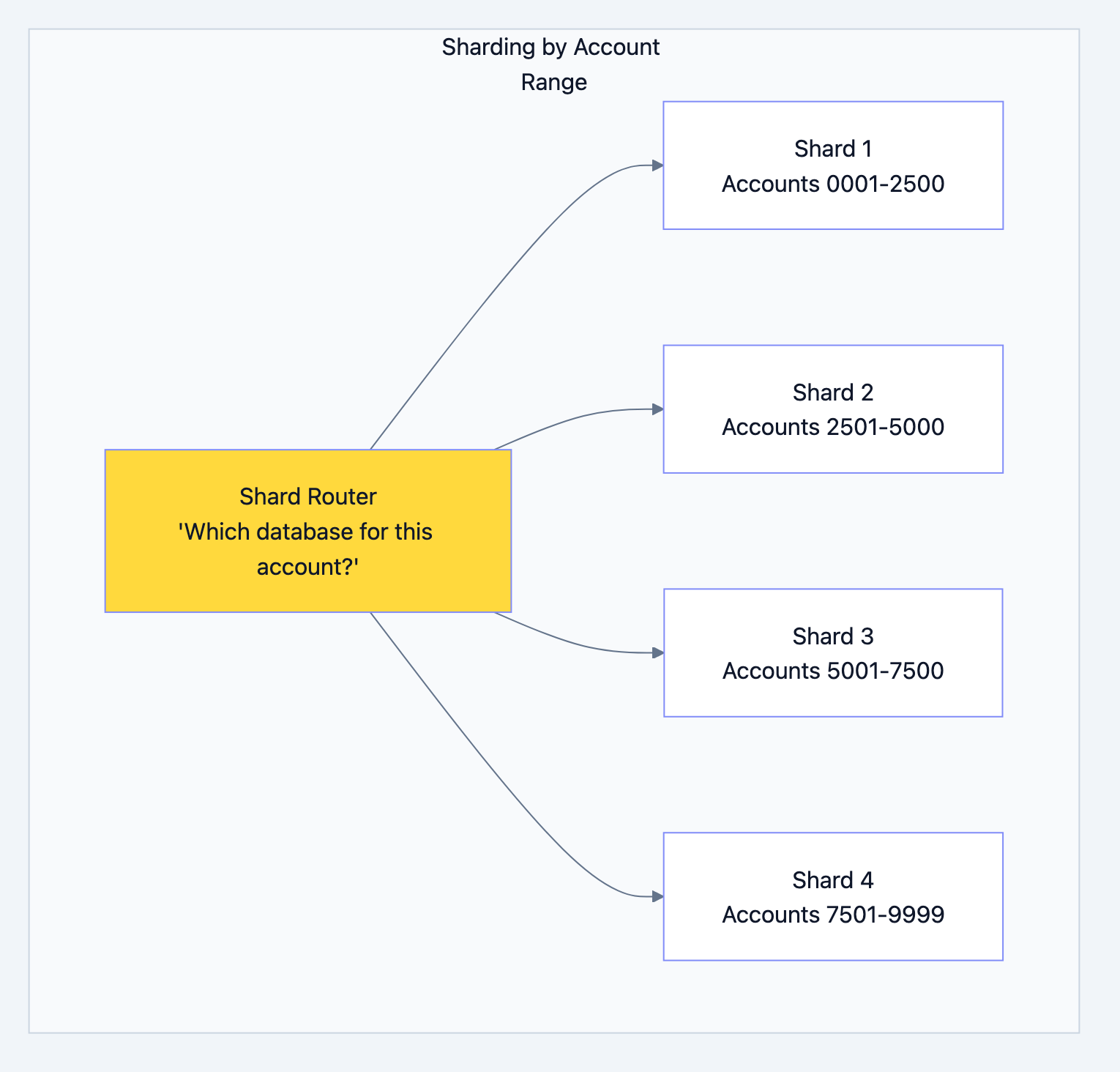
Banking system diagram 22
The Problem: What if Rahul (Shard 1) transfers to Priya (Shard 3)?
The Solution: Saga Pattern
Instead of one transaction across databases, do multiple with compensation:
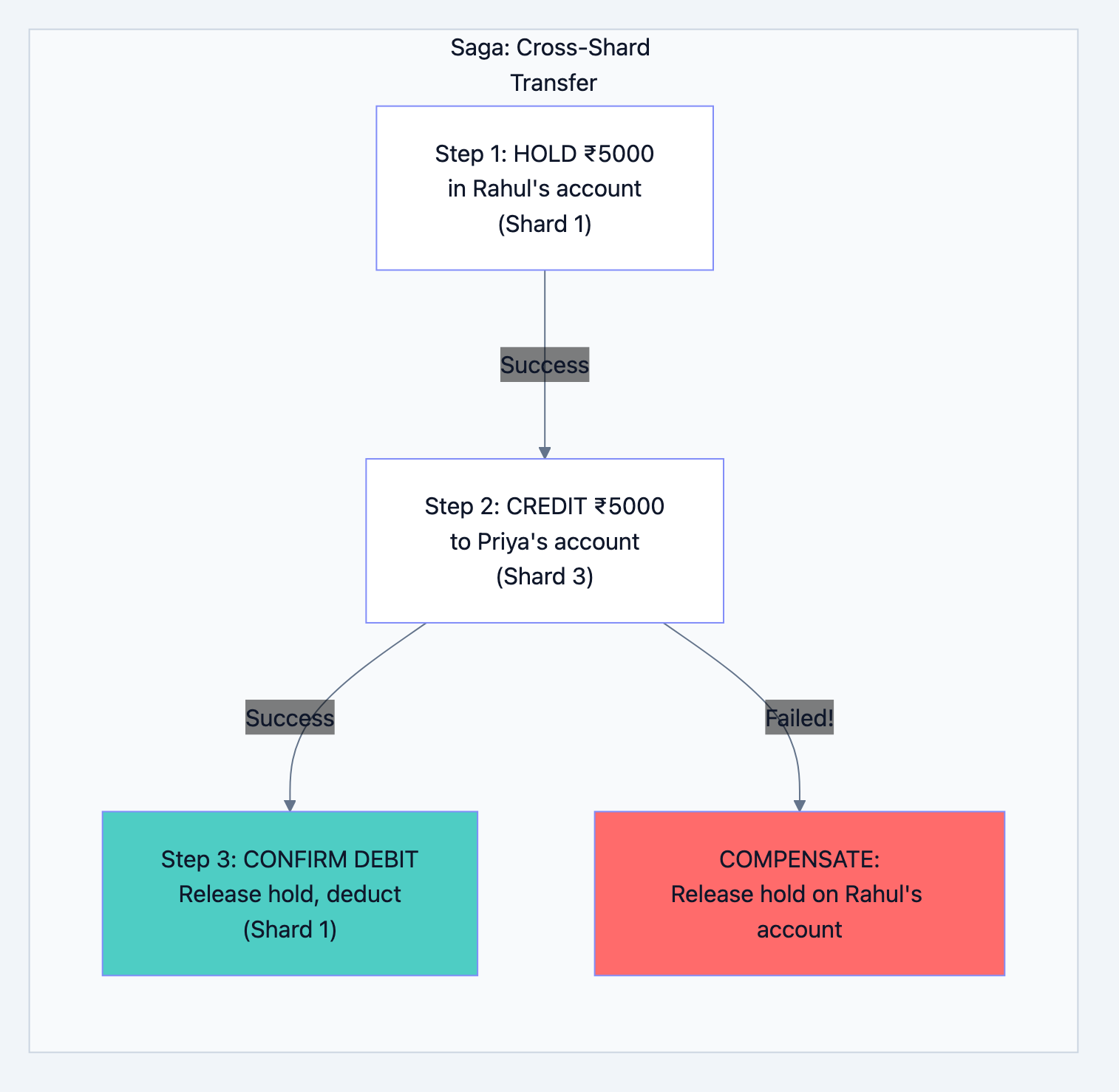
Banking system diagram 23
Caching Strategy
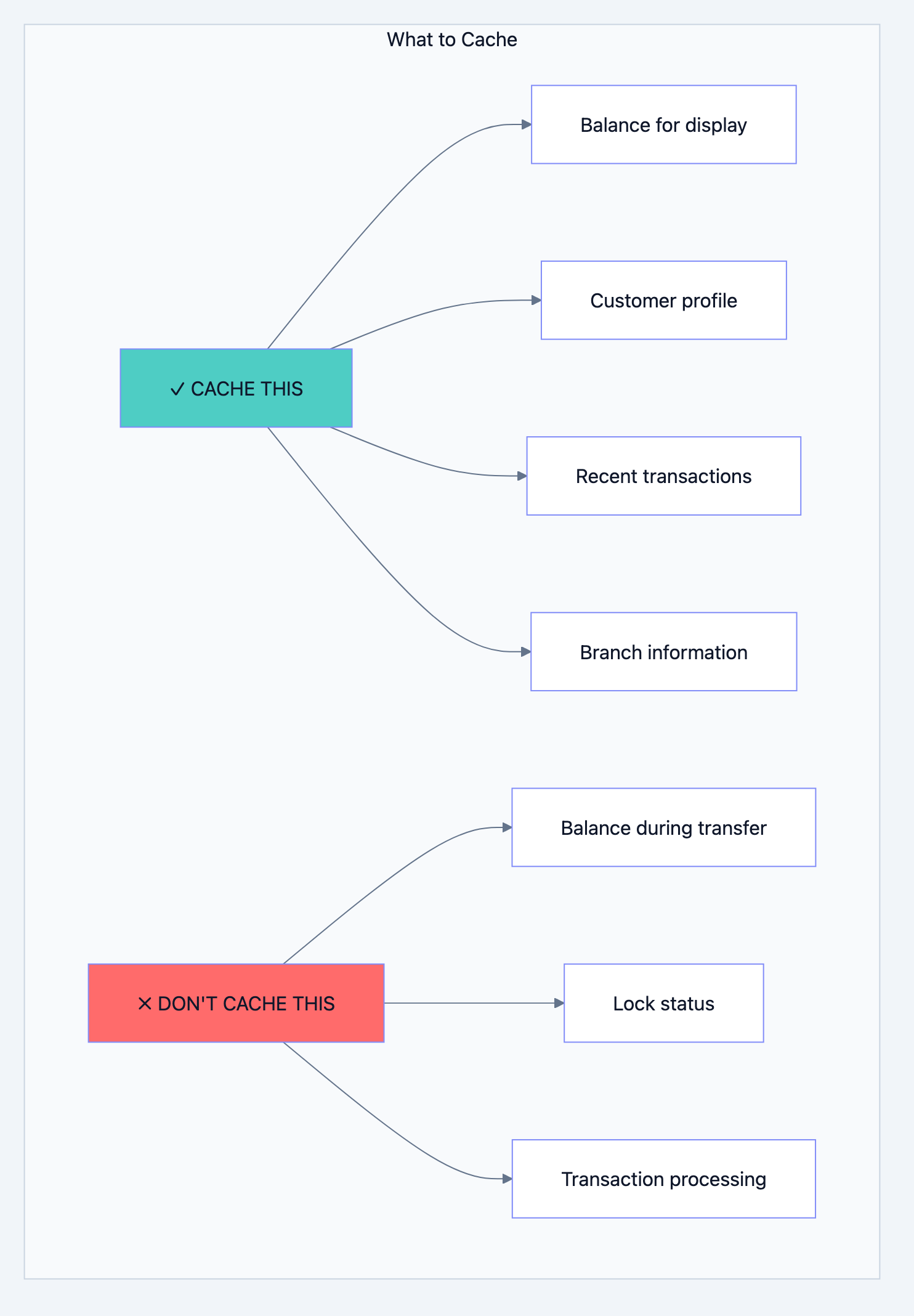
Banking system diagram 24
Cache Invalidation Strategy:
go// After any account balance change
func afterBalanceUpdate(accountID int64) {
    // Delete from cache
    redis.Del(fmt.Sprintf("balance:%d", accountID))

    // Publish event for other services
    kafka.Publish("balance_changed", accountID)
}

// When reading balance
func getBalance(accountID int64) float64 {
    // Try cache first
    cached := redis.Get(fmt.Sprintf("balance:%d", accountID))
    if cached != nil {
        return cached.(float64)
    }

    // Cache miss - get from database
    balance := db.Query("SELECT balance FROM accounts WHERE account_id = $1", accountID)

    // Store in cache for next time (expires in 5 minutes)
    redis.Set(fmt.Sprintf("balance:%d", accountID), balance, 5*time.Minute)

    return balance
}
Chapter 7: Disaster Recovery - When Things Go Wrong
What Can Go Wrong?
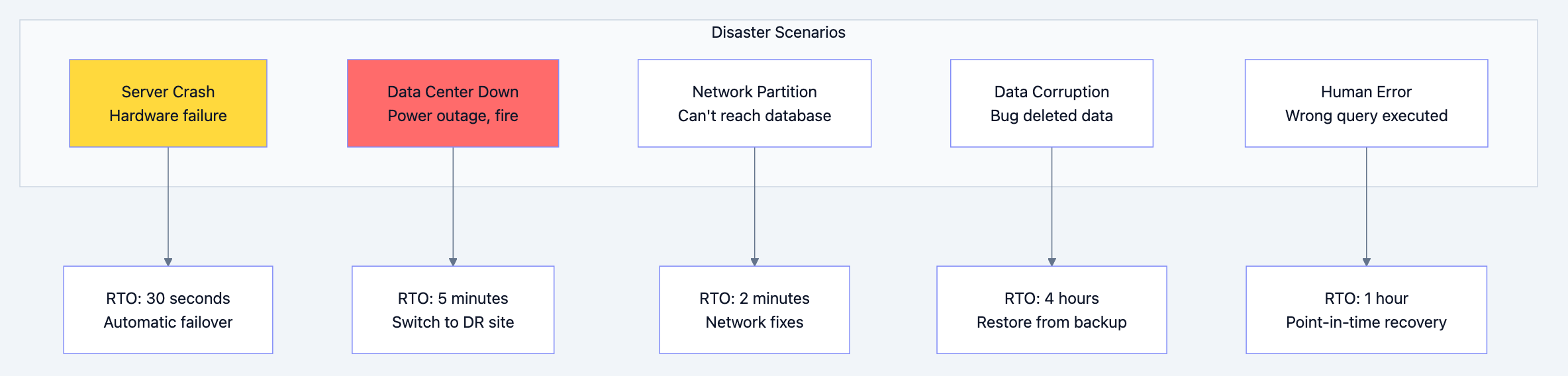
Banking system diagram 25
Multi-Region Setup
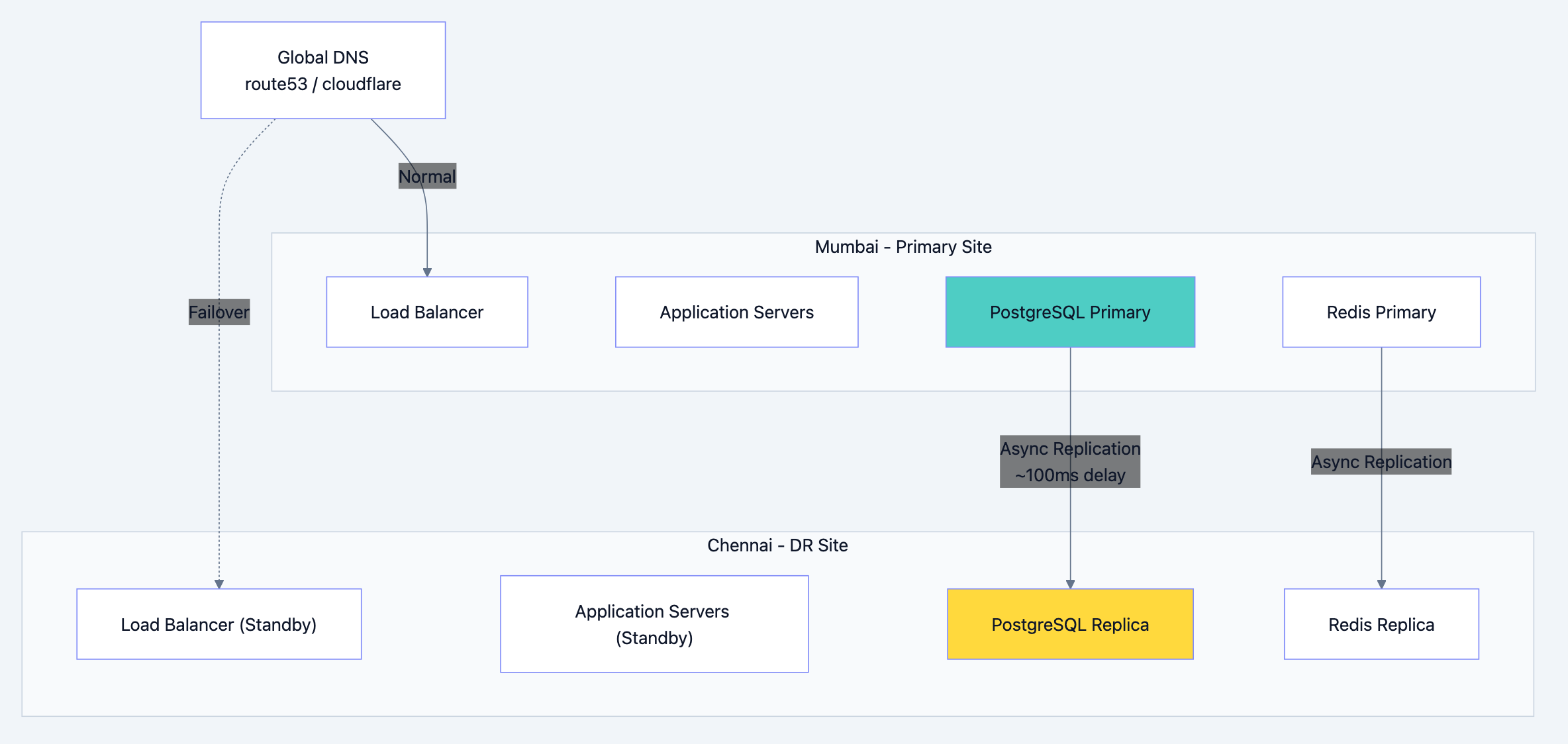
Banking system diagram 26
Backup Strategy
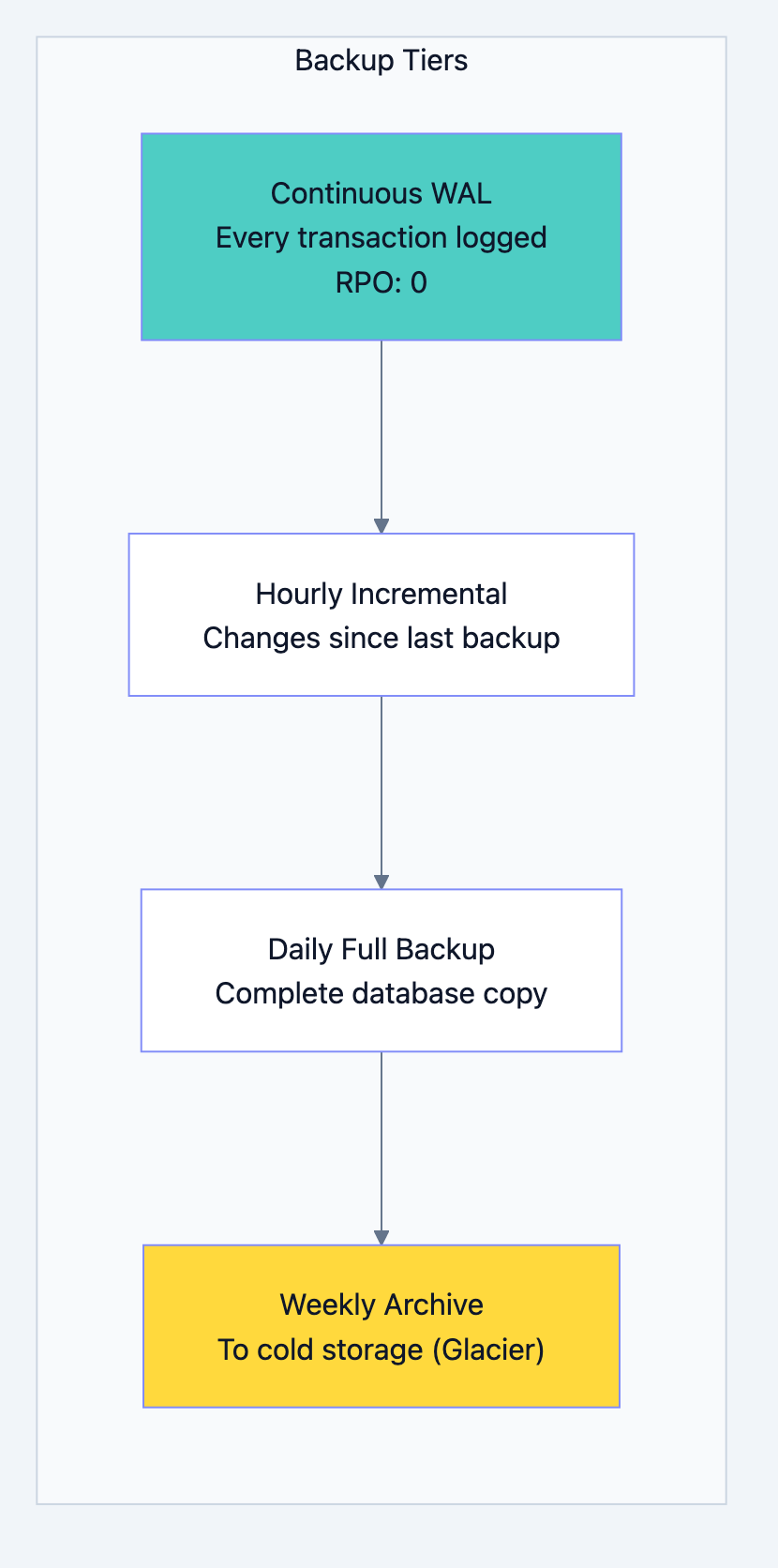
Banking system diagram 27
WAL (Write-Ahead Log):
Every change to the database is first written to a log file. Even if the server crashes mid-transaction, we can replay the log to recover.
WAL Entry 1: "BEGIN TRANSACTION 12345"
WAL Entry 2: "UPDATE accounts SET balance=5000 WHERE id=100"
WAL Entry 3: "UPDATE accounts SET balance=15000 WHERE id=200"
WAL Entry 4: "INSERT INTO transactions ..."
WAL Entry 5: "COMMIT TRANSACTION 12345"
If crash happens after Entry 3:
- Entries 1-3 are incomplete (no COMMIT)
- Recovery process ignores them
- Data returns to pre-transaction state
- No partial transfer!
Point-in-Time Recovery
Someone accidentally ran
DELETE FROM accounts. How do you recover?bash# Restore to exactly 2:30 PM yesterday pgbackrest restore \ --stanza=banking \ --type=time \ --target="2024-01-14 14:30:00" \ --target-action=promote
This restores the database to exactly how it was at 2:30 PM, before the bad DELETE.
Chapter 8: Security - Protecting the Money
Defense in Depth
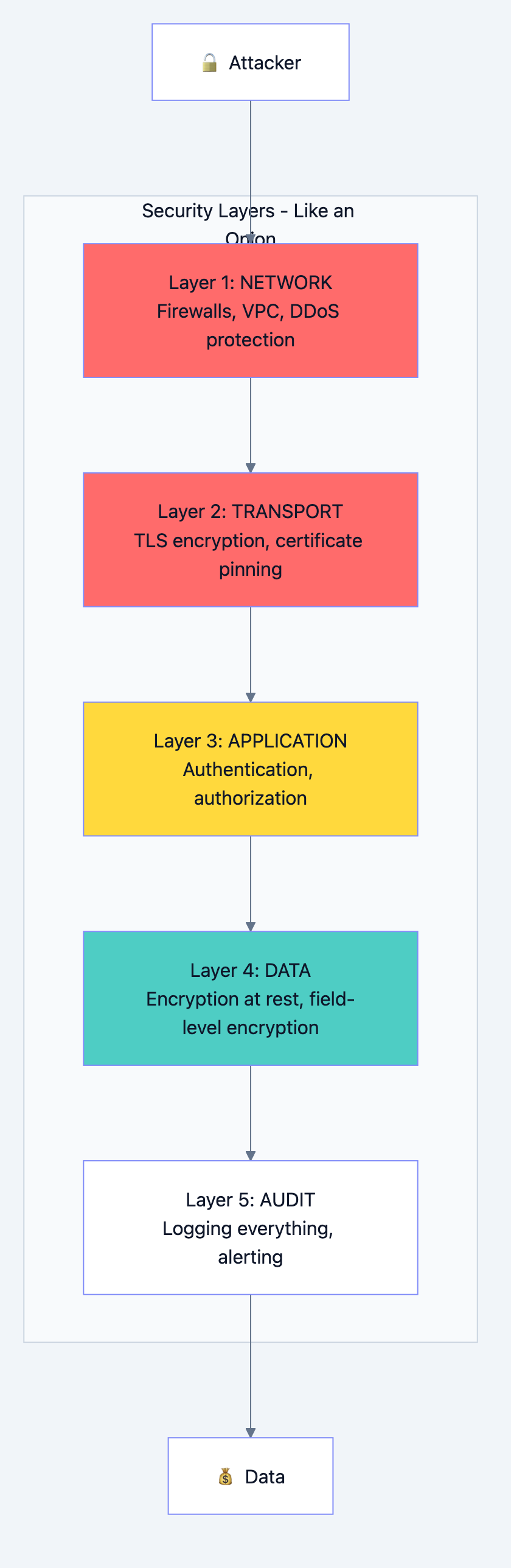
Banking system diagram 28
Encryption
In Transit: All data moving over network is encrypted with TLS 1.3
Without TLS: "Transfer ₹5000 to account 12345"
With TLS: "a7f3b2c9e8d4f1a0b5c6d7e8f9..."
At Rest: All data stored on disk is encrypted
Database file without encryption:
"Rahul Kumar, PAN: ABCDE1234F, Balance: 50000"

Database file with encryption:
"7f3a9c2b8e5d1f4a0c6b9d2e5f8a1b4c..."
Field-Level Encryption: Extra sensitive fields encrypted separately
sql-- PAN number is encrypted with a different key
-- Even DBAs can't see it without special access
INSERT INTO customers (name, pan_encrypted)
VALUES ('Rahul', encrypt('ABCDE1234F', get_encryption_key()));
Access Control
sql-- Different roles have different access
CREATE ROLE branch_teller;
GRANT SELECT ON customers, accounts, transactions TO branch_teller;
GRANT INSERT ON transactions TO branch_teller;
-- Tellers can view data and create transactions, but can't modify accounts

CREATE ROLE branch_manager;
GRANT branch_teller TO branch_manager;
GRANT UPDATE ON customers TO branch_manager;
-- Managers can do everything tellers can, plus update customer info

CREATE ROLE fraud_investigator;
GRANT SELECT ON ALL TABLES TO fraud_investigator;
REVOKE SELECT ON employees FROM fraud_investigator;
-- Investigators can see everything except employee data
Row-Level Security
Even with SELECT permission, users only see relevant data:
sql-- Tellers only see accounts from their branch
CREATE POLICY branch_isolation ON accounts
    USING (branch_id = current_user_branch_id());

-- Now even if teller queries "SELECT * FROM accounts",
-- they only see their branch's accounts
Chapter 9: Monitoring - Keeping Watch
What to Monitor
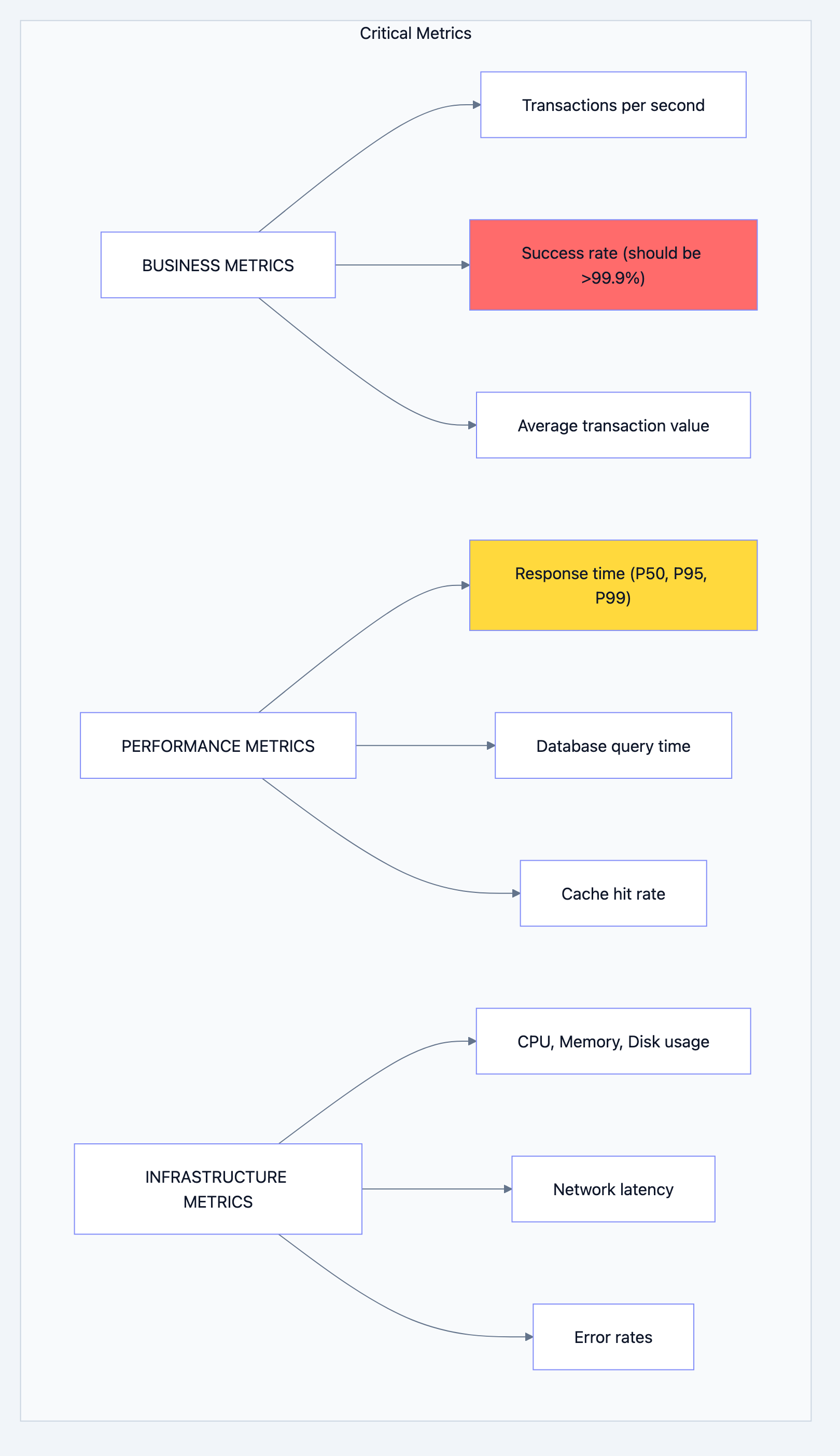
Banking system diagram 29
Alert Rules
yaml# Alert if transaction success rate drops below 99.9%
- alert: LowTransactionSuccessRate
  condition: success_rate < 99.9%
  duration: 2 minutes
  severity: CRITICAL
  action: Page on-call engineer immediately

# Alert if response time is high
- alert: HighLatency
  condition: p99_latency > 2 seconds
  duration: 5 minutes
  severity: WARNING
  action: Send Slack notification

# Alert if replication is lagging
- alert: ReplicationLag
  condition: lag_bytes > 10MB
  duration: 1 minute
  severity: CRITICAL
  action: Page DBA team
Dashboards
Every engineer should have these dashboards:
- Business Dashboard: TPS, success rate, volume
- Performance Dashboard: Latency percentiles, slow queries
- Infrastructure Dashboard: Server health, resource usage
- Database Dashboard: Connections, replication, locks
Chapter 10: Interview Cheat Sheet
When Asked "Design a Banking System"
Step 1: Clarify Requirements (2 minutes)
- "How many users? Transactions per second?"
- "What types of transactions? Domestic only or international?"
- "What's the consistency requirement? Can we show slightly stale balance?"
Step 2: Start with Data Model (5 minutes)
- Draw Customers, Accounts, Transactions tables
- Explain relationships
- Mention partitioning for transactions
Step 3: Explain Transaction Flow (5 minutes)
- Idempotency
- Locking (and why order matters)
- Double-entry bookkeeping
- Commit/Rollback
Step 4: Discuss Scaling (5 minutes)
- Read replicas for read scaling
- Sharding for write scaling (mention challenges)
- Caching strategy
Step 5: Cover Non-Functionals (3 minutes)
- Disaster recovery (multi-region, backups)
- Security (encryption, access control)
- Monitoring (key metrics)
Common Follow-Up Questions
| Question | Key Points to Mention |
|---|---|
| "How do you prevent double-spending?" | Pessimistic locking, version field, serializable transactions |
| "What if primary database goes down?" | Automatic failover to sync replica, < 30 second RTO |
| "How do you handle peak load?" | Read replicas, caching, queue non-critical work |
| "How do you ensure data consistency?" | ACID transactions, double-entry bookkeeping, reconciliation |
| "What about cross-border transfers?" | Separate system, different compliance, Kafka for async |
The Gold Standards Checklist
- ACID compliance for all money movements
- Double-entry bookkeeping (debits = credits)
- Optimistic locking (version field)
- Pessimistic locking (FOR UPDATE)
- Idempotency for all write operations
- Partitioned transaction tables
- Immutable audit logs
- Field-level encryption for PII
- Multi-region disaster recovery
- Comprehensive monitoring and alerting
Summary: What We Built
We designed a banking system that:
- Never loses money - ACID transactions, WAL, backups
- Never creates money - Double-entry bookkeeping
- Never shows wrong numbers - No eventual consistency for balances
- Scales to millions - Read replicas, sharding, caching
- Survives disasters - Multi-region, automatic failover
- Stays secure - Encryption, access control, audit logs
- Is observable - Metrics, alerts, dashboards
The key insight: Banking isn't about clever algorithms. It's about being boring, predictable, and reliable. Every design decision prioritizes safety over speed, correctness over convenience.
When you walk into that interview, remember: They're not looking for the fastest system. They're looking for the one that never loses a single rupee.
Good luck! 🏦