GraphQL: A Query Language for APIs
Why This Matters
Imagine you're building a mobile app that needs user data. With REST, you face two problems:
Problem 1: Over-fetching
bashGET /users/123
→ Returns: {id, name, email, bio, avatar, address, phone, settings, ...}
# You only needed name and avatar, but got 20 fields!
Problem 2: Under-fetching (N+1 problem)
bashGET /users/123        → User data
GET /users/123/posts  → User's posts
GET /posts/1/comments → Post 1 comments
GET /posts/2/comments → Post 2 comments
# 4+ requests to get what you need!
With GraphQL, you request exactly what you need in ONE query:
graphqlquery {
  user(id: 123) {
    name
    avatar
    posts {
      title
      comments {
        text
        author { name }
      }
    }
  }
}
Developed by Facebook in 2012 (open-sourced 2015), GraphQL now powers:
- Facebook: 100 billion+ GraphQL queries per day
- GitHub: Entire API available via GraphQL
- Shopify: Powers 1M+ commerce stores
- Netflix, Airbnb, Twitter: Using GraphQL for mobile apps
By the end of this deep-dive, you'll understand:
- How GraphQL's type system prevents runtime errors
- When GraphQL beats REST (and when it doesn't)
- How to solve the N+1 query problem with DataLoader
- Real-world GraphQL architecture patterns
Real-world impact: Airbnb reduced mobile data usage by 30% and API requests by 50% after migrating to GraphQL.
What GraphQL Solves
REST API Limitations
1. Multiple Round Trips
A typical mobile app startup requires data from multiple endpoints:
bash# REST: 5 separate requests
GET /api/user/me
GET /api/user/me/friends
GET /api/user/me/notifications
GET /api/user/me/settings
GET /api/feed
On a 3G connection, this takes 2-5 seconds. GraphQL does it in ONE request.
2. Over-Fetching Wastes Bandwidth
json// REST returns everything
GET /users/123 → 15KB response
{
  "id": 123,
  "name": "Alice",
  "email": "alice@example.com",
  "bio": "...",
  "avatar": "...",
  "address": {...},
  "phone": {...},
  "settings": {...},
  "created_at": "...",
  "updated_at": "...",
  // ... 10 more fields you don't need
}

// GraphQL returns only what you ask for
query { user(id: 123) { name, avatar } } → 200 bytes
On mobile with limited bandwidth, this matters.
3. API Versioning Complexity
REST forces versioning:
/api/v1/users  (old clients)
/api/v2/users  (new clients)
/api/v3/users  (newer clients)
GraphQL doesn't need versions you just add new fields:
graphqltype User {
  name: String
  email: String
  avatar: String  # Added in "v2", old clients ignore it
}
4. Frontend-Backend Coordination
REST requires backend changes for every new data requirement:
Frontend: "I need user's city"
Backend: "Let me add a new endpoint or modify existing one"
Frontend: "Now I need user's friends count"
Backend: "Another change needed..."
GraphQL empowers frontend to query what it needs.
Real-World Scenarios Where GraphQL Excels
- Mobile Apps: Minimize bandwidth and round trips
- BFF Pattern: Backend-for-Frontend aggregating microservices
- Rapid Prototyping: Frontend iterates without backend changes
- Complex Data Graphs: Social networks, e-commerce with related data
- Microservices Aggregation: Single GraphQL gateway to multiple services
How GraphQL Works
GraphQL is a query language for APIs and a runtime for executing those queries.
Core Concepts
1. Schema: The Contract
Define your API with a strongly-typed schema:
graphql# Schema Definition Language (SDL)
type User {
  id: ID!           # Non-null ID
  name: String!     # Non-null String
  email: String
  avatar: String
  posts: [Post!]!   # Non-null array of non-null Posts
  friends: [User!]! # Self-referencing type
}

type Post {
  id: ID!
  title: String!
  content: String!
  author: User!     # Relationship
  comments: [Comment!]!
  createdAt: String!
}

type Comment {
  id: ID!
  text: String!
  author: User!
  post: Post!
}

# Root query type
type Query {
  user(id: ID!): User
  post(id: ID!): Post
  users(limit: Int, offset: Int): [User!]!
}

# Root mutation type
type Mutation {
  createUser(name: String!, email: String!): User!
  updateUser(id: ID!, name: String): User!
  deleteUser(id: ID!): Boolean!
}

# Root subscription type (real-time)
type Subscription {
  userCreated: User!
  postCreated: Post!
}
2. Queries: Fetch Data
Client requests exactly what it needs:
graphql# Simple query
query {
  user(id: "123") {
    name
    email
  }
}

# Nested query
query {
  user(id: "123") {
    name
    posts {
      title
      comments {
        text
        author {
          name
        }
      }
    }
  }
}

# Query with variables
query GetUser($userId: ID!) {
  user(id: $userId) {
    name
    email
  }
}
# Variables: {"userId": "123"}
3. Mutations: Modify Data
graphqlmutation {
  createUser(name: "Bob", email: "bob@example.com") {
    id
    name
    email
  }
}

# Returns newly created user
4. Subscriptions: Real-Time Updates
graphqlsubscription {
  postCreated {
    id
    title
    author {
      name
    }
  }
}

# WebSocket connection receives updates when posts are created
GraphQL Execution Model
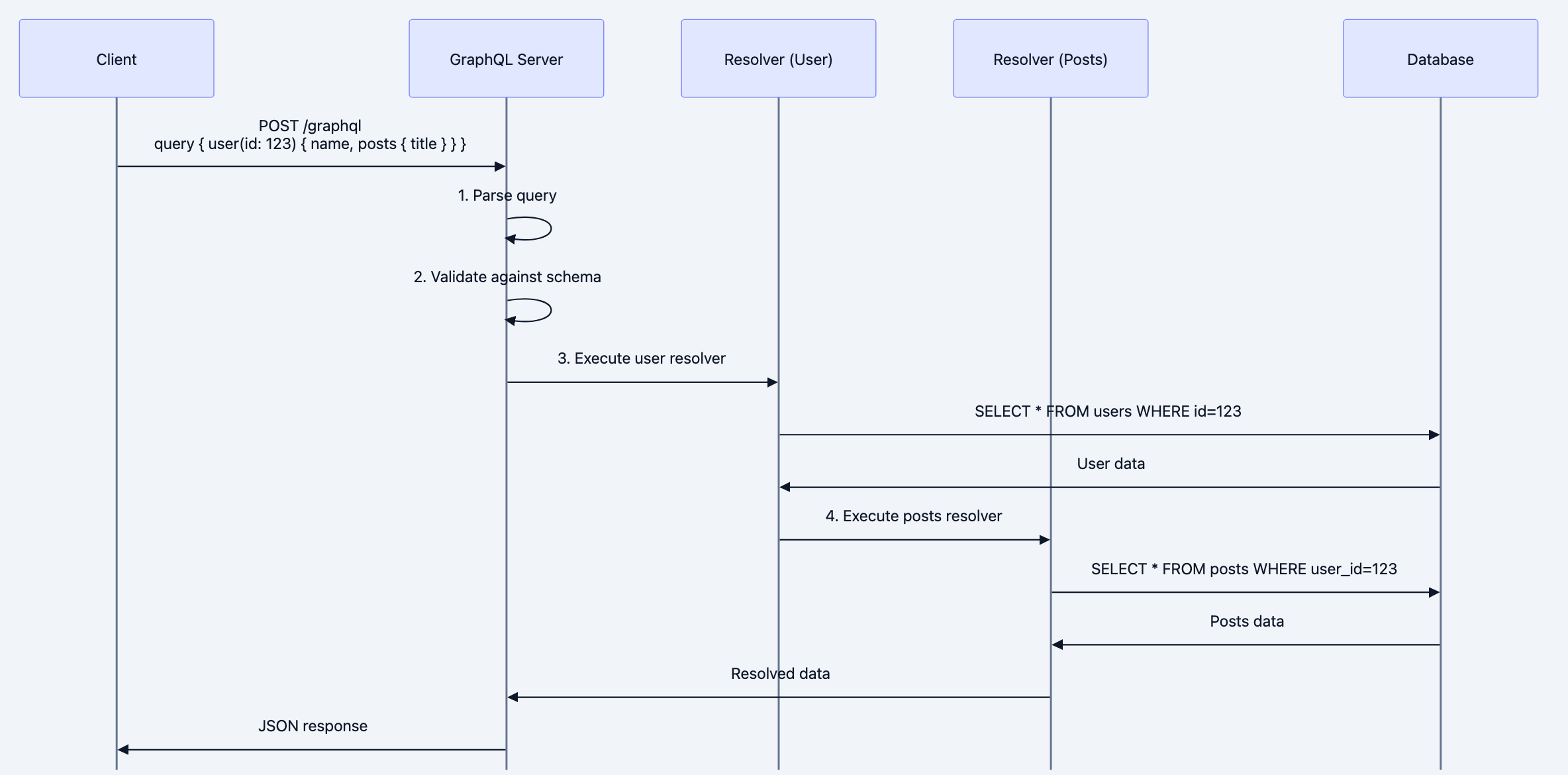
Diagram 1
The Three Core Operations
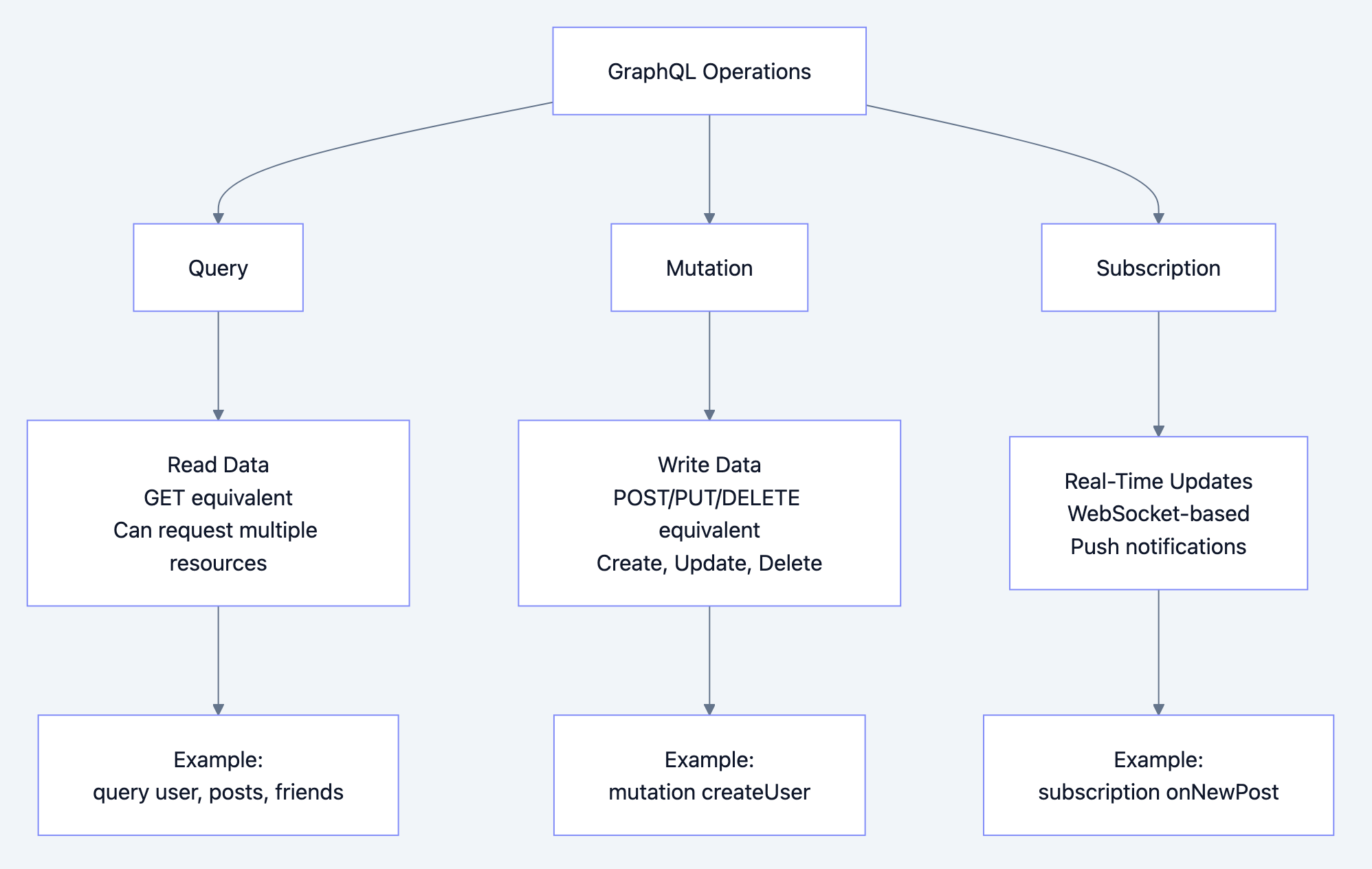
Diagram 2
Database Query Language for APIs
Think of GraphQL like SQL for your API:
SQL queries a database:
sqlSELECT name, email FROM users WHERE id = 123;
SELECT title FROM posts WHERE user_id = 123;
GraphQL queries an API:
graphql{
  user(id: 123) {
    name
    email
    posts {
      title
    }
  }
}
Both:
- Declarative (what you want, not how to get it)
- Strongly typed
- Single query fetches related data
- Optimized execution (resolvers/query planner)
Deep Technical Dive
1. Code Example: GraphQL Server in Go
Using
graphql-go/graphql:gopackage main import ( "encoding/json" "fmt" "log" "net/http" "github.com/graphql-go/graphql" ) // Data models type User struct { ID string `json:"id"` Name string `json:"name"` Email string `json:"email"` } type Post struct { ID string `json:"id"` Title string `json:"title"` Content string `json:"content"` AuthorID string `json:"author_id"` } // In-memory data store var users = []User{ {ID: "1", Name: "Alice", Email: "alice@example.com"}, {ID: "2", Name: "Bob", Email: "bob@example.com"}, } var posts = []Post{ {ID: "1", Title: "GraphQL Intro", Content: "...", AuthorID: "1"}, {ID: "2", Title: "Go Tutorial", Content: "...", AuthorID: "1"}, {ID: "3", Title: "Microservices", Content: "...", AuthorID: "2"}, } // Define GraphQL types var userType = graphql.NewObject(graphql.ObjectConfig{ Name: "User", Fields: graphql.Fields{ "id": &graphql.Field{ Type: graphql.String, }, "name": &graphql.Field{ Type: graphql.String, }, "email": &graphql.Field{ Type: graphql.String, }, "posts": &graphql.Field{ Type: graphql.NewList(graphql.NewNonNull(postType)), Resolve: func(p graphql.ResolveParams) (interface{}, error) { user := p.Source.(User) var userPosts []Post for _, post := range posts { if post.AuthorID == user.ID { userPosts = append(userPosts, post) } } return userPosts, nil }, }, }, }) var postType = graphql.NewObject(graphql.ObjectConfig{ Name: "Post", Fields: graphql.Fields{ "id": &graphql.Field{ Type: graphql.String, }, "title": &graphql.Field{ Type: graphql.String, }, "content": &graphql.Field{ Type: graphql.String, }, "author": &graphql.Field{ Type: userType, Resolve: func(p graphql.ResolveParams) (interface{}, error) { post := p.Source.(Post) for _, user := range users { if user.ID == post.AuthorID { return user, nil } } return nil, nil }, }, }, }) // Define root query var queryType = graphql.NewObject(graphql.ObjectConfig{ Name: "Query", Fields: graphql.Fields{ "user": &graphql.Field{ Type: userType, Args: graphql.FieldConfigArgument{ "id": &graphql.ArgumentConfig{ Type: graphql.NewNonNull(graphql.String), }, }, Resolve: func(p graphql.ResolveParams) (interface{}, error) { id := p.Args["id"].(string) for _, user := range users { if user.ID == id { return user, nil } } return nil, fmt.Errorf("user not found") }, }, "users": &graphql.Field{ Type: graphql.NewList(userType), Resolve: func(p graphql.ResolveParams) (interface{}, error) { return users, nil }, }, "post": &graphql.Field{ Type: postType, Args: graphql.FieldConfigArgument{ "id": &graphql.ArgumentConfig{ Type: graphql.NewNonNull(graphql.String), }, }, Resolve: func(p graphql.ResolveParams) (interface{}, error) { id := p.Args["id"].(string) for _, post := range posts { if post.ID == id { return post, nil } } return nil, fmt.Errorf("post not found") }, }, }, }) // Define mutations var mutationType = graphql.NewObject(graphql.ObjectConfig{ Name: "Mutation", Fields: graphql.Fields{ "createUser": &graphql.Field{ Type: userType, Args: graphql.FieldConfigArgument{ "name": &graphql.ArgumentConfig{ Type: graphql.NewNonNull(graphql.String), }, "email": &graphql.ArgumentConfig{ Type: graphql.NewNonNull(graphql.String), }, }, Resolve: func(p graphql.ResolveParams) (interface{}, error) { name := p.Args["name"].(string) email := p.Args["email"].(string) newUser := User{ ID: fmt.Sprintf("%d", len(users)+1), Name: name, Email: email, } users = append(users, newUser) return newUser, nil }, }, }, }) // Create schema var schema, _ = graphql.NewSchema(graphql.SchemaConfig{ Query: queryType, Mutation: mutationType, }) // HTTP handler func graphqlHandler(w http.ResponseWriter, r *http.Request) { var params struct { Query string `json:"query"` Variables map[string]interface{} `json:"variables"` OperationName string `json:"operationName"` } if err := json.NewDecoder(r.Body).Decode(¶ms); err != nil { http.Error(w, err.Error(), http.StatusBadRequest) return } result := graphql.Do(graphql.Params{ Schema: schema, RequestString: params.Query, VariableValues: params.Variables, OperationName: params.OperationName, }) w.Header().Set("Content-Type", "application/json") json.NewEncoder(w).Encode(result) } func main() { http.HandleFunc("/graphql", graphqlHandler) log.Println("GraphQL server running on :8080") log.Fatal(http.ListenAndServe(":8080", nil)) }
2. Solving the N+1 Problem with DataLoader
The N+1 Problem:
graphqlquery {
  users {         # 1 query to get users
    name
    posts {       # N queries (one per user) to get posts
      title
    }
  }
}
# Total: 1 + N database queries
Solution: DataLoader (batching and caching)
goimport "github.com/graph-gophers/dataloader"

// Batch function to load posts
func batchLoadPosts(ctx context.Context, keys dataloader.Keys) []*dataloader.Result {
    userIDs := make([]string, len(keys))
    for i, key := range keys {
        userIDs[i] = key.String()
    }

    // Single query to load all posts for all users
    var allPosts []Post
    db.Where("author_id IN ?", userIDs).Find(&allPosts)

    // Group posts by user
    postsByUser := make(map[string][]Post)
    for _, post := range allPosts {
        postsByUser[post.AuthorID] = append(postsByUser[post.AuthorID], post)
    }

    // Return results in same order as keys
    results := make([]*dataloader.Result, len(keys))
    for i, key := range keys {
        userID := key.String()
        results[i] = &dataloader.Result{Data: postsByUser[userID]}
    }

    return results
}

// Create loader
postsLoader := dataloader.NewBatchedLoader(batchLoadPosts)

// Use in resolver
"posts": &graphql.Field{
    Type: graphql.NewList(postType),
    Resolve: func(p graphql.ResolveParams) (interface{}, error) {
        user := p.Source.(User)

        // Load posts using DataLoader (batches automatically)
        thunk := postsLoader.Load(p.Context, dataloader.StringKey(user.ID))
        result, err := thunk()
        if err != nil {
            return nil, err
        }

        return result.([]Post), nil
    },
},
Result: N+1 queries → 2 queries (1 for users, 1 batch for all posts)
3. Code Example: GraphQL Client in Go
gopackage main

import (
    "bytes"
    "encoding/json"
    "fmt"
    "net/http"
)

type GraphQLRequest struct {
    Query     string                 `json:"query"`
    Variables map[string]interface{} `json:"variables,omitempty"`
}

type GraphQLResponse struct {
    Data   json.RawMessage `json:"data"`
    Errors []struct {
        Message string `json:"message"`
    } `json:"errors,omitempty"`
}

func main() {
    // Query with variables
    query := `
        query GetUser($userId: String!) {
            user(id: $userId) {
                name
                email
                posts {
                    title
                }
            }
        }
    `

    variables := map[string]interface{}{
        "userId": "1",
    }

    reqBody := GraphQLRequest{
        Query:     query,
        Variables: variables,
    }

    jsonData, _ := json.Marshal(reqBody)

    resp, err := http.Post("http://localhost:8080/graphql",
        "application/json",
        bytes.NewBuffer(jsonData))
    if err != nil {
        fmt.Println("Error:", err)
        return
    }
    defer resp.Body.Close()

    var result GraphQLResponse
    json.NewDecoder(resp.Body).Decode(&result)

    if len(result.Errors) > 0 {
        fmt.Println("GraphQL Errors:")
        for _, err := range result.Errors {
            fmt.Println("-", err.Message)
        }
        return
    }

    fmt.Println("Data:", string(result.Data))
}
4. Advanced: Implementing Field-Level Permissions
go// Context key for user
type contextKey string

const userContextKey contextKey = "user"

// Directive for permissions
func requireAuth(next graphql.FieldResolveFn) graphql.FieldResolveFn {
    return func(p graphql.ResolveParams) (interface{}, error) {
        user := p.Context.Value(userContextKey)
        if user == nil {
            return nil, fmt.Errorf("unauthorized")
        }
        return next(p)
    }
}

// Use in field definition
"email": &graphql.Field{
    Type: graphql.String,
    Resolve: requireAuth(func(p graphql.ResolveParams) (interface{}, error) {
        user := p.Source.(User)
        return user.Email, nil
    }),
},

// Middleware to add user to context
func authMiddleware(next http.Handler) http.Handler {
    return http.HandlerFunc(func(w http.ResponseWriter, r *http.Request) {
        token := r.Header.Get("Authorization")

        user, err := validateToken(token)
        if err == nil {
            ctx := context.WithValue(r.Context(), userContextKey, user)
            r = r.WithContext(ctx)
        }

        next.ServeHTTP(w, r)
    })
}
When to Use: Decision Framework
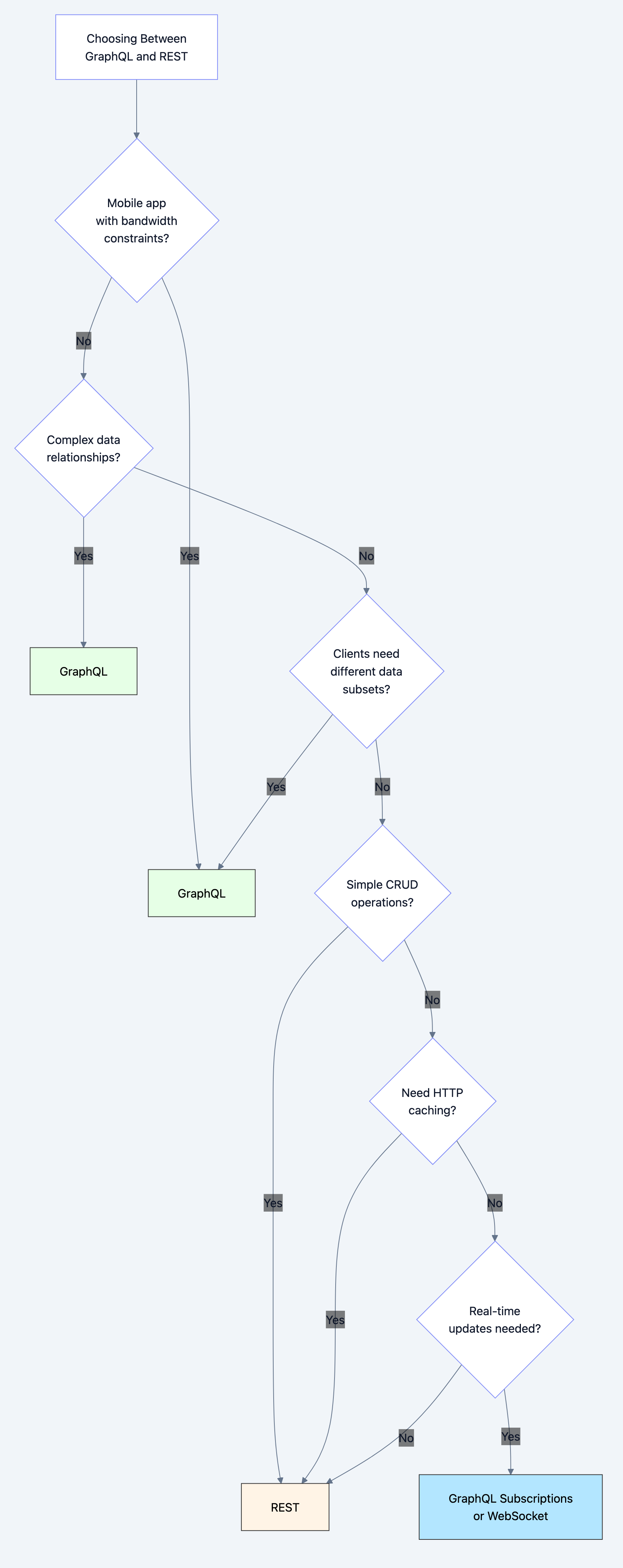
Diagram 3
Use GraphQL When:
- Mobile apps: Minimize bandwidth and round trips
- BFF pattern: Aggregating multiple microservices
- Rapid iteration: Frontend needs to evolve quickly
- Complex data graphs: Social networks, nested relationships
- Multiple clients: Web, mobile, partners need different data
Use REST When:
- Simple CRUD: Straightforward resource operations
- HTTP caching critical: Leverage CDNs and browser caching
- File uploads/downloads: Multipart forms work better
- Public API: Easier for third-party developers
- Microservices: Service-to-service communication
Don't Use GraphQL When:
- File upload/download heavy
- Need HTTP-level caching (GraphQL uses POST)
- Team unfamiliar with GraphQL (learning curve)
- Simple APIs (overhead not worth it)
Common Pitfalls and How to Avoid Them
Pitfall 1: N+1 Query Problem
The Mistake:
go// Resolver fetches posts one user at a time
"posts": &graphql.Field{
    Resolve: func(p graphql.ResolveParams) (interface{}, error) {
        user := p.Source.(User)
        // Executes query for EACH user!
        return db.Where("user_id = ?", user.ID).Find(&[]Post{})
    },
}
The Fix: Use DataLoader (see example above)
Pitfall 2: No Query Depth/Complexity Limiting
The Mistake:
Allowing arbitrarily deep queries:
graphqlquery {
  user {
    friends {
      friends {
        friends {
          friends {
            # ... infinitely deep
          }
        }
      }
    }
  }
}
The Fix:
goimport "github.com/graph-gophers/graphql-go/validation"

// Limit query depth
maxDepth := validation.MaxDepth(10)

result := graphql.Do(graphql.Params{
    Schema:        schema,
    RequestString: query,
    Rules:         []validation.Rule{maxDepth},
})
Pitfall 3: Exposing Internal Fields
The Mistake:
graphqltype User {
  id: ID!
  name: String!
  passwordHash: String!  # EXPOSED TO CLIENTS!
  internalNotes: String! # INTERNAL ONLY!
}
The Fix:
Separate internal and external types:
graphqltype User {
  id: ID!
  name: String!
  email: String!
  # Only expose what clients need
}
Pitfall 4: No Error Handling
The Mistake:
goResolve: func(p graphql.ResolveParams) (interface{}, error) {
    return nil, nil  // Silent failure
}
The Fix:
goResolve: func(p graphql.ResolveParams) (interface{}, error) {
    user, err := fetchUser(id)
    if err != nil {
        return nil, fmt.Errorf("failed to fetch user: %w", err)
    }
    return user, nil
}

// GraphQL returns errors in response
{
  "data": null,
  "errors": [
    {"message": "failed to fetch user: not found"}
  ]
}
Pitfall 5: No Rate Limiting
The Mistake:
Allowing expensive queries without limits.
The Fix:
Implement query cost analysis:
go// Assign costs to fields
type User {
  id: ID!          # cost: 1
  name: String!    # cost: 1
  posts: [Post!]!  # cost: 10 (expensive join)
}

// Reject queries over budget
maxCost := 100
if queryCost > maxCost {
    return error("query too expensive")
}
Performance Implications
GraphQL vs REST Performance
| Metric | GraphQL | REST |
|---|---|---|
| Network requests | 1 (batched) | 3-10 (multiple endpoints) |
| Over-fetching | None (request exact fields) | High (returns all fields) |
| Under-fetching | None (nested queries) | High (N+1 problem) |
| Caching | Complex (POST requests) | Simple (GET requests, CDN) |
| Parsing overhead | Medium (query parsing) | Low (simple JSON) |
Optimization Strategies
1. Persisted Queries:
go// Instead of sending full query each time
POST /graphql
{"query": "query { ... }", ...}  // Large payload

// Send query hash
POST /graphql
{"queryId": "abc123"}  // Small payload

// Server looks up pre-registered query
2. Apollo Federation (Microservices):
graphql# User service schema
type User @key(fields: "id") {
  id: ID!
  name: String!
}

# Posts service schema
extend type User @key(fields: "id") {
  id: ID! @external
  posts: [Post!]!
}

# Gateway automatically joins data
3. Caching Strategies:
go// Response caching with Redis
cacheKey := generateKey(query, variables)
cached, _ := redis.Get(cacheKey)
if cached != nil {
    return cached
}

result := executeQuery(query)
redis.Set(cacheKey, result, 5*time.Minute)
Real-World Use Cases
Use Case 1: Facebook Mobile App
Facebook's mobile app uses GraphQL for:
- News feed (complex nested data)
- User profiles (different fields per view)
- Notifications (real-time subscriptions)
Benefits:
- 30% reduction in data transferred
- 50% reduction in API requests
- Faster app startup
Use Case 2: GitHub API v4
GitHub provides both REST (v3) and GraphQL (v4) APIs:
REST approach:
bashGET /repos/:owner/:repo
GET /repos/:owner/:repo/issues
GET /repos/:owner/:repo/pulls
# 3 requests
GraphQL approach:
graphqlquery {
  repository(owner: "golang", name: "go") {
    issues(first: 10) { ... }
    pullRequests(first: 10) { ... }
  }
}
# 1 request
Use Case 3: Shopify Storefront API
Powers 1M+ e-commerce stores with GraphQL:
graphqlquery {
  products(first: 10) {
    edges {
      node {
        title
        variants {
          price
          availableForSale
        }
        images {
          url
        }
      }
    }
  }
}
Interview Questions
Junior Level
Q: What is GraphQL and how is it different from REST?
A: GraphQL is a query language for APIs. Unlike REST (multiple endpoints, fixed responses), GraphQL has one endpoint where clients specify exactly what data they need in a single query.
Q: What are the three main GraphQL operations?
A: Query (read data), Mutation (write data), Subscription (real-time updates via WebSocket).
Mid Level
Q: Explain the N+1 problem in GraphQL and how to solve it.
A: N+1 happens when fetching a list triggers one query per item. For 10 users with posts, that's 1 + 10 = 11 queries. Solution: Use DataLoader to batch requests into a single query.
Q: How does GraphQL handle versioning?
A: GraphQL doesn't version APIs like REST. Instead, you add new fields and deprecate old ones. Clients request only fields they need, so adding fields doesn't break existing clients.
Senior Level
Q: Design a GraphQL architecture for a microservices system.
A: Use Apollo Federation:
- Each microservice defines its GraphQL schema
- Gateway service composes schemas
- Gateway routes queries to appropriate services
- Use DataLoader for batching cross-service queries
- Implement authentication at gateway level
- Cache frequently accessed data
- Monitor query complexity and rate limit
Q: How would you implement authorization in GraphQL?
A: Field-level authorization:
go- Add user to context via middleware
- Create resolver wrappers checking permissions
- Conditionally include/exclude fields based on auth
- Return null for unauthorized fields
- Use directives for declarative auth rules
Key Takeaways
-
GraphQL solves over-fetching and under-fetching - clients request exact data needed
-
Single endpoint - unlike REST's multiple endpoints
-
Strongly typed schema - prevents runtime errors
-
N+1 problem needs DataLoader - batch database queries
-
Not a replacement for REST - best for mobile apps and BFFs
-
Caching is harder - POST requests don't work with HTTP caching
-
Query complexity limiting critical - prevent expensive queries
-
Real-time via subscriptions - WebSocket-based push updates
-
Schema evolution over versioning - add fields, don't version
-
Perfect for aggregating microservices - Apollo Federation pattern
Further Learning
- Practice: Build a GraphQL server with nested types
- Study: Apollo Federation for microservices
- Read: GraphQL specification and best practices
- Tools: Learn GraphiQL/Apollo Studio for testing
- Advanced: Implement custom directives and schema stitching
GraphQL isn't just about fetching data it's a paradigm shift in how clients and servers communicate. Master it for building modern, efficient APIs.