Chapter 3: Go Sync Package - Coordinating Goroutines Like a Pro
Introduction
Your banking application processes 1,000 concurrent users. Each performs a simple operation: read the account balance, add a deposit, write the new balance. It seems foolproof. But at the end of the day, $50,000 is missing. No hackers. No bugs in the arithmetic. Just concurrent access gone wrong.
This is the classic race condition two goroutines reading the same balance simultaneously, both adding their deposits, both writing back. One write overwrites the other. Money vanishes into thin air.
In previous chapters, you learned to use channels for goroutine communication. Channels are excellent for transferring data between goroutines. But sometimes you need to protect shared state rather than transfer it. This chapter introduces Go's
sync package a collection of synchronization primitives that guard shared resources from concurrent access.Why the sync package matters:
- Protecting an in-memory cache accessed by multiple goroutines
- Maintaining accurate counters for metrics and monitoring
- Ensuring expensive initialization happens exactly once
- Coordinating the completion of a group of goroutines
- Reusing expensive objects to reduce garbage collection pressure
These scenarios don't fit naturally into channel patterns. The
sync package provides the right tools.Core Concepts
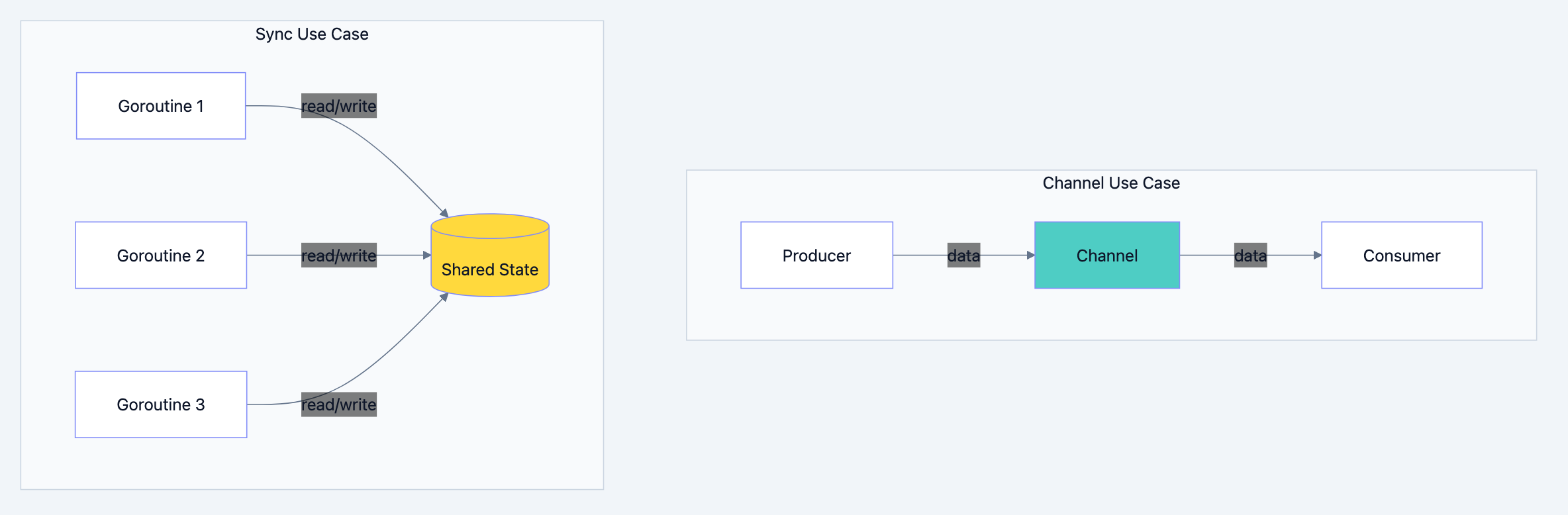
Go blog diagram 1
When Channels Aren't the Answer
Channels excel at transferring ownership of data between goroutines. But consider an in-memory cache:
gotype Cache struct {
    data map[string]string
}
Multiple goroutines need to read from and occasionally write to this cache. Using channels would require:
- A dedicated goroutine owning the cache
- Request channels for read/write operations
- Response channels to return results
- Complex coordination for every access
This overhead doesn't make sense for a simple map lookup. What you really want is a way to say, "Only one goroutine can access this right now." That's what mutexes provide.
The Traffic Light Analogy
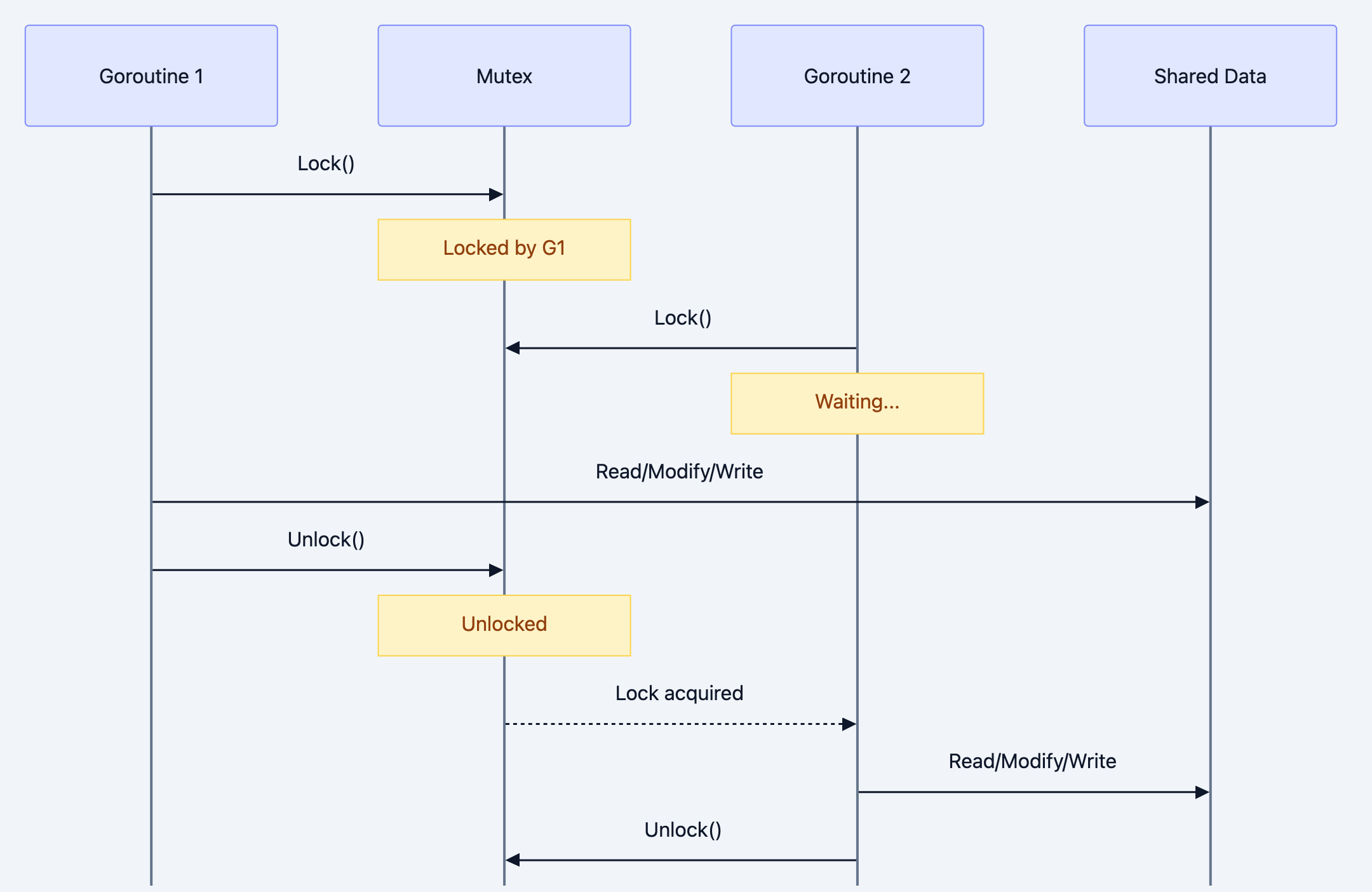
Think of a Mutex as a traffic light at a single-lane bridge:
- When a car (goroutine) wants to cross, it checks the light
- If green, it turns the light red (locks) and crosses
- Other cars wait at the red light
- When the car finishes, it turns the light green (unlocks)
- The next waiting car proceeds
This simple mechanism only one car on the bridge at a time prevents collisions (race conditions).
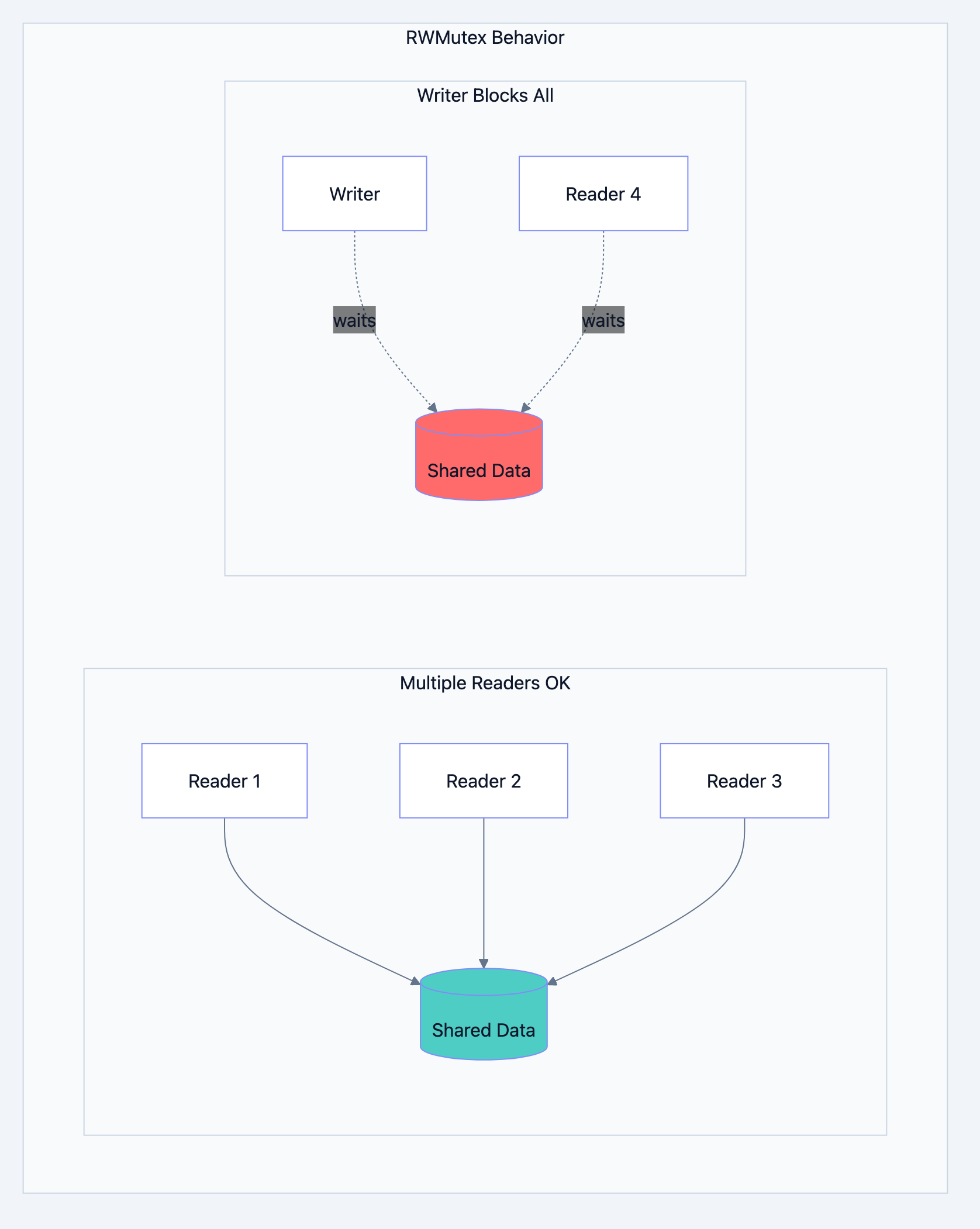
An RWMutex is smarter, like library rules:
- Many people can read books simultaneously
- But when someone needs to reshelve books, everyone waits
- Multiple readers are fine; writers need exclusive access
Detailed Explanation: Mutex
Go blog diagram 2
What Is a Mutex?
A Mutex (mutual exclusion lock) ensures that only one goroutine can execute a section of code at a time. Any goroutine that attempts to acquire a locked mutex will block until it becomes available.
govar mu sync.Mutex

mu.Lock()   // Acquire the lock (or wait until available)
// ... critical section (only one goroutine here at a time) ...
mu.Unlock() // Release the lock
Protecting Shared State
Let's see the problem and solution in action:
go// Filename: unsafe_counter.go
// BROKEN: Race condition
package main

import (
    "fmt"
    "sync"
)

type UnsafeCounter struct {
    value int
}

func (c *UnsafeCounter) Increment() {
    c.value++  // Read, modify, write not atomic!
}

func (c *UnsafeCounter) Value() int {
    return c.value
}

func main() {
    counter := UnsafeCounter{}
    var wg sync.WaitGroup

    for i := 0; i < 1000; i++ {
        wg.Add(1)
        go func() {
            defer wg.Done()
            counter.Increment()
        }()
    }

    wg.Wait()
    fmt.Println("Final count:", counter.Value())
    // Expected: 1000, Actual: varies (usually less)
}
Run this several times you'll get different numbers, almost never 1000. The race detector (
go run -race) would flag this immediately.Fixed version with Mutex:
go// Filename: safe_counter.go
package main

import (
    "fmt"
    "sync"
)

type SafeCounter struct {
    mu    sync.Mutex
    value int
}

func (c *SafeCounter) Increment() {
    c.mu.Lock()         // Acquire exclusive access
    c.value++           // Only one goroutine here at a time
    c.mu.Unlock()       // Release for others
}

func (c *SafeCounter) Value() int {
    c.mu.Lock()
    defer c.mu.Unlock()  // defer ensures unlock even if we panic
    return c.value
}

func main() {
    counter := SafeCounter{}
    var wg sync.WaitGroup

    for i := 0; i < 1000; i++ {
        wg.Add(1)
        go func() {
            defer wg.Done()
            counter.Increment()
        }()
    }

    wg.Wait()
    fmt.Println("Final count:", counter.Value())
    // Always prints: 1000
}
Key implementation details:
- Lock before access: Call
Lock()before reading or writing protected data - Unlock when done: Always release the lock, preferably with
defer - Protect all access points: Both
Increment()andValue()need protection - Use defer: Guarantees unlock even if code panics
Mutex Granularity
Where you place the mutex matters for performance:
Coarse-grained (simple but may limit concurrency):
gotype Account struct {
    mu      sync.Mutex
    balance int
    name    string
    // ... many fields protected by one mutex
}
Fine-grained (more concurrency but more complexity):
gotype Account struct {
    balanceMu sync.Mutex
    balance   int

    nameMu sync.Mutex
    name   string
}
Start coarse-grained. Only split if profiling shows contention.
Detailed Explanation: RWMutex
Go blog diagram 3
The Read-Heavy Pattern
Consider a configuration store:
- Thousands of goroutines read configuration every second
- Configuration changes maybe once per hour
With a regular Mutex, only one goroutine reads at a time even though concurrent reads are perfectly safe. This creates unnecessary contention.
RWMutex distinguishes between readers and writers:
- Multiple readers can hold the read lock simultaneously
- A writer needs exclusive access no other readers or writers
Using RWMutex
go// Filename: cache_rwmutex.go
package main

import (
    "fmt"
    "sync"
    "time"
)

type Cache struct {
    mu   sync.RWMutex
    data map[string]string
}

func NewCache() *Cache {
    return &Cache{data: make(map[string]string)}
}

// Get acquires a read lock multiple goroutines can read simultaneously
func (c *Cache) Get(key string) (string, bool) {
    c.mu.RLock()          // Read lock
    defer c.mu.RUnlock()  // Read unlock
    val, ok := c.data[key]
    return val, ok
}

// Set acquires a write lock exclusive access
func (c *Cache) Set(key, value string) {
    c.mu.Lock()          // Write lock
    defer c.mu.Unlock()  // Write unlock
    c.data[key] = value
}

func main() {
    cache := NewCache()
    cache.Set("greeting", "Hello, World!")

    var wg sync.WaitGroup

    // Spawn 10 concurrent readers
    for i := 0; i < 10; i++ {
        wg.Add(1)
        go func(id int) {
            defer wg.Done()
            val, _ := cache.Get("greeting")
            fmt.Printf("Reader %d: %s\n", id, val)
        }(i)
    }

    wg.Wait()
}
When to Use RWMutex vs Mutex
| Scenario | Best Choice |
|---|---|
| Read-heavy, write-rare | RWMutex |
| Write-heavy or balanced | Mutex (simpler) |
| Very fast critical sections | Mutex (RWMutex has overhead) |
| Reader starvation concerns | Mutex |
Important: RWMutex has more overhead than Mutex. If your critical section is extremely fast (a few nanoseconds), the overhead may outweigh the benefit. Profile to be sure.
Detailed Explanation: WaitGroup
Go blog diagram 4
The "Wait for Everyone" Problem
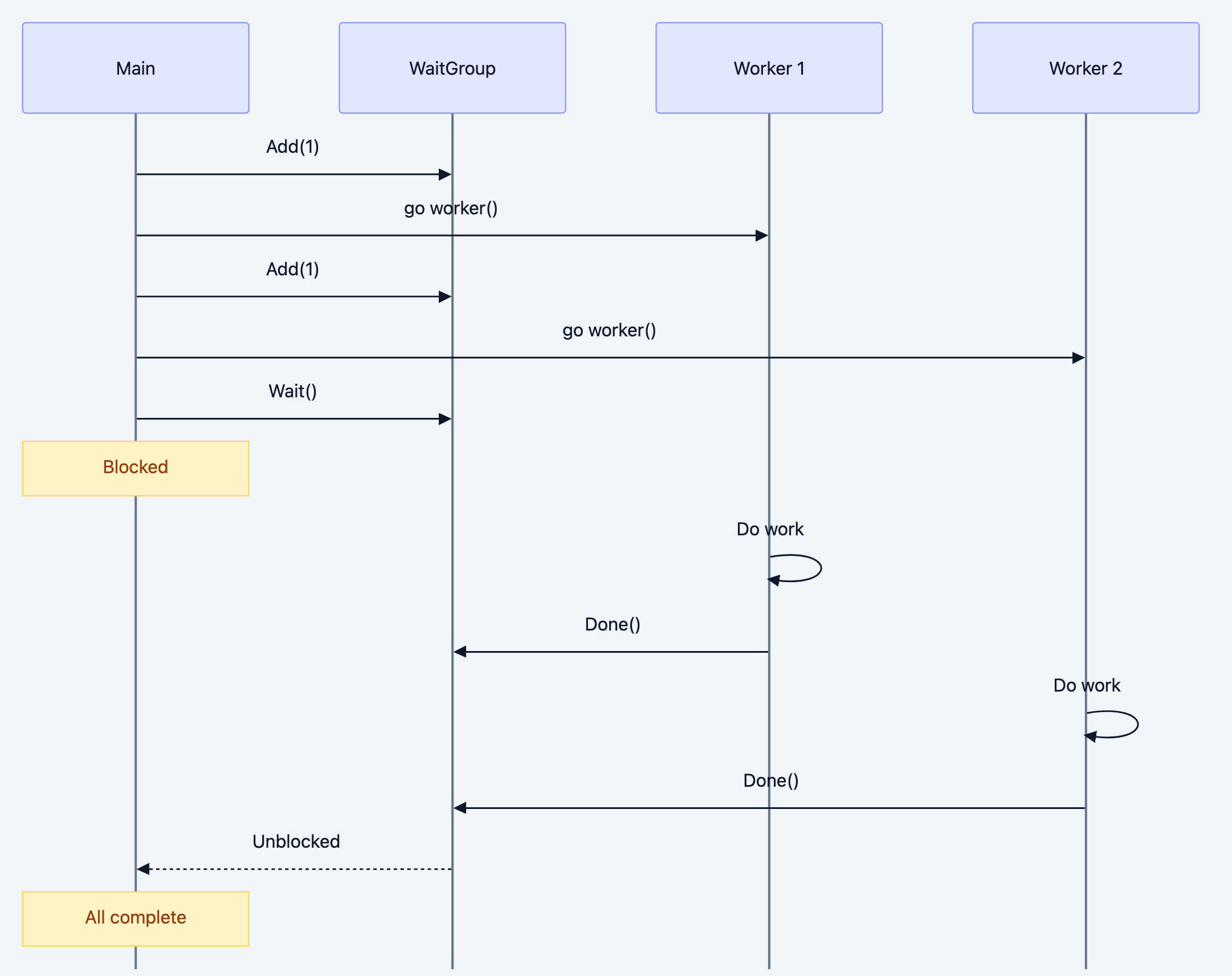
You spin up 100 goroutines to process items in parallel. When can main() safely continue? Using
time.Sleep is a hack you don't know how long to wait.WaitGroup provides a counter:
Add(n)increases the counter by nDone()decrements the counter by 1Wait()blocks until the counter reaches zero
go// Filename: waitgroup_example.go
package main

import (
    "fmt"
    "sync"
    "time"
)

func worker(id int, wg *sync.WaitGroup) {
    defer wg.Done()  // Decrement counter when this goroutine finishes

    fmt.Printf("Worker %d starting\n", id)
    time.Sleep(time.Second)  // Simulate work
    fmt.Printf("Worker %d done\n", id)
}

func main() {
    var wg sync.WaitGroup

    for i := 1; i <= 5; i++ {
        wg.Add(1)           // Increment BEFORE starting goroutine
        go worker(i, &wg)   // Pass WaitGroup by pointer
    }

    wg.Wait()  // Block until all workers call Done()
    fmt.Println("All workers completed!")
}
Output (order of workers may vary):
Worker 1 starting
Worker 5 starting
Worker 3 starting
Worker 2 starting
Worker 4 starting
Worker 1 done
Worker 5 done
Worker 2 done
Worker 4 done
Worker 3 done
All workers completed!
Critical WaitGroup Rules
- Add before launching: Call
Add()before thegostatement - Pass by pointer:
*sync.WaitGroup, notsync.WaitGroup - Always Done: Use
defer wg.Done()at the start of the goroutine - Match Add and Done: Each
Add(1)needs exactly oneDone()
Common mistake:
go// BROKEN: Add inside goroutine
go func() {
    wg.Add(1)  // May not execute before Wait() is called!
    defer wg.Done()
    // ...
}()
Detailed Explanation: Once
The Initialization Problem
Consider expensive initialization that should happen exactly once, regardless of how many goroutines try:
govar config *Config

func GetConfig() *Config {
    if config == nil {
        config = loadConfigFromDisk()  // Expensive!
    }
    return config
}
This has a race condition: two goroutines might both see
nil and both load.sync.Once guarantees a function runs exactly once:
go// Filename: once_example.go
package main

import (
    "fmt"
    "sync"
)

var (
    config map[string]string
    once   sync.Once
)

func loadConfig() {
    fmt.Println("Loading configuration...")  // Prints only once
    config = map[string]string{
        "host": "localhost",
        "port": "8080",
    }
}

func GetConfig() map[string]string {
    once.Do(loadConfig)  // loadConfig runs exactly once
    return config
}

func main() {
    var wg sync.WaitGroup

    // 10 goroutines all calling GetConfig
    for i := 0; i < 10; i++ {
        wg.Add(1)
        go func(id int) {
            defer wg.Done()
            cfg := GetConfig()
            fmt.Printf("Goroutine %d got host: %s\n", id, cfg["host"])
        }(i)
    }

    wg.Wait()
}
Output:
Loading configuration...
Goroutine 1 got host: localhost
Goroutine 5 got host: localhost
... (all get the same config, but "Loading" appears only once)
Once Semantics
- The function passed to
Doruns exactly once - All callers block until the first call completes
- Even if the function panics,
Doconsiders it "done" and won't retry - Each
Onceinstance tracks one execution use separateOncefor separate one-time operations
Detailed Explanation: Pool
The Allocation Problem
Creating and destroying objects costs CPU time and creates garbage collection pressure. If you repeatedly need temporary buffers:
gofunc ProcessRequest(data []byte) {
    buf := make([]byte, 1024)  // Allocation every request
    // ... use buf ...
    // buf becomes garbage
}
sync.Pool maintains a cache of temporary objects:
go// Filename: pool_example.go
package main

import (
    "bytes"
    "fmt"
    "sync"
)

var bufferPool = sync.Pool{
    New: func() interface{} {
        fmt.Println("Creating new buffer")  // Track allocations
        return new(bytes.Buffer)
    },
}

func processData(data string) string {
    // Get buffer from pool (or create new if pool empty)
    buf := bufferPool.Get().(*bytes.Buffer)
    buf.Reset()  // Clear previous contents

    // Use the buffer
    buf.WriteString("Processed: ")
    buf.WriteString(data)
    result := buf.String()

    // Return buffer to pool for reuse
    bufferPool.Put(buf)

    return result
}

func main() {
    // Process several items
    for i := 0; i < 5; i++ {
        result := processData(fmt.Sprintf("data-%d", i))
        fmt.Println(result)
    }
}
Output:
Creating new buffer
Processed: data-0
Processed: data-1
Processed: data-2
Processed: data-3
Processed: data-4
Only one buffer created! It gets reused across all five calls.
Pool Behavior Details
- Get: Returns a pooled object or calls
Newif pool is empty - Put: Returns an object to the pool for potential reuse
- GC interaction: Pool contents may be cleared at any garbage collection
- No guarantees: Objects may not be reused the pool is a hint, not a cache
When to Use Pool
Good candidates:
- Byte buffers for encoding/decoding
- Temporary slices in hot paths
- Reusable objects with expensive initialization
Poor candidates:
- Objects with complex cleanup requirements
- Objects holding external resources (connections, files)
- Small objects where allocation is cheap
Practical Use Cases
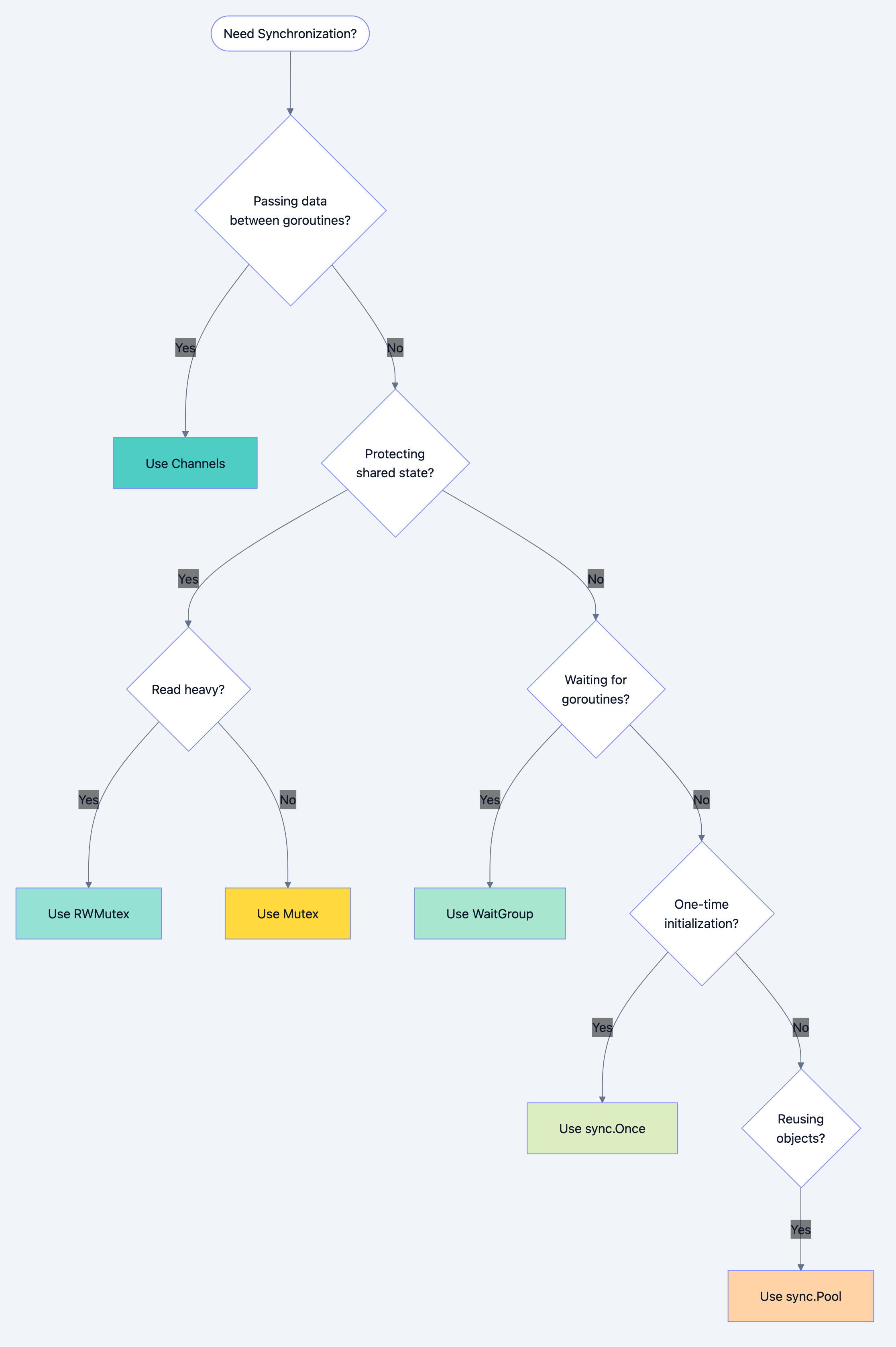
Go blog diagram 5
Rate Limiter Implementation
go// Filename: rate_limiter.go
package main

import (
    "fmt"
    "sync"
    "time"
)

type RateLimiter struct {
    mu        sync.Mutex
    tokens    int
    maxTokens int
    refillAt  time.Time
    interval  time.Duration
}

func NewRateLimiter(rate int, interval time.Duration) *RateLimiter {
    return &RateLimiter{
        tokens:    rate,
        maxTokens: rate,
        interval:  interval,
        refillAt:  time.Now().Add(interval),
    }
}

func (r *RateLimiter) Allow() bool {
    r.mu.Lock()
    defer r.mu.Unlock()

    now := time.Now()

    // Refill if interval has passed
    if now.After(r.refillAt) {
        r.tokens = r.maxTokens
        r.refillAt = now.Add(r.interval)
    }

    if r.tokens > 0 {
        r.tokens--
        return true
    }

    return false
}

func main() {
    limiter := NewRateLimiter(3, time.Second)  // 3 per second

    var wg sync.WaitGroup

    for i := 1; i <= 10; i++ {
        wg.Add(1)
        go func(id int) {
            defer wg.Done()
            if limiter.Allow() {
                fmt.Printf("Request %d: Allowed\n", id)
            } else {
                fmt.Printf("Request %d: Rate limited\n", id)
            }
        }(i)
    }

    wg.Wait()
}
Thread-Safe Map with RWMutex
gotype SafeMap struct {
    mu   sync.RWMutex
    data map[string]interface{}
}

func (m *SafeMap) Get(key string) (interface{}, bool) {
    m.mu.RLock()
    defer m.mu.RUnlock()
    val, ok := m.data[key]
    return val, ok
}

func (m *SafeMap) Set(key string, value interface{}) {
    m.mu.Lock()
    defer m.mu.Unlock()
    m.data[key] = value
}

func (m *SafeMap) Delete(key string) {
    m.mu.Lock()
    defer m.mu.Unlock()
    delete(m.data, key)
}
Common Mistakes and Misconceptions
Mistake 1: Copying Mutex
go// BROKEN: Mutex copied, protection lost
type Counter struct {
    sync.Mutex
    value int
}

func broken(c Counter) {  // Copies the mutex!
    c.Lock()
    c.value++
    c.Unlock()
}

// CORRECT: Pass by pointer
func correct(c *Counter) {
    c.Lock()
    c.value++
    c.Unlock()
}
When you copy a struct containing a mutex, you get a new mutex. The original and copy have independent locks no protection.
Mistake 2: Forgetting to Unlock
go// BROKEN: Lock never released
func dangerous() {
    mu.Lock()
    if someCondition {
        return  // Lock still held!
    }
    mu.Unlock()
}

// CORRECT: defer ensures unlock
func safe() {
    mu.Lock()
    defer mu.Unlock()

    if someCondition {
        return  // defer runs, lock released
    }
}
Mistake 3: Recursive Locking (Deadlock)
go// BROKEN: Same goroutine locks twice -> deadlock
func outer() {
    mu.Lock()
    inner()  // This also tries to lock
    mu.Unlock()
}

func inner() {
    mu.Lock()    // DEADLOCK: we already hold this lock
    defer mu.Unlock()
    // ...
}
Go mutexes are not reentrant. The same goroutine cannot acquire the same lock twice.
Mistake 4: Holding Lock During Slow Operations
go// BROKEN: Holds lock during network call
func fetchAndStore(key string) {
    mu.Lock()
    defer mu.Unlock()

    data := httpClient.Get(url)  // Slow! All other goroutines blocked
    cache[key] = data
}

// CORRECT: Minimize locked section
func fetchAndStore(key string) {
    data := httpClient.Get(url)  // Fetch outside lock

    mu.Lock()
    cache[key] = data  // Only lock for the store
    mu.Unlock()
}
Performance and Best Practices
Choosing the Right Primitive
| Primitive | Use Case | Overhead |
|---|---|---|
| Mutex | Simple exclusive access | Very low |
| RWMutex | Read-heavy workloads | Low-medium |
| WaitGroup | Wait for goroutine completion | Very low |
| Once | Single initialization | Very low |
| Pool | Object reuse | Medium |
| Channels | Data transfer, signaling | Low-medium |
Guidelines
- Prefer channels for communication: Use sync primitives for state protection
- Keep critical sections short: Lock, do minimum work, unlock
- Use defer for unlocking: Prevents bugs from early returns
- Avoid nested locks: Risk of deadlock increases
- Profile before optimizing: Contention might not be where you expect
Detecting Race Conditions
Always test with the race detector:
bashgo test -race ./...
go run -race main.go
The race detector finds many concurrency bugs at runtime.
Summary
Key takeaways from this chapter:
-
Mutex provides exclusive access: Only one goroutine in the critical section at a time.
-
RWMutex optimizes read-heavy patterns: Multiple readers, exclusive writers.
-
WaitGroup coordinates completion: Wait for a group of goroutines to finish.
-
Once guarantees single execution: Thread-safe lazy initialization.
-
Pool reduces allocation: Reuse expensive temporary objects.
-
Never copy mutexes: Always pass by pointer.
-
Use defer for unlocking: Prevents lock leaks on early returns.
-
Keep critical sections minimal: Lock late, unlock early.
What's next: With channels and sync primitives mastered, you have the foundational tools for concurrent Go programming. The next chapter explores practical concurrency patterns worker pools, pipelines, fan-out/fan-in that combine these tools into production-ready solutions.
Interview Questions
-
Explain the difference between a Mutex and an RWMutex. When would you choose each?
-
What happens if a goroutine tries to lock a Mutex that it already holds? How does this differ from some other languages?
-
A developer uses
sync.WaitGroupbut goroutines complete faster than expected. What mistake might they have made? -
Explain why you must pass a
sync.WaitGroupby pointer to goroutines. What happens if you pass by value? -
How does
sync.Oncediffer from simply using a boolean flag with a mutex to guard initialization? -
What is the relationship between
sync.Pooland garbage collection? Are pooled objects guaranteed to be available later? -
Explain the "copy lock" problem with embedded mutexes. How does
go vethelp detect this? -
A function holds a mutex lock while making an HTTP request. Why is this problematic? How would you restructure?
-
Describe a scenario where using a channel would be better than a mutex, and vice versa.
-
What are the risks of nested mutex locks? How can you design to avoid deadlocks?
-
Compare
sync.Mapto a regular map protected by RWMutex. When would you choose each? -
How would you implement a bounded worker pool that limits concurrent HTTP requests?
-
A
sync.Oncefunction panics. What happens on subsequent calls toDo()? -
Explain the memory ordering guarantees provided by mutex Lock/Unlock operations.
-
You need to update multiple fields atomically on a struct. Would you use one mutex or multiple? What are the trade-offs?