Chapter 2: Channels in Go - How Goroutines Talk to Each Other
Introduction
Imagine an orchestra where musicians cannot hear each other. The violinist finishes their part, but the drummer doesn't know. The pianist waits forever for a cue that never comes. The result is chaos, not music.
This is exactly what happens when goroutines cannot communicate. They run independently but have no way to share results, coordinate timing, or signal completion. You end up with race conditions, missed data, and programs that work "sometimes."
In the previous chapter, you learned how to create goroutines independent threads of execution that can run concurrently. But isolated workers aren't very useful if they can't collaborate. This chapter introduces channels, Go's elegant solution for goroutine communication.
Why channels matter in real-world systems:
- A web scraper needs workers to report results back to a central collector
- A pipeline processor must pass data from one stage to the next
- A rate limiter needs to coordinate access to a shared resource
- A graceful shutdown system must signal all workers to stop
Without channels, you'd resort to shared memory protected by locks error-prone, hard to reason about, and a source of subtle bugs. Channels provide a higher-level abstraction that makes concurrent programming safer and more intuitive.
Core Concepts
The Problem with Shared Memory
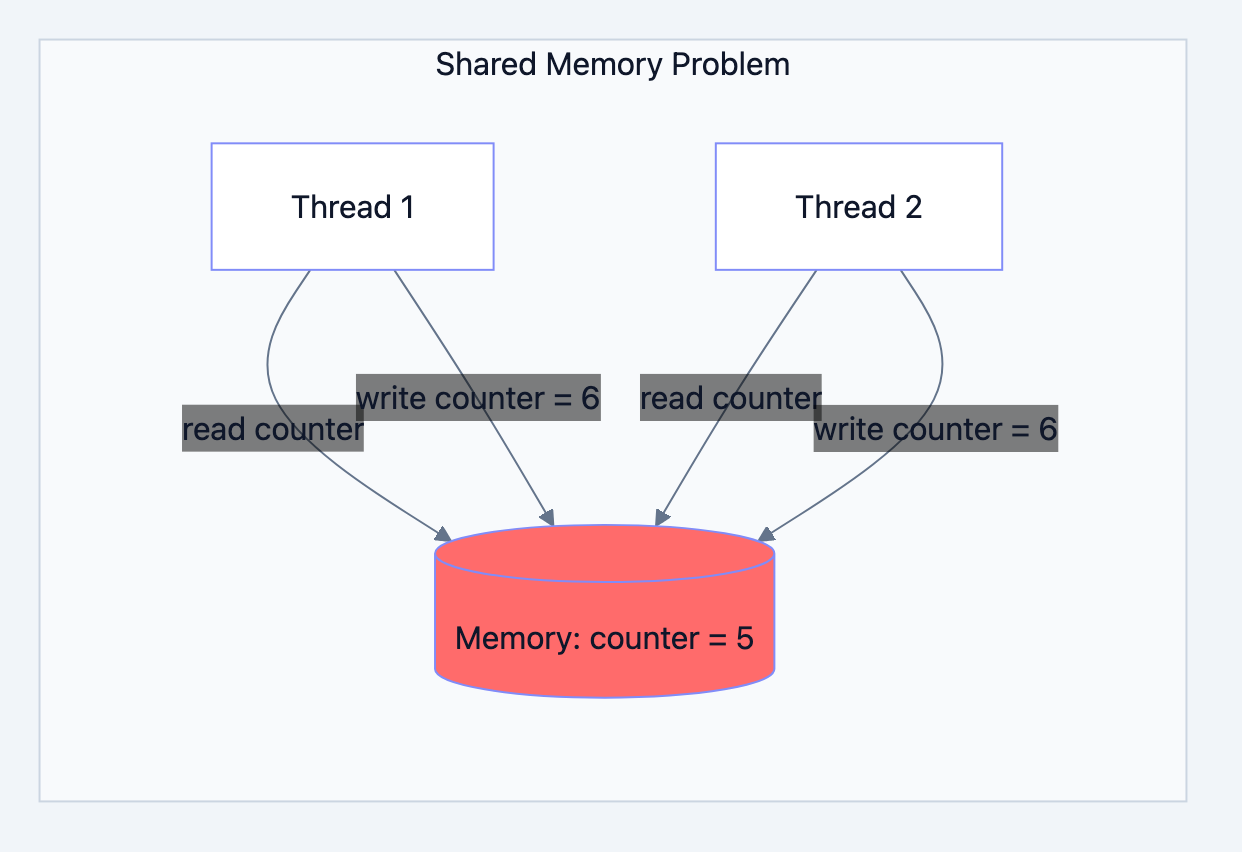
Go blog diagram 1
Before understanding channels, let's see why they exist. Traditional concurrent programming uses shared memory multiple threads access the same variables. This seems simple until you realize the dangers.
Consider two threads trying to increment a counter:
Thread A reads counter: 5
Thread B reads counter: 5
Thread A calculates: 5 + 1 = 6
Thread B calculates: 5 + 1 = 6
Thread A writes: 6
Thread B writes: 6

Final value: 6 (should be 7!)
This is a race condition. Both threads read the same value, computed independently, and one write overwrote the other. We lost an increment. The insidious part? This bug happens randomly, depending on thread timing. It might work perfectly 999 times and fail on the 1000th.
Traditional fixes involve mutexes, semaphores, and careful programming. One mistake and you get deadlocks or corrupted data. It's mentally exhausting.
Go's Communication Philosophy
Go blog diagram 2
Go takes a different approach, expressed in this famous quote:
"Don't communicate by sharing memory; share memory by communicating."
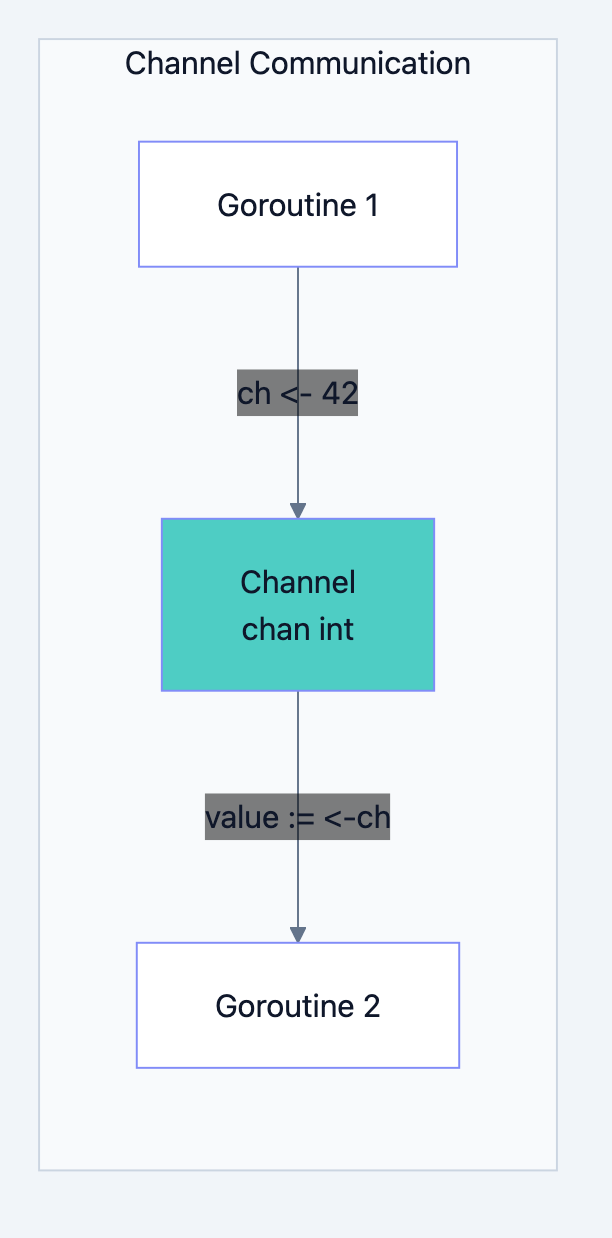
Instead of goroutines accessing shared data, they send data to each other through channels. Each piece of data has a single owner at any time. When you send a value through a channel, you transfer ownership. The sender no longer uses that value; the receiver takes over.
This model eliminates most race conditions by design. If only one goroutine owns a piece of data, there's no race.
What Is a Channel?
A channel is a typed conduit through which you can send and receive values. Think of it as a pipe connecting two goroutines.
go// Create a channel that carries integers
ch := make(chan int)

// Send a value into the channel
ch <- 42

// Receive a value from the channel
value := <-ch
Key characteristics:
- Typed: A
chan intcan only carry integers. Type safety is enforced at compile time. - Thread-safe: Channel operations are atomic. No locks needed.
- Blocking by default: Sends wait for receivers; receives wait for senders.
The directional operators are intuitive:
ch <- valueArrow points into the channel (send)value := <-chArrow points out of the channel (receive)
Detailed Explanation: Unbuffered Channels
Go blog diagram 3
How Unbuffered Channels Work
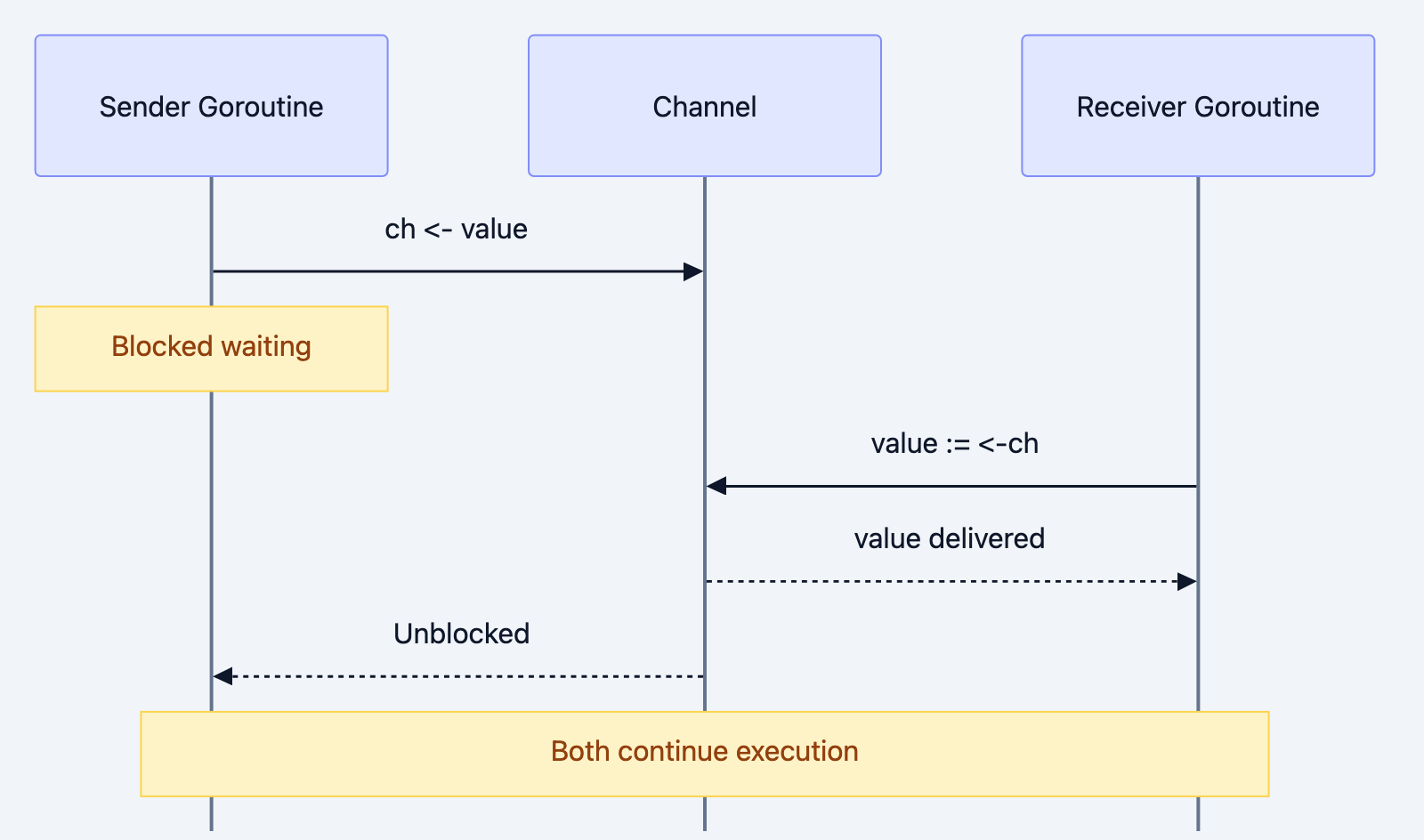
An unbuffered channel (the default) has no storage capacity. When you send a value, the sender blocks until another goroutine receives it. This creates a synchronization point the sender and receiver must meet at the channel simultaneously.
go// Filename: basic_channel.go
package main

import "fmt"

func main() {
    // Create an unbuffered channel for strings
    messages := make(chan string)

    // Start a goroutine that sends a message
    go func() {
        messages <- "Hello from goroutine!"
        // Sender blocks here until main() receives
    }()

    // Receive the message in the main goroutine
    // This blocks until the sender sends
    msg := <-messages
    fmt.Println(msg)
}
Execution flow:
- Main goroutine creates the channel
- Main goroutine starts an anonymous goroutine
- Main goroutine reaches
<-messagesand blocks (nothing to receive yet) - Anonymous goroutine reaches
messages <-and unblocks (main is waiting) - Value transfers from sender to receiver
- Both goroutines continue
This synchronization happens automatically. No explicit signaling required.
The Blocking Nature: A Feature, Not a Bug
Beginners sometimes see blocking as a problem. It's actually a powerful feature:
go// Filename: blocking_demo.go
package main

import (
    "fmt"
    "time"
)

func main() {
    ch := make(chan string)

    go func() {
        fmt.Println("Goroutine: Starting work...")
        time.Sleep(2 * time.Second)
        ch <- "Work complete!"
        fmt.Println("Goroutine: Message sent!")
    }()

    fmt.Println("Main: Waiting for result...")
    msg := <-ch  // Blocks until message arrives
    fmt.Println("Main: Received:", msg)
}
Output:
Main: Waiting for result...
Goroutine: Starting work...
Goroutine: Message sent!
Main: Received: Work complete!
Notice:
- Main doesn't busy-wait or poll. It simply blocks until data arrives.
- The ordering is guaranteed: main receives after the goroutine sends.
- No
time.Sleephacks needed for synchronization.
Visualizing the Handoff
Think of an unbuffered channel as a relay race baton exchange. The sender (outgoing runner) holds out the baton and waits. The receiver (incoming runner) reaches back. The exchange happens only when both runners are present. Neither can continue until the baton transfers.
Sender:     [waiting with value] -----> [transfer] -----> [continues]
                                            |
Receiver:   [waiting for value] <----- [transfer] -----> [has value, continues]
This forced synchronization prevents many concurrency bugs by ensuring a clear handoff.
Detailed Explanation: Buffered Channels

Go blog diagram 4
When Blocking Hurts
Sometimes immediate blocking is undesirable. Consider a logging system:
go// Unbuffered: Logger blocks if consumer is slow
logCh := make(chan string)
logCh <- "Event happened"  // Blocks until someone reads this!
If the log consumer is processing a previous message, the producer is stuck. In a web server, this could cause request handling to stall.
Buffered channels solve this by providing internal storage:
go// Buffered: Can hold 100 messages before blocking
logCh := make(chan string, 100)
logCh <- "Event 1"  // Doesn't block (buffer has room)
logCh <- "Event 2"  // Doesn't block (buffer has room)
// ... up to 100 messages ...
logCh <- "Event 101"  // NOW it blocks (buffer full)
Creating and Using Buffered Channels
go// Filename: buffered_channel.go
package main

import "fmt"

func main() {
    // Create a channel that can buffer 3 values
    ch := make(chan int, 3)

    // These sends don't block buffer has room
    ch <- 1
    ch <- 2
    ch <- 3

    fmt.Println("Sent 3 values without blocking")

    // If we tried ch <- 4 here, it would block
    // because the buffer is full

    // Receive values
    fmt.Println(<-ch)  // 1
    fmt.Println(<-ch)  // 2
    fmt.Println(<-ch)  // 3
}
Output:
Sent 3 values without blocking
1
2
3
Buffer Dynamics
A buffered channel behaves like a queue (FIFO first in, first out):
Buffer capacity: 3
State: [empty] [empty] [empty]

Send 10: [10] [empty] [empty]        no blocking
Send 20: [10] [20] [empty]           no blocking
Send 30: [10] [20] [30]              no blocking
Send 40:                              BLOCKS (buffer full)

Receive: returns 10, buffer becomes [20] [30] [empty]
Send 40: [20] [30] [40]              now succeeds
When to Use Buffered vs Unbuffered
| Scenario | Channel Type | Reason |
|---|---|---|
| Request-response | Unbuffered | Ensures sender knows receiver got message |
| Work queue | Buffered | Smooth burst handling |
| Event logging | Buffered | Producer shouldn't block on slow consumer |
| Done/quit signals | Unbuffered | Synchronization point is desired |
| Rate limiting | Buffered | Buffer size = limit |
Rule of thumb: Start with unbuffered channels. Add buffering only when you have a specific reason and understand the implications.
Closing Channels
Go blog diagram 5
Why Close Channels?
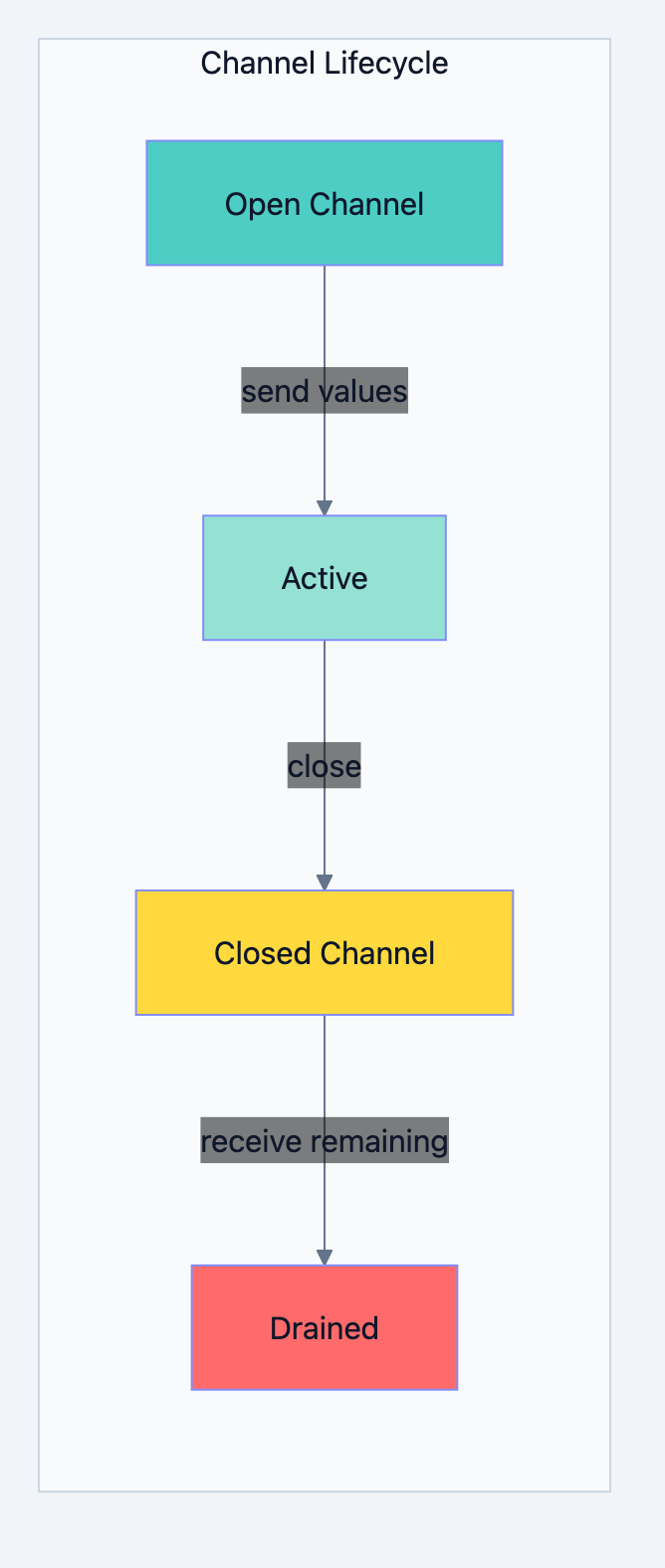
Closing a channel signals that no more values will be sent. This is crucial for receivers who need to know when to stop listening.
goclose(ch) // Signal: "No more values coming"
Key behaviors after closing:
- Sending to a closed channel panics
- Receiving from a closed channel immediately returns the zero value
- You can check if a channel is closed using the comma-ok idiom
The Comma-OK Idiom
govalue, ok := <-ch
// ok is true if value was received normally
// ok is false if channel is closed and empty
Example:
go// Filename: channel_close.go
package main

import "fmt"

func main() {
    ch := make(chan int, 3)
    ch <- 1
    ch <- 2
    ch <- 3
    close(ch)

    // Receive with comma-ok
    for {
        value, ok := <-ch
        if !ok {
            fmt.Println("Channel closed!")
            break
        }
        fmt.Println("Received:", value)
    }
}
Output:
Received: 1
Received: 2
Received: 3
Channel closed!
Ranging Over Channels
Go provides elegant syntax for receiving all values until a channel closes:
go// Filename: channel_range.go
package main

import "fmt"

func producer(ch chan int) {
    for i := 1; i <= 5; i++ {
        ch <- i
    }
    close(ch)  // Signal completion
}

func main() {
    ch := make(chan int)
    go producer(ch)

    // Range automatically stops when channel closes
    for num := range ch {
        fmt.Println("Received:", num)
    }

    fmt.Println("Done receiving")
}
Output:
Received: 1
Received: 2
Received: 3
Received: 4
Received: 5
Done receiving
The
range loop handles the closing detection automatically cleaner than explicit comma-ok checks in a loop.Who Should Close?
Only senders should close channels. This is a firm guideline:
- The sender knows when there are no more values
- Closing a channel twice panics
- Sending on a closed channel panics
If multiple goroutines send to a channel, coordinate closure carefully (often using a separate "done" mechanism rather than closing the work channel).
Select: Multiplexing Channels
Go blog diagram 6
The Problem of Multiple Sources
Real programs often need to handle multiple channels. Maybe you're waiting for:
- Work results from several workers
- A timeout signal
- A cancellation signal
You can't just read from one channel you might miss messages from others.
The Select Statement
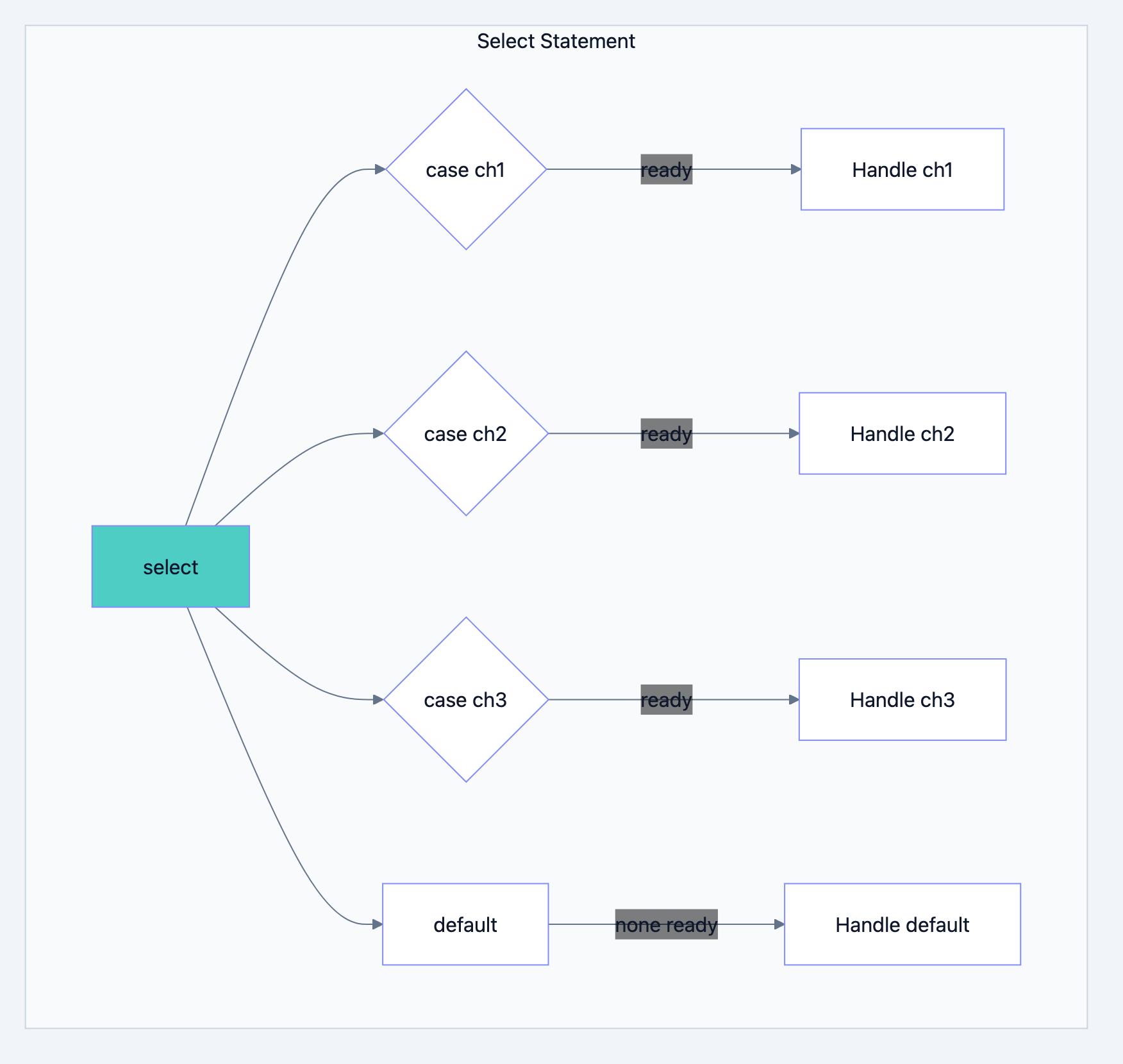
select lets you wait on multiple channel operations simultaneously:goselect { case msg1 := <-ch1: fmt.Println("Received from ch1:", msg1) case msg2 := <-ch2: fmt.Println("Received from ch2:", msg2) case ch3 <- value: fmt.Println("Sent to ch3") }
The
select blocks until one case is ready, then executes that case. If multiple cases are ready simultaneously, Go picks one randomly (to avoid starvation).Example: First Response Wins
go// Filename: select_example.go
package main

import (
    "fmt"
    "time"
)

func main() {
    ch1 := make(chan string)
    ch2 := make(chan string)

    // Simulate two services with different response times
    go func() {
        time.Sleep(1 * time.Second)
        ch1 <- "Response from Service A"
    }()

    go func() {
        time.Sleep(2 * time.Second)
        ch2 <- "Response from Service B"
    }()

    // Receive both responses
    for i := 0; i < 2; i++ {
        select {
        case msg := <-ch1:
            fmt.Println(msg)
        case msg := <-ch2:
            fmt.Println(msg)
        }
    }
}
Output:
Response from Service A
Response from Service B
Implementing Timeouts
select combined with time.After enables timeout patterns:goselect { case result := <-workCh: fmt.Println("Got result:", result) case <-time.After(3 * time.Second): fmt.Println("Timeout: no result in 3 seconds") }
Non-Blocking Operations with Default
Adding a
default case makes select non-blocking:goselect { case msg := <-ch: fmt.Println("Received:", msg) default: fmt.Println("No message available right now") }
This is useful for polling or attempting operations without blocking.
Channel Direction
Restricting Channel Operations
You can specify that a function only sends or only receives on a channel:
go// Send-only channel parameter
func sender(ch chan<- int) {
    ch <- 42
    // <-ch would be a compile error
}

// Receive-only channel parameter
func receiver(ch <-chan int) {
    value := <-ch
    // ch <- 42 would be a compile error
}
Why Direction Matters
Direction restrictions provide:
- Documentation: Function signature clearly shows intent
- Compile-time safety: Bugs caught before runtime
- Design clarity: Enforces clean channel usage patterns
Conversion Rules
A bidirectional channel (
chan int) can be converted to unidirectional:goch := make(chan int) var sendOnly chan<- int = ch // OK var recvOnly <-chan int = ch // OK
But not vice versa once restricted, you can't get back to bidirectional.
Code Examples: Real-World Patterns
Go blog diagram 7
Worker Pool Pattern
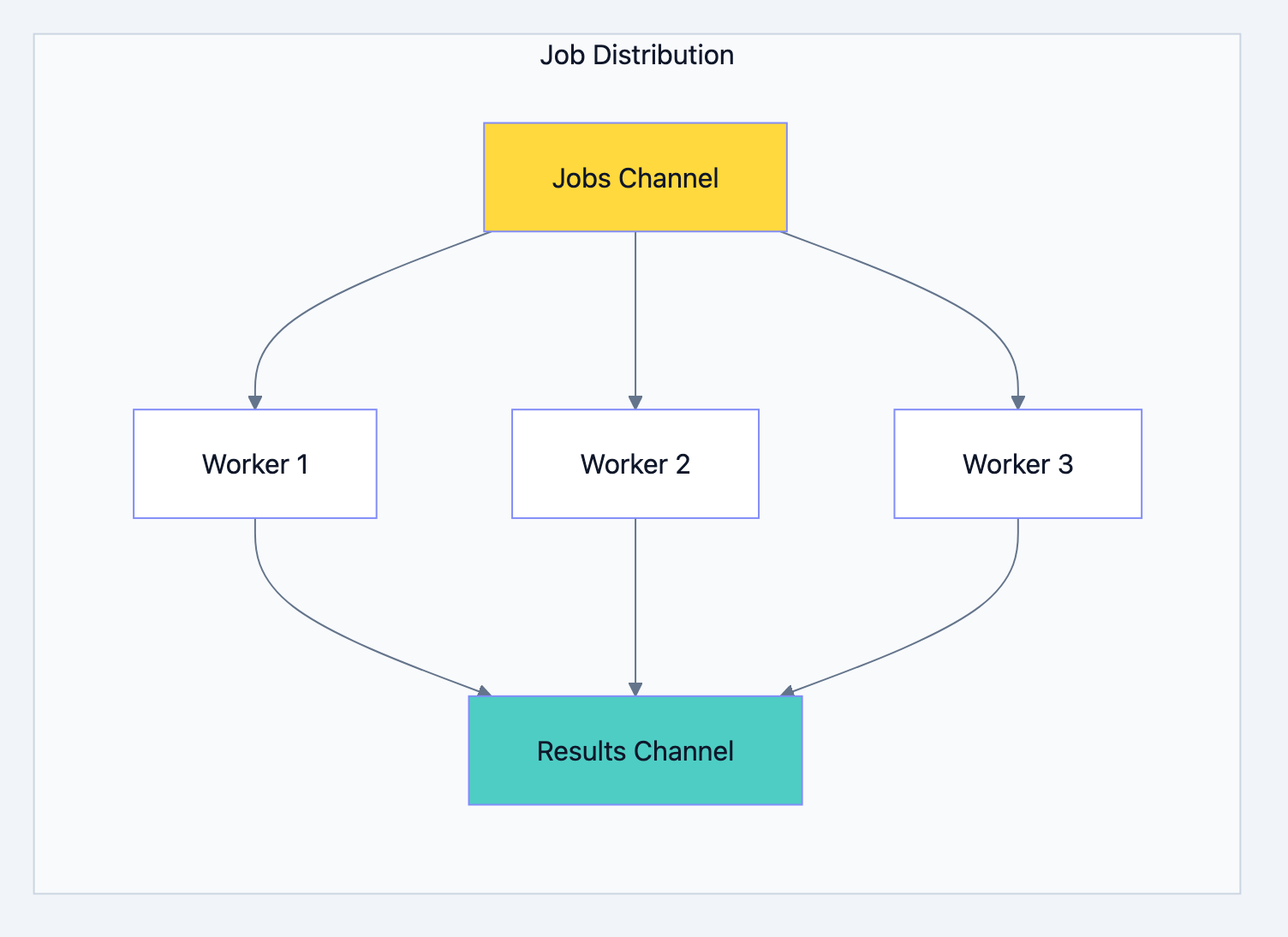
A fixed number of workers process jobs from a shared queue:
go// Filename: worker_pool.go
package main

import (
    "fmt"
    "sync"
    "time"
)

type Job struct {
    ID   int
    Data string
}

type Result struct {
    JobID  int
    Output string
}

// worker processes jobs and sends results.
// jobs is receive-only; results is send-only.
func worker(id int, jobs <-chan Job, results chan<- Result, wg *sync.WaitGroup) {
    defer wg.Done()

    for job := range jobs {
        // Simulate processing
        time.Sleep(500 * time.Millisecond)

        results <- Result{
            JobID:  job.ID,
            Output: fmt.Sprintf("Worker %d processed: %s", id, job.Data),
        }
    }
}

func main() {
    const numJobs = 5
    const numWorkers = 3

    jobs := make(chan Job, numJobs)
    results := make(chan Result, numJobs)

    var wg sync.WaitGroup

    // Start workers
    for w := 1; w <= numWorkers; w++ {
        wg.Add(1)
        go worker(w, jobs, results, &wg)
    }

    // Send jobs
    for j := 1; j <= numJobs; j++ {
        jobs <- Job{ID: j, Data: fmt.Sprintf("Task-%d", j)}
    }
    close(jobs)  // Signal no more jobs

    // Wait for workers and close results
    go func() {
        wg.Wait()
        close(results)
    }()

    // Collect results
    for result := range results {
        fmt.Println(result.Output)
    }
}
Why this pattern matters:
- Bounded concurrency: Exactly 3 workers, regardless of job count
- Clean shutdown: Closing
jobssignals workers to exit - No goroutine leaks:
WaitGroupensures we wait for completion
Timeout Pattern
Prevent operations from running forever:
gofunc fetchWithTimeout(url string) (string, error) {
    resultCh := make(chan string, 1)
    errCh := make(chan error, 1)

    go func() {
        // Simulate HTTP fetch
        time.Sleep(2 * time.Second)
        resultCh <- "Response data"
    }()

    select {
    case result := <-resultCh:
        return result, nil
    case err := <-errCh:
        return "", err
    case <-time.After(1 * time.Second):
        return "", fmt.Errorf("timeout after 1 second")
    }
}
Done Channel for Cancellation
Signal goroutines to stop:
gofunc worker(done <-chan struct{}, work <-chan int) {
    for {
        select {
        case <-done:
            fmt.Println("Worker: Received stop signal")
            return
        case job := <-work:
            fmt.Println("Processing:", job)
        }
    }
}

func main() {
    done := make(chan struct{})
    work := make(chan int)

    go worker(done, work)

    work <- 1
    work <- 2

    close(done)  // Signal worker to stop
    time.Sleep(100 * time.Millisecond)
}
Common Mistakes and Misconceptions
Mistake 1: Sending on a Closed Channel
This causes a panic:
goch := make(chan int)
close(ch)
ch <- 1  // PANIC: send on closed channel
Rule: Only close from the sender side, and only when you're certain no more sends will occur.
Mistake 2: Forgetting to Close in Range Loops
go// BROKEN: Range never ends
ch := make(chan int)
go func() {
    for i := 0; i < 5; i++ {
        ch <- i
    }
    // Forgot close(ch)!
}()

for v := range ch {  // Blocks forever after receiving 5
    fmt.Println(v)
}
Mistake 3: Deadlock from Unbuffered Single-Goroutine
go// BROKEN: Deadlock
ch := make(chan int)
ch <- 1  // Blocks forever no receiver
fmt.Println(<-ch)  // Never reached
Fix: Use a goroutine or buffered channel:
goch := make(chan int, 1)  // Buffer of 1
ch <- 1                   // Succeeds
fmt.Println(<-ch)         // Works
Mistake 4: Nil Channel Behavior
A nil channel blocks forever on both send and receive:
govar ch chan int  // nil
ch <- 1          // Blocks forever
<-ch             // Blocks forever
This can be useful in
select to disable a case, but is often a bug.Performance and Best Practices
Buffer Size Guidelines
| Buffer Size | Use Case |
|---|---|
| 0 (unbuffered) | Synchronization points, request-response |
| 1 | Signal channels, mutual exclusion simulation |
| Small (10-100) | Burst handling, smoothing producer-consumer speeds |
| Large (1000+) | Rarely needed; question your design |
Warning: Large buffers can mask problems. If your producer consistently outruns your consumer, a bigger buffer just delays the inevitable backup.
Channel vs Mutex
Both solve synchronization problems. Choose based on the situation:
| Use Channels When... | Use Mutex When... |
|---|---|
| Transferring data ownership | Protecting internal state briefly |
| Coordinating goroutines | Single field updates |
| Implementing pipelines | Performance-critical sections |
| Signaling events | Implementing custom data structures |
Memory Efficiency
Each channel has overhead (~96 bytes on 64-bit systems, plus buffer storage). For millions of channels, consider alternative designs.
Summary
Key takeaways from this chapter:
-
Channels are typed communication pipes: They safely transfer data between goroutines.
-
Unbuffered channels synchronize: Sender and receiver must meet; both block until the other arrives.
-
Buffered channels decouple: Sends succeed immediately if buffer has room; useful for burst handling.
-
Closing signals completion: Receivers detect closure; range loops use this automatically.
-
Select multiplexes channels: Wait on multiple operations; enables timeouts and non-blocking patterns.
-
Channel direction restricts operations:
chan<-for send-only,<-chanfor receive-only; caught at compile time. -
Only senders should close: Closing is a broadcast signal that no more data is coming.
What's next: Channels handle communication, but what about protecting shared state that doesn't transfer ownership? The next chapter explores the
sync package mutexes, wait groups, and other primitives for cases where channels aren't the best fit.Interview Questions
-
Explain the difference between unbuffered and buffered channels. When would you choose one over the other?
-
What happens when you send to an unbuffered channel with no receiver? What about to a buffered channel that isn't full?
-
A developer closes a channel and then attempts to send to it. What happens? What about receiving from a closed channel?
-
Explain the
selectstatement. How does Go choose which case to execute when multiple channels are ready? -
What is the comma-ok idiom for channel receives? When is it necessary versus using
range? -
Describe a scenario where a nil channel might be intentionally useful in a
selectstatement. -
What are channel direction types (
chan<-and<-chan)? Why would you use them in function signatures? -
You have a producer generating data and three consumers processing it. Design a channel-based solution. Who closes what channel?
-
Explain why the following code deadlocks:go
ch := make(chan int) ch <- 42 fmt.Println(<-ch) -
What's the difference between
len(ch)andcap(ch)for a buffered channel? -
A range loop over a channel never terminates even though the sender function has returned. What's wrong?
-
Describe the worker pool pattern using channels. What are its advantages over creating one goroutine per task?
-
How would you implement a timeout for a channel receive without using the
contextpackage? -
What are the performance trade-offs between channels and mutex-based synchronization?
-
Can you explain why Go chose channels as a core language feature rather than leaving concurrency to libraries?