Chapter 1: Go Concurrency - Making Your Programs Do Multiple Things at Once
Introduction
Imagine walking into a coffee shop with a single barista serving a line of 50 customers. Each coffee takes 3 minutes to prepare. Simple arithmetic tells you the last person in line waits 150 minutes over two hours for a coffee. Now imagine the same shop with 10 baristas working simultaneously. Suddenly, 10 customers get served every 3 minutes, and the wait drops dramatically.
This scenario perfectly illustrates what concurrency does for your programs. Your Go application might currently be operating like that single barista handling one task while everything else waits in line. This chapter will teach you how to change that.
Why does this matter in real-world systems?
Modern applications face demands that sequential processing simply cannot meet:
- A web server handling thousands of simultaneous user requests
- A data pipeline processing millions of records from multiple sources
- A microservice orchestrating calls to several downstream APIs
- A real-time system monitoring hundreds of sensors simultaneously
Without concurrency, each of these operations would queue up, creating unacceptable latency and poor user experiences. Go was designed from the ground up to make concurrent programming accessible, safe, and efficient.
Core Concepts
What is Concurrency?
Go blog diagram 1
Before diving into code, let's establish a clear understanding of what concurrency actually means and importantly, how it differs from parallelism.
Concurrency is about dealing with multiple things at once. It's a way of structuring your program so that multiple tasks can make progress, even if they're not literally executing at the same instant.
Parallelism is about doing multiple things at once. It requires multiple CPU cores physically executing instructions simultaneously.
Think of it this way: a single chef can be cooking multiple dishes concurrently by switching between them stirring the soup, then flipping the pancake, then checking the oven. That's concurrency. Having multiple chefs each cooking their own dish simultaneously is parallelism.
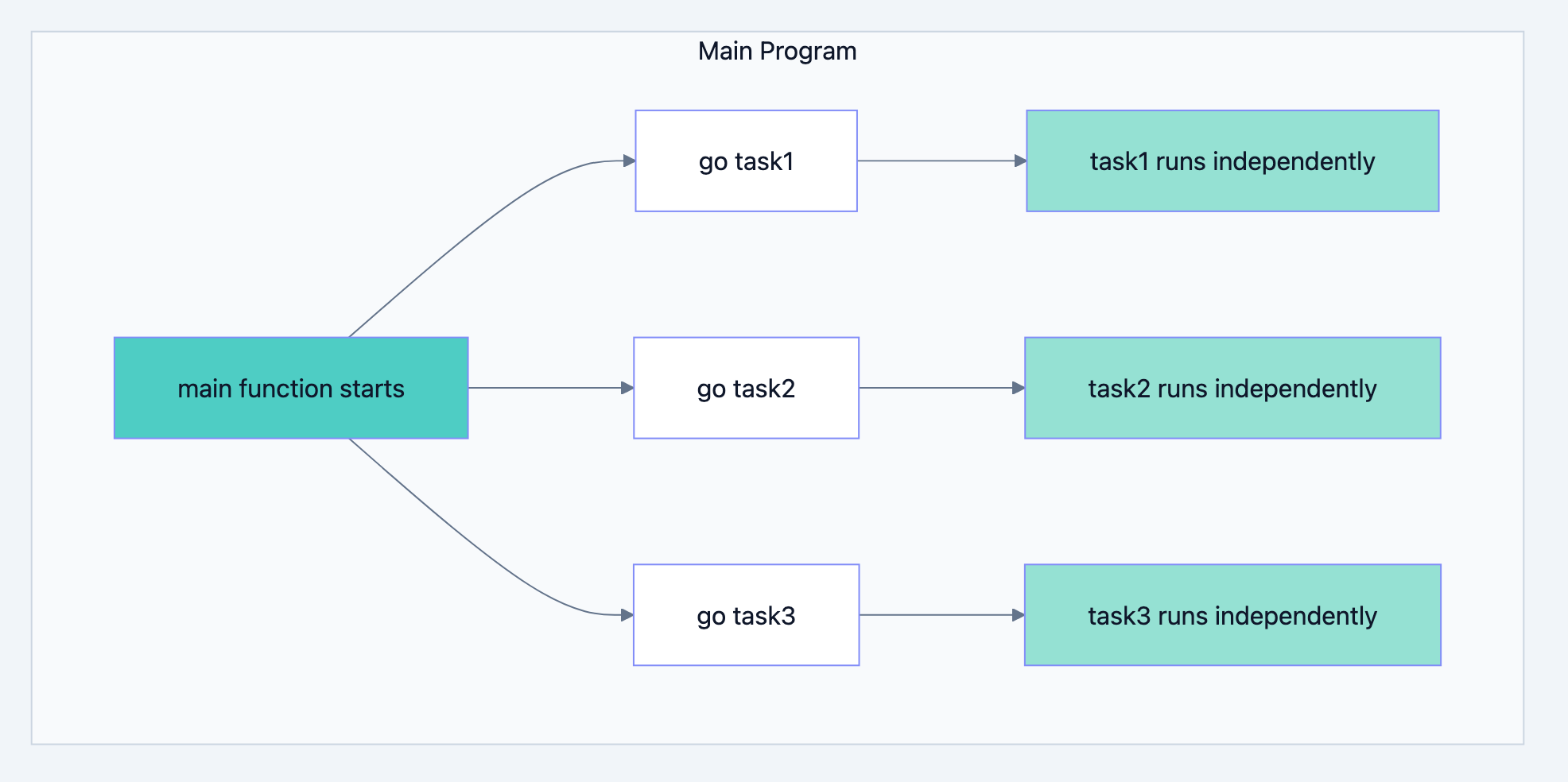
Go gives you concurrency primitives (goroutines and channels), and the Go runtime automatically leverages parallelism when multiple CPU cores are available. You write concurrent code; Go handles the parallel execution.
Go blog diagram 2
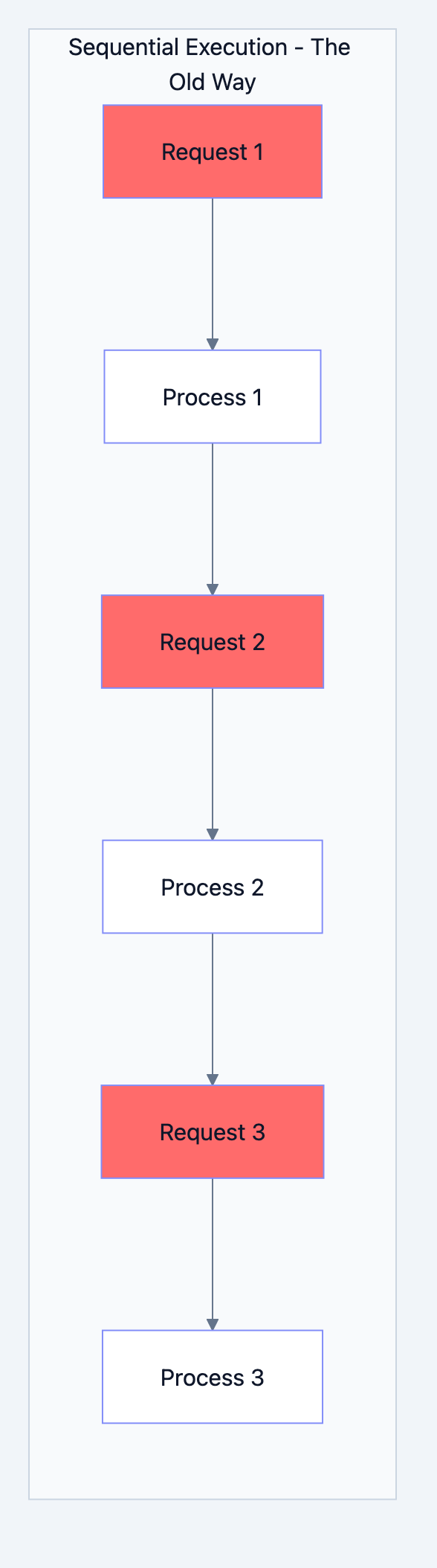
The Traditional Sequential Model
Before concurrency became accessible, programs executed like this:
Task 1 → Complete → Task 2 → Complete → Task 3 → Complete
Each task had to fully complete before the next could begin. This worked fine when computers performed simple, quick operations. But consider a modern scenario: your program needs to:
- Fetch data from a database (100ms network wait)
- Call an external API (200ms network wait)
- Read a file from disk (50ms I/O wait)
- Process the combined results (10ms computation)
In a sequential model, this takes 360ms total even though your CPU only did 10ms of actual work. The remaining 350ms was spent waiting.
Concurrent programming allows your program to start the database query, immediately start the API call (without waiting for the database), immediately start the file read (without waiting for either), and then combine the results when they arrive. The total time drops to roughly the longest individual wait plus processing time perhaps 210ms instead of 360ms.
The Go Philosophy: Communicating Sequential Processes
Go's approach to concurrency is rooted in a formal model called Communicating Sequential Processes (CSP), developed by Tony Hoare in 1978. The core idea is elegant:
"Don't communicate by sharing memory; share memory by communicating."
Traditional multi-threaded programming often involves multiple threads accessing shared variables, protected by locks and mutexes. This approach is notoriously error-prone deadlocks, race conditions, and subtle bugs are common.
Go encourages a different approach: independent processes (goroutines) that communicate by sending messages through channels. Each goroutine owns its data and shares it only by explicitly passing it to another goroutine. This model is easier to reason about and less prone to synchronization bugs.
Detailed Explanation: Goroutines
What is a Goroutine?
Go blog diagram 3
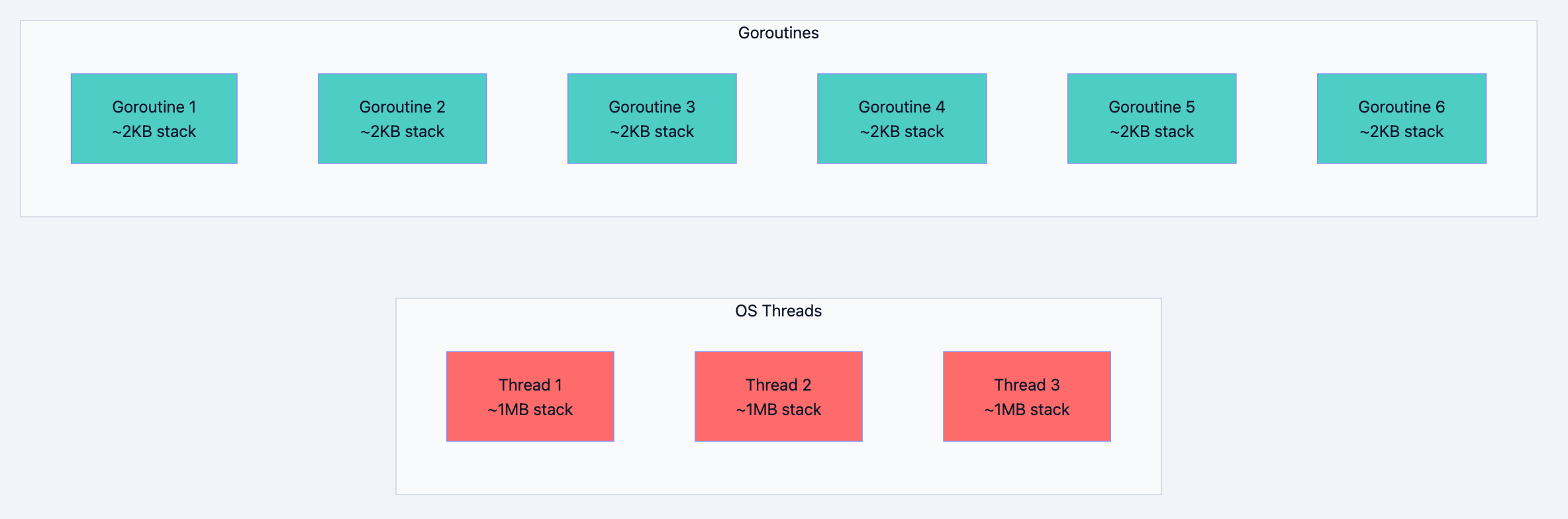
A goroutine is a lightweight thread of execution managed by the Go runtime. Unlike operating system threads, goroutines are incredibly cheap to create and run. The Go runtime multiplexes potentially thousands of goroutines onto a small number of OS threads.
Creating a goroutine requires just one keyword:
go.gogo someFunction() // This starts someFunction in a new goroutine
When you prefix a function call with
go, three things happen:- Goroutine creation: Go allocates a small stack (starting at about 2KB)
- Scheduling: The Go scheduler adds the goroutine to its run queue
- Concurrent execution: The scheduler runs the goroutine when a processor is available
The calling code continues immediately without waiting for the goroutine to complete.
The Mechanics: How Goroutines Differ from Threads
Understanding why goroutines are special requires understanding what makes OS threads expensive:
| Characteristic | OS Threads | Goroutines |
|---|---|---|
| Initial stack size | ~1-8MB (fixed) | ~2KB (grows as needed) |
| Creation overhead | Kernel system call | User-space allocation |
| Context switch cost | ~1-10μs (kernel involved) | ~200ns (no kernel) |
| Memory per instance | Megabytes | Kilobytes |
| Practical limit | Thousands | Millions |
| Scheduling | OS scheduler | Go runtime scheduler |
This table reveals something profound: goroutines are roughly 500x more memory-efficient and 5-50x faster to context-switch than OS threads. These characteristics enable patterns that would be impractical with traditional threads.
Go blog diagram 4
Your First Goroutines
Let's examine a complete example that demonstrates concurrent execution:
go// Filename: goroutine_basics.go
package main

import (
    "fmt"
    "time"
)

// brewCoffee simulates making a coffee order.
// Each call represents work that takes time to complete.
// In real applications, this might be a database query,
// an HTTP request, or any I/O-bound operation.
func brewCoffee(order string) {
    fmt.Printf("Starting: %s\n", order)
    time.Sleep(2 * time.Second)  // Simulates the time to brew
    fmt.Printf("Completed: %s\n", order)
}

func main() {
    orders := []string{"Latte", "Espresso", "Cappuccino", "Americano"}

    start := time.Now()

    // Launch each order as a separate goroutine.
    // The 'go' keyword starts concurrent execution.
    for _, order := range orders {
        go brewCoffee(order)
    }

    // IMPORTANT: We must wait for goroutines to complete.
    // Without this sleep, main() would exit immediately,
    // terminating all goroutines before they finish.
    time.Sleep(3 * time.Second)

    fmt.Printf("All orders completed in: %v\n", time.Since(start))
}
What to expect when you run this:
Starting: Americano
Starting: Latte
Starting: Cappuccino
Starting: Espresso
Completed: Latte
Completed: Cappuccino
Completed: Americano
Completed: Espresso
All orders completed in: 3.001s
Key observations:
-
Order of "Starting" messages is non-deterministic: Goroutines may start in any order depending on how the scheduler assigns them to processors.
-
Total time is ~3 seconds, not 8 seconds: Four 2-second tasks completed in parallel instead of sequentially. The extra second comes from our sleep margin.
-
The
time.Sleepis a temporary workaround: This is not how you'd write production code. We'll explore proper synchronization techniques in subsequent chapters.
Understanding the Execution Model
Go blog diagram 5
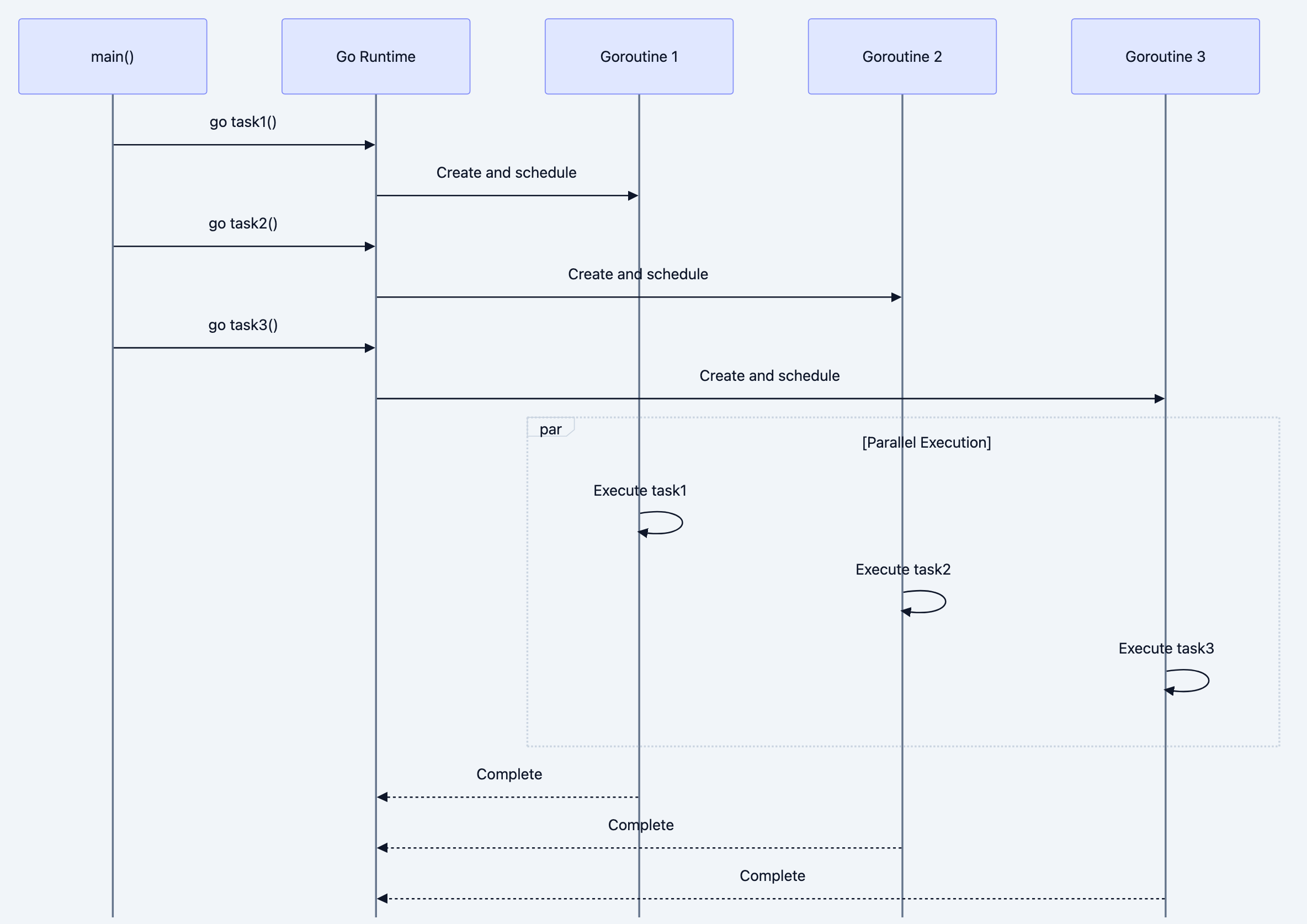
When you write
go someFunction(), here's what happens internally:Step 1: Stack Allocation
Go allocates a small stack (approximately 2KB) for the goroutine. Unlike OS threads with fixed-size stacks, goroutine stacks can grow and shrink as needed. If your function needs more stack space, Go automatically allocates more memory.
Step 2: Scheduler Queuing
The goroutine is placed in a run queue. Go's scheduler maintains multiple queues:
- A local run queue for each processor (P)
- A global run queue for overflow
- Network poller queue for goroutines waiting on I/O
Step 3: Execution
When a processor becomes available, it picks a goroutine from its queue and runs it. The goroutine runs until it:
- Completes its function
- Makes a blocking call (channel operation, system call)
- Is preempted by the scheduler (after ~10ms of execution)
Step 4: Cleanup
When the goroutine's function returns, the runtime cleans up its stack and marks it as done. There's no value to return to the calling code continued long ago.
Code Examples
A Practical Example: Concurrent Web Checker
Let's build something useful a tool that checks whether multiple websites are online:
go// Filename: website_checker.go
package main

import (
    "fmt"
    "net/http"
    "time"
)

// checkWebsite performs an HTTP GET request and reports the result.
// This is a realistic I/O-bound operation where concurrency shines.
//
// Parameters:
//   - url: The full URL to check (must include http:// or https://)
//
// This function doesn't return a value; it prints results directly.
// In production code, you'd typically return results through a channel.
func checkWebsite(url string) {
    start := time.Now()

    // Create an HTTP client with a timeout.
    // Without a timeout, slow or unresponsive sites could block forever.
    client := http.Client{
        Timeout: 5 * time.Second,
    }

    resp, err := client.Get(url)
    duration := time.Since(start)

    if err != nil {
        fmt.Printf("FAIL: %s (Error: %v)\n", url, err)
        return
    }
    defer resp.Body.Close()  // Always close response bodies

    fmt.Printf("OK: %s (Status: %d, Time: %v)\n", url, resp.StatusCode, duration)
}

func main() {
    websites := []string{
        "https://google.com",
        "https://github.com",
        "https://golang.org",
        "https://stackoverflow.com",
        "https://amazon.com",
    }

    start := time.Now()

    // Check all websites concurrently.
    // Each checkWebsite call runs in its own goroutine.
    for _, site := range websites {
        go checkWebsite(site)
    }

    // Wait for all checks to complete (temporary solution).
    time.Sleep(6 * time.Second)

    fmt.Printf("\nTotal time: %v\n", time.Since(start))
}
Why this example matters:
Network requests are inherently I/O-bound operations. Your CPU spends most of its time waiting for packets to travel across the internet. Without concurrency, checking 5 websites sequentially might take 1-2 seconds. With concurrency, all requests fire simultaneously, and total time equals roughly the slowest response.
Anonymous Goroutines and Closures
You can start goroutines with anonymous functions. This is common for short, inline concurrent operations:
gopackage main

import (
    "fmt"
    "time"
)

func main() {
    // Anonymous goroutine with no parameters
    go func() {
        fmt.Println("Hello from anonymous goroutine!")
    }()

    // Anonymous goroutine with parameters
    // The (42) at the end immediately calls the function with argument 42
    go func(n int) {
        fmt.Printf("Received number: %d\n", n)
    }(42)

    time.Sleep(time.Second)
}
Common Mistakes and Misconceptions
Mistake 1: Forgetting That main() Doesn't Wait
This is the most common beginner mistake:
go// BROKEN: Program exits before goroutine runs
func main() {
    go fmt.Println("Hello!")
    // main() returns here, program terminates
}
When
main() returns, the entire program terminates including all running goroutines. Your "Hello!" never prints because the goroutine didn't get a chance to execute.Correct approach (temporary):
gofunc main() {
    go fmt.Println("Hello!")
    time.Sleep(time.Second)  // Give goroutine time to run
}
Proper approach (using sync.WaitGroup):
gofunc main() {
    var wg sync.WaitGroup
    wg.Add(1)

    go func() {
        defer wg.Done()
        fmt.Println("Hello!")
    }()

    wg.Wait()  // Blocks until wg.Done() is called
}
Mistake 2: Loop Variable Capture Bug
This subtle bug has caught countless Go developers:
go// BROKEN: All goroutines likely print the same value
for i := 0; i < 5; i++ {
    go func() {
        fmt.Println(i)  // Captures 'i' by reference
    }()
}
What goes wrong: The anonymous function captures a reference to
i, not its value at the time the goroutine was created. By the time the goroutines execute, the loop has usually completed, and i is 5. You might see output like: 5 5 5 5 5.Solution 1: Pass as parameter:
gofor i := 0; i < 5; i++ {
    go func(n int) {
        fmt.Println(n)  // Each goroutine gets its own copy
    }(i)
}
Solution 2: Create local copy:
gofor i := 0; i < 5; i++ {
    i := i  // Shadow with new variable
    go func() {
        fmt.Println(i)  // Captures the new 'i'
    }()
}
Note: Go 1.22 changed this behavior for
for loops, making each iteration create a fresh variable. However, understanding this bug remains important for maintaining older code.Mistake 3: Using time.Sleep for Synchronization
While we've used
time.Sleep in examples for simplicity, it's wrong for production code:go// PROBLEMATIC: How long should we sleep? func main() { go doWork() time.Sleep(5 * time.Second) // What if doWork takes 6 seconds? }
Problems with this approach:
- If work finishes in 1 second, you waste 4 seconds
- If work takes 6 seconds, you exit too early
- Real-world timing is unpredictable (network latency, server load)
Proper synchronization tools:
sync.WaitGroup- Wait for a group of goroutines to complete- Channels - Communicate completion signals
context.Context- Cancellation and timeouts
Practical Use Cases
When Concurrency Shines
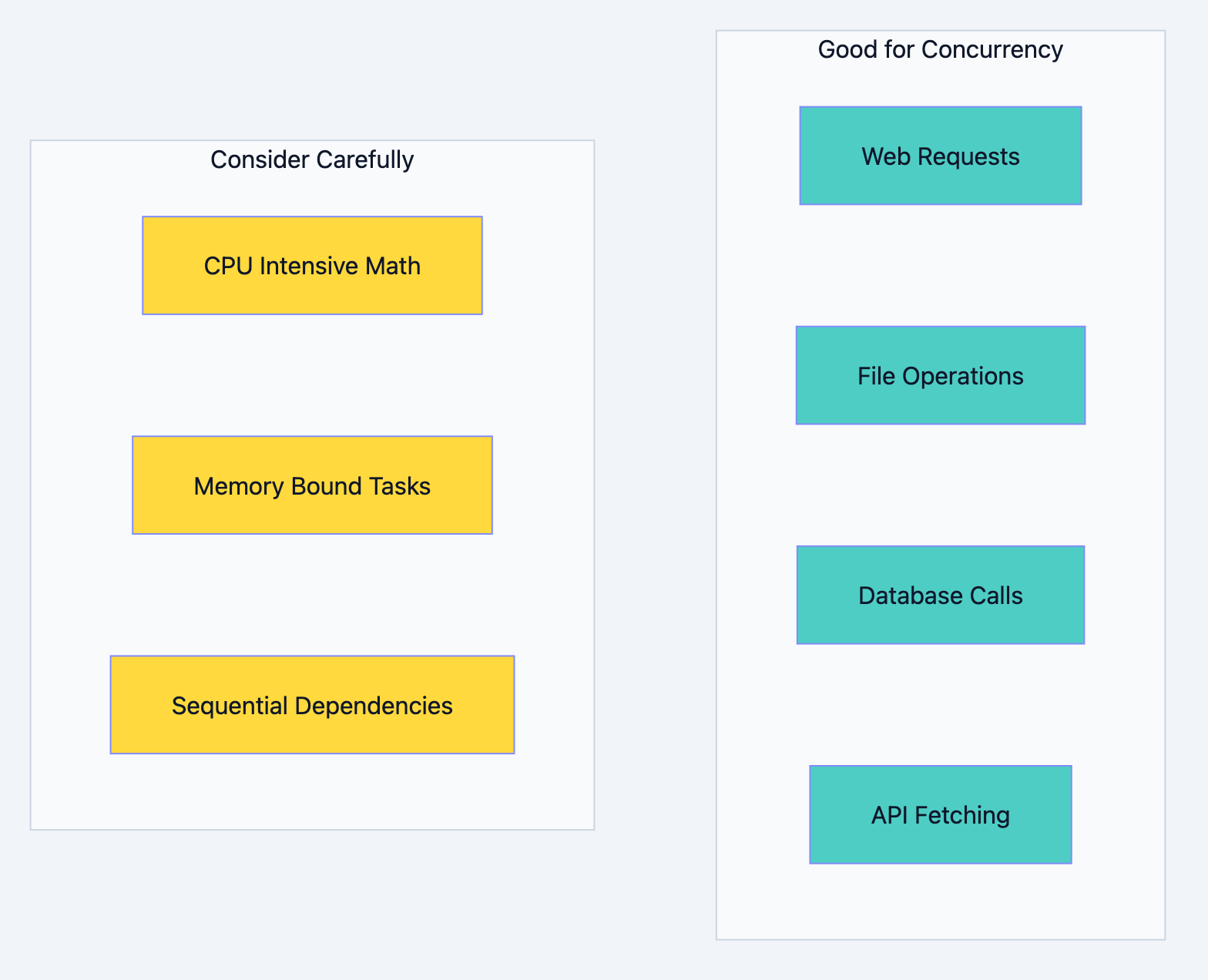
Concurrency provides the most benefit when your program spends significant time waiting:
I/O-Bound Operations:
- Database queries
- HTTP requests
- File system operations
- Network socket communication
Independent Task Processing:
- Batch processing of items
- Handling multiple user requests
- Running parallel test cases
- Processing queue messages
When Concurrency Has Less Impact
CPU-Bound Sequential Operations:
go// Each calculation depends on the previous result
result := 0
for i := 0; i < 1000000; i++ {
    result = heavyComputation(result)
}
Small, Fast Operations:
go// Overhead of goroutine creation exceeds benefit
for i := 0; i < 10; i++ {
    go func(n int) {
        fmt.Println(n)  // Println is fast; goroutine overhead adds latency
    }(i)
}
Performance and Best Practices
Goroutine Overhead
While goroutines are cheap, they're not free:
- Memory: ~2KB initial stack (can grow to gigabytes if needed)
- Scheduling: Adding/removing from run queues has cost
- Context switching: ~200ns per switch
For most applications, you can create thousands of goroutines without concern. However, creating millions for trivial operations may cause issues.
Guidelines for Production Code
-
Don't fire-and-forget: Always have a plan for how goroutines will terminate.
-
Propagate cancellation: Use
context.Contextto signal goroutines to stop. -
Handle panics: A panic in a goroutine crashes the whole program unless recovered.
-
Limit concurrency when needed: Unbounded goroutines can overwhelm external systems (database connection limits, API rate limits).
go// Using a semaphore pattern to limit concurrent operations
sem := make(chan struct{}, 10)  // Allow 10 concurrent operations

for _, task := range tasks {
    sem <- struct{}{}  // Acquire
    go func(t Task) {
        defer func() { <-sem }()  // Release
        process(t)
    }(task)
}
Summary
Key takeaways from this chapter:
-
Concurrency is structure, not necessarily parallelism: It's about organizing your program to handle multiple tasks, which may or may not run simultaneously.
-
Goroutines are lightweight: Starting at ~2KB of stack, they're 500x more memory-efficient than OS threads.
-
The
gokeyword is simple but powerful:go someFunction()starts concurrent execution. -
main() exit terminates everything: Goroutines die when the main function returns.
-
Time.Sleep is for demos, not production: Use proper synchronization primitives.
-
Loop variables need careful handling: Pass values as parameters to avoid capture bugs.
-
Concurrency shines for I/O-bound work: Network calls, file operations, and database queries benefit most.
What's next: Goroutines alone are limited they can't easily share results or coordinate with each other. In the next chapter, we'll explore channels, Go's mechanism for goroutine communication, which transforms isolated concurrent tasks into coordinated workflows.
Interview Questions
-
What is the difference between concurrency and parallelism? How does Go's runtime handle both?
-
Explain what happens internally when you write
go someFunction(). What data structures and runtime components are involved? -
Why are goroutines more efficient than operating system threads? Discuss memory, scheduling, and context switching.
-
A developer writes
go fmt.Println("Hello")as the only line inmain(), and nothing prints. Explain why and how to fix it. -
Describe the "loop variable capture" bug in goroutines. Why does it happen, and what are two ways to prevent it?
-
When would using concurrency actually slow down your program rather than speed it up?
-
What happens to a goroutine that panics? How does this differ from a panic in the main goroutine?
-
Explain why
time.Sleepis inappropriate for production synchronization. What alternatives exist? -
You need to check 1000 URLs for availability, but the target servers rate-limit to 50 concurrent connections. How would you structure your concurrent solution?
-
How does the Go scheduler decide when to switch between goroutines? What events cause a goroutine to yield execution?
-
A service creates one goroutine per incoming HTTP request. Under heavy load, memory usage spikes dramatically. What's happening, and how would you investigate?
-
Can you return a value from a goroutine? If not, how do you get results back from concurrent operations?
-
Describe a real-world scenario where concurrent execution would significantly improve application performance. What characteristics make it suitable for concurrency?
-
What is GOMAXPROCS, and how does it relate to goroutine execution?
-
How would you gracefully shut down a service that has multiple long-running goroutines?